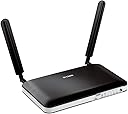
🚀 Unlock lightning-fast mobile broadband and never miss a beat!
The D-Link DWR-921/B is a UK version 4G/3G LTE unlocked mobile broadband router delivering up to 150 Mbps download speeds and 50 Mbps upload speeds. Featuring 4 Ethernet ports and dual-band WAN support, it automatically switches between 4G and 3G for uninterrupted connectivity. Designed for easy SIM card setup and secure wireless sharing, it’s ideal for professionals seeking reliable, high-speed internet on the go or at home, backed by a limited lifetime warranty.


| ASIN | B00BN36NMM |
| Antenna Location | Home |
| Antenna Type | Retractable |
| Best Sellers Rank | 87,289 in Computers & Accessories ( See Top 100 in Computers & Accessories ) 670 in Routers |
| Box Contents | (2) Antennas, D-Link DWR-921 4G LTE Router, Manual and Warranty on CD, Power adapter |
| Brand | D-Link |
| Brand Name | D-Link |
| Colour | Black |
| Compatible Devices | Not |
| Compatible devices | Not |
| Connectivity Protocol | wifi |
| Connectivity Technology | Ethernet, LTE |
| Control Method | Touch |
| Controller Type | Switch |
| Coverage | Wireless (Range Not Specified) |
| Customer Reviews | 4.1 out of 5 stars 2,057 Reviews |
| Data Transfer Rate | 300 Gigabits Per Second |
| Frequency | 2.4 GHz |
| Frequency Band Class | Single-Band |
| Frequency band class | Single-Band |
| Global Trade Identification Number | 00790069382246, 00790069394850, 05054230753422 |
| Is Modem Compatible | Yes |
| Item Dimensions L x W x H | 19L x 11.2W x 2.4H centimetres |
| Item Part Number | DWR-921/E, DWR921E |
| Item Type Name | Wireless N300 4G LTE Multi-WAN Router |
| Item Weight | 10.41 Ounces |
| LAN Port Bandwidth | 10/100 megabits_pro_sekunde |
| Manufacturer | D-Link |
| Manufacturer Part Number | DWR-921/B |
| Maximum Upstream Data Transfer Rate | 50 Megabits Per Second |
| Model Name | DWR-921/B |
| Model Number | DWR-921/E |
| Model name | DWR-921/B |
| Number of Ports | 5 |
| Operating System | RouterOS |
| Other Special Features of the Product | WPS |
| Product Warranty | 2-Year D-Link Warranty |
| Security Protocol | WEP, WPA2-PSK, WPS |
| Special feature | WPS |
| UPC | 790069430114 790069394850 790069393532 790069382246 |
| Unit Count | 1.0 Count |
| Voltage | 240 Volts |
| Wireless Compability | 802.11b, 802.11g, 802.11n |
| Wireless communication standard | 802.11b, 802.11g, 802.11n |
S**N
The best 4G SIM router available for the price
I had used 3G dongles to get internet access and found them quite good and reliable, getting download speeds of between 2 Mbps and 3 Mbps, quite good enough for general internet use although not so good for downloads or streaming services. So, as an experiment, I decided to see how much better 4G might be using the same Smarty SIM but with a Wifi router which could be shared between several devices rather than only be plugged into one at a time. I knew that D-Link manufactured affordable quality hardware and, after reading dozens of reviews online, decided that the D-Link DWR-921/B offered all I needed insofar as a suitable router went. When the device arrived I had it up and running in ten minutes flat, despite the fact that the instruction manual was very sparse, immediately ran an online broadband speed test and found that my download speed had increased ten fold in one fell swoop to over 30 Mbps! As you can see for yourself if you look at the picture associated with this review. IMPORTANT: When you set up your router run through its Wizard to change the devices SSID (so that potential hackers receiving its signal won't know who manufactured it), set the device's wifi key (a password used to connect to the router wirelessly) to something really strong and uncrackable, set a simpler password the web-based interface used to manage the router (so that nobody connected to the router will be able to change any of its settings) and the encryption used by the D-Link to maximum, i.e., WPA2-PSK(AES), so nobody will be able to hack the router or intercept any of your data. Having enjoyed D-Link speed for a good few days now I can't imagine going back to anything slower and have to say that buying this device was one of my best decisions of 2020. Easy to set up, sturdy, reliable, tried and tested if you are looking for a reasonably priced router that can connect to a 4G network and grant internet access using only a SIM look no further. You are very unlikely to be disappointed if you pick the D-Link DWR-921/B.
A**R
Great value for money and does the job excellently...
I've never really been a big fan of D-Link (or some others to be perfectly honest) but that is because my experience has always really been focused on Cisco, Billion and Netgear and such... However on this occasion I was purely looking for value for money alongside ability. I had a job it needed to do and I have to say, this ticks all the right boxes. I weighed up going with a TP-Link offering but the D-Link was my choice in the end. Very good, easy out-of-the-box experience (OOBE); plugged in, switched on and popped in the now old fashioned, large SIM card on a Vodafone Pay As You Go to test, having selected a meaty data bundle for the limited testing. I did have to tweak the mobile settings as the auto-detect, although finding Vodafone (2g and 3g) kept dropping (according to front lights) and didn't want to connect using default APN and user settings (which are usually pretty generic). Having popped in the PAYG ones manually (APN: pp.vodafone.co.uk User: wap Password: wap) I only then had to force the device to use the 4g coverage; else it would insist on only picking out the 3g on auto-detect. Coverage throughout the home is more than adequate. Speed across the LAN is brilliant and multiple devices running in tandem from Alexa, through FireTV, laptops and printers, all working better than I would have expected which is a great bonus. With the Vodafone 4g signal at a good strength where we are now and their data bundles having massively improved, this will also double up as a handy travel companion (signal permitting). Why did we feel the need to try one of these (particularly having used out phones as hot spots thus far)? Well, the hot spot is limiting for the person who is providing it and the number of devices it can manage. Then you have the going out factor. In addition, Vodafone do offer broadband far more competitively priced than most (£20 a month all in) by not insisting on you taking line rental with it, unlike the likes of BT; however, alas not in our area apparently. So, the options having moved were a line and broadband/fibre (if available) with an alternative (in excess of £30 per month with line and service); or with such a good mobile signal,explore the options. Since you can now get a 5g (not massively rolled out yet, certainly not here) unlimited option for £20 a month it makes sense to look at today's alternatives rather than getting stuck, blinkered on past offerings. The questions you ask if you have a good mobile signal are; do I need a landline? If the answer is no, there are reasonably priced alternatives out there, dependant of course on your usage/needs. I admit that some bandwidth/data hungry families may well need the likes of fibre but that's what you have to investigate on an individual basis. This D-Link is perfect for our home use and streaming on a 3g and 4g signal strength, operating consistently between 50% and 75%.
J**T
Great sim card router
Purchased to use when fiber is down. Did try it and it worked fine using regular data sim from my phone.
P**N
Comprehensive 4G Solution
Works well. Easy to set up but you need a computer with an Ethernet socket to do the initial configuration: not great if you have gone over to Apple 100%. Fortunately, I had an old Windows laptop I could use. I used this router to provide whole house internet access when we moved house and waited 10 days for the ISP to get its act together. In fact I was very tempted to retain 4G and tell the ISP to take a hike (Smarty provide an unlimited data Sim for £20 a month). This unit has Ethernet sockets, plus a WAN socket, so you can use it as your regular router, or avoid being tied by where Openreach put your main socket; use 4G and locate the router near your TV, set top box, etc and use Ethernet cables for better streaming performance. In summary; good unit but a bit pricey.
O**C
THE WORST ROUTER EVER
THE WORST ROUTER EVER? SIGNAL IS CRAP - TRUST ME This box was only getting 1 bar 3G and disconnecting every half an hour. Compare this two the Huawei I bought it got 3 bars 4G. Terrible signal CRASHES EVERY HALF AN HOUR For some unknown reason it would loose connection with 3G and there would be an error about time and date, the only way to get it connected again would be to turn it off and on and repeat every 30 minutes, nice when your playing call of duty. NASTY INTERFACE / BUGGY I updated the firmware but still the interface looks like it is from 1999 and feels it too. It's not easy to setup like any of the competitors. This will be the last D-Link product I ever buy, I remember numerous customers using their home Wireless Routers the constant disconnecting issues only resolved by changing it to any other brand even the ISP's own routers functioned better. I should have learned from my customers.
G**G
I don't want an Internet contract with landline
I currently use a 3 mobile data sim on 1 month rolling contract which gives me 100Gb of data a month - though I may swap to a Smarty sim to save a few quid and get unlimited data.. With this Dlink box (it is Rev C3) - I get 20 to 30Mbit using my 3 sim with the standard aerials (I may get better if I try to relocate the router near a window, but this if fine and very reliable) - it was almost plug-and-play and needed only a quick run through the wizard to configure and the WiFi signal from this box reaches all corners of my Victorian terrace house with no problems even though there must be a dozen competing wireless routers visible from my neighbours. I am able to use my Amazon Fire stick for TV without buffering - this works great for my Internet and catch-up TV needs. I am tempted to put on the latest firmware as my box seems to be one revision behind the latest - though as I don't have any problems I may just leave it - perhaps someone can advise me what extra I'll get with a newer version? Overall - I'm really pleased with this router and would recommend it..
A**R
Exercise caution - online gamers
A solid router for general use, average user use. The connection was solid and it boosted my 4G LTE connection in a rural area from the Huawei AI Cube router Three Mobile sent me with my contract. We have very little access to fibre in our area so this was our only solution to get true high speed broadband to some degree. This did wonders for upload speed which is a major thing my usage relies on. However, do not buy this router if you wish to play games online. Xbox Live will not work with this router and D-Link could not help me work this out or understand even how to forward ports. This router does not have the functionality to open ports for any service. I use Xbox Live as well as a Plex Media Server. Both worked seamlessly under the Huawei Router without the need for any port-forwarding. Yet, this router couldn't even do this and the user interface on the router login is like something from 2010. Not a modern-day solution. The TP-Link TL-MR6400 is a much better solution and much more modernised. Not necessarily a bad review, just a word of caution if you plan to use for anything other than simple internet use.
P**L
Signal not as good as hoped
I’m a bit disappointed because the signal is not as good as expected and I’m using it in an area with good 4g. The signal goes up to about 13mpbs then drops to 1mpbs and few minutes later and so it goes on. I’ve tried moving it but to no avail, I might try an external aerial but not confident that will help.
Trustpilot
2 weeks ago
4 days ago