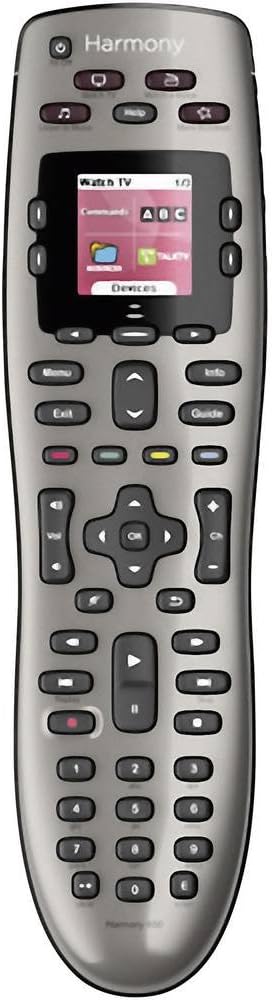
🎯 Master your media kingdom with Harmony 650 — one remote to rule them all!
The Logitech Harmony 650 is a universal remote control designed to replace up to five remotes, featuring a colour smart display with intuitive icons and backlit buttons. It supports over 6000 brands and 225,000 devices, ensuring broad compatibility. Setup is streamlined via guided online software for Windows and Mac, and one-click activity buttons simplify multi-device control. Powered by AA batteries, it offers a premium, clutter-free entertainment experience tailored for the modern connected home.


| ASIN | B00IRUS6K6 |
| Battery Types | 2 x AA or 2 x AAA batteries |
| Best Sellers Rank | 35,969 in Remote Controls (Electronics & Photo) |
| Brand | Logitech |
| Brand Name | Logitech |
| Button Quantity | 22 |
| Colour | Grey |
| Compatible Devices | Audio/Video Receiver, DVD/Blu-ray Player, Set Top Box, Television |
| Compatible Television Models | Roku 43R4A5R, Roku 50R4A5R, Roku 55R4A5R, Roku 55R6A5R, Roku 55R8B5, Roku 65R4A5R, Roku 65R6A5R, Roku 65R8B5, Roku 75R4A5R, Roku 75R6A5R, Roku 75R8B5, Samsung GQ65Q800TGTXZG, Samsung QE50QN94AATXXU, Samsung QE55LS01TAUXZG, Samsung QE55LS03AAUXXC, Samsung QE55LS03BGUXXU, Samsung QE55LS03RAUXZG, Samsung QE55LS03TAUXXC, Samsung QE55QN700ATXXU, Samsung QE55QN700BTXXU, Samsung QE55QN85AATXXC, Samsung Q… |
| Compatible devices | Audio/Video Receiver, DVD/Blu-ray Player, Set Top Box, Television |
| Connectivity technology | IR Wireless |
| Controller Type | Button Control |
| Customer Reviews | 4.2 out of 5 stars 5,533 Reviews |
| Global Trade Identification Number | 05099206051560 |
| Item Weight | 0.18 Kilograms |
| Manufacturer | Logitech |
| Manufacturer Part Number | 2229250 |
| Max number of supported devices | 8 |
| Maximum Number of Supported Devices | 8 |
| Maximum Range | 10 Metres |
| Model Name | Harmony 650 |
| Model Number | 915-000229 |
| Network Connectivity Technology | IR Wireless |
| Number of Batteries | 2 AA batteries required. |
| Product Features | Learnable |
| Special feature | Learnable |
C**S
Get your remotes under control
I could have built a wall out of the number of remote controls I used to have beside my side of the sofa. It was getting out of hand and I’d been considering the Logitech Harmony range for some time but baulked at the cost when it’s at full price. However, around Black Friday last year I finally buckled and ended up going nuts with building an Alexa-equipped smart home, with the Harmony front and centre. I bought it to do three things; Do away with multiple remotes, allow my TV to be controlled by Alexa and to provide a shortcut to operating multiple devices together. My review is based therefore not just on the Harmony but its integration with Alexa. It’s a slick piece of kit, well built and a premium product. The bundle I got was for the remote control, the hub and a couple of “IR blasters” which help pick up reluctant devices. It also has a docking station for charging. Battery life is supposed to be very good, however I park it in the docking station every night as the dock is on the table next to my chair and it’s easy to locate one-handed in the dark. As far as getting started is concerned I’m not going to claim it’s the most straight-forward thing in the world to set up, but if you have a bit of technical nous it’s intuitive enough. There’s a good App that you’ll need to download to get the most out of the Harmony, from which you can detect and set up your devices to be controlled. You can also get creative and set up Activities, allowing you to control multiple devices with a single command. Where things get really good though is if you have Amazon’s Alexa in your house. You’ll need to activate the necessary Skill in the Alexa App, but once done you can control your devices by voice as if you were using the physical remote. Set up correctly you can accomplish multiple tasks very easily. For example, I say “Alexa, watch a film” and the TV, Blu-ray player and soundbar all come on. You could add to that with additional smart sockets/lights and have lights dim should you so wish. Get as creative as you want with your devices. We also say “Alexa, goodnight” and all of the AV equipment turns off with a cheery “Goodnight” back from Alexa. Voice control is very good, if not infallible. I’d say 9 times out of 10 our voice commands work correctly, and on the 10th occasion repeating the instruction will work. Our most commonly used commands, other than turn on and off, is “Alexa, turn on BBC1, ITV, Dave, Challenge TV etc” or “Alexa Pause the TV/resume”. Currently, the Harmony has replaced remotes controlling most of my devices in the living room. It controls my LG TV, BT Youview box, Blu-ray/DVD player, Apple TV, Xbox and soundbar. It is not able to control the Sony PS4 because Sony won’t allow third party access to the console. I’ve got the Harmony remote configured to cover the vast majority of commands I normally use. Sometimes it takes a bit of concentration to flick between the remotes on the Harmony’s touchscreen, or to remember which of the user-defined shortcut buttons do what, but that’s not a criticism of the remote. The Harmony has enough power and intelligence to do what you need it to do. My wife does keep a couple of the original remotes on her side of the sofa though, which are useful to have as a standby. In summary, we’ve been using the Logitech Harmony remote and hub for about 9 months now and it has performed exceptionally well in that time. It syncs well with Alexa and voice commands are better than I expected. It’s a lot of money at full price, but it’s on offer regularly enough to become reasonable value. I say that the value of a gadget is in whether you use it regularly, and this is used daily. If you’re into your tech then it’s definitely a good one.
P**E
The only one you will need... maybe UPDATED - with a solution?
This is the third Harmony remote I have used. I had a 1000, which the software became obsolete so couldn't update it. Then moved to a non-rechargeable version that I only used to turn my devices on/off and set them to the correct outputs as that was too slow to be used to operate items as there was a big delay between pressing a button and the command going out. I'm happy to say that the Elite doesn't suffer from this problem so can be used for everyday control of the whole set-up (TV, AV Amp, TiVo, Amazon Fire and BluRay player). My set up started fairly easily, as I just transferred the settings from the old remote and hey presto, the remote controlled all my devices and switched them to the correct setting. I just needed to add the Firestick which is a Bluetooth device which this remote can control, unlike the older versions. So full points there. What this remote does well, is starting all the devices you need and setting them up to operate the activity you want. That means it will set the AV amp to say Video 1, set the TV to HDMI 1, and turn on the media source (DVD, Bluray, Media stick etc.) in one button push. It's great if you have a home cinema setup with HiFi type separates. It feels good in the hand and appears well made. It's rechageable and the battery is easily replaceable when it gets old. The only downside, as with all the Harmony remotes I have used is the software. It's a bit clunky and always seems to have at least one annoying aspect that makes you tear your hair out. (I'm on my third, so very little hair left). This one is annoying in that the hub, that needs to be in close proximity to the TV, needs to be in range of the remote when an update is being done, even if you just want to modify a single button on the remote. Like many, I suspect your PC isn't in with your main TV, so I have to pull out the furniture and unplug the hub, move it to the PC to alter a button option on the hand set. Surely it could have updated the handset then updated the hub later, it just goes to show how little forethought goes into the Harmony software and how, in practice, it will be used. However, overall it's a great little device, will replace all you remotes and will work. Especially great as this was a Flash sale item from Amazon. UPDATE 1 - Hmm... the hub crashed for no apparent reason during watching which renders the remote useless. I am hoping this is not a sign of things to come. On the plus side, you can transfer all the IR commands to the handset and use it like an ordinary remote. If this continues, I'll update this review. Afterthought... maybe people expect this for an expensive item, but, the packaging seemed a little excessive. Open the box and find a box! Open the box to find another box with inserts and extra spaces underneath. Oh, and the main box was in a fitted plastic bag. Looses a Star... The Hub requires a regular re-boot and now one of my wifi access points seems to be a problem, which it never has been. I needed to re-boot the wifi router which the hub was connected to for it all to work. I'll monitor and update this review if I discover where the problem is. Update 2 - It has continued to reboot itself and I am unsure why. The router has been stable and not a problem to any other devices so I am ruling out a router problem. If you do get this problem, you can set the actual remote to send out IR codes instead. That gets around most of the problems but the remote can't control bluetooth devices (i.e. Amazon Firestick) so that solution reduces the functionality. On the plus side, you can set this up from the remote itself via the settings option on the remote and don't have to go back to the desktop software. UPDATE 3 - Eh? So it turns out the Harmony needs "something" that only a new and expensive wifi access point will give it. I had Harmony connected to a TP-Link WAP. This WAP has worked successfully for every other device for many years, but not I'm afraid with the Harmony. I have now upgraded the WAP to a Netgear Nighthawk and all the "tantrums" have ceased. It does seem odd that iPhones, Android phones and tablets, Blu-Ray and Amp all connected to the old WAP without issue. So if your Harmony is playing up, it may be the WAP or wireless on your router that is causing the problem.
B**.
Great piece of kit
I’ve had this for about 6 months now & feel like I’m able to give a decent insight into it & share my findings. With a compatibility list that should meet the needs of any user there’s no denying its use & purpose of cutting down on remote controls, initial setup is simple but fine tuning will need to be done on the app (Android & iOS) or I found it easier to do all my set-up on the pc app. Getting the remote set-up & all your devices synced will take some time & be ready for some frustrating moments when adding “activities” from my experience it wouldn’t change the selection on my LG tv when needed & failed to turn on my Xbox One X but after a few tweaks & re-syncs I managed to get the kinks ironed out. The remote is responsive & the touch screen is an essential when adjusting lights, favourite channels etc. It has a nice weighted feeling to it but you’d expect that from a premium product that is essentialy £200 for a remote control! I’ve had no issues with any of my devices (4K LG tv, Virgin, Xbox One X, Phillips Hue, Nvidia Shield, Nest & Smart Home switches) some devices will have a much more of a customisable functionality when compared to others but you can edit the remote buttons or touch screen to liking in the app. Remote holds its charge really well in my home (with 4 children & my wife constantly changing channels & lights) I generally dock it when playing a movie just to keep it topped up. I’ve had no need to use the IR blasters as the hub is in direct line of sight to the remote but I’m sure they work just as well. Is this remote worth the price tag??? If you’ve only got a few devices then I’d say no but once you factor in lights, switches & multiple other home entertainment devices then I’d say yes definitely! The customisation & ease of use (once set-up) will make movie nights considerably less frustrating when your hunting for the volume control or pause button.
B**N
The Best Real World Remote
Best remote I've ever used. I had the old Harmony One before which was great and lasted five years before getting a little testy. This new remote is smaller and therefore easier to hold and is really easy to use. Setup looks more complicated than it is (you will need the exact version numbers for your kit although I found Sky DVR worked fine) but once that's done your good to go. My remote works an AV receiver, the sky box, a plasma TV and pioneer Blu ray player, basically it turns everything you want on in the right order and handles the sound and all other commands with ease. A nice touch is during the setup you can very easily program your favourite channels onto the remote just by selecting from a list, then the remote will populate a screen with the individual channels logos which are then selected by just touching the required logo. The touch screen is much like your smartphone and by swiping left and right it'll select individual pieces of equipment or your favourite channels its all very easy to use and understand. A couple of extra niceties are the help button which will guide you through any problems you might have and if you select a single piece of equipment from the devices button you can access all of the devices menus including individual setup or settings, this is especially handy for selecting different surround sounds from your AV receiver if your a bit of a nerd without having to find the original remote. Finally it comes with a hub which allows your stuff to stay behind a door and still be operated or allow you to get Alexa to turn everything on for you, but for those of us who still have all their stuff on a rack you can use the remote like any old fashioned remote and just point it at the telly and like wonderful modern magic everything still works.
J**N
Good when it works but doesn't always function as expected
I’ve been using this for about a month now to allow some time to get used to the remote. There are a number of points to consider 1. Mostly easy to setup devices but when it doesn’t work by entering the model number its very frustrating to setup. Adding devices worked by model number except for my Humax box (even with the right model number), following the instructions I then had to press each key on the remote for the logitech to learn the key, this was very frustrating as in most cases I had to press the key 5-6 times so was a bit time consuming as it repeatedly displayed an error message (don’t know why – I thought it was holding the remote in the wrong place but it wasn’t). If I had experienced this issue with the amp I could have been stuck given the remote was broken. 2. Activities allow multiple actions at the touch of a button (e.g. turn on multiple devices, set correct HDMI inputs etc.) which is good when it works. Activities have a fix now for when a device doesn’t turn on or set correct HDMI input but I find randomly the wrong device is turned on. 3. Buttons can be configured as part of the activity so you can generally keep the same functionality of the original remote. However some actions will require more button presses than an original remote 4.Alexa voice control. This has to be the worst part of the setup as its very temperamental, for example “alexa turn on tv”, response “sorry I cannot find a video service”. Repeat 3-4 times, disable skill and re-enable to make it work. The next day “alexa turn on tv” which works, the “alexa mute tv”, response “sorry I cannot find a video service”even though it understood “alexa turn on tv”. Other Alexa commands are understood without any issues its only the harmony skill that doesn’t work properly. The reviews of the skill indicate other people have similar issues. 5. Control for a Windows 10 device doesn’t work, even though I paired the device and some buttons work the majority do nothing e.g. launch music even if you setup shortcuts correctly. 6. Cost – although I purchased during a sale the remote is expensive 7. Anytime+ had to be turned off on my TV as activities kept crashing my TV when disconnecting a device I purchased as I was having issues with 2 original remote controls (Roku and Sony Amp). For the cost it does seem to be a little buggy. The app used to setup the remote is easy to use but I have experienced some crashes when connecting to server. Overall decent when it works but if you want a remote that works seamlessly and has good voice control you will be disappointed I feel.
M**S
Not perfect, but very good. The best I have tried so far.
This is a complex system that I am still exploring after three months. I have previously used every version of Philips Pronto and have now moved on to Harmony with the Elite&hub combo. So I have some experience of programmable remotes. Users of other programmable remotes such as Prontos will be frustrated at the distinct lack of discrete on/off codes in the database. Some are present,but hidden behind questions encountered when adding devices. These are usually discrete power-on and power-off options. Answer that question wrongly and Harmony will give you only a power toggle, which is as much use as a chocolate tea spoon. Discretes for non power related functions are sometimes present, such as switching AV inputs. Secondary discrete options are very rare. Experience shows that many of these may to exist, but not in the public databases that you are presented when you add a piece of equipment. This shows up when you want to, say, switch an Arcam amp input to Direct Stereo On. You only have an on/off toggle option. This has a 50 50 chance of getting it right. Harmony get around this by having a question visible shortly after activity start asking if it started correctly. It the offers you the toggle buttons to “fix” the startup. To my mind the correct fix is that if a system has a “turn function on” remote code, and Harmony can send he code, then the device codes from Harmony should carry the code. Instead you have to learn the discrete code from your old Pronto into the handset. Oh yes, there is a bug whereby around 15-20 codes into a learning session my hub locks up for 2-3 minutes. When this happens you should simply wait for it to come back to life. There is no web interface into which you can feed codes either. So you must keep an old Pronto alive to setup complex scenes. Now for the best bits. For a novice user the setup is about as easy as a complex system like this can be. You really can get something working in a few minutes armed only with brand names and model numbers of your target devices. After initial setup you can enter the activities setup menus and that is where the real work begins. Alexa integration works at a basic macro level. The link between Alexa and Harmony is quite basic. When you add the Harmony skill (when you can figure out which coloured skill to use) you see a list of Harmony activities. Watch out!!! This is the only time you will see this list! At this point you add descriptive words to each activity. You cannot test them (the verbal command) at this point. If you get them wrong you must now complete the skill setup, test each activity, then to fix broken ones you must delete the Harmony skill, and re-add the skill again. This quickly becomes tiresome. Especially when you realise that the sequence is buggy. Some of my command labels vanished, some moved around when re-adding the skill and I had seven “television” labels on different activities appear from nowhere on one occasion. Rather annoying. When this happens best go to the Alexa Smart Home -> Scenes menu where you find all your Harmony activity names in amongst the built-in Alexa scene collections. Delete all the Harmony skills from here and then delete&add the Alexa Harmony skill again. So the first lesson is to completely setup Harmony before introducing Alexa. The second lesson is to create a clear and distinct list of different Alexa commands for each activity. If they are too similar Alexa will get confused. Remember that you will need Alexa to recognise these words above a lot of music or tv noise at some point in the future and you get some idea of the problem. So why the 5 stars with all the warnings above? Well whilst it is complex it is extremely powerful. Once setup it works superbly. Just be aware that you will need to spend some real time getting it just right before you buy into this system.
T**.
A good hardware idea, ruined by grotesquely incompetent software
This is the most frustrating product I have seen in a very, very long time. The key issue is a disastrous app and the patronising mindset of the Logitech developers. The app is just absurd - do not bother even trying. When you start it it plays you a video which basically tells you what the Harmony remote is - and then, without bothering about explaining any detail of the setup process, it requests you to enter your Wifi security key. Lasted when you are trying to connect to a FireTV via Bluetooth - waiting for minutes to connect (it won't, because it will only trigger this process when you first run an action interacting with the FireTV) - it is time to realise this is not going to work. Getting even there is actually really difficult - the designers of the app insisted using huge fonts and positioning buttons at the bottom of the screen, so they are always hidden under the edge of the screen - apologies, I am "only" using an iPad Pro 10.5, maybe this setup requires the 12.9 inch version to run... The Desktop app is much easier to use, runs the firmware updates which apparently are required, and initially looks quite reasonable. The point of failure was then when I tried to access my projector which is connected to its own Amazon Fire TV (easier than running a cable to the ceiling...). The software rejects setting up an action starting a fire TV and a projector because I did not include a "channel changing device". I am still not quite sure what a "channel changing device" is - the projector has multiple inputs and can change between them, and the FireTV will play whatever I want - but apparently Logitech has a very clear view which HDMI devices you are supposed to connect, and prevents you from stupid mistakes such as connecting a projector and a source directly. BTW - you cannot just look up a device in a database, like "Amazon FireTV 2017" - you need the precise model number to configure it. So I had to pull out the Amazon device under the cupboard and copy the "LDC9WZ" (yes, that's the model number Logitech expects you to enter). Pity I have a Chinese HDMI switch without a model number printed on it (Logitech knows the brand and probably also the device, but without breaking the device open I will never find out the number...) I thought I could at least use it as a (very expensive) "all in one" remote - but again smart Logitech developers kept me even from this last resort. Did not happen - the remote will not allow you to use it to control individual devices unless you have completed the entire setup of actions, and will just tell you to use the app to complete the setup. So all in all - a nice hardware idea, but completely ruined by an utterly incompetent team of software developers who try to straightjacket the user into what can and can't be done with the device, and (in case of the app) prioritise design completely over usability. After 6 hrs wasted I think this is not a product for me. I admire some reviewers for their patience who spent 3 months and still try to make certain features work - I do not have the time for spending more than half a day programming a remote to make a projector and a Fire TV work together.
B**K
Stunningly good - with very simple set up! Can drop devices at random though
My existing remote is a Harmony 1100 bought 8 years ago. At the time it was cutting edge with a price to match. Boy how things have moved on. The Elite is my replacement for the 1100. The remote communicates with devices by IR Bluetooth or WiFi as appropriate (via the hub) so it can be mounted out of site and can operate devices in cabinets. Set using the IOS app was a cinch so much so that I do wonder what the negative reviewers are on about. It was so simple. The number of devices that can be controlled is awesome and includes Nest and Sonos and various home automation systems. The number of variables that can be included in the set up is also excellent When starting up "watch TV" with a Tivo you can have it start up on a speck channel for instance. In the box comes the hub (central to the system) and the remote and charging dock, all power supplies and 2 IR blasters for remote packaging. Instructions were very basic but as the app guides you though set up which is fairly intuitive a manual is simply not required!. Solid and well made the hub and dock are glossy black and the remote has a rubberised back surface. There is an issue with battery life with the remote (the hub is always on) but as you are likely to leave it in the charging dock overnight it should not be an issue in reality. Sur it costs but then it seems in this case you get what you pay for - an excellent remote. As an update it can quite suddenly fail to control a device or a function of a device. No clear reason for this and it is annoying. I hope that "locking" the remote to prevent changes may stop this. As a further update if it drops a device do NOT panic and try to re-install the device just turn off the activity and turn it on again and you should be good to go again
Trustpilot
5 days ago
2 months ago