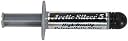
Desertcart purchases this item on your behalf and handles shipping, customs, and support to Nicaragua.
❄️ Arctic Silver 5: The elite thermal paste your CPU deserves — don’t let heat hold you back!
Arctic Silver 5 Thermal Compound is a premium 3.5g tube of high-density thermal paste featuring 99.9% pure silver particles and advanced ceramic fillers. Designed for professional-grade CPU cooling, it offers exceptional heat transfer, long-term stability without electrical conductivity, and compatibility with all common CPU sockets and heatsinks.
| ASIN | B0087X728K |
| Best Sellers Rank | 52,492 in Computers & Accessories ( See Top 100 in Computers & Accessories ) 83 in Thermal Paste |
| Brand | Arctic Silver |
| CPU Socket | [ANY_COMMONLY_USED_CPU_SOCKET] |
| Cooler Heatsink Compatibility | Compatible with any commonly used CPU socket |
| Cooler Heatsink Material | Aluminium |
| Cooler heat sink material | Aluminium |
| Cooler heatsink compatibility | Compatible with any commonly used CPU socket |
| Customer Reviews | 4.7 out of 5 stars 18,006 Reviews |
| Global Trade Identification Number | 00642008439903, 00832199001014, 03700268901411 |
| Item Dimensions L x W x H | 12.7L x 2.5W x 17.8H centimetres |
| Item Highlight | NBR material, 12mm inner diameter, 2mm thickness, replacement gasket |
| Item Part Number | AS5-3.5G |
| Item Weight | 3.5 Grams |
| Item weight | 3.5 Grams |
| Manufacturer | Arctic Silver |
| Manufacturer Part Number | AS5-3.5G |
| Model Number | AS5-3.5G |
| Mounting Type | Self Adhesive |
| Mounting type | Self Adhesive |
| Number of Items | 1 |
| Number of Packs | 1 |
| Product dimensions | 12.7L x 2.5W x 17.8H centimetres |
| UPC | 642008439903 800953173550 979980001317 840556003052 739197116170 801579489704 012304363170 794057451358 083219900101 798804167585 833054999194 832199001014 683728187231 |
| Unit Count | 1.00 count |
J**S
Excellent Quality | Easy to Use | Well Packaged
Despite building various computers and working on others, this the first time I have reviewed thermal paste. I have always believed that when it comes to certain PC components, there is no point in buying cheap as you will always end up having to replace it sooner; thermal paste is one of them. If you don't know, thermal paste is used to create a thermally fused bridge between a chip such as a CPU with a heat sink; this is done to ensure as much heat can be dissipated from the chip as quickly as possible. Why? Because we don't want anything to overheat and potentially cause permanent damage. Packaging: This came in a clear resealable bag. The tube itself is a spring loaded syringe that feels strong. Ease of use: I recommend sacrificing a small amount to start with as it is nearly always slightly watery compared to the rest of the tube. Firstly, you MUST wipe off any old thermal paste from the heat sink and chip that you wish to apply this too. I recommend using 99% rubbing alcohol and cotton buds to work off any residue. Once clean, apply a small line to the chip and very carefully put the heat sink down evenly so not to smear the paste. Tighten in a cross motion, that is, tighten screws as opposite pairs so that the load is even across the heat sink. Doing this will help spread the line of thermal paste in an even manner. Many people think you need to cover the chip entirely, you do not, don't forget, the heat sink is in contact with the chip anyway and the paste only serves as a very fine bridge between the two. Performance: I have used this on so any PCs and have only ever seen decreases in temperature. Notable examples include repairing an old Xbox 360 using different screws for the heat sink and replacing the paste with this stuff. The Xbox no longer overheats and still works now. This specific order was used for an old Acer Aspire Revo Nettop. In order to upgrade the hard drive I had to remvoe the heat sink. Because th eheat sink was coming off, I needed to replace the thermal paste. Running Kodi before showed idle CPU temps of 70-75 degrees. Since replacing, I haven't seen it go over 71 and idles at around 63. It seems to be often the case that factory used thermal paste just isn't as good quality as the dearer ones such as this. Value: Considering I still have at least 3g left, I'd say that I will get another three big uses out of this tube, and at £5.99 delivered next day, this is great value. Pros: - Spring loaded syringe - Thick compound - Excellent quality Cons: - Paste separates in storage (but all seem to do that) If you are looking for a thermal paste, buy this, you will not be disappointed.
J**S
Pleasantly surprised
Bought this as my tube of AS3 had dried up and I only had some standard thermal paste lying around and I needed to replace the graphic card on my Rock laptop. The graphic card's chips uses a set of thermal pads but the paste is needed for the CPU when reinstalling the fan and cooling assembly. The new card came before the thermal paste, my fault, so initially I used the standard paste I had lying around. Normal (browsing, checking emails, using Windows Explorer, watching an AVI video with KMPlayer types of thing) usage CPU temperature with the standard paste was 58-62C with idle around 56C. When the AS5 arrived and I used it, initially there was a ~5C difference between AS5 and the standard paste in similar usage (53-57C & 51C idle). But after a few days bedding in, (common with many of the more sophisticated formulations of thermal pastes) I lost another couple of degrees across the board (51-55C & 40 idle). Note, previous to replacing the graphic card, normal CPU temps, even though it had a better than standard paste on the CPU, was closer to the temps seen with the standard paste. Other bonus points, it has made a difference to the maximum temperature seen. Previously, when e.g. encoding video, which would push the CPU to max for long periods, max temperature would get up to around 88-90C. Now doing the exact same task, I never get above 83-84C. This is also reflected in the fact that now, even when doing some heavy lifting with the laptop, it is noticeable that the fan now runs for far shorter periods than it used to, i.e. the temperature drops far quicker. Though I have not changed any of the fan control settings in the BIOS or the on board SW I use. All in all, money well spent and a bargain at a fiver and a very pleasant surprise as it has produced far better results than I expected.
C**L
Don't normally do this, but...
I'm not one for writing reviews, never take the time, however this product merited a review. I use my PC a lot and the fan for the CPU ran hell for leather almost straight after boot up. It was stable, but not suitable. Even when new the fan ran fairly high under load. My PC cut out one day, so I decided to take the entire thing apart to see the problem. I found the inside of the power box caked with dust, layers of dust on the fan blades of both the CPU heatsink and the power box fans. So I cleaned it all, looks good as new in there now. While reattaching the heatsink and fan unit to the motherboard I noticed a few blotches of white on the CPU. Looked it up and found that it was the most likely cause for the cut outs, due to CPU overheating issues. Looked up some products and saw this. Read a couple of reviews and thought, hell I'll give it a go. It's got to be better than the crud left in there now. Package arrived, I was excited as I could finally reassemble the PC fully and get back to Borderlands 2. Applied liberally to the copper area of the heatsink and carefully replaced the sink and fan unit. I was amazed. At start up the fan would spin up to around medium and by the time I'd logged in it would be going at full wack. After application of Arctic Silver I couldn't even tell if the fan was on. I lent closer to the tower and heard the fan barely spinning. I thought "Give it a chance to warm up and it'll be back to nearly breaking point" I was wrong. Doing menial tasks, IE Internet browsing, iTunes, word processing (Running Simultaneously) the fan is dramatically reduced and is probably at about 10% of max RPM. Even when under load, IE Borderlands 2 full spec and iTunes running, the fan is at about 50%. VERY PLEASED WITH THIS PRODUCT. Would happily recommend to anyone. 6 out of 5 stars. Solved my problem beautifully. Thank-you Arctic Silver!!
L**E
Excellent. "It does what it says on the tin!"
Works fine creates s strong conductive seal between the CPU and the Heat Sink. Make sure that you: 1. Clean all previous seal residue from both the Cpu and the Heat Sink, I suggest that you use ISOPROPYL ALOCHOL to do this, applied with a lint free cloth. (Quality Make-up remover pads are good for this). 2. Allow 5 minutes for the ISO to evaporate before applying the new seal to both the CPU and the Heat sink. Use a small plastic spatula to do this, ensuring a thin even coating on both surfaces, with no gaps or breaks in the seal covering. 3. Finally replace the Fan/Heat sink assembly over the CPU (Usually four screws at the base of the assembly) but it can differ depending on the assembly.
K**A
Best I've used!!!
I bought this thermal paste to compliment my CM V8 on my 125W Ph II 965 BE C3. It took me a little while to work out my application method, but after a few reseats I got all the kinks sorted out. I've used this in every single build I have right now and apart from the little inconvenience caused by the break in period(which is greatly assisted by torture tests btw) it's given me the best results. I've started to replace my GPUs' thermal greases as well. On a 9500GT and a 9600GSO it's giving good results and I'm thinking of swapping out the 4770's one as well, but that's tolerable for now. I used this to replace the thermal pad that was on a laptop as well. The AMD TK-55 went from 92*C under prime to just about 70. The fan didn't go faster than65%. I also put a bit on the thermal conductive soft pad(the really thick ones) that was on the GPU. That dropped to about 60*C as well(from 78 originally). My friend had an annoying fan on his machine. He had had the CPU replaced once before after some usage. When I popped it open, the thermal pad looked and felt like a piece of rubber. I tried to scrape it off, but it was pointless so I just used the ArctiClean instead. When I replaced it with AS5, the temps dropped from around 70 under prime to 51 max. Also the fan wasn't as loud and didn't become audible until after 5 minutes in the prime stress test. That's before the break in had finished. My best guess is that now it runs at about 48-50*C. It also helps my 965 stay at 52*C when running at 3.8-4GHz
R**H
Immediately noticed improvement
Despite the 200 hour break-in period which I am still to reach, I have noticed a massive improvement in my temperatures. I have a Toshiba Satellite L500 laptop which used to have a T6500 core2 duo which used to run idle at 45 to 50, and would easily reach temperatures upto 65/70 which i consider not acceptable. The laptop is 3.5 years old now though. Rather than buying a new laptop I recently put in a new CPU, the P8600 2.4ghz which actually runs cooler, but only just at idle of 40C. I used some cheap ebay paste, the 2 for a pound type ones, but then I got some of this paste as it is relatively inexpensive (and i got the cpu from ebay for £10 which i considered a bargain so an extra £6 on paste wasnt too bad, especially as it will last an absolute age with how little you use per application). Following the instructions online, I applied a blob onto my CPU to spread into a thin layer across the surface, and I mean THIN, the metal reflection on the die should turn into a "translucent haze". Applying onto the metal of the heatsink is also a good idea as the paste will bridge the metal surface imperfections. My laptop CPU runs idle at 30C now, and with 100% load I havnt seen it climb over 52C, the fan pretty much never comes on. I just hope it continues to perform this well. The software I use to monitor hardware temperatures is called speedfan. A couple of comments about the product packaging, I did have it delivered by amazon prime, not sure if that makes a difference, but the product wasnt in OEM packaging, it was just in a small plastic bag, meaning no instructions or any useful hints/tips. I guess this is for a reason, people who buy this should really know what they are doing with it. I did my homework before buying this product and its important you do the same, check the arctic silver website for full application tips per processor family, it will tell you exactly what you need to do, apparently getting it wrong can give you worse performance.
A**N
Buy with Confidence!
I bought this as I am the owner of a Sony Vaio "F" series, with the Intel i7 processor. These models are prone to serious cooling or rather, lack of issues. The fan is constantly spinning at high rpm's. I decided to strip it down and clean the fan, and re-apply the thermal paste to both the CPU and GPU. Searching YouTube I found a video explaining the disassembly process. Once you have it disassembled give it a good blow out with the Air can. Then remove the fan and the attached copper piping, I was amazed looking at both the CPU and GPU which were absolutely covered in crusty old thermal paste, some parts on the top had no paste and down the sides was a mountain of crusty old paste spilling out on to both the processors!!!! Obviously who ever had applied this had no idea at all, Sony really should look into this as it really was bad, and I think this could be a major reason why Sony have had so many complaints about hot "F" series laptops. If you are planning on doing your machine you will need the following. A can of compressed air, cotton balls and cotton buds, Isopropyl alcohol, available at a pharmacy, a credit card or something similar, a very small flat head screwdriver. Starting with the copper pipe part, of the CPU and GPU apply plenty of alcohol to the copper pipe and rub away to break up the old paste I used cotton buds to gradually shift it, then move to the CPU and GPU, be careful here, and go easy again using cotton buds and lots of alcohol I cleaned the tops with care and for more stubborn areas around the sides I soaked liberally with alcohol and carefully picked away the hardest bits with a tiny flat bladed screwdriver. This took me over 30 mins just be patient as you go along, once you are finished, blow again with the air can to remove any minute debris. Take your Arctic Silver and apply a tiny amount to the GPU, approx. that of a very small grain of rice and apply to the top of the GPU, I used a cotton bud compressed tight to apply it evenly,, then get the credit card and smooth until very fine, then do the CPU with it being larger just apply a little more than the GPU, again smooth and apply, you do not need lots, just a thin coat! Allow to dry slightly for about 20 mins then clean up any excess around the CPU and GPU. Finally reassemble. Once I rebooted my temperatures had fallen from around 70c to an unbelievable 45c, and the fan is almost silent, good news is it can take 200 hours to bed in! so I expect the temps to drop even more. In summary a worthwhile investment worth every penny, and lots left should I need to do it again.
T**N
thermal paste for CPU OR GPU
This paste is so much better than the cheap stuff on Ebay This arctic silver paste holds the heat better and becomes an immediate insulator once applied. Ive used this brand various times on the RROD and the YLOD and all i can say is its worth the £6 the other side to having this stuff is it spreads better and you only need an ant size bit of paste and it tends to fill and cover all the area needed on the GPU and CPU. i would recommend this arctic silver paste as for the quality if you are constantly repairing like me then you will need to purchase again as the tube is really small. Oh and by the way this stuff stains badly on clothing i learnt that when wearing and adidas original jacket light blue when doing a repair and it never came out.
⚡**⚡
Just Go For It- Wont be disappointed! Its AS5
Arctic Silver- Age old name & professionals choice for any high end machine. Had its name in mind since years. So when the need came ordered one. Product comes in open poly packaging. There is neither any blister pack nor any seal. Appears like product is imported in bulk & then sold in loose packaging. Only a Zip lock poly bag with a syringe containing 3.5 AS5 compund. But it appears genuine & performs well. ******* PROS ******* 1. Its old & trusted name in thermal paste world 2. Will bring down temperatures by 10-20 degrees. More important is system will be stable under load & run for longer durations at higher frequencies. 3. Qty is also good. If applied in right qty without wastage, it may last for approx 4-5 repaste jobs, on cpu & gpu. ******* CONS ******* Only con being, though not electrically conductive its slightly capacitive, and if not applied carefully, will spread outside to small components on die & create trouble. ********************** USAGE SCENARIO ********************** I used it in my old Dell XPS L502x & Inspiron 15R (all stats are wrt xps one), to replace stock thermal paste on CPU & GPU. CPU throttling due to excess core temperatures 95 Deg + on load. On even small load, it shooted up to 100 & then throttling will occur. High temp were due to dust accumulation on vents, fin & old expired thermal paste. *********** HOW TO *********** 1. Using cleaning solution (eg isopropyl alcohol available at chemist shop) & swab, clean out old paste. Be careful. Clean dies to mirror finish. 2. On square die, apply a drop. Neither too big, nor too small. Will depend on die size & your guess. On rectangular die, apply a line. When heatsink is pressed on to die, due to pressure it auto spreads consistently. Its preferred method, i did not go for spread method as it may sometimes leave air bubbles which is a no go. *pic attached with illustration on square/rectangular die & real application on rectangular die ************************** BEFORE APPLICATION ************************** Cold boot, no apps running, core temp was 63 Deg, CPU at 800mhz On full load via prime 95 After 2 min 95 deg & cpu at 1700mhz After 5 mins 95 deg & cpu at 1500mhz After 15 mins 95 deg & cpu at 1100mhz Fan: at full rpm, continuously whirring. ************************ AFTER APPLICATION ************************ Cold boot, no apps running, after 15 mins core temp was 50 Deg, CPU at 2400mhz On full load via prime 95 After 2 min 79 deg & cpu at 2900mhz After 5 mins 82 deg & cpu at 2700mhz After 15 mins 82 deg & cpu at 2600mhz Fan: less noise and triggers less. Very lesso n high rpm So it appears like, huge difference in performance & power saving!! Its been a few days after application, n laptop seems to run cool & there is visible boost in performace on load. ****************** FINAL VERDICT ****************** So getting AS5 was not a bad investment! You can surely go for it. Just be careful in its application as though not electrically conductive, its capacitive & if not used in desired qty may spread out to small components on die & create trouble. Also be patient after application as it takes around 200 hours to cure or to reach its full capacity. Thats burn in time for AS5.
J**O
Muy buena pasta tenia
Para mi la mejor pasta térmica en mis consolas y pc
C**K
prompt deliver
Prompt delivery! Item as described
S**N
kalite
ürün gayet kaliteli, ortalama bir termal macuna göre işlemci ve ekran kartı sıcaklığını 3-5 derece olumlu fark ettiriyor
D**N
Arctic still can't be beat!
I recently had the pleasure of using Arctic Silver thermal paste for my computer build, and I must say it exceeded my expectations in every way. This incredible product has proven to be a game-changer when it comes to maintaining optimum temperatures for my processor. Arctic Silver's thermal paste boasts exceptional thermal conductivity, which ensures efficient heat transfer between the CPU and the heatsink. This quality is crucial in preventing overheating, as it effectively dissipates heat, keeping the processor cool even under heavy loads. I noticed a noticeable decrease in temperature compared to my previous thermal paste, resulting in improved system stability and longevity. One aspect that truly impressed me was the ease of application. The syringe-style packaging allows for precise and controlled application, ensuring that the paste is evenly spread across the processor surface. It also comes with clear and detailed instructions, making the entire process hassle-free, even for beginners. Additionally, the paste's non-conductive properties guarantee that it won't cause any accidental short circuits, providing peace of mind during installation. Arctic Silver thermal paste exhibits excellent longevity. Unlike some other thermal pastes that tend to dry out or degrade over time, this product maintains its effectiveness for an extended period. This means less maintenance and reapplication, saving both time and money in the long run, as Arctic Thermal Paste is made with the best compound to keep your processor cool for a long time! Another significant advantage of Arctic Silver is its compatibility with a wide range of processors and heatsinks. Whether you have an Intel or AMD CPU, or you're using an aftermarket cooler, this thermal paste is designed to work flawlessly across various platforms, ensuring a seamless fit. In conclusion, Arctic Silver thermal paste is a must-have for any computer enthusiast or professional builder seeking superior thermal performance. Its remarkable thermal conductivity, ease of application, longevity, and compatibility make it an exceptional choice. I highly recommend Arctic Silver to anyone in need of reliable thermal management for their CPU.
Trustpilot
3 weeks ago
2 months ago