Buy anything from 5,000+ international stores. One checkout price. No surprise fees. Join 2M+ shoppers on Desertcart.
Desertcart purchases this item on your behalf and handles shipping, customs, and support to Nicaragua.
🎨 Elevate your digital art game with precision and speed—don’t get left behind!
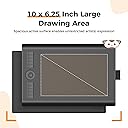
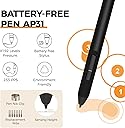
The GAOMON M10K 2018 is a professional-grade graphic drawing tablet featuring a spacious 10 x 6.25 inch active area, 8192 levels of pressure sensitivity, and a battery-free stylus for smooth, responsive input. Equipped with a programmable touch ring, round key, and 10 customizable hotkeys, it streamlines your creative workflow. Compatible with Windows 7+ and macOS 10.12+, it supports all major design software, making it the ideal choice for designers, educators, and digital artists seeking precision and versatility at an unbeatable price.


| ASIN | B07HQDN7W6 |
| Active Surface Area | 10 inches x 6.25 inches |
| Best Sellers Rank | 656 in Computers & Accessories ( See Top 100 in Computers & Accessories ) 1 in Graphic Tablets |
| Box Contents | USB Cable |
| Brand | GAOMON |
| Brand Name | GAOMON |
| Colour | Black |
| Compatible Devices | [Windows 7, Mac OS 10.12 or higher] |
| Connectivity technology | USB |
| Country of Origin | China |
| Customer Reviews | 4.4 out of 5 stars 22,984 Reviews |
| Display Type | LCD |
| EU Spare Part Availability Duration | 2 Years |
| External Testing Certification | 0000 |
| Item Dimensions L x W | 25.4L x 15.9W centimetres |
| Item Type Name | Digital Drawing Pad |
| Item Weight | 695 Grams |
| Manufacturer | GAOMON |
| Manufacturer Part Number | A0.M10K00-1-002018-EU |
| Model Name | GAOMON M10K 2018 |
| Model Number | M10K 10*6.25 inches |
| Model name | GAOMON M10K 2018 |
| Native Resolution | 1920x1080 |
| Network Connectivity Technology | USB |
| Operating System | Windows 7 or later, macOS 10.12 or later |
| Operating system | Windows 7 or later, macOS 10.12 or later |
| Pressure Sensitivity | 8192 Levels |
| Pressure sensitivity | 8192 Levels |
| Product Features | 1 Touch Ring(Canvas Zoom in/out, Brush Zoom in/out and roll)+1 Round Key+10 Express Keys |
| Product Warranty | 1 Year Warranty Against Manufacturer Defects |
| Screen Size | 10 Inches |
| Special feature | 1 Touch Ring(Canvas Zoom in/out, Brush Zoom in/out and roll)+1 Round Key+10 Express Keys |
| Specific Uses For Product | Teaching |
| Target Audience | Teachers and Students |
| UPC | 653334993496 |
| Unit Count | 1.0 count |
D**9
Better than the competition, and cheaper!
Wow. I'm pleasantly surprised. I previously owned a much more expensive Wacom tablet. After years of frustrations with that one in relation to drivers and glitchy behaviour I finally decided to chance a different brand. I have to say I'm blown away. For the price point it's excellent. I don't know why anybody would need to spend more money than this. It does everything I want and does it well. The software is great too. Nice and simple, works well without clutter. Very happy with my purchase.
B**A
Impressive signature tablet!
Very impressed with this signature tablet!! Compatible on Windows 11, very to install. Just download the driver from their website. (Tip: Run As Administrator when installing the driver for all users to use on a PC). The tablet is light weight, decent, practical sized. The stylus is lovely to grip and responsive on the tablet. Easy to use and setup.
A**S
Pretty good, but not really for my needs in particular
I own a MacBook Pro 14” with an M5 chip, and mainly use this product in the preview app to add annotations. It was very easy to set up and works as described, though since I’m using the preview app there isn’t a shortcut for the brush/pen though a shortcut can be added. It does get a little bit confused every now and then and seems to not be able to properly replicate the delete button. There is no more usb port on a MacBook so I had a little scare that I wouldn’t be able to use but the converter meant for the phone works just fine. Seems pretty smooth but I tend to write with a lot of pressure and can not figure out how to change that. Though if you’re using the recommended applications this will be easily customisable for you. Comes with everything for described and for 20 pounds is an excellent alternative to a iPad
K**D
Overall fantastic product
Order came quickly, lovely packaging, product works very well and its very easy to use (plug and play basically) !! I have no complaints
W**P
Great alternative for wacom
Very good quality for the price, it works very well on my laptop and i have recommended to others as im so happy with it, i use it for college and i was originally looking at wacom but not for the price and found this brand instead and decided to try and i much prefer this brand, the buttons are great as i can change them to open which app i want through this brands app
S**R
A great tablet.
My wife needed a tablet to complete a design course that she is doing. She has a Mac and a PC, so I needed a tablet that was low cost that works easily with Mac OS and Windows. I also didn't want a pen with a battery. I looked at all the others in this price range and watched many videos. Some of the review videos can be very fussy when reviewing these things so I also had to add a bit of my own judgement. I seem to have made the right choice with this model. As my wife is incredibly pleased with it. Believe me, if this were no good, she would be getting me to buy a different one. So already, we are onto a winner. The pen is of an excellent quality and has no battery to keep having to change. It is accurate and the only problem my wife has is getting used to using it as a pen and not a mouse. When you first use these things, you want to try to use it like a mouse. But with a tablet, if you move the pen to the top right of the pad, then the mouse pointer will be at the top right no matter what you do. The buttons on the tablet are a nice to have. They are easy to setup and customise with the provided app. She has been using it with Adobe Creative Cloud with no issues at all. We just plugged it in, and it worked. Nothing else to do really. At the cost, I thought it was going to be a nightmare. But this tablet has really surprised me with how effective it is at this price. I have been buying the famous brand all these years thinking there is no other make of tablet that I would want to use. This model has changed all that for me and I would be happy to look at other products made by this brand. This tablet also comes with a nice storage bag and a USB to USB C and USB Mini adapter. It also works with Windows 7 if you don't have Windows 10 yet. You can also use the USB C adapter to connect other items to your Mac such as a USB memory stick. The tablet is 10mm thick, so not too high for drawing. Overall, a high-quality, extremely easy to use tablet and comes in a quality box with everything needed.
M**D
Great Drawing Tablet with Customisable Pressure and Good Value
it's good for drawing. The buttons are useful. There is no battery life connects to USB. The value for money is good when it has discounts. you can customise the pressure and sensitivity to however you like. To improve it can be a big bigger to be perfect. Overall the quality is great.
R**S
Affordable tablet that just works
Affordable tablet that just works My experience with the tablet has been great, it’s a nice and affordable bit of kit, may not be an artist or an OSU player, but for my use of teaching online, it’s been great. Using it The pen glided well, nice bit of resistance, not as much as paper but enough to make it comfortable to write with. The button mapping was useful and easily reprogrammable in the app, my main use being switching brushes and tacking screenshots. The pressure sensitivity, yeh nice and responsive with smooth size changing. It made my writing look much more natural. So enjoyed it. Use in MS white board Once you get the screen ratio right it is great and improves your ability to teach as you can show live examples and easily annotate. The reprogrammable buttons have been more useful than I thought, switching between brushes and screenshots made easy. Pen The pen, honestly was the best. Much better than the pen you get with other budget tablets like the Wacom One. The pen being battery free was a good convenience as you have it ready when ever you need it, but bear in mind that there is a limit to how far up you can hold the pen being roughly 0.7 cm when you just lifted it off the pad. So you will want to hold the pen a bit higher up but that’s not really an issue. Holding it was realy comfortable esspecialy with the grip. Connectivity This is where it starts of strong, this is one of them rare occasions where there is support for Linux. This off the bat was surprising. This ment I could use it with my workstation. However, my main use was on windows, so regarding that it was great. Basic plug and play. App The app responsive, and simple. Plug in the tablet, it does the rest. With the UI, it was very clean, making it easy to remap buttons and screen ratio which was nice and intuitive. Didn’t like that it was on start-up, but the tablet works best with the app so that’s fine. But personally, I leave start-up disabled and open as needed. Overall I have loved using it and in my opinion for its price it is the best and possibly only thing you need as 10 replacement nibs will last you a while and given your not doing anything extreme it ticks most boxes and is better than similar priced alternatives like Wacom one. Warning The app drivers conflict with Asus armoury crate to the point I had weird issues. Please ensure if you have an asus computer or motherboard to disable this dumb app.
A**A
Ottima
Molto buona, usata poco. In maniera esperte sono sicura che sarebbe il top
I**A
Encantada con ella
Esta tableta GAOMON S620 es una opción muy sólida si estás buscando una tableta gráfica compacta, ya sea para dibujo digital, edición de fotos o para juegos como OSU!. El tamaño de 6,5 x 4 pulgadas es ideal para escritorios pequeños o para llevarla contigo, sin sacrificar demasiada área activa. El lápiz sin pilas es un gran punto a favor, ya que es ligero y no necesita carga. La compatibilidad es muy amplia (Android, Windows, Mac, Linux), y los 4 botones exprés son muy útiles y personalizables. El producto llegó en perfecto estado. El embalaje era seguro y todos los accesorios estaban incluidos e intactos. Es una compra muy recomendable por su relación calidad-precio. Funciona perfectamente y es muy fácil de configurar.
A**.
Gayet kaliteli ve kullanışlı.
Ben m10k pro sürümünü aldım. Türkiye'de aynı ürün iki katından fazlaya geliyor. Paketten 10 tane yedek uç, bunları koyabileceğiniz küçük bir çanta, kalem, tablet, eldiven, bağlantı kablosu, 2 tane çevirici (usb to typec - usb to micro usb), kullanım kılavuzu, garanti belgesi, tableti koyabileceğiniz bir de kılıf çıkıyor. Programını kurmanız için bir yönerge kartı da çıkıyor. Birkaç tıkla kurabilirsiniz. Çok zor bir olay değil. Program içinde, kalemdeki 2 tuşu ve tabletteki tüm tuşları istediğiniz gibi değiştirebiliyorsunuz. Enable wheel seçeneği seçiliyken, tabletteki orta tuş çalışması lazım ama seçili değilken çalışıyor :) Programın sonraki sürümünde güncellenir büyük ihtimal. Büyük bir olay değil. Tablette tuşlar da kalemdeki tuşlar da çıt çıt ses çıkarıyor. Sessiz değiller. Fare tıklaması gibi. Rahatsız etmiyor. Tabletteki orta tuşa bastığınızda birden çok işlevden birini seçip, kaydırma kısmını ona göre kullanıyorsunuz. Kaydırma kısmı dokunmatik. Dönen bir tuş yok. Tablet üzerinde iki ışık var. Birisi kalem işlem yapacak kadar yaklaşınca yanıyor. Diğeri orta tuşu kaydırırsanız yanıyor. Orta tuşun yanında. İkisi de yeşil, küçük, nokta kadar bildirim ışıkları. Kalem baskı değerini de programdan ayarlayabilirsiniz. Alt eşiği biraz artırmakta fayda var gibi. Kalemi fazla bastırmanıza gerek kalmadan daha iyi bir çizim yapabiliyorsunuz. Hem kalem hem tablet kullanım ömrü için yapılabilir. Program üzerinden çalışma alanını da ayarlayabiliyorsunuz. Varsayılan olarak tüm ekranı kullanıyor. Yine program üzerinden her program için tek ayar ya da her program için ayrı ayar yapabiliyorsunuz. Windows ve Mac desteği var. Programı Linux'a kuramıyorsunuz. Telefonda da çevirici aracılığıyla çalışıyor. Çalışma alanını ayarlamanız gerekebilir. İlk taktığınızda tabletin tamamını, telefonun çalışma alanı olarak görüyor. Çizim yapmaya yeni başlayacaklar için bir iki program da önerebilirim: 1 - Krita (Ücretsiz): Photoshop alternatifi. Bazı konularda daha iyi. Her türlü çizimi yapabilirsiniz. (Fotoğraf manipülasyonu, manga-anime çizimi vb.)(manga-anime çizimleri için hazır şablonla geliyor.) Windows, Mac, Linux ile kullanabilirsiniz. Android için tablette de kullanabilirsiniz. Telefon uygulaması yok. 2 - MediBang Paint Pro (Ücretsiz/Ücretli): Manga çizimine yönelik bir program. Sitesinde, hatta programın içinde çizim eğitimleri bulabilirsiniz. Ücretsiz sürümde 3GB bulut alanı veriyor. Neredeyse tüm özellikleri kullanabiliyorsunuz. Windows, Mac, Linux, iOS, Android, Telefon-Tablet... Her yerde kullanabileceğiniz bir program. Ücretli sürümü de yıllık abonelik üzerinden çalışıyor. Japon Yeni ile fiyatlandığı için çok pahalıya gelmiyor ama ücretliye gerek duyar mısınız bilmiyorum. Ücretsiz sürümde, telefon uygulamasında reklam çıkıyor. 3 - Adobe Fresco (Ücretsiz): Karita ve MediBang Paint Pro varken gerek duyar mısınız bilmem ama, Windows, Mac ve iOS ile kullanabileceğiniz bir program. Android desteği yok.
H**A
So far I would recommend
Generally speaking great product for digital drawing. Smooth and comfortable to use with the 12 programmable buttons. The pen is light with a good grip and calibration the pad with my laptop was an easy. The only issue I have come across is that the pad sometimes doesn’t react to the pens movement when I try to draw something, even if the green dot is lighting up. It tracks the pen but refuses to actually make the lines when I press down. The way to fix this however is pretty simple. I just open the driver and go into the pen settings - without pressing anything in the driver itself i go back to my drawing software the pen magically works again. I have no idea if I just accidentally press something in my drawing software that makes the pen slightly uncooperative but it works again so I guess it’s an non issue
P**E
Den fungerar jättebra och jag ger högsta betyg och rekommendationer.
Den är lätt att använda och rolig att rita med.
Trustpilot
1 week ago
5 days ago