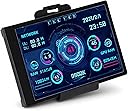
Desertcart purchases this item on your behalf and handles shipping, customs, and support to Nicaragua.
🖥️ Stay ahead with your PC’s pulse—monitor like a pro, flex like a boss!
The ASHATA 3.5-inch USB Mini Screen is a compact, high-contrast IPS display designed for real-time PC monitoring. It connects via USB Type-C, requiring no additional power or HDMI cables, and supports 360° rotation with horizontal/vertical switching. Customizable themes and a glossy 320x480 resolution screen provide clear visuals of CPU/GPU temperatures, usage stats, network speed, and more. Ideal for tech-savvy professionals seeking a dedicated, always-on system status display integrated seamlessly into their workspace.


| ASIN | B0B3F2WH9R |
| Additional Features | Host Extended Display |
| Aspect Ratio | 1:1 |
| Best Sellers Rank | #78,847 in Electronics ( See Top 100 in Electronics ) #50 in LCD Touch Panels #1,725 in Computer Monitors |
| Brand | ASHATA |
| Brightness | [Can Adjust] |
| Built-In Media | 1 x Display, 1 x Usb Power Cable, 1 x Mainboard Adapter Cable, 1 x Special Data Cable, 1 x Bracket, 1 x User Manual |
| Color | USB Type-C Interface-1 |
| Compatible Devices | Windows Computers |
| Connectivity Technology | USB Type C |
| Contrast Ratio | 1000:1 |
| Customer Reviews | 3.8 out of 5 stars 214 Reviews |
| Display Resolution Maximum | 320x480 |
| Display Technology | LCD |
| Display Type | LCD |
| Hardware Connectivity | USB |
| Has Color Screen | Yes |
| Image Contrast Ratio | 1000:1 |
| Is Electric | No |
| Item Dimensions D x W x H | 0.3"D x 3.3"W x 2.2"H |
| Manufacturer | ASHATA |
| Model Name | ASHATA480astk9iu361 |
| Model Number | ASHATA480astk9iu361 |
| Mounting Type | Desk Mount |
| Native Resolution | 320 x 480 |
| Pixel Pitch | 0.211 |
| Processor Count | 1 |
| Resolution | 320x480 |
| Screen Finish | Glossy |
| Screen Size | 3.5 Inches |
| Screen Surface Description | Glossy |
| Series Number | 480 |
| Shape | Rectangular |
| Specific Uses For Product | Business |
| Total USB 2.0 Ports | 1 |
| Total Usb Ports | 1 |
| Viewing Angle | 170 Degrees |
J**S
Compact, useful and very practical
The 3.5-inch USB IPS mini monitor was an excellent purchase. Installation was simple, and upon connecting it, I could immediately view system data with AIDA64: CPU temperature, memory usage, and other sensor readings. The image quality is clear and sharp, despite its compact size, and the design blends seamlessly into the desktop. It's very practical for monitoring PC performance without having to open windows on the main screen. In short, a small but highly functional accessory for keeping everything under control.
A**O
Novelty device - challenging setup - limited reliability
This 3.5-inch screen is a specialized device designed for very specific use cases. It’s not a traditional monitor and is configured to work exclusively with proprietary software that must be downloaded from a Google Drive link hosted on a Chinese server. Unlike the product description says, it is not compatible with Aida64. Setting up the screen is not for the faint of heart. The proprietary software requires careful configuration, and the process can involve multiple restarts of both the device and the software to get them to sync properly. It’s definitely a trial-and-error process, and users without technical troubleshooting experience may find it frustrating. When it was working, the screen did a pretty good job of its intended function. I used it to display real-time stats, which updated every second, and it handled this task quite well. The display quality was bright and sufficient for its purpose, making it a practical tool for monitoring data. One thoughtful feature is the inclusion of USB connections on both the long and short edges of the device, providing convenient orientation options regardless of its installation location. Unfortunately, the device’s lifespan was disappointing. After about one year of use, the screen failed, displaying only garbled static. Based on my limited troubleshooting, this was likely caused by a blown internal capacitor. For a device with such a niche application, a longer lifespan would have been expected, so this was a significant letdown. This device has potential but comes with several caveats. It’s well-suited for tech-savvy users who need a small, dedicated screen using the specific application and don’t mind a tricky setup process. However, its limited compatibility, complicated configuration, and lack of durability make it hard to recommend for anyone looking for long-term reliability. If you decide to purchase it, be prepared for some challenges—and keep in mind that it may not last beyond a year.
N**2
Great little monitor to show off temps/stats.
This little monitor was great for showing off speeds and temps. Its a little small, but perfect for my needs. It is slightly customizable; you can change the background image and the rename the devices you have installed (I believe the defaults were set to Intel and I have AMD components). It comes with several themes in portrait and landscape, so before using 3M tape to mount it, make sure to try out the different configurations. You will also have to play with the power settings as when I put my PC to sleep the monitor stayed on and active, but I was able to get it to sleep as well, with a little patience. I tried it out on My PC and ended up installing it on my son's PC. Cool little device.
J**L
Junk
This is the worst software/(and so-called manual) I have seen in my 30 years of being a professional programmer and network administrator. I am returning it for a refund. Trouble is even with all my experience I cannot find out how to remove their start up software. Their website is incomprehensible even tho it has the capability to translate to english (very poorly at that). If anyone can tell me how to properly remove their software and from Windows 11 start up I would very much appreciate it. Keeps coming up with "DEVCON.EXE FILE MISS!" and others such as "missing this", "missing that" etc. I cannot find the software in the apps at startup or under the Task Manager. Total trash software/manual.
J**E
great hardware, unfriendly software
i really like the idea of having an external display for resource monitoring and this does just that. it updates in real time and like the description states; it’s a very low resource hog itself. so running the program will not be noticeable on nearly 99% of all machines. i do not like the software for this product. it is poorly built. it interchanges between english to chinese when making a custom theme after you change one setting, forcing to save and close then reopen the editor to continue making a theme that is different than the stock ones. the stock ones are poor in ability to detect the processor type and change the name of the hardware on the display, defaulting to an intel 9xxxK processor. the search function for weather display is useless as it never actually finds my city. once you have beat your head around making a custom theme that isn’t just a huge sore thumb in design this is a nice device. hope it works for a long time coming, we will see.
M**A
It worked great with modular skins. Software usable but sketchy Google Drive download file
It works as advertise. I looked for many model and this one is mid-range but got all the features I needed. I ran it off USB. Software came with many pre-made skins. Bright and small next to my gaming monitor. I'm using its MSI skin for CPU/GPU/Network/RAM/HD. Only draw back is the software on a Google Drive; not very confident about software security but it worked.
R**.
works fine
once setup works fine no issues with software it is one of those plug it in set it up and leave it alone type things. I installed it using 2 small button size magnets glued to the bottom allowing a universal fitting im my computer case. I did use the USB header adaptor and it nees to be labeled in correct orientation.
O**E
Stops working but there's a work-around.
TL;DR: Unless you are comfortable working in the command line with Python, this thing will let you down. The software that comes with it will fail and you'll have to do a lot to get something working. It looks good, brightness is great. Temps are accurate. After about two months the software for it stops working. It gives an error about hardware or something. Luckily there is free Python based software that actually works better. I'd give a link but Amazon doesn't like that. So, just search for software dev's name "Matthieu Houdebine". Should take you right to it. Fair warning it takes some command-line stuff to get it going. You have to install Python 3.11 (from the Python's website not Windows Store) and then install some addons. Getting it to launch with windows requires some tricky work in windows Event Scheduler. Instructions for that are on the page with the with the app. Good luck.
N**A
Cool asset for computer
It's designed to do what it says, the setup is simple, and the quality is really good. For network numbers to work on wifi, you need to rename your Wifi connection to "Ethernet" so it starts reading it. Also, it's not a Google Drive anymore, when you connect the screen, it shows an actual website.
I**S
Divertida
Buen producto si quieres hacer un setup elegante, tal vez compre la de 5" pero para probar, está bien. El software funciona de manera básica, poco a poco iré customizando.
K**A
Interesante, facil de usar y util.
La pantalla es brillante y de una tamaño legible. Si la buscas para presumirla, teniéndola dentro de de tu gabinete, creo que es muy pequeña. Pero, si la pones en tu escritorio, cerca de tu teclado, es funcional. El software es facil de acceder y usar las configuraciones predeterminadas. Crear una configuración de cero es algo que no se ve facil o intuitivo pero no lo he hecho directamente. Los cables son super prácticos y bonitos. Con esto en mente, vale la pena.
A**I
Worked fine till it didn’t/UPDATE DO NOT BUY
The app and screen worked perfectly until a couple of weeks ago. Since then, the app no longer recognize the screen. I have to turn off and on the PC multiple times before it finally gets recognized. I can use the cable provided on multiple USB headers and same result. I have also used my own USB cable into a USB port, and same issue. These reviews, sadly didn’t exist when I bought it but now they do, so buy something else from a more reputable seller or brand who will actually support its products or customers. Simply do not buy, it has went from working once in a while to never. This product is pure trash.
I**Z
Si deseas monitorear tu pc este es un elemento que requieres.
Es una pantalla sencilla pero de calidad con software medio complicado pero una vez que lo aprendes es fácil. No trabaja mas que con su software. La pantalla la puedes conectar e instalar tanto internamente como exteriormente. Internamente en el puesto de usb de la motherboard o de manera externa por medio de usb incluso la probe con un hub y funcionó bien.
Trustpilot
1 day ago
2 weeks ago