Desertcart purchases this item on your behalf and handles shipping, customs, and support to Nicaragua.
🌍 Capture Life in Every Direction — Because Your Story Deserves the Full 360° Experience
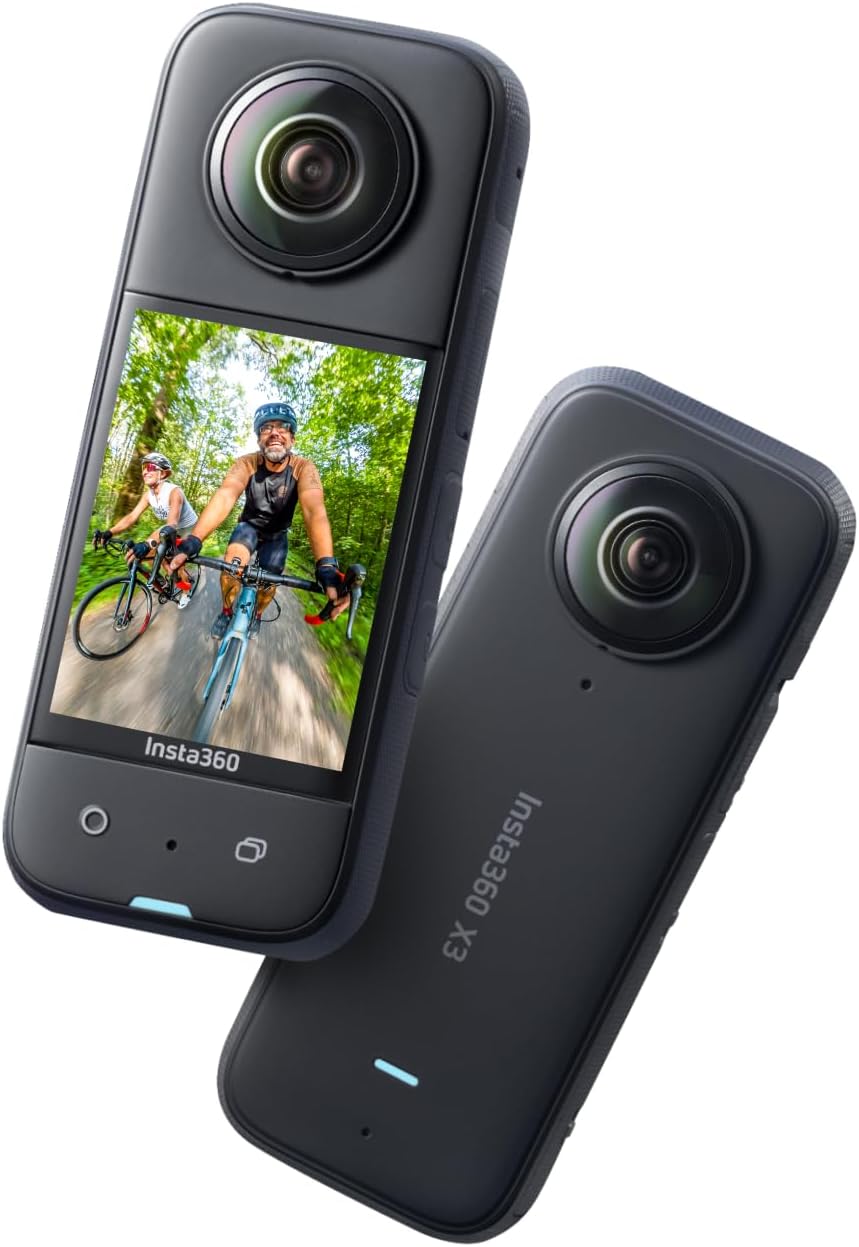
The Insta360 X3 is a cutting-edge 360° action camera delivering ultra-high 5.7K HDR video and 4K wide-angle shots. Featuring FlowState Stabilization and Horizon Lock, it ensures smooth, level footage in any environment. Its 2.29" touchscreen and AI-powered editing app make reframing and professional-quality video creation effortless. Waterproof and rugged, it’s designed for extreme sports, travel, and vlogging, empowering creators to capture immersive, share-worthy moments from every angle.


| ASIN | B0B9H572LC |
| Antenna Location | Action sports, travel experiences, underwater activities, filmmaking, journalism, live streaming |
| Best Sellers Rank | #1,388 in Electronics ( See Top 100 in Electronics ) #4 in Sports & Action Video Cameras |
| Brand | Insta360 |
| Built-In Media | Item |
| Camcorder Type | Action Camera |
| Color | Black |
| Compatible Devices | Devices with WiFi and/or Bluetooth connectivity |
| Connectivity Technology | Bluetooth |
| Customer Reviews | 4.6 out of 5 stars 6,748 Reviews |
| Digital Zoom | 3 x |
| Display Resolution Maximum | 5.7K |
| Effective Still Resolution | 16 |
| Effective Video Resolution | 5760 pixels |
| Exposure Control Type | Automatic |
| File Format | MP4 |
| Flash Memory Bus Interface Type | SD |
| Flash Memory Installed Size | 1 GB |
| Flash Memory Speed Class | C10 |
| Flash Memory Type | Micro SD |
| Flash Memory UHS Speed Class | U3 or higher |
| Flash Memory Video Speed Class | V90+ |
| Focus Type | Auto Focus |
| Form Factor | Handheld |
| Image Aspect Ratio | 16:9 |
| Image stabilization | Hybrid |
| Item Dimensions D x W x H | 0.91"D x 1.81"W x 4.49"H |
| Item Weight | 200 g |
| Lens Type | Wide Angle |
| Log Gamma Curve | LOG |
| Manufacturer | Insta360 |
| Maximum Aperture | 2 f_stop |
| Maximum Focal Length | 35 millimeters |
| Minimum Aperture | 2 f_stop |
| Minimum Focal Length | 6.7 millimeters |
| Model Name | CINSAAQ/B |
| Model Number | CINSAAQB |
| Number of Batteries | 1 Lithium Polymer batteries required. |
| Number of Speakers | 1 |
| Optical Zoom | 3 x |
| Photo Sensor Technology | CMOS |
| Screen Size | 2.29 inches |
| Sensor Type | CMOS |
| Shooting Modes | Easy |
| Special Feature | 360 Degree Capture |
| Style Name | Standalone |
| Supported Audio Format | AAC |
| Supported Image Format | JPEG |
| UPC | 842126103742 |
| Upper Temperature Rating | 104 °F |
| Video Capture Format | MP4 |
| Video Capture Resolution | 5.7K , 4K |
| Video Resolution | 5.7K, 4K |
| Warranty Description | 1-year |
| Water Resistance Level | Waterproof |
| White Balance Settings | Auto |
| Wireless Compability | Bluetooth |
| Zoom | Digital |
Y**I
Amazing camera for unforgettable trips
I’ve been using this camera all the time, and it has been fantastic. The best experience was taking it with me on a vacation to Las Vegas. It captured incredible 360° videos that made those memories even more special. The video quality is excellent, it’s easy to use, and it’s perfect for traveling and outdoor adventures. I’m very happy with this purchase and would definitely recommend it to anyone looking for a fun and reliable action camera.
D**M
This camera is great.
After having used the camera for more time now and having tested the video editing software, I am updating my review with a better score. First of all the recording quality is great, both video and audio and can be viewed on a big screen TV with crystal clear image. The camera has a wind noise cancelation feature that you can turn on that I really like. It works by the camera having four mics, one on each side, and the camera chooses audio input from the mic that has no wind noise. This makes audio recording great in any condition. I used this camera to record some family videos during a festival in town. Being able to just hold the camera up with the invisible selfie stick and record without having to worry about what is in frame is great and allows you to be in the moment. Then after I got home, with the included video editing software you can just reframe the video making it look "professionaly" shot, capturing all key moments. For example we had many family members attend this festival and I was able to capture key moments without even realizing it until I started editing in the software. It even allowed me to experience moments I had missed while I was focused on something else. Which is what I would describe as a sort of a spiritual experience. This made realize the 360 video recording isn't just a gimmick or for specific scenarios. It is fantastic to capture everything happening around you and allowing you capture specific events that you would have missed with a normal camera. The software is very easy to use and allows you to follow a target or adjust keyframes manually. It comes with a plugin to be used with professional video editing software if needed. In my first review I mentioned the camera overheating, but that was in the scolding California sun, no shade and no air movement. I have not had any problem with overheating other than this one time, so this was just due to these extreme environment conditions. I ordered the mic adaptor that has just arrived and am looking forward to testing it with a wireless mic.
A**.
Great item
I love this camera. I highly recommend you get one as soon as you can. It's fun to capture everything
L**A
Insta360 X3 360° Camera 5.7K Waterproof with HDR & Stabilization – Professional Quality
The Insta360 X3 is absolutely impressive. The 5.7K video quality is incredibly sharp, and the 72MP photos capture every detail beautifully. The stabilization works flawlessly, even during movement, making it perfect for travel, sports, and content creation. Its waterproof design and responsive touchscreen make it very practical and easy to use. Without a doubt, one of the best 360 cameras on the market
A**N
Great product
Works GREAT! Quality product.
E**M
Good quality
Word of advise, when you download the app on your phone to edit your video, make sure you save the video to your phone and not just to use it to edit, the app glitched and when I got back into it, my videos were deleted…..
M**G
The BEST Action camera i've ever used!
If you’re interested in capturing your sports, activities, or even just your daily life, the Insta360 X3 is probably the best and most versatile option to look at. I would go so far to say that this is the best action camera i’ve ever had. I’ve had so much fun with it; it takes amazing and high-quality 5.7k videos, and up to 72 megapixel 360° photos! I bought the Insta360 X3 Get Set kit, which includes a selfie stick, lens cover and a 32mb SD card. It’s exactly what you need to get started. The superb 360° video quality and in-camera stabilization are my favorite features of this camera and the build quality is phenomenal. I’m serious when I say Insta360’s FlowState stabilization is next-level! All of your footage is smooth like you’re using a gimbal! The X3 is a vast improvement over the One X2, mainly because of the touch screen. The X3 features a 2.29” touch screen and it is smooth and as responsive as your phone! I can now change settings easily while running or on my bike (something I couldn’t do with the small screen on the One X2)! The camera also has haptic feedback, so you feel a slight vibration when you change settings or start recording! Ok, so you’re obviously interested in this camera because it can shoot 360° footage, but a big bonus of the X3 is the ability to shoot 4k 30 in single lens mode! Basically, this allows you to use the X3 like a normal action camera, and to get the 4k footage we all want! The X3 now features several physical buttons in addition to the touch screen. This is HUGE! Sometimes we need to just press a button and go, and the X3 lets you start/stop recording with a easily accessed button on the front as well as easily switch between lens modes with another front facing button. There is a customizable Q button (quick menu) on the side which allows you to quickly switch between using the 360° lens or single-lens mode. It may not sound like much, but this has made my video creation so much quicker and easier! The X3 now has 3 microphones, so it picks up sounds much better than the One X2. This means that if you’re using this camera to vlog, the camera will pick up your voice better! Tbh, it still sounds like an action camera, but it gets the job done. I have made videos while running in windy conditions and the mic picked up my voice perfectly! The X3 is waterproof to 10 meters. I have taken mine in the pool and the ocean and it works like a charm coming in and out of the water. I love Insta360’s color science and you are able to shoot video in Vivid, Standard, or LOG (flat) color profiles. Most of my footage is shot in the Vivid color profiles because the type of footage I take with this camera looks best when the color really pops! The X3 now features 1/2” sensors. This may or may not mean something to you, but because the sensors are bigger than previous cameras, it can film better in low light situations. If you’re new to filming with a 360° camera, it is a real treat! The 360 lenses capture everything around the camera so you can choose which direction you want to see in the video in post-production and export it as such. Working with 360° footage takes a little longer than filming with a normal camera (that only shows the direction you point it), but the results are amazing. In normal 360° mode you will need to reframe your footage to show what part of the 360° sphere you want, but all your friends will be wondering how you got those shots. New on the X3 is the “Me mode” which eliminates the need to reframe your footage. In “Me mode” the camera records you when you hold the camera. In “Me mode you can’t look around the entire sphere, but you will remain in the center of the shot! It can be a real time saver when you want to film yourself! The very best part of using the X3 is that the AI is able to remove the selfie stick from the image so it appears as if the camera if floating around you. This is done because the camera’s two lenses overlap each other in what they capture. The X3 has a 1/4 20 mount on the bottom, so will attach to any standard selfie stick or tripod with that mount. If you’re attaching the X3 to a standard action camera finger mount, a tip for 360 camera users is to ensure the camera is positioned straight directly above the selfie stick. (If the camera is not straight on the selfie stick, you may see a little of the selfie stick in your video). This does not happen if you screw the selfie stick directly into the camera! Again, video stabilization is excellent. It really is amazing how I can do so much stuff (running, biking, snowboarding, etc) with the camera shaking and the final video comes out looking smooth. Battery life is good and I usually can take the camera out for a day of shooting without having to recharge. This is probably because I take a lot of short videos. The camera specs say the battery will last 81 minutes when filming in 5.7k 30, and I think that is probably accurate. I think the best thing I can say about the battery life is that I don’t have battery anxiety from it. This is a good thing! There are a lot of other features I don’t use that will make this camera valuable to others; you can use it as a webcam and you can livestream your 360° footage! I expect good quality from Insta360, and the camera delivers. Moreover, the X3 is feels solid and imo is Insta360’s best built camera yet! I don’t leave home without this camera. Oh, one more thing that is not about the camera but makes the camera better: the app! Insta360 has a desktop and mobile app in which you can reframe your videos and apply filters and can make special effects! To say the app is great is an understatement and it will allow you to level up your video production and content creation skills.
R**Y
I use it while riding
This camera is incredible. The video quality is sharp, the stabilization is impressive, and the ability to capture everything around you means you never miss a shot. The app is easy to use and editing is surprisingly simple. One of the best tech purchases I’ve made.
V**Z
La mejor cámara 360
Llego un día antes, todo venia en una caja y venia en buenas condiciones, la verdad hace buenas todas y en la edición es muy fácil de hacerlo Excelente cámara
M**O
Eccellente
Risoluzione e qualità dei video ottima. Con il kit neve molto comoda e versatile. Video sullo snowboard eccezionali.
A**A
Exelente servicio
La cámara está súper genial! Compré el kit Bateria y llegó todo sellado sin golpes, todo mejor de lo que esperaba. Muchas Gracias!
T**H
V good
As described
M**S
Die Kamera hat mich begeistert
Lieferumfang & Erster Eindruck Im Lieferumfang befindet sich natürlich die eigentliche Kamera, die Insta360 X3. Des weiteren gibt es das passende USB-C Ladekabel sowie den Akku. Der Akku kann recht einfach eingesetzt sein. Man muss lediglich darauf achten, dass alles richtig einrastet, damit der Akku auch abgedichtet ist. Was wirklich praktisch ist, dass direkt eine weiche Tasche dabei ist, sodass man die Kamera mitnehmen kann ohne das etwas zerkratzt. Zum Starten wird dann eine Micro SD Karte benötigt. Hier würde ich euch mindestens 128GB empfehlen, damit man auch längere Videos aufnehmen kann ohne immer die SD Karte wechseln zu müssen. Nach dem ersten Einschalten habe ich die Kamera mit meinem Smartphone via Insta360 App verbunden. Das hat ohne Probleme funktioniert und daraufhin wurde erstmal ein Software Update installiert. Mein erster Eindruck war sehr gut, die Kamera lässt sich super bedienen und das Display ist ziemlich groß. Display Das Display ist im Alltag sehr gut! Es ist viel größer als von anderen Insta360 Kameras und somit sieht man auch viel besser was aufgenommen wird. Durch das große Display sind auch Änderungen im Menü viel einfacher. Bedienung Man bedient die Kamera entweder direkt am Display, in dem man durch Wischbewegungen z.B. den Modus ändert. Die eigentliche Aufnahme startet mann dann per Knopf unter dem Display. Neben diesem Knopf befindet sich noch ein weiterer Knopf, der die Perspektive der Linse wechselt. Da wir hier ja eine 360° Kamera haben, sind 2 Linsen vorhanden, die im 360° Video Modus dann simultan aufnehmen. An der Seite gibt es dann noch den Ein- und Ausknopf und einen Q Button. Dieser Q Button ist im Alltag wirklich sehr nützlich. Drückt man auf Q, so kommt ein Schnellzugriff Menü und dort kann man vorgefertigte Presets hinzufügen. Beispielsweise eine Vorlage zum Skifahren, eine Vorlage zum Vloggen, eine Vorlage für Slo Motion und so weiter. Dadurch muss man nicht mehr durch die Menüs und immer seine Settings ändern, sondern erstellt sich einfach die Vorlagen. Film / Fotomöglichkeiten Wenn man von links nach rechts auf dem Display wischt, dann gelangt man zu den verschiedenen Modi. Beim normalen Videomodus filme ich am liebsten mit einer Auflösung von 5,7K und 30 Frames pro Sekunde. Das sieht super flüssig aus und durch die hohe Auflösung ist das Material sehr klar und detailreich. Neben dem Standard Videomodus gibt es dann noch einen Active HDR Videomodus. Dieser ist besonders sinnvoll, wenn ihr an Orten filmt, wo es viel Dynamikumfang gibt, beispielsweise viele helle und dunkle Stellen. Im Zeitraffermodus können 8K 360 Videos aufgenommen werden. Es gibt noch haufenweise andere Modi wie z.B. TimeShift oder Bullet-Time. Für Bullet Time benötigt ihr allerdings noch ein Bullet Time Zubehörkit von Insta360. Das lohnt sich meiner Meinung nach, denn mit der Time Bullet Funktion bekommt man ganz besondere Aufnahmen hin. Wer Sterne mag, kann sogar per Starlapse Sternschnuppen aufnehmen. Ihr seht schon, dass für jeden etwas dabei ist, sodass man sich auch kreativ austoben kann. App Neben der Hardware bietet Insta360 noch die passende App an. Über diese kann die Kamera sowohl gesteuert werden, aber damit kann auch das Material von der Kamera ganz einfach und schnell auf das Smartphone übertragen werden. Was ziemlich cool ist, dass das Material direkt in der App angepasst und geschnitten werden kann. Man benötigt dafür keinen PC mehr, alles geht direkt über das Smartphone. Unter dem Menüpunkt Stories gibt es noch die sogenannten Shot Labs. Hier findet man kreative Ideen und Effekte, die man dann mit Hilfe von kurzen Anleitungsvideos ganz einfach nachmachen kann. Somit kann man Videos erstellen, bei denen andere Leute denken, dass diese sehr aufwendig waren. In Wirklichkeit gehen die aber sehr einfach und schnell über die App. Das ist schon magisch. Bildqualität Gerade bei einer 360° Kamera musste man in der Vergangenheit oft Abstriche bei der Bildqualität machen. Die Bildqualität der X3 ist nun so gut geworden, dass das die erste 360° Kamera ist, die ich allen Leuten ohne Abstriche empfehlen kann. Durch die 5,7K Auflösung hat man genügend Details, dass man das Video auch ohne Probleme croppen kann. So kann man aus einem 360° Video beispielsweise über die App ein 9:16 Video für Instagram exportieren. Fotos habe ich auch so einige gemacht und war von der Bildqualität überzeugt. Besonders tagsüber bei gutem Licht macht die Kamera sehr gute Fotos und Videos. Fazit Alles in allem bin ich begeistert von der Insta360 X3. Ich kann sie auf jeden Fall empfehlen. Die Bildqualität ist super und die vielen Modi haben mich begeistert. Ich würde euch allerdings auf jeden Fall noch einen Invisible Selfiestick von Insta360 und das Bullet Time Zubehör empfehlen. Erst damit kann man alle Möglichkeiten nutzen und noch kreativere Videos erstellen. Egal ob Einsteiger oder langjähriger Videoshooter. Diese 360 Kamera ist eine absolute Kaufempfehlung.
Trustpilot
3 weeks ago
3 weeks ago