We remain fully operational. Our teams are working around the clock to ensure your deliveries continue safely.

DOWNLOAD THE APP


Customer Services
Copyright © 2025 Desertcart Holdings Limited
DOWNLOAD THE APP


Buy anything from 5,000+ international stores. One checkout price. No surprise fees. Join 2M+ shoppers on Desertcart.
Desertcart purchases this item on your behalf and handles shipping, customs, and support to Nicaragua.
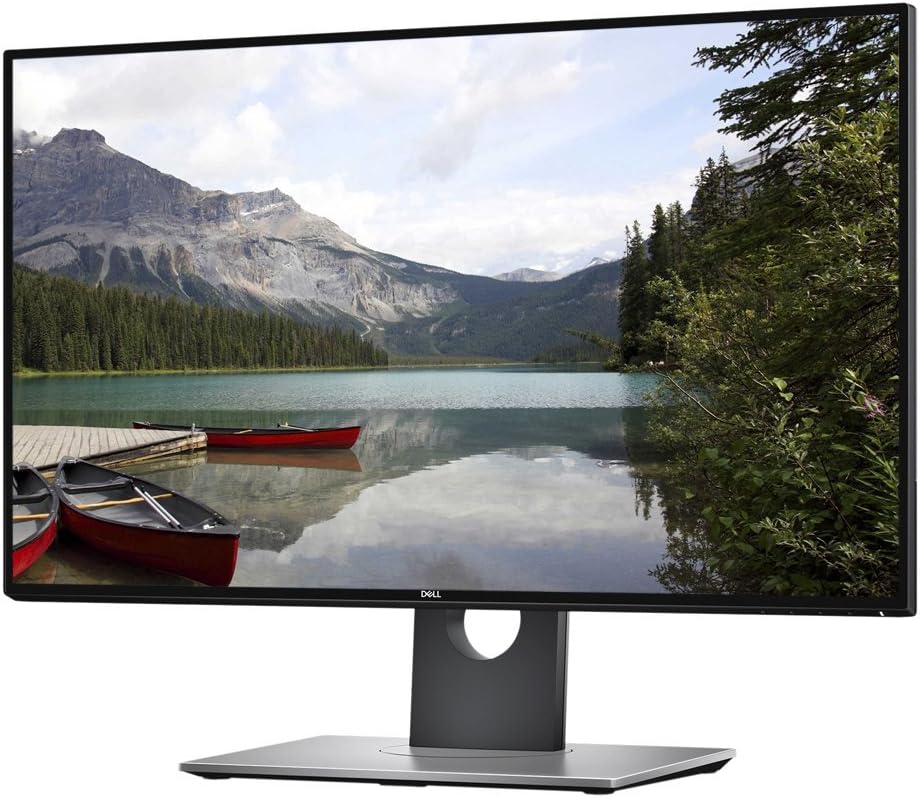
🚀 Elevate your workspace with the Dell Ultrasharp U2718Q — where precision meets style.
The Dell Ultrasharp U2718Q is a 27-inch 4K UHD IPS monitor featuring ultrathin InfinityEdge bezels for seamless multi-monitor setups, HDR support with 1.07 billion colors for vivid imagery, and Bluetooth 4.0 connectivity enabling pairing with multiple devices. Designed for professionals seeking exceptional clarity, color accuracy, and ergonomic flexibility, it offers a 60Hz refresh rate, 5ms response time, and anti-glare coating, backed by a 3-year advanced exchange warranty.



| ASIN | B073VYVX5S |
| Additional Features | High Dynamic Range |
| Aspect Ratio | 16:9 |
| Best Sellers Rank | #73,479 in Electronics ( See Top 100 in Electronics ) #1,710 in Computer Monitors |
| Brand | Dell |
| Brightness | 1199.1 lm |
| Built-In Media | 1 x Power cable 1 x mDP-DP cable, 1 x USB 3.0 upstream cable, Drivers and documentation media, Factory Calibration Report, Monitor with stand, Quick setup guide, Safety, Environmental, and Regulatory Information |
| Color | Ultrasharp |
| Color Gamut | 99.90 |
| Connectivity Technology | Bluetooth |
| Contrast Ratio | 1000:1 |
| Customer Reviews | 4.1 out of 5 stars 945 Reviews |
| Display Resolution Maximum | 3840 x 2160 Pixels |
| Display Technology | LED |
| Display Type | LCD |
| Global Trade Identification Number | 00884116268369 |
| Hardware Connectivity | Bluetooth 4.0 |
| Has Color Screen | Yes |
| Image Contrast Ratio | 1000:1 |
| Item Dimensions D x W x H | 7.89"D x 24.07"W x 21.27"H |
| Item Type Name | Dell UltraSharp 27 4K Monitor - U2718Q |
| Item Weight | 13.8 Pounds |
| Manufacturer | Dell Marketing USA, LP |
| Model Name | U2718Q |
| Model Number | U2718Q |
| Mounting Type | Wall Mount |
| Native Resolution | 3840x2160 |
| Number of Component Outputs | 1 |
| Pixel Pitch | 0.1554 |
| Processor Count | 2 |
| Refresh Rate | 60 Hz |
| Resolution | 4K UHD 2160p |
| Response Time | 5 Milliseconds |
| Screen Finish | Anti-glare, Hard coating (3H) |
| Screen Size | 27 Inches |
| Screen Surface Description | Anti-glare, Hard coating (3H) |
| Shape | Rectangular |
| Specific Uses For Product | business, personal |
| Total Number of HDMI Ports | 1 |
| Total Usb Ports | 1 |
| UPC | 725638466744 884116268369 |
| Viewing Angle | 178 Degrees |
| Voltage | 240 Volts |
| Warranty Description | 3 Years Advanced Exchange Service & Limited Hardware Warranty |
K**.
Software Engineer's Perspective
This review is from the perspective of a software engineer and programmer in hope that it may help others coming from a similar position. For perspective, I was previously using two 1080p TN panel displays at 27 inches each (one landscape and one in portrait). This monitor is a dramatic improvement for me in multiple aspects: 1.) First and most obvious is the upgrade in resolution from 1080p to 4k. The text/image clarity is amazing compared to 1080p! It's a night and day difference...especially when I still have 1 of my old 27 inch 1080p panels in portrait right next to this 4k monitor. All of the code in my IDEs look beautiful and crisp with perfect clarify. I'm on Windows 10 and applied 175% scaling. While 1080p is perfectly acceptable at 27 inches, the 4k display is a very noticeable difference and has made my coding experience more enjoyable. 2.) Next was the transition from a TN panel to an IPS panel. This is also a major difference in the colors displayed. Since I use most of my IDEs in a dark theme I can really see the difference comparing to my old TN panel where the darker colors seemed washed out and on the IPS panel they seem more "true" to what you'd think it would be. However, it's not just the darker colors, all the colors are much better. There's a clear improvement on the IPS panel. 3.) Lastly, the physical design of this monitor is nice. This has very sleek bezels and while this is subjective I think the monitor has a beautiful style that is clean and professional. The stand is also very sturdy. The monitor allows for tilt and swivel to find your desired angle and position. Eventually I might vesa mount it and it is compatible. My concerns prior to buying: Some people complained about backlight bleed on this monitor. Although I'm still using the default color configuration and settings from the factory (had no reason to change it) I don't notice any backlight bleed during regular use at all. The only time when it's slightly noticeable is when the monitor is going to sleep after I turn off my PC, basically when the entire screen is black, I can see a little light from the corners. That's literally the only time I've noticed it. As I mentioned above, I run almost all my IDEs in dark theme. I don't notice any backlight bleed against my dark background environments at all. Some people also mentioned problems with green colors on this display when using display port. This was apparently an issue earlier in the monitors life which has been resolved by a firmware update. The firmware on my monitor is M2B103, which I haven't yet verified is the very newest, but I have absolutely no problems with any weird colors using display port for my connection. Other thoughts: While this monitor has an anti-reflective coating I do notice a little light glare when there's a lot of bright light coming from a window. I believe compared to many other monitors I've used in the past this one seems to glare a bit more, but this is not a problem for me. I definitely wouldn't remove a star for it. But this may be something to keep in mind if you plan to use this around of ton of windows during the day. Lastly, a small side note about gaming. Although I bought this for work purposes I have gamed on it a bit. It looks great but of course you'll need a beefy graphics card to run games at 4k. I have needed to bump a few games down to 1440p to run smoothly on this display and they still looked good. This monitor is only 60hz but for a little casual gaming it's pretty good. I'd definitely recommend turning on the "fast" response time which I do believe made a difference for me. Conclusion: For programming I think this is a great monitor. Coming from a 1080p TN panel display, the image clarity and colors displayed on this 4k IPS panel are truly a night and day difference. After using this monitor side by side with one of my old 1080p displays for about a week now I'm convinced I'll eventually need to purchase a second one as my 1080p display is so lacking next to this one. Overall, this has made my programming experience much more enjoyable which makes it a winner in my book.
D**E
Beautiful monitor for video games
After spending about a month with this monitor I can say that I absolutely love it. This monitor is 100% used for console gaming so if you're here for work, school or anything else, I can't help you. I'm sure it makes PowerPoint look great though. Anyway, I bought this monitor after returning a Samsung 4k display for a few reasons. 1) It's the only (affordable) monitor with HDR support. It's not full HDR10 which you can read about but it's also not $1,600 like Dell's super ultrasharp HDR10 monitor. Since I have a PS4 pro and Xbox One X on the way, I wanted to achieve some level of HDR gaming BUT it's very hard to find monitors right now with HDR. At the time of purchase, it was really the only other option. 2) It's got a 5ms response time in gaming mode. This is crucial for competitive games. While many 4k TVs come HDR ready, if you dig deep and look at response times, you'll find that a lot are in the 30-40ms range. I opted for a monitor over a TV for this reason. That and many full HDR10 TVs are in the $1,000+ range and HDR only seems to come on displays 45" and up. 3) HDCP 2.2: what the heck is that? yeah that's what I originally said. HDCP in the easiest sense is the license to display 4k content. The original Samsung 4k monitor I bought was only HDCP1.4 (not HDCP 2.2) and that means that in the future, it may not have the license to display all 4k content. This causes a black screen and effectively breaks your expensive tv or monitor. Mostly an issue with streaming content like Netflix and Amazon but it's possible it makes its way into video games. 4) IPS panel. IPS panels display much nicer than older TN style panels BUT at the cost of speed. Many TN panels feature 1ms response times but IPS delivers better color and allows for a wider viewing angle before distorting the image. Since 5ms was enough for me, and I was purchasing a monitor for 4k and HDR, I opted for the IPS panel. Overall, I'm extremely happy with this monitor. I would have loved for it to come fully HDR10 ready with super high brightness and contrast ratios but I understand that functionality is not achievable at this price point. To me, I feel that this monitor is the best balance between speed, quality and price and haven't found something to replace it with. For those wondering, it's a 60hz display but unless you're running dual GTX 1080s and pumping out 4k@120, you won't need anything faster for a long time.
D**3
Great mid-range 4K monitor with HDR support
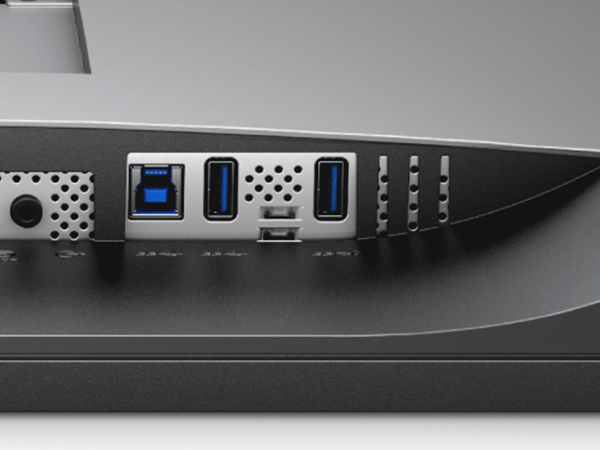
I'll start by saying I would give this monitor 4.5 stars if possible due to excessive backlight bleed with the first monitor I received. Also, note that this monitor is currently available for significantly less than on Amazon, selling for $550 from Dell and $500 from Microcenter (as of late Aug 2017). I've had the monitor for a few weeks now and use it primarily as an external display for a 2017 Macbook Pro but also with a PS4 Pro and with a secondary PC. Pros: --Works well out of the box with my 2017 Macbook pro using a USB-C to DisplayPort cable. HiDPI scaling in OSX works well and offers a noticeable improvement in sharpness/ picture quality over my previous Dell 1440p monitor. --The U2718Q is one of the first "affordable" monitors to offer HDR10 support. HDR automatically kicks in when connected to a PS4 Pro and offers a very noticeable improvement in both color depth as well as contrast. The monitor also displayed HDR from my Samsung 4K Bluray player without any issues. --Every monitor is factory color calibrated. The U2718Q supports 99.9% sRGB coverage making it a great choice for photo/ video editing. --The monitor offers many connectivity options including: HDMI 2.0, DisplayPort 1.2, mini DisplayPort, 4 x USB 3.0 ports and an audio out. --The stand is height, tilt, swivel, and pivot adjustable --The monitor is really beautifully designed with ultra thin bezels and a premium fit/ finish --Comes with a 3 year warranty/ advance exchange service/ premium panel guarantee (substantially better than most other manufacturers at this price point) Cons: --Quality control issues. My first monitor had some of the worst back light bleed that I've ever seen. My second monitor is substantially better, although still has a bit of bleed along the bottom of the panel. This is not really noticeable unless viewing dark material at night. --Many people would not call this a "true" HDR monitor as the panel tops out at around 350 nits of brightness (reference HDR requires around 1000 nits). Truth be told, I'm still really impressed with the HDR performance of the U2718Q connected to a PS4 Pro: Uncharted Lost Legacy looks absolutely spectacular in 4K HDR on this monitor. --Lack of support of full DCI-P3 wide color gamut for Apple users or professionals. Can't really hold that against the monitor given its price point. The only monitors that I'm aware currently supporting it cost well over $1,000. --Lack of support for Nvidia G-Sync or AMD FreeSync. In summary, I'm really pleased with the monitor so far. At the $500-600 price range, I feel that it represents an exceptional value and is a great choice for photo/ video editing, mac users, and people looking for a 4K HDR monitor for a PS4 Pro or other 4K content. first attached picture shows 4K HDR material from a PS4 Pro
B**.
Defective unit, stopped working after 1 month, terrible customer service
****** UPDATE ************************* Actually, buying this monitor is worse than flipping a coin. I'm on the second monitor (out of 3 after they sent a replacement for my first monitor) that has stopped working. Please don't order this monitor. They will not give a refund despite the fact that the monitors obviously have serious quality issues. ******************************************* Buying this monitor is flipping a coin. I bought two of these monitors: one broke after a month; the other is fine. However, a 50% defection rate is very poor quality. Dell customer service, after staying on the phone for over an hour, only offered a refurbished model replacement for a brand new monitor. If I wanted a refurbished model, I would have paid for one. I could have saved a pretty penny by buying used or refurbished. This is my second dell monitor to just suddenly stop working in the past 3 months. Dell does not have the same quality that they used to. If I could, I would just return both monitors, but Dell customer service explicitly won't allow refunds or replacements with refurbished models. I will never buy Dell again. I don't want to pay for a premium monitor and get bottom rate quality and customer service. Don't flip a coin on your monitor!
A**O
Well designed monitor (UPDATE 1)
The design is beautiful, sturdy, and well-constructed. The gunmetal grey color adds a nice pro touch. Color accuracy is not great with display ports, green, cyan, and yellow are off. HDMI does not exhibit any color abnormalities. I will be getting my Spyder Color Calibrator soon to report exact values. HDR is decent, although I don't have a way to measure the quality of HDR, Dell claims this monitor can display up to 550 nits. After checking native HRD video content, I was quite impressed. Colors were a bit over saturated, but nevertheless HDR like. If HDR is your main purpose, I suggest getting a HDR TV. HDR monitors are on the rise and very expensive at this point. It's still a great experience to see HDR content once in a while. UPDATE: My Spyder Color Calibrator has not arrived yet, but I just want to point out some discoveries after my second monitor arrived. Both monitors were manufactured on July 2017. Out of the box, the second monitor had a more green-ish hue while the first was more cyan. This is when both are connect on the same mini DP using Nvidia GTX 1070. (See image with text editor). On cold boot the second monitor (left) had more light bleeds, and both of them had a rainbow haze, this could be a IPS anomaly before warm up, so if anyone know what that it is, please let me know. The discoloration is not visible with normal use. The only seems annoying in a dark room with a black screen, but not visible with normal use or when viewing head straight movies with black bars. (See picture of monitor with black background). Color accuracy, brightness, and contrast is similar on both when connected with mini DP or DP. (See image with color test with similar black levels). When using HDMI, the brightness is contrast seem off, but the color accuracy is better (See image with a grayer right monitor). Not pictured, I've noticed that using the HDMI port of my Nvidia GTX 770, the colors accuracy is worse, especially when viewing a gray scale gradient, you'll see a lot of awful banding and inaccurate colors. I’ve tested both monitors using the same port and three different HDMI cables, the results were the same. I've concluded if there are any issues with colors, it's more likely due to your GPU and not the monitors. DP ports do not exhibit the problem. I’m slightly disappointment regarding the light bleeds, rainbow uniformity, but again it's never noticeable during every day use or even when you try to look for it. The burn-ins are especially bad if you leave a bright window open, it does seem to disappear after a short while or after the pixels have been refreshed with new content. Although the monitors vary slightly in color difference, I still like them. I'll update my review after I obtain the color values and post calibration. As a personal note to DELL, the bottom bezel logo could have been one mm lower so that each bezel edge could have been the same width.
J**J
Excellent 4K monitor in a 27" panel size if you can use HDMI2.0
The good: Excellent 4K monitor in a 27" panel size... for certain setups. Text can be a bit small, but that's ok; you know what you're buying into. No really obvious defects in pixels. It's a few dim ones here and there but there are so many other pixels, the bad ones blend in. Contrast is noticeably better than my 1000:1 AUO IPS panel and a good bit better than the U2313HM as long as full RGB range is selected. Limited range mode will lead to the 600:1 ratio that some sites measured. Colors are great when using custom RGB mode at 100/100/100. Not I'm a a stickler on colors so don't hold me to an artists's standard. Minor bleeding from the edges of the display, but otherwise good black uniformity. See photo. The mediocre and bad: At oblique angles, IPS glow is visible on the corners when the screen is dark as is expected of IPS panels. No points off since this is to be expected of all IPS panels. HOWEVER, DisplayPort colors are messed up on the green channel, and it's not an individual monitor issue. Not sure how Dell missed this defect when qualifying this monitor. If you want to use this panel, you need to use HDMI 2.0 at 8bpc and full color range. Not sure if a DP1.2 -> HDMI2.0 adapter will work. Theoretically it should, but I have not tried it. Since I have a free HDMI2.0 port, I did not take any stars off, but for anyone that cannot, this monitor is a nonstarter. Others: The design looks like the panel was just slid into an open frame. Pressing gently on the edges will change the amount of backlight bleeding as there's no hard bezel from the front. Not a detraction, just an interesting observation.
K**T
Not the clear cut winner the P2715Q was, but a very nice monitor nonetheless. - Maybe not (See Update)
**Please see update at bottom for revised purchasing advice.** This is a solid upgrade to the insanely popular Dell Ultra HD 4k Monitor P2715Q 27-Inch Screen LED-Lit Monitor UHD monitor from the last generation. That one was hands down the best of the blossoming midrange UHD/4K pack and a no brainer pick. Dell sold them by the ton for a reason. This generation, it's not so simple. From a pure panel performance standpoint, I think the LG Electronics 27UD68P-B 27" Screen LED-Lit Monitor is the better choice, especially if you're a gamer as it has FreeSync. For many, that's the midrange UHD I'd recommend. However, there are advantages to the Dell that ultimately pushed me in that direction (I still use the beloved P2715Q as well). 1. The Dell has 4 USB ports, including 2 fast charging ports for charging iPhones/iPads etc. The LG has NO USB ports. This is a drag as USB ports are very limited on most laptops and who wants to have to have an extra hub on the desk. 2. The Dell stand is much more flexible, even allowing for vertical orientation which is great when doing page layout work, especially posters. 3. The Dell has a slightly higher contrast ratio which is great for editing. Well, at least on paper it does. I've yet to do my own calibration, so we'll see. What about HDR? "Dell HDR" is NOT a reason to get this monitor over the LG. It's HDR-lite at best and while it adds a bit of extra pop to a HDR enabled PS4 game, it's a long way from the true HDR10 standard. Heck, the monitor brightness is only rated at 350 cd/m² and the HDR standard requires at least 1000. Dell is doing a software HDR emulation which is a very noticeable leap from the real deal. File it under "nice to have, but ultimately forgettable". Besides, you have to connect via HDMI 2.0 to use it and my MacBook Pro with HDMI 1.4b requires the use of the Mini Display Port connection for 60Hz at UHD/4K. If this is an important feature for you, be sure your PC has HDMI 2.0 port(s). Overall, if you're in the market for a midrange UHD/4K display, your best bet is either this one or the LG 27UD68P-B. If the features I listed above are important to you, go with the Dell. It's got excellent image quality at a nice price. If you want the best panel possible in this price range, and do a lot of gaming, go with the LG. Either way you'll have a very nice monitor. UPDATE: So, I had a chance finally to run calibration using an i1 Display Pro. I'm sorry, but this monitor is a let down in image quality compared to the venerable P2715Q. I'm really disappointed. First the good, it does indeed have a 1300:1 contrast ratio. I'm measuring it at around 1275:1 which is close enough to call this a pass. Now for the bad. Dell promises the display is calibrated from the factory with a Delta E of ≤ 2. That would be great as far as color accuracy goes if it were true. However, after several calibration attempts (native white, D65, 80/120/native luminance, etc.) the best Delta I can achieve is an average of 3.63 with a max of the lowest 90% of 9.12!! That's terrible. By comparison, my P2715Q measures an average Delta E of 1.85 with a max of the lowest 90% of 2.10. If this if foreign language to you it's simply a measure of how close the display comes to matching a set of color swatches. The lower the number, the better. The P2715Q is truly remarkable for a display in its price range. Worse is that this isn't a theoretical issue. The greens are particularly bad, and no amount of calibration will get them to look just right. The display won't match the calibrated retina MBP display right next to it, while the P2715Q matches it dead on. My advice? If color accuracy is important to you, grab the P2715Q while you still can. It's cheaper, is much more accurate, has the same resolution, and save the faux HDR and bezel-less frame, is greatly superior to the newer U2718Q.
N**2
In a word, Awesome... Highly recommend this monitor if you're considering a new 2018 model 4K...
Just got this today, so far so good. No complaints yet. I know there were some color and HDR issues from a few reviews that its not as good as its UP2718Q hardware HDR cousin (of course!) but I wasn't about to fork out $1000 more bucks for that either. This monitor so far is very nice indeed, larger than my 24" LCD that bit the dust last week due to old age and power outage surge. Lighter weight that I expected too. Anyway, still playing around w/ it but so far love all the features, esp the height, tilt, pivot and swivel adjustments, they're perfect! In fact I won't buy a new monitor that doesn't have these versatile stand features in an LCD. The buttons being on bottom are kinda nice and outta the way too (long as you know which is which, still figuring that out. Oh yea and the thin bezel is a definite plus. Would make great side by side for a dual monitor setup. Also love that Dell included both a 6" HDMI, DisplayPort and USB 3.0 cables right in the box. Currently have it hooked up via HDMI running 2K resolution at 60Hz, Both Warcraft, and Witcher 3 look incredible in those specs! Highly recommended if you're looking for a new 2018 model 4K monitor.. I may update review w/ 4K results a bit later. Thanks again Amazon and Dell! UPDATE 05/31/18: Set 4K in both Windows and WoW, works great w/ 60Hz on HDMI. Yes you have way more real estate screen wise but keep in mind Windows 10 at 4K, fonts and icons are very small and spread out -- & if you're like me I can't see too small of fonts anymore -- not w/o reading glasses anyway and I don't want to strain my eyes any more than have to. As for Warcraft, while it may look a bit smoother on some areas / screens I couldn't tell a big difference if any over 1080p so switched back to 1080p Widescreen which still looks great. I have not tried some newer game titles in 4K b/c do not have anything except Witcher 3, and have not tried it under 4K yet ... I'm sure its fine. Some of you hard core gamers can give it a try....
Trustpilot
3 weeks ago
1 day ago