Buy anything from 5,000+ international stores. One checkout price. No surprise fees. Join 2M+ shoppers on Desertcart.
Desertcart purchases this item on your behalf and handles shipping, customs, and support to Nicaragua.
โจ๏ธ Elevate your control gameโwireless freedom meets smart precision!
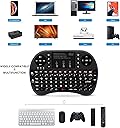
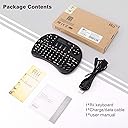
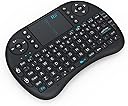
The Rii i8 Mini is a versatile 2.4GHz wireless keyboard and touchpad combo featuring a 92-key QWERTY layout, a rechargeable lithium-ion battery, and a 360-degree flip touchpad. Designed for seamless control of PCs, gaming consoles, and smart TVs within a 15-meter range, it offers ergonomic portability and plug-and-play compatibility across multiple platforms, making it the ultimate compact input device for professionals and media enthusiasts alike.
| ASIN | B00B9996LA |
| Additional Features | Ergonomic, Rechargeable |
| Antenna Location | Gaming, Office |
| Best Sellers Rank | #1,551 in Computer Keyboard & Mouse Combos |
| Brand | Rii |
| Built-In Media | Rii mouse |
| Button Quantity | 92 |
| Color | Black |
| Compatible Amazon Tablet Models | Amazon Fire 5th Generation, Amazon Fire 7 5th Generation, Amazon Fire 7 7th Generation, Amazon Fire 7 9th Generation, Amazon Fire HD 10 5th Generation, Amazon Fire HD 10 7th Generation, Amazon Fire HD 10 9th Generation, Amazon Fire HD 8 5th Generation, Amazon Fire HD 8 6th Generation, Amazon Fire HD 8 7th Generation, Amazon Fire HD 8 8th Generation, Amazon Fire HD 8 Plus 10th Generation, Amazon Fiโฆ |
| Compatible Devices | Gaming Console, Laptop, PC, Television |
| Connectivity Technology | wireless |
| Customer Reviews | 4.2 out of 5 stars 4,786 Reviews |
| Enclosure Material | Acrylonitrile Butadiene Styrene |
| Global Trade Identification Number | 00610393821900 |
| Hand Orientation | Ambidextrous |
| Item Weight | 0.13 Kilograms |
| Keyboard Description | Ergonomic |
| Keyboard Layout | QWERTY |
| Manufacturer | Rii |
| Mechanical Keyboard Switch Model | Cherry MX |
| Mfr Part Number | FMKRFL1-IV4 |
| Model Name | FMKRFL1-IV4 |
| Model Number | FMKRFL1-IV4 |
| Number of Batteries Required | 1 |
| Number of Keys | 92 |
| Number of Sections | 3 |
| Power Source | Battery Powered |
| Recommended Uses For Product | Gaming, Office |
| Special Feature | Ergonomic, Rechargeable |
| Style Name | Minimalist |
| Switch Type | Mechanical |
| Theme | Computer Accessories |
| UPC | 702411805648 636523426500 610393821900 799872083425 702411805761 702248511965 |
| Unit Count | 1.0 Count |
P**Y
I love almost everything about it... and what I don't love is inconsequential.
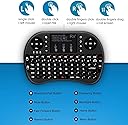
This thing is great. It does what you want it to do. I have it hooked to a Raspberry Pi running RasBMC- just a flavor of XBMC, catered to the Pi. Entering passwords and doing searches is a million times easier with actual letters to press. The touchpad as a mouse control works great. One thing I don't like is totally personal preference. It has nothing to do with the functions of this- which work fine. It feels too light, translating into feeling "cheap." It comes with a "cordless phone-like"rechargeable battery (via USB), but for the first time ever I have ever seen in a piece of electronics, you have to option to disconnect the rechargeable and use three AAA's. Totally genius and cool. But it's so lightweight and thin-skinned... it just feels like it's going to drop and shatter. I might use the AAA battery option just to see if it feels heavier. It's not a valid argument against this device, I realize. AGAIN, NOTHING IS TECHNICALLY WRONG WITH THIS KEYBOARD- It's just a feeling... It doesn't seem like the device could take much abuse. In my house, remotes are ABUSED. Once a toddler gets a hold of one by accident.. ugh. Goodbye battery door. Hello chip in housing. Perhaps goodbye remote- it's happened: completely split in two with rubber button sheet torn to pieces.That sort of thing. It's a rare occasion, but they do get their hands on things they should not. And once one of my little guys get's his paws on this wireless keyboard.... I have a bad feeling the keyboard will lose. *** I PLAN TO UPDATE THIS REVIEW IF THE KEYBOARD DOES BREAK IN ANY WAY: WHETHER IT IS FOR DEVICE FAILURE UNDER NORMAL USE OR IF IT HAS BEEN DESTROYED BY AN ACCIDENT OR TODDLER MISUSE **** Other notes. Feels perfect held two handed by an adult: thumbs easily adapt to layout and use. There are two or three positions to hold the device in, depending on hand size and use: (1)Typing, (2)Control Pad L/R, and (3)Touchpad. Nimble fingers can combine the "(2)Control Pads and (3)Touchpad" holding positions into one, but the user does have to hold the controller differently to type than use the upper controls, in any case. The touchpad is responsive and accurate. Addition of "left click and right click mouse" buttons is great. Control Pad controls on each side work great in tandem for my uses, within XBMC. One side is navigation arrows and a center "ok/enter" button, the other side has play controls for media like play/pause, skip forward & back (file / chapter/ track), fast forward, rewind, etc. The device is somewhat directional. I do have the receiver attached to a Raspberry Pi, on a shelf below a mounted TV. It is turned sideways and the shelf has a lot of other gear on it. From the viewing position, the receiver is about 12 feet away and 5 feet higher than the remote, again, turned sideways, with other video gear close to it, if not butted up against it. I still have about an 80% success rate using it, with all of those obstacles, from my lap. It will miss a signal - because of the way I have positioned it - and if I lift the keyboard out of my lap to eye level and press the button again, it reaches the receiver. I have had it this way for two days and and just going to rearrange the stuff on the shelf so the receiver is out front and has no obstructions. I wrote this because I think it's a good testament to how good the reception is, even with all sorts of obstacles. I don't think it would work if totally covered and behind too much gear, but I haven't tried. *** I PLAN TO UPDATE THIS REVIEW IF THE KEYBOARD DOES BREAK IN ANY WAY: WHETHER IT IS FOR DEVICE FAILURE UNDER NORMAL USE OR IF IT HAS BEEN DESTROYED BY AN ACCIDENT OR TODDLER MISUSE **** Take note: Today is February 18, 2014 and I have been using this device for almost two weeks. We shall see how it holds up. I have had a few of these that have had a "Honeymoon"period, prompting tons of positive reviews. Then one wireless keyboard I had wouldn't hold a charge. Another had keys that just didn't work when pressed anymore. Another was dropped and totally disintegrated. I'll be sure to come back and tell you how this keyboard met it's end, even if it's by natural causes in ten years, I'll come back and tell you about it's life and how it died.
A**D
Great product, works flawlessly out of the box on OS X.
As soon as you open the box the Rii i8 feels well made and durable, or at least as durable as can be expected of any TV remote and it even has a certificate of authenticity on the box to prevent piracy. My guess is someone is manufacturing cheap copies that look a lot alike, so look for the seal on the box, it almost looks like what comes with software where the serial number is. This product worked great on both my Mac Mini (late 2007) and my iMac (21.5 mid 2012) out of the box without installing any drives or configuring anything, I you can just plug in the receiver in your USB port and you can even type your password in if your Mac was sleeping. A lot of reviews on other wireless keyboards complain that you need a wired keyboard in order to wake up the PC and type your password before the wireless keyboard is usable, that is not the case here, you can plug it while the PC is on or while sleeping. Prior reviews also point out that there is a lack of range with this keyboard and some point out that the issue can be easily solved if you use a USB extension cable (USB male to USB female). Obviously the manufacturer has been reading the comments, as my remote was shipped with a charger for the remote's battery that is also an extension, like a Y you plug in the USB to the back of the computer then plug in the receiver in the USB female end and when your remote needs charging you use the other exit to charge it. So at least in my experience there is no issues with range, right now the keyboard is controlling my Mac Mini that is plugged in to my TV and I sit about 10 feet away and the remote works flawlessly from that distance. All things considered this is the best mini wireless keyboard I've tried and I would certainly recomend it to my friends or anybody that needs to control any type of media center as it makes watching movies from my PC in my TV as easy as it should be. Cons would be that Mac OS X will tell you that the keyboard is unsupported even though every single key works including then volume and playback keys but OS X won't even let you configure it due to it having only one shift key on the left and none on the right and OS X asks you to press the key to the left of the right shift key to configure the keyboard, but still the keyboard works and so does the mouse(trackpad) The other thing I would have loved was for it to do RF so I could control other devices with it not just the PC but at this price range I can't complain. In summary it's a great product and I would buy it again and recomend it to anyone.
T**K
Solid for XBMC
I tried a number of mini keyboards for use with my XBMC and this was the one I ended up keeping. I like the fact that this, when held with two hands is very easy to 'feel' where you are while typing and not have to look at it. With the media controls section in the top left, the touch pad in the top middle, and the direction and OK\enter section on the top right and the keyboard below with some of the most used keys a different shape\size it makes using this very quick and easy and the learning curve is short. The key presses though are not as crisp and sharp as some of the others I used and dismissed because their shortcomings far outweighed a slightly mushy key push. Don't get me wrong it has a nice soft click for each key press but on occation I get the click when pressed and either do not get the character of I get multiples of the same character. Just a little more precision on the key presses would make this a 5 out of 5 stars for me but a solid 4.0 as is especially considering the price. I tested a few that were double the price that were not as nice as this one. PROS: Nice touch intuitive and well laid out keyboard you mostly do not need to look at to use Rechargeable battery lasts forever and I never turn it off Touch pad is pretty precise and also works as a left mouse click when tapped Nice to have the media and directional controls as separate keypads up top Nice to have the touch pad in the middle up top vs it being on one side or another CONS: Slightly mushy key press feeling despite the soft click No back-lit keyboard miniUSB charging port and not microUSB
L**E
Great product 4 a great price
First Iโll begin by saying Iโve been an Amazon customer for 10 yrs and I havenโt had any major problems but one. I think it was my 2nd order, A package with blank dvds got lost in the mail, 30 days later I informed Amazon about the late package and they sent another package of dvds, which showed up 3 days after I complained. Well a couple weeks after, low and behold, the original dvd package finally showed up. I contacted Amazon again to let them know and how I should go about returning the package. To my surprise the rep at Amazon told me to keep the package at no extra charge. Iโve been a loyal customer ever since. Ok, back to the present. Iโve been looking for a wireless keyboard and mouse but both together it was $30 or more. So I went to Amazonโs Warehouse Deals looking for a used pair for under $20 and come across this nifty item, for $15 and some change, used. I looked up the product details and saw it was $16.50 new. So I ordered it with another item to avoid shipping fees. At checkout I was ask to join Amazon Prime, Iโve signed up for Amazon Prime 30 trial before, so I sign up again just to get it quicker. 3 to 7 days is how long the shipping but I live in a rural area in Alaska so I figured 5 to 10 days. 3 days after I ordered the package, to my surprise, it arrived. Iโm giving one extra star for Amazon Prime. Alright, alright, and now for the product review, well I open the package and it was better than I anticipated. Worked straight out of the box, plug and play, gotta love it. Worked better than I thought it was going to. I see a lot of people complaining about the cheap material itโs made from, but for $16.50 that the heck were they thinking they were getting at a real cheap price. The only complaint I have is I wish it was an inch shorter, about the same size as my cell phone keypad. For this reason alone is why Iโm giving it a 4 star review. Donโt get me wrong itโs still an awesome product. So thatโs 4 stars for the product and plus 1 star for the service. Oh by the way I wrote this review with the Hausbell mini keyboard.
C**N
Nice small keyboard with some annoyances
In general, it does what I need it to do (namely, act as keyboard & mouse for my media center PC). It's small, which is great for storing it away when not in use. The keys feel solid and are easy to type on. If you've ever used a phone with a physical keyboard (Blackberry or Nokia E-series), you'll feel right at home typing on this. The left & right mouse buttons are placed smartly near the touchpad and are similarly responsive. The battery recharges via USB with a blue charging LED that shuts off when charging is complete, and the unit has an on/off switch, so battery life is no issue at all (there is no battery charge meter though, so you never know how much you have left). I find the trackpad a bit problematic. It has separate areas for scroll and movement, but I find that the scroll area doesn't always register as such unless you press hard. The trackpad also has tap to click, which I am not a fan of even on higher-end trackpads (I turned it off on my Macbook Pro, for instance) and which cannot be disabled. I often find myself sliding a finger around the trackpad to move the cursor only to have a tap/click register. With the good hardware mouse buttons, I find the tap to click redundant here and wish it could be disabled. The unit puts itself to sleep after a period of inactivity. That's great, but that period is far too short for my liking. It's less than one minute in my unit. The touchpad also doesn't seem to wake up the unit aside from tapping (the keyboard keys also wake it up). That makes reading a long article, for example, a little inconvenient since you can't scroll until you wake up the unit with a key press or a tap, and if you do that while the unit is not asleep (there is no indicator so you won't know), you may inadvertently click something you didn't mean to. For the price, I feel like I can live with the quirks. Overall, I'm happy with this keyboard.
R**H
inexpensive, works as intended
I bought this Hausbell keyboard with touchpad with a little skepticism considering I wanted it to work with openelec. I also wanted an RF remote so that I did't need to point it at any direction. Since it uses a small usb dongle, I believe the HTPC sees it as a keyboard and mouse combo and I am sure this keypad should work with most of OS. It did work right out of the box with openelec, and a random linux distro. it comes with a lithium ion battery and the battery life is beyond my expectation. it might be annoying to some people that the keypad sleeps almost instantaneously but I don't mind pressing my first button twice (once to wake up the keypad and again to send the key press) especially if it means I don't need to charge it often. I've had it for about a month and I have not charged it yet, not even when I got it for the first time. The battery is still going strong. The keypad is quite light and some might say it looks cheap. I'll probably say it is cheap (which I say in a good way) and doesn't look as cheap as it sounds. I must admit that I am not a big fan of the tactile and audible feedback of the keypress but I am sure for most people it is not an issue. All things considered, I am quite happy with this product. I will definitely recommend it to someone who is trying to replace an HTPC remote or even building an HTPC. The IR remotes are one thing but this keypad is truly convenient, once you use it, I don't think you'll ever want to go back to those old IR remotes.
Z**Y
Great idea, poor implementation
I usually try to be fair and objective, but honestly this is a horrible product. I understand that you get what you pay for, but if a product doesn't do what it's supposed to reasonably well, then it is a waste of everyone's money. And of course it's inexpensive enough that it's almost not worth the hassle of sending it back. First of all, the keyboard layout is atrocious. I sometimes wonder if the people who design these mini keyboards ever try using them. It would be nice if someone could design one of these things with a more typical layout and which includes all of the standard keys. Having to use the Fn key to access keys like Home/End is inconvenient and annoying. I understand that when designing a small keyboard economizing space is a consideration, but let's face it, a keyboard this size is never going to be very useful for extended typing anyway so either make the keys smaller or make the keyboard larger to allow for a more standard layout. At least in my opinion, control is the primary use for a mini keyboard, not typing so having more of the standard keys available would be useful. Some of the above I might be willing to overlook since it is typical for these types of keyboards, but on top of that, half of the time you have to hit the keys two or three times before they do anything. The USB dongle is small which is nice, but as other reviewers have stated, it is a very tight fit and a struggle to insert or remove. The build feels sturdy enough, although I don't really care for the clicking keys. So in conclusion, like most mini keyboards, it is a great idea which is poorly implemented. Update, Continuing my search for a mini keyboard I can live with, I purchased the Eskyยฎ Mini i8 2.4GHz Wireless Entertainment Keyboard with Touchpad. http://www.amazon.com/Esky-Wireless-Entertainment-Keyboard-Touchpad/dp/B008JA980Q Well, I didn't realize this when I purchased it, but it turns out that the Hausbell and the Eskyยฎ are almost exactly the same keyboard. I'm not sure which one of them is the original manufacturer or if it is manufactured by a third-party, but there are definitely some differences. If I had to guess between the two though, I would say that the Eskyยฎ is the original build of this product based on the higher quality. The Eskyยฎ does not feel as cheaply made. It is a much more sturdy build. On the Eskyยฎ, the group of multimedia keys on the top left are a single circular piece which feels firmly seated in the case. On the Hausbell, these keys are also a single piece, but with cutouts between the keys so that it feels cheap and like it might come loose at some point. Yet another difference is the two keys on the left hand side of the keyboard. On the Hausbell, these two keys are assigned to produce www. and .com for prefixing and suffixing a URL. Not the most useful feature in the world. However on the Eskyยฎ, these two keys are additional left/right click mouse buttons which I suspect many people will find much more useful and convenient. The Eskyยฎ also seems to have better connectivity with the adapter so that you don't always have to press keys several times for them to register. Finally, the Eskyยฎ has a dongle that fits into the USB port without a struggle. I still stand by some of my original complaints about this design, but the Eskyยฎ is at least somewhat easier to live with.
X**S
This thing is pretty cool!
After using this device for quite a while I have to say while I do love it. Certain things seem missed or slightly overdone. For example, two shift buttons would have helped a ton, as would have a scroll portion on the mousepad. It is not enough to take a star away as it is much more useful and saves me a lot more trouble than actually being in a position that would allow for ideal use of a laptop normally, with the Rii keyboard, it makes it feel more like a tablet experience which is something that makes for portability without losing power. It is OVERWHELMINGLY easy to get used to typing on this, especially if you play video games or even if you are the average seek typist who doesn't mind using two hands. The sleep function on this thing will make it feel just as versatile as a smart wireless mouse in the idea that you would always leave it on. And the media control buttons will make your listening experiences a lot greater as well. There is one extreme drawback that I will warn you of however... This one I have tends to go back on rare occasions. And while it may not be a huge deal to anyone who keeps to main text boxes with a browser competent enough to keep the data typed in just in case... Users on forums or other places without some sort of "are you sure you want to leave this page" will probably end up missing out on a lot of submissions or ideas they were typing out as they thought of it... That's a really big issue for some. in minor cases, the top media button opens notepad with a huge mess on windows 7... The mail button does nothing for me. search will highlight search in firefox, home will open windows explorer, the e icon probably loads your default browser, and loads your homepage when pressed while it is already open. They managed to hit all of the buttons you would need all in a small smart package, I never let the battery get low, and I charge it every few days after I wake up. In my opinion it is priceless for anyone who does anything that doesn't involve a keyboard and then randomly needs a keyboard, great if you're playing a game and need to send a chat. or if you're watching a movie and someone skypes you. It's very worth it.
A**S
Five Stars
great top quality
B**T
Nice
Good
W**O
Three Stars
Met expectations.
J**H
this makes me happy ๐
It works, it work well, this makes me happy ๐
S**S
Five Stars
Works great, no problems connecting
Trustpilot
1 week ago
2 weeks ago