Buy anything from 5,000+ international stores. One checkout price. No surprise fees. Join 2M+ shoppers on Desertcart.
Desertcart purchases this item on your behalf and handles shipping, customs, and support to Nicaragua.
🎮 Plug in, split out, and game on like a pro!
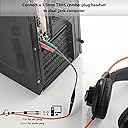
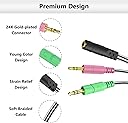
The MillSO Headphone Splitter is a compact 8-inch 3.5mm TRRS female to dual TRS male Y-adapter designed to split audio and microphone signals for PCs and laptops with separate ports. Featuring gold-plated connectors and a durable braided cable, it ensures premium sound quality and long-lasting use. Compatible with CTIA standard headsets and popular VOIP applications, it’s the essential accessory for gamers and professionals needing seamless headset connectivity.


| ASIN | B071NDLCGC |
| Best Sellers Rank | #8,048 in Electronics ( See Top 100 in Electronics ) #171 in Headphone Adapters |
| Brand | MillSO |
| Built-In Media | PVC |
| Color | Black |
| Compatible Devices | Headset, double-jack computer, PC, laptop |
| Connector Type | 3.5mm Trrs Female Jack |
| Customer Reviews | 4.5 out of 5 stars 8,689 Reviews |
| Finish | Gold |
| Item Dimensions | 4.02 x 0.39 x 1.97 inches |
| Item Weight | 10 Grams |
| Item dimensions L x W x H | 4.02 x 0.39 x 1.97 inches |
| Manufacturer | MillSO |
| Mfr Part Number | Zxjh1To2BUs20Cm |
| Model Number | 1T2-20 |
| Number of Items | 1 |
| Number of Ports | 3 |
| Package Quantity | 1 |
| Power Plug Type | No Plug |
| Smart Home Compatibility | Not Smart Home Compatible |
| Specific Uses For Product | Microphone |
| UPC | 759974980701 |
| Unit Count | 1 Count |
| Warranty Description | MillSO offers a 12-months unconditional Warranty for all our products to guard against any quality trouble. Please just contact our 24-hour customer support team if you need any help. |
| Warranty Type | Extended to 18 months |
T**S
Great, durable, perfect size.
The braided cord feels much more durable than some of the other options on the market. The compact size makes it easy to leave on the PC as a poet that doesnt get in the way. Ive used these front and rear mounted on a PC, and have not had any issue with signal loss or degradation. We also have a headset that has a reverse wired plug, and the ability to swap the Jacks on this in reverse makes it a versatile option.
F**.
This format of adapter works great there is a way to test in my review
If you live in the US and need an adapter for any headset with a mic this item should work. There are two different types of audio cable plugs CTIA and OMPT formats. What this means is there is a difference between the plugs at the end of your wire for your headset. Here is a snipet from google explaining the two: There are different types of 3.5mm TRRS smartphone headsets and they are not compatible with each other. The most common issue that causes compatibility issues is the number of conductor points on the headset and what they are connected to (i.e. pinout), but the signalling arrangement (i.e. the way remote controls work) is also important. Modern smartphone typically use smartphone headsets with four conductor points (the "bands" that you can see on a connector). In almost all cases two points are used for audio out (stereo), one for the microphone, and one for signalling (e.g. to end a call). However, these points are not always used in the same way, or in the same order. There are two common arrangement for a four conductor point headset. The first, known as American Headset Jack (AHJ) standard or sometimes CTIA, has the microphone connector point on the sleeve end, with the signalling (or ground) connector on the second ring. This arrangement is used by most newer smartphones. Apple uses a similar connector arrangement, but uses a non-standard microphone and control signalling method. The second common arrangement is the OMTP standard. It has the signalling connector (ground) next to the sleeve, with the microphone connector on the second ring. This is the reverse of the AHJ arrangement. It is used by older smartphones. So to test if this adapter will work for your PC, first you need to find a newer android phone, plug your headset into it and listen to a stereo video on Youtube, or some music that you know is in stereo format. IF you can hear out of both ear pieces and the music or video is balanced in both ears this adapter WILL work for your headset for your PC. I found that way to test from doing extensive research on the two formats through Google. And man the cord is braided! another bonus if you're worried about it becoming worn or getting nicked and damaged. Overall I am very happy with this and would and will buy it again when I need to.
J**O
Simple but effective.
Wish they made a male-to-male to patch my PC audio output to my 3.5mm audio switch, but paired with a Male-to-Male TRRS cable, this works fine. Cable is thin and flexible, with a braided sheath, and seems to have decent enough connectors.
M**K
Works with Apple headset and Zomm H6 recorder
I bought this so that I could use my Apple headset with a Zoom H6 audio recorder. And it works with a few caveats. I noticed that some of the reviews indicated that it doesn't work with one headset or another, but I'm wondering if those people are aware that condenser microphones require power, be it from a battery compartment that is part of the microphone, or via phantom power or plug in power from the connected device. In the case of the Apple headset, power normally comes from an iDevice via plug in power. In my case, the Zoom H6 can provide plug-in power. This would be a requirement with any cable or adapter. In any case, it works - I can hear sound from the Zoom via the headset and I can also hear my own voice from the headset mic. It may be worth mentioning that this particular cable is a little bit shorter than ideal for the Zoom H6, since the headphone jack is near the bottom of the left side and the mic input is at the upper right, on the X/Y capsule. It reaches, but one has to either run the cable under the recorder, or over the top of it. I attached a photo so you can see what I mean. That's not really a knock against this adapter, unless one intends to use it for exactly the same purpose, and even then, it is workable. As for quality, when the headset is the only thing connected to the H6, that audio quality is quite good. Much better than one might expect after hearing the same headset used with for a phone call from an iPhone. It is as good as some dedicated lav/lapel mics that I have. There is no audible hum, although Apple's mic does have some self-noise, again, similar to some sub $100 lavaliere mics. I believe that one could reasonably use a similar setup for any number of applications and that 99 percent of listeners would think it sounded great. With that said, there is some cross-talk/bleed between the headset and the microphone. If I max out both the mic gain and the headphone volume on the Zoom H6, it actually causes feedback. Keeping in mind that there is a lot of gain going on when I do that. I can hear my own breath quite loudly, so the levels are way beyond anything "normal". Other reviewers have stated that this adapter causes bleed-through with their headset, but I'm not sure that it's fair to blame the adapter because I have used this same headset with the Rode Rec app on my iPhone (and thus, no adapters), and it is possible to cause feedback with that setup as well. So I would conclude that most, if not all of the cross-talk/bleed-though/feedback with this particular headset happens within the headset itself. I would expect differing results with other headsets. And then the shielding issue that some have mentioned. If I connect my digital piano to the H6 at the same time as the headset, I then hear some hum. It's not a lot of hum, but it's there. If I handle the TRRS jack on the adapter cable, it then hums much louder. It's not clear to me exactly what is taking place, but I can only assume that the piano connection exposes the recorder to the AC lines in some way, although, to be clear, there is zero hum when the adapter/headset combination is not connected. For example, if I connect the piano and my iPhone at the same time, that does not cause any hum at all. And other self-powered microphones plugged directly into the H6 also cause no hum. I have a working theory that it has something to do with the CTIA standard itself, because contrary to good engineering practice, that standard puts the mic line on the shell of the connector, which by all logic, is where the shield should be. The only way that one could effectively shield a CTIA connectors would be to use a secondary shield around the entire connector body, which is something that I have not yet seen done. Interestingly, the competing OMTP standard does, in fact, make the shell ground, but Apple has traditionally gone out of their way to buck any and all industry standards, so it's not too surprising that they didn't adopt OMTP. One can only wonder why others followed. If I'm right, then all CTIA-based microphones are going to be prone to hum, which would be no fault of this adapter. One could argue that MillSO could have come up with a way to provide shielding, but at the same time, it's not hard to imagine that they would just go with the standard, even though it may have a tragic flaw. Apple has since abandoned their own standard in favor of Lightning, yet another proprietary standard, and most recently, now that the world has purchased untold millions of dollar worth of Lightning adapters, they appear to be moving toward USB-C, which is bound to be the first time that Apple has ever adopted an existing industry standard. One might applaud if it were not for the investment in Lightning. None of that speaks to the needs of any serious audio production work, but it certainly will muddy the waters for headphone and headset makers. And I have not offered a complete answer as to the quality of this adapter. All I can offer at this time is that I plan to try building my own. We have a cable shop here, so I am wondering if we can do a better job with using off-the-shelf components, but my initial searches for shielded TRRS jacks did not turn anything up. FWIW, I intend to use this adapter for a while and see if the hum is a problem in a real-world recording. I think it may be okay, and beyond that, I’m not sure that any other adapter would be any better. Most of the sellers on Amazon aren’t even willing to commit to the CTIA standard, let alone reveal any technical details like shielding, so while this adapter may be imperfect, it may also be as good as one can easily get.
M**T
Serves its purpose and is affordable
Who knew such a small piece of equipment could save me so much money!? I didn't! Instead of having to buy a mic and headset seperate, I was able to buy this and use my gaming headset like usual rather than spending a ton more money! It does seem to make me sound quieter but thankfully volume adjustment is a thing! Its about the same thickness as your typical gaming headset cord, and over all the cable function is exactly what I was needing! No issues with the flexibility or connectivity of it either!
J**N
Great time saving product
Worked really well will definitly buy again
W**J
High Quality, Low Price—and Works
I wanted for some situations with my PC to get away from using a traditional-style (but lightweight) set of headphones with mic (two plugs) because of being somewhat cumbersome, and instead use my earbuds with mic that I use with my Moto G5 Plus smartphone. Well, this adapter works fine and seems high quality; is as depicted in the photos; and I also like that it's not too long, 8¾ in. tip to tip. Before purchase seller MillSO customer service was very good about confirming from the Amazon sales page of my earbuds that the CTIA config of the adapter is compatible with my TRRS earbuds. Shipping and receipt was extremely speedy, even over a weekend—ordered Friday, received Monday—which is excellent. (The only problem is now I see how much less bass performance my earbuds have than my headphones. I guess that shouldn't surprise me but it's still disappointing, and rather influences me to stick with my headphones when listening to music files on my PC, which would mean I didn't really need the adapter after all. But this is no fault or shortcoming with the adapter, and it still is a good quality, inexpensive (esp. with free shipping thru this month) device worth having that surely will come in handy for uses like Skype and other spoken vocal inputs.) I'm fully satisfied and would buy from MillSO again and can recommend.
J**N
Using adapter to connect a Logitech G933 headset directly to a Cisco CP-9951
Summary: Bought this to connect my office extension running on a Cisco CP-9951 video phone to my Logitech G933 headset connected to my media player. It works flawlessly to allow me to easily answer personal calls to my PC or business calls to my VoIP phone while also mixing in music to listen. Have only used for a couple of day at the time of this writing. Details: - I connect the adapter to the side of my Cisco phone and the packaged G933 mobile phone wire with the built-in mic between the adapter and my headset. - There is a switch that toggles the mic sound between the one built into the G933 CTIA wire and the headset itself. You would expect that the headset boom mic would perform better than the in-line mic, but there seems to be a lot more noise on the boom mic on the headset, so I prefer the in-line mic. - There is also a mute toggle on the G933 CTIA opposite the mic toggle. The mute toggle works for both the in-line mic and the boom mic. - A noise filter doesn't seem to be necessary Lastly, it doesn't seem like the G933 software will allow dynamic mixing of the sound levels between the USB wireless transmitter, the USB input, and the 3.5 mm CTIA input. This isn't related to the adapter nor the Cisco phone, but more specific to the G933 headset mixing. However, I'm including it here in case someone finds this review based on searches. The USB input and 3.5 mm CTIA input volumes go up and down with their source volume and the headset volume. The USB wireless transmitter volume levels can be changed in software, separate from the headset and the sources. If you mix your input using the input on your soundcard rather than via the USB input jack, you can mix that dynamically though.
P**N
Works perfectly, exactly as advertised
This is a very inexpensive, medium weight build item. Worked out of the box.
K**N
Delivered as advertised
The MillSO Headset Adapter works exactly as expected. The 3.5mm audio jack provides clear sound quality with no static or interference, and the 3.3-foot length is perfect—long enough for comfortable use without being bulky. It’s well-built, sturdy, and compatible with my headset and devices without any issues. Great value for the price and very reliable for everyday use. Highly recommended.
R**T
As described
Worked as described and decent quality construction.
T**S
Great
Using on a PC, works perfectly
B**E
Works well connecting headset to PC
This splitter worked great for connecting my headset to my desktop PC which has the connection for a speaker (headphone) and microphone.
Trustpilot
2 weeks ago
2 weeks ago