Desertcart purchases this item on your behalf and handles shipping, customs, and support to Nicaragua.
🖐️ Lift your wrist, lift your work — vertical comfort meets sleek style!
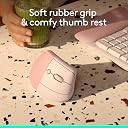
The Logitech Lift Vertical Ergonomic Mouse is a right-handed, wireless mouse designed for small to medium hands, featuring a 57° vertical ergonomic angle to reduce wrist strain. It offers dual connectivity via Bluetooth Low Energy and Logi Bolt USB receiver, supports multi-OS compatibility (Windows, macOS, iPadOS, Linux, Chrome OS), and boasts up to 2 years of battery life. With 4 customizable buttons, whisper-quiet clicks, and a SmartWheel for precise scrolling, it combines productivity with comfort. Made partially from recycled plastics, it’s an eco-friendly choice for professionals seeking ergonomic excellence.


| ASIN | B07W6JLFZ7 |
| Antenna Location | Office |
| Are Batteries Included? | Yes |
| Are Batteries Required | Yes |
| Battery Average Life | 2 years |
| Best Sellers Rank | 394 in Computers & Accessories ( See Top 100 in Computers & Accessories ) 23 in Mice |
| Box Contents | Mouse |
| Brand | Logitech |
| Brand Name | Logitech |
| Button Quantity | 4 |
| Colour | Pink |
| Compatible Devices | Android devices on Android 8.0 or later, Chromebook, Mac, Personal Computer, iPad on iPadOS 14 or later |
| Connectivity technology | Bluetooth |
| Country of Origin | China |
| Customer Reviews | 4.5 out of 5 stars 9,761 Reviews |
| EU Spare Part Availability Duration | 2 Years |
| Enclosure Material | Plastic |
| Global Trade Identification Number | 05099206099913 |
| Hand Orientation | Right |
| Hardware Platform | Mac, PC |
| Item Dimensions L x W | 10.8L x 7W centimetres |
| Item Type Name | Wireless Ergonomical Mouse |
| Item Weight | 0.22 Kilograms |
| Manufacturer | Syktcjgs |
| Manufacturer Part Number | 910-006478 |
| Minimum Required Operating System Version | Windows 10 |
| Model Name | Lift Ergonomical Vertical Mouse |
| Model Number | 910-006478 |
| Mouse Maximum Sensitivity | 4000 Dots per Inch |
| Movement Detection | Optical |
| Movement detection technology | Optical |
| Network Connectivity Technology | Bluetooth |
| Number of Batteries | 1 AA batteries required. (included) |
| Number of buttons | 4 |
| Operating System | Chrome OS, Linux, Windows® 10, Windows® 11 or later, iPadOS 14 or later, macOS 10.15 or later |
| Pattern | Right-Handed |
| Power Source | Battery Powered |
| Product Features | Ergonomic Design, Lightweight, Wireless |
| Product Finish Type | Textured |
| Product Warranty | 2 year manufacturer |
| Range | 10 meters |
| Special feature | Ergonomic Design, Lightweight, Wireless |
| Style Name | Mouse |
| Theme | Ergonomics |
| Unit Count | 1.0 count |
J**I
Mighty Mouse
I lost my previous ergonomic mouse so got this one this time. I'm glad I did only had to put the USB Bluetooth in and the mouse was working (super easy). Using it I noticed many improvements to the previous one it's much smoother, accurate, fits my hand better and the silent click is much welcome in all it's a quality piece of kit and would recommend it. Slightly more expensive than others but the quality makes it good value.
@**F
Superb handling and connectivity
Did a lot of research and landed on this model to ease shoulder pain during daily use. The connectivity and compatibility with other devices and operating systems is excellent and it is very responsive and comfortable to use for long periods on any surface. Awkward shape, so strongly recommend investing in a specific case to prevent any damage from knocks or drops.
J**B
Excellent mouse
Perfect for medium sized hands. It’s really comfortable to use and it’s super silent. Absolutely recommend. I used to love my anker vertical mouse but when it broke (after 8 years RIP) I decided to invest in something a little higher quality and I do not regret it.
T**K
Decent general use mouse for the right setup. Not for gaming.
First and foremost, this mouse is to be used in the right scenario. If your hand naturally lies flat where you will be using your mouse, do not use this as it will be both uncomfortable and bad for your wrists. However, if your hand naturally is sideways (little finger down, thumb upwards), this can be a comfortable solution for general use mousing. Decent enough build quality. It's not amazing but certainly a step above budget mice. Logitech have a history of making decent stuff at a decent price (their top end stuff can be a bit hit and miss though). Being able to connect to three different devices is great and the accompanying dongle works flawlessly. The movement is smooth and the wheel feels nice. The back and forward buttons feel a little duff, though, enough to dock a point. They're too loose and clicky in a mouse that otherwise feel solid, and it makes them stand out all the more because of that. They function fine though. I do not recommend this if you're looking for a mouse for intense gaming. This is a general purpose five button mouse, which to be fair is even what most gamers need, but the stance on the mouse can make button presses a bit less accurate as you're pressing into your own hand rather than a hard surface, which can make the mouse move inwards a little. This is arguably a skill issue, but the majority of gamers will understand why I bring this up. Finally, why pink? It was £10 cheaper when I was shopping. Get whatever is cheapest at the time since it really doesn't matter, unless you care that much. Ultimately a mouse is a mouse.
B**.
Good quality
Provides good user feedback. Feels well made. Good grip and hand positioning. Long battery life. Adjustable scrolling speed options. Large for a mouse with a tendency to tip if knocked over but overall very good. Would recommend.
S**S
Reliefs shoulder pain
I started struggling with neck and should pain which the doctors identified as a trapped nerve in my lower neck, there is a way to tell depending on what part of your arm or hand aches or tingles, anyway, I later discovered this thing call mouse shoulder and that a vertical mouse can help. Which is did, so good news, and could be good news for you if you need relief from mouse shoulder. I opted for this one over the more expensive rechargeable version and glad I did as I have one of those and it needed constant charging whereas this one is still using its original battery about a year in to using it. So great value for money! Its well built, easy to use and the buttons are easy to reach including a couple that can toggle you camera and microphone on and off when on Teams calls which is neat. I liked it so much I bought another for the office!
T**F
Great for FPS and intricate work, not so great for general use.
I bought this to help ease the constant stiffness I have in my right wrist as most mice I've used before forced you into a very unnatural position. I looked at various options and chose three, but only bought two as the third was double the price. I white enjoyed this mouse, however it really requires a large desk for you to be able to sing your arm to move the mouse around, which would be rather tiresome. When I tried out the other mouse (Logitech Ergo M575) which has a thumb trackball and doesn't require any movements except from the thumb, I quickly adopted this instead. I didn't return the Logitech lift, however, as the Ergo has limitations. The Lift is excellent for playing First Person Shooter (FPS) games over a conventional mouse even, as it is far easier to control horizontal movement, especially as the hand and arm are almost positioned like one is holding a gun. It also excels at very intricate work like in GIMP or Paint, or adjusting knobs in FL Studio, whereas the Ergo is better suited to everyday tasks. The convenience of accessing the batteries is excellent, as is the ability to store the USB there, meaning transportation is an ease. It's also very pleasing to the eye unlike the Ergo which whilst sharing the same clamshell-like striations, does not match the stylish paper-weight-esque appearance of the Lift. They're both great bits of kit and well worth getting!
A**R
A must have for long working sessions.
I must admit it. I didn't expect this level of comfort by simply changing the holding position of the mouse. I've always been extremely sceptical, thinking that vertical mice were simply a different design for a wider "audience". You know, typical marketing move. And, I was really wrong. Fortunately, I didn't come from a position where I needed a vertical mouse. I never had wrist problems, although it happened that during busy periods at work I had a bit of wrist fatigue after several hours of intense work. Over the past many years I used first the Apple Magic Mouse, which I always considered one of the few positive things Apple has ever done; then the Microsoft Surface Arc mouse, which I really enjoyed using, I found it much more comfortable than the Magic Mouse, with the only complaint being for the price. Way overpriced for what you get. Finally, I really wanted to try one of those vertical mice. And, apparently, I picked the right one. The Lift is super responsive and comfortable especially for long working sessions. It is precise and works seamlessly with both Windows and Mac. What I love the most, comfort aside, is that it can be paired with three different devices, which means you can switch between them effortlessly. It works with two double A batteries which even with intense use they seem to never drain. I never used it for gaming although in some reviews they say it is fine but not for competitions. Overall I’m really loving the comfort of this mouse especially for long working sessions.
S**Y
releaves hand stress
works well as expected and very ergonomic and easy to use, initially it took little time to get used to it but now it feels comfortable and better than the standard mouse. will recommend surely.
M**.
très bien
déjà acheter en noir, très bonne souris avec la positon du poignet à la vertical.
S**K
Great mouse
Good quality and supporting software
T**Y
Supoer Comfortable! Perfect for Everyday Use!
I love this mouse! The vertical design is super comfortable, especially for long hours of use. I have long fingers, so I feel like it could be just a bit bigger, but it still fits my hand much better than any regular mouse I’ve tried. Setting it up was easy, just plug it in, and you’re good to go. Plus, being able to connect it to three different computers is such a nice bonus. Switching between devices is easy, although a bit inconvenient since the buttons are under the mouse. The responsiveness is great for my everyday work. I don’t game, so I can’t speak to how it would handle that, but for general use, it’s smooth and reliable. The buttons are also really well-placed, easy to press, and super quiet. The pink color is so cute! I only wish they made it in purple to match my Logitech keyboard. That said, it still looks great on my desk. I haven’t tried it on anything other than Windows yet, but the battery life has been amazing. I’ve been using it for a while now, and it still shows almost full. Yes, it’s a bit pricey, but if you use a mouse all day like I do, it’s absolutely worth it. It’s comfortable, quiet, and stylish. Highly recommend!
F**N
Neredeyse mükemmel !..
Grafik tasarım işi yapıyorum. Yıllardır Logitech ürünleri kullanıyorum ve çok memnunum. Tutuş pozisyonu gerçekten çok rahat. Elinizi neredeyse hareket ettirmeniz bile gerekmiyor. Küçük parmak hareketleriyle bütün ekranda dolaşabiliyorsunuz. Tuş sesi, pad kullanırsanız hiç yok, doğrudan sert zeminde ise belli belirsiz. Yatay kaydırma için fiziki bir donanımı yok ancak ileri/geri tuşu kombinasyonu ile tekerlek yatay kaydırma moduna geçiyor. Tekerlek hariç diğer 6 tuşa özel görev atanabiliyor. Olumsuz demek doğru olmaz ama; Sol/ sağ tuşları geleneksel faredeki gibi aşağı yönde değil sola doğru (ya da sol el faresi için sağa doğru) hareket ettirdiğimiz için tuşa basarken kürsör hafifçe sola kayabiliyor ve tıklama yerine seçim işlevi yapmanıza neden olabiliyor ama birkaç gün içinde bunun üstesinden geliniyor. Bu fare "Bolt" alıcı kullandığı için "unifying" alıcılı cihaz da kullanıyorsanız (ki ben Logitech klavye kullanıyorum) her iki alıcıyı da takmanız gerekiyor. Altıncı tuşun (hassasiyet tuşu) yeri pek ergonomik değil. "MX vetical" modelinde üst tarafa konmuş ve daha kullanışlı olmuş bence.
Trustpilot
4 days ago
1 month ago