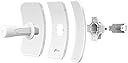
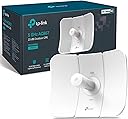
📶 Elevate your outdoor network game—speed, range, and resilience in one sleek package!
The TP-Link CPE710 is a high-performance outdoor wireless access point delivering up to 867 Mbps via a 23 dBi directional 2x2 MIMO antenna. Designed for long-range, stable connections, it features IP65 weatherproofing, lightning protection, and flexible installation options. Managed centrally through Pharos Control software, it’s ideal for professionals seeking reliable, high-speed outdoor networking solutions.


| ASIN | B08D71HC9L |
| Best Sellers Rank | 341,009 in Computers & Accessories ( See Top 100 in Computers & Accessories ) 649 in Wireless Access Points |
| Guaranteed software updates until | unknown |
| Item model number | CPE710 |
| Manufacturer | TP-Link |
| Product Dimensions | 36.2 x 28 x 20.6 cm; 1 kg |
D**W
Bought two of these 5ghz 710 units, set up one as an access point(ap), the other as a client, note there are multiple other methods to use these, as shown in the online documentation. The setup video for 710 doesn't specify that you can only 'align' via the client. set each up while attached to my computer using the fast method, and I enabled WPA protection. Then I attached AP to one of my source asus routers 'Lan' port, and the Client to my other Asus router 'Wan' port, (aprox 300' away) as soon as the routers realized they were paired, they became one network. I was using aiMesh, but the distance was a little too far (even with enhanced antennas on them), These may be overkill for this use, but they sure make my setup provide the same wifi speed in two locations. When my WIFI speed increases, these should handle it. update: 2 years later. These are working flawlessly. They have never been down/lost connection. I am very pleased on what 200 dollars can get. Highly recommend for some distance between 2 points... Bonus. The Sending Unit (which ever you set up connected to the 'Source' internet) broadcasts in a wifi range that you can connect to on your wifi enabled device. when within the radio path from the device. However, I do not use this functionality, as my two routers are close enough, to allow for uninterupted Wifi on a device... i.e. all around my house, and between, and all around the other router(both routers have same wifi Network Names (SSID) so devices auto switch to closest router)... Nice.
M**N
Worked better than hoped. I Purchased 3 of these to replace and old 2.4Ghz Tycon. I am using and a chain of intermediary routers and repeaters. Configured 1 as the AP and attached it to the roof. The was placed on the workshop some 350 feet away. Both directed at each other. I now get full line rate to the internet at some 360MB which is my rate through my provider. My third was placed as a client 450 feet away through some trees at a 110 degree agle from the way the AP is pointing at the Workshop. Slightly behind it to the right. The roof that the AP is mounted on cuts the line of site and the wood sheething under the shingles is foil wrapped. Surprisingly I get 135Mbits to this Client. Using the wavelink High gain routers to reach the old network I was only receiving about 4-5Mbits. Very pleased as this runs wifi for a remote wireless gate and a Wireless Camera. Just ordered a 4th to place in the barn around 275 feet away. Note: When first installed, I had stability issues. It was bouncing connection where the AP would be seen by the client for a bit then it would not. I decided to upgrade the firmware to the latest on the Client. The upload of the binary file completed but it appears I lost connection during the write. to flash. This corrupted the units software. The unit never came back. After investingations and using the third unit I had bought. I found the 100 ft Cat 6 cable was causing issues. Isolated out and put in a new cable and everything came up clean. The problem was the original CPE710 was corrupted during the image upgrade. I located a firmware upgrade procedure on the TPLINK website for the Pharos equipment and was able to do a reflash of the unit with the newest Binary file. It is revived configured and the unit is back working. Suggestion: TPLINK should add the short procedure to relash a unit if corrupted downloads to their manuals.
V**.
Por el momento está configurado para realizar un enlace de punto a punto, no se a instalado todavía, pero creo que sí funcionará, luego comentó como me fue..
J**E
Ho acquistato una coppia di CPE710 per realizzare un link wireless. Debbo dire che è stato abbastanza facile configurarlo come AP - Client. Ottima EIRP ed ottimo throughput attorno ai 320 Mbps ad oltre 850 mt. Vedremo in seguito come si evolveranno stabilità connessione e durata.
R**N
These units work awesome and may be at lower cost than ubiquiti equilavent. The only advantage the ubuquiti has over this is a wider spread of frequencies to pick from. This one only covers 5 ghz channels 149 to 161 in the upper 5.7 to 5.8 ghz range. Other than that, these are reliable and fast with very low latency. These units will work as an Access Point, a router/access point or a bridge. They will work very well with the TP Link Pharos EAP-225 omni directional, pretty much any ubiquiti 5ghz access point or bridge and will work as a bridge using any 5 ghz router as an access point. The advantage with these units is you can take advantage of the 80 mhz spacing if you have a router, another CPE 710, or an EAP-225 that is brodcasting on channels 151 to 155 on 80 mhz spacing. If you achieve SNR of 40 or better you can get a usable throughput over 500 mbps uplink and downlink with very low latency. Another cool feature is you can use the omada app or smtp features for remote management. I also like the ARP traffic monitoring feature if you use these in large scale WLAN or LAN applications. These units work well but you have to know how to set them up properly, point and fine tune and know all the little settings. I feel the negative reviews come from people who aren't setting them up right. I would also add that these may not work well long range in a noise environment, like setting up a a point to point between houses in an inner city area, The bridge will pick up interference from all the 5Ghz routers in the area. These work very well in rural settings with less noise. The UBIQUITI LBE-5AC-GEN2 Litebeam would be more suitable in noisy situations as you would be able to take advantage of frequencies on the lower 5 ghz spectrum.
Trustpilot
2 months ago
2 weeks ago