


🚀 Elevate your workflow with silent clicks and multi-device mastery!
The Razer Pro Click Mini is a compact, wireless mouse engineered for professionals who demand silent operation and seamless multitasking. Featuring silent mechanical switches rated for 15 million clicks, HyperScroll technology for versatile navigation, and the ability to connect up to 4 devices via Razer HyperSpeed wireless dongle, it combines portability with powerhouse productivity. With 7 programmable buttons and compatibility across Windows, macOS, and Linux, it’s designed to keep your workspace clutter-free and your workflow uninterrupted.
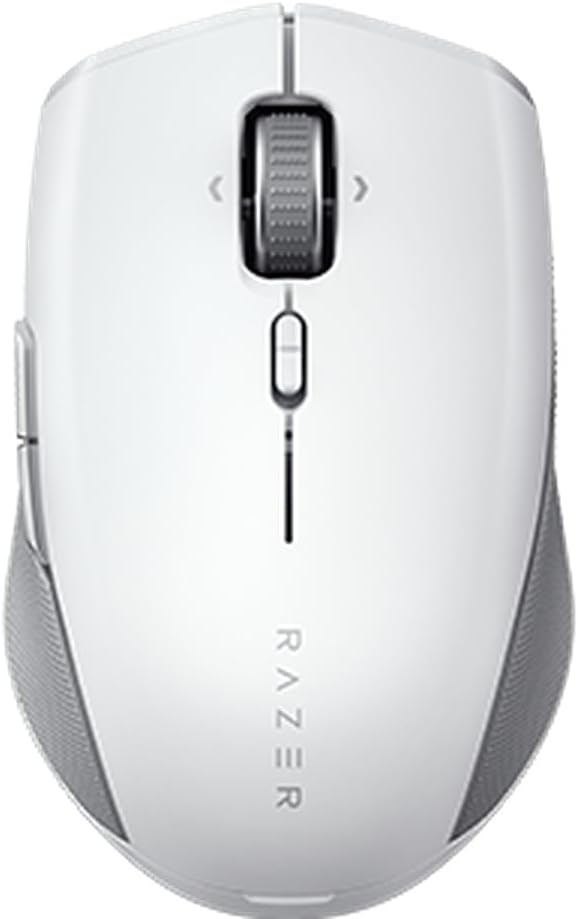



| ASIN | B09J6RF5TV |
| Additional Features | Portable, Wireless |
| Antenna Location | Office |
| Battery Average Life | 595 hours |
| Best Sellers Rank | #1,502 in Computer Mice |
| Brand | Razer |
| Button Quantity | 7 |
| Color | White |
| Compatible Devices | Laptop, Personal Computer, Tablet |
| Connectivity Technology | Bluetooth, USB |
| Customer Reviews | 3.8 out of 5 stars 506 Reviews |
| Embellishment Feature | LED |
| Enclosure Material | Plastic |
| Hand Orientation | Ambidextrous |
| Hardware Platform | PC |
| Included Components | [USB Dongle, AA Battery] |
| Item Type Name | PC Gaming Mouse |
| Item Weight | 111 g |
| Manufacturer | Razer |
| Mfr Part Number | RZ01-03990100-R3U1 |
| Minimum Required Operating System Version | Mac OS 10.15 Catalina, Ubuntu 20.04 Focal Fossa, Windows 10 |
| Model Name | Pro Click Mini |
| Model Number | RZ01-03990100-R3U1 |
| Movement Detection | Optical |
| Movement Detection Technology | Optical |
| Number of Batteries | 2 AA batteries required. (included) |
| Number of Buttons | 7 |
| Operating System | Windows, macOS, Linux |
| Power Source | Battery Powered |
| Range | 10.0 meters |
| Special Feature | Portable, Wireless |
| Style Name | Modern |
| UPC | 810056143312 |
| Unit Count | 1 Count |
| Warranty Description | 2 year manufacturer |
J**E
It's a great mouse; push the top white button forward, and use a single battery to make it light.
It is very good that both the left and right mouse buttons are quiet and this is a very accurate and responsive mouse. The initial setting of the wheel button is very loud and turning the wheel is loud in one direction but not the other direction. However, after I had the mouse for a while, I found out that pushing the top white button forward causes the wheel to be silent and also scroll a LOT faster. It actually works amazingly; this is the first mouse I've ever had that has this function. Another thing that I learned only later from reading the company website is that it can run on a single AA battery, which makes it substantially lighter. I found that with two batteries, that really slows down how fast you can move the mouse from place to place across the screen, while it is much better with just one battery. Finally, I am using it on Ubuntu 20.04, which the mouse works on, but the software that sets up button customization isn't a Linux program. I found that there are some Linux hacks, but I haven't heard one that claims to make the button customization work. Finally, I like the size of the mouse for my medium-small hand. I find larger mice uncomfortable. Given this combination of quiet clicks, fast, silent scroll wheel, accuracy, and great size, it really makes for a mouse.
I**N
Super comfortable to use, great behavour
First of all, I won't speak about battery durarion, because I have not been using it enough time for that. The weight for me is ok, it's a little heavier than cheaper mices, but I like that, it feels not cheap. The materials are great, the rubber on each side gives a great grip. Main buttons are very muted, it feels great, other buttons sounds normal. The movement sensitivity is probably what likes me the most: change the DPIs, and you can have a lot more precise moves, change it again, and it goes fast. I programmed side buttons to change DPI, so it's very easy for me to that. I have dual boot in my laptop, so I run Windows sometimes, and Linux others. The app to configure the mice runs on Windows only, but what you configure in Windows is saved in the mouse itself, so the DPI change runs in Linux too each time I use the side buttons, that was impressive and unexpected! I'd prefer a black version, but that's ok, it works really great.
N**U
Very good mouse, only if it doesn't die in less than a year
Really liked it as both a work and a gaming mouse, until it stopped working after only 6 months of use. The clicks are silent and the infinite scroll wheel was very useful, used both via 2.4Hz and Bluetooth in both a Macbook and a PC (Windows and Linux), never installed the software since it works out of the box. Battery life was also really great compared to other options (except Logitech MX series, but those aren't really good for more than casual gaming). Even with small hands these feels very compact, like a mouse made for travel since it's lightweight (without the batteries) and small, so for everyday use it's not really recommended for people with big hands. Even though I liked this mouse, the sensor stopped working correctly and the cursor moves by itselft, tried all the "solutions" provided in Razer's website but still can't fix my mouse.
T**T
A Compact and Quiet Mouse Perfect for On-the-Go Use
I recently bought the Razer Pro Click Mini Portable Wireless Mouse, and I'm really happy with it. The mouse is silent, which means I can use it without disturbing anyone around me. The clicks feel nice and tactile, and it's a great feature for someone like me who prefers a quieter mouse. The design of this mouse is sleek and compact, making it easy to carry around in my backpack. The HyperScroll Technology is super cool, too, as it lets me scroll through documents and websites quickly and smoothly. The productivity dongle is a nice touch, allowing me to connect up to four devices at once, which is really convenient when I'm working on different projects or switching between devices. One of the best things about this mouse is its seven programmable buttons. I can customize them to suit my needs, making it much easier to navigate and use my computer. Overall, I highly recommend the Razer Pro Click Mini Portable Wireless Mouse to anyone who needs a compact, quiet, and efficient mouse for their daily use.
R**5
A good product that needs changes
So to be clear, I’m writing this review as someone that daily uses this mouse and WOULD purchase it again, but I believe in being critical of products where due. In fact, my mouse, keyboard, and headphones are Razer. Super happy with them but am objective in my reviews. As such, as the subject implies, this is a great product, but like the rest of Razer’s productivity lineup, in need of some serious improvement for the next iterations. First off, a feature set of this mouse shows a major problem in the Pro Click (full size). This can share one single dongle with the Pro Type Ultra. Why in the world would you make Razer’s largest work keyboard only be able to be paired with the compact travel mouse? And why is that feature not backwards compatible with its predecessor (Razer tech themselves were unable to answer this)? I’d far prefer the predecessor for a number of reasons that will become apparent as this review goes on, but the updated features on this make the Mini the pick for me, despite the drawbacks. Secondly, and the cause of this 4 (previously 3) star review since Amazon asks about ergonomics straight away. Aside from the Apple Mouse, I can’t think of one as bad as this at its price point. It is so small that it is impossible to palm grip it at any hand size. The fingertip grip will work for many hand sizes, and claw for a small handful, but palm grip is the most ergonomic and it’s impossible. For ergonomics to be the focus of marketing for the previous iteration and it to be absent in design from its successor is confusing to say the least. UPDATE: in practice, and months of use, it’s truly not that bad if you have small to average size hands. If you are the person that everyone says you have large hands, keep looking. The original Pro Click still is superior in this regards. Unlike the previous version with built in battery and included USB-A to Micro-USB charge / usage cable, this opts for 2 AA batteries. No wired option. You can use 1 or 2 AAs dependent on your weight preference (or availability of spare batteries). If you’d like to reduce eWaste consider purchasing some rechargeable AAs. Improvements over its predecessor include silent clicks compared to the Pro Click and other mice. Quite satisfying and tactile, yet much more pleasant on the ears. A free spinning wheel option in addition to the previous notched only scrolling is also welcome. I would like the notch to feel more notchy personally (the amount of times I scroll past my secondary weapon back to my empty primary during gameplay is frustrating). Speaking of gameplay, though this is marketed as a productivity mouse, Razer’s gaming heritage is in the DNA of this product. 10,000 DPI, 1,000 polling rate, 10ms latency is all impressive, and on par or better than many of their gaming mice. Skip the Orochi V2 (budget permitting). This is your portable gaming mouse from Razer. Skip the rest. Yes, Razer does make other wireless mice with HyperSpeed USB receivers. At that point, it would be ergonomics that I’d recommend them over this, as this is more portable and will provide a similar experience. The original Pro Click beats it by 1ms response time and I believe 2K on the DPI, but you lose the ability to use one USB receiver for mouse / keyboard if you go full Razer Productivity like myself. Multi device functionality is a selling point for this again, like all the Productivity line. It beats out even Logitech Master series by offering four device functionality over three. Logitech has it beat in user interface as it pertains to Logitech Options, which allows remapping of mice buttons per application natively, but those devices can’t be used for gaming for anything requiring reactive response from the player. You’re limited to Turn Based Strategy, RPG, Puzzle, Board, Racing games. No FPS, no MMO, no RTS. UPDATE: I would also like to point out if you use Razer Synapse, you can easily rival Logitech in the per-application button layouts. So, again, this is not going to be the best choice for you for pure productivity. It’s not going to be the best full time gaming mouse from a comfort / versatile handgrip standpoint. But it will give you the best of both, go anywhere, and you can use it with three devices via Bluetooth and a fourth with its HyperSpeed USB dongle. It’s blazing fast, very portable, and gives a ton of features and value for the dollar. What I would really LOVE, is for the original Pro Click to gain the silent clicks, free spinning wheel, and ability to have one USB receiver shared to bring the best of this product to one that’s actually ergonomically. Until then, buy one of these. But just as you wouldn’t expect a sports car to be your do-it-all vehicle, be aware of those limitations when you purchase one.
R**T
Better than the Microsoft Wireless Mobile Mouse 4000 I used for many years
This is a great replacement for the Microsoft Wireless Mobile Mouse 4000 I used for many years and had bought new every year due to the buttons wearing out. I have had this one for a year so far, so I am hoping the buttons last much longer. Features I like... very ergonomic (no hand strain), two buttons on the side (nicely placed), switch-selectable flywheel mode for the wheel works great, battery life is good and very easy to replace, the Teflon pads on the bottom are generous. I use the included with my PC through a KVM and have found the mouse to be 100% reliable. I also like the software... it is easy to switch modes when I am doing CAD work versus general use.
L**N
Poor quality, bad bluetooth performance with great looks and ergonomics.
The bad: I am shocked at the quality of this device from a well-known brand like Razer. 1. This mouse goes to "sleep" quickly by default. It's intensely annoying to have a mouse that isn't responsive immediately if I spend any extended time typing. You can change the time to sleep in the Razer utility, but there is no MacOS utility, so I had to find someone with a windows computer to change this setting. 2. Although it has the ability to pair to 3 different devices, if you later decide to re-pair one of the device pairings (like a new computer), the mouse seemingly forgets the new device pairing. This is so odd - I have never seen this with a mouse before. After getting a new laptop, I now have to re-pair the mouse every time I turn it off and back on. 3. This morning, I got the mouse out of my bag after traveling, and I found that the left click button is no longer responding correctly and needs a harder click to register (yes, I tried to reseat it, clean it, etc). This is the final straw and prompted me to write this review. I have only owned this mouse for 7 months. 4. This is a more minor annoyance, but it uses 2 AA batteries. My old M720 Logi only needs one. The good: The ergonomics are great, I love the side grips. The color and design is top notch and looks attractive. The silent click is an absolutely amazing experience. I do not recommend this mouse. There are plenty of less expensive silent click mice with basic functionality that far exceeds this.
R**T
Better, and worse than the Logitech MX
My Logitech MX Anywhere 2 died and this showed as a potential replacement. I have a Razer Viper Ultimate Wireless as well. What's to like? First it's almost a clone of the Logitech MX for size and shape. It even fits in the case I had bought for the Logitech. It fixes two of my main complaints about the MX 2, and 3. It uses AA Batteries so you can replace them if needed during a session. It also has storage for the Dongle. It's too soon to tell if it fixes the double click issue that has caused me to turn my back on the MX series. Overall it's close enough to the MX to be a good if not quite as good replacment. That's the good. As for how well it replaces the MX for form and function. It's less rosy. The click is quieter. That's one of Razers selling points. But it's less precice and takes more vertical space. Or at least it feels like it. It's not as comfotable as it should be. The scroll wheel is mushy. When scrolling it should freewheel or have snap points as feedback for how far you have scrolled. Both the MX and even the Viper Ultimate do a better job here. The MX 3's new system can fade in and out so while the new MX is better than the Razer, neither is steller. The Viper Ultimate does a good job. For the price this should have side buttons on both sides so the mouse would be good for either hand. Like the MX it has two thumb buttons for right handed folks. Since I used a mouse left handed I don't use them. These buttons stick out and dig into my finger. The Viper and MX both have designs that provide these same buttons but without sticking out as far. My Razer arrived with one of the plastic glides curled and peeling up from the bottom of the mouse. I smushed it back into place. The MX laser is top notch and works on any surface. The Razer has problems with glossy and glass surfaces. I was using it on a Corian desktop and it was jumpy and laggy. The frosted glass desk I'm using to type this review up is a no go. I had to put paper under it. Summarizing. It has dongle storage, better battery option (though with USB charging being common now this is less of an issue than it used to be). It has a good feel and overall is almost on a par with the MX for performance. If you are tired of buying MX mice only to have the double click problem ruin your day and your mouse investment, this is an acceptable alternative. At least until Logitech throws a "We solved it" party. Razer themselves has room to improve. They have the design chops to do as good as, if not better than Logitech.
P**A
Wow
Excellente souris. La souris ne fait littéralement aucun son.
N**F
ممتاز
افضل ماوس اخذته
S**T
Great mouse - silent and ergonomic
H**R
Ótimo produto!
ótimo produto. chegou muito antes do prazo. atendeu todas as expectativas que podia ter. clique macio, sem barulho. conexão via bluetooth ou USB sem problemas no Mac M1.
E**F
Useless waste of money
I got the mouse from box new I open it I try to use it and it doesn’t work
Trustpilot
2 weeks ago
1 month ago