
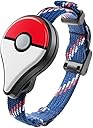


⚡ Level up your Pokémon GO game—catch, collect, and conquer hands-free!
The Nintendo Pokémon GO Plus is a Bluetooth-enabled accessory compatible with any smartphone running Pokémon GO. It vibrates and lights up to alert players of nearby Pokémon and PokéStops, allowing quick interaction via a single button press. This device enhances gameplay by enabling hands-free catching and item collection, making it perfect for busy, on-the-move players aiming to maximize their in-game progress without constantly checking their phones.


| ASIN | B01H482N6E |
| Batteries | 1 Lithium Metal batteries required. (included) |
| Best Sellers Rank | #80,818 in Electronics ( See Top 100 in Electronics ) #138,919 in Electronics Accessories & Supplies |
| Customer Reviews | 4.1 4.1 out of 5 stars (8,237) |
| Date First Available | June 15, 2016 |
| Is Discontinued By Manufacturer | No |
| Item Weight | 1.6 ounces |
| Item model number | PMCAPBAA |
| Language | English |
| Manufacturer | Nintendo |
| Product Dimensions | 3 x 1 x 4 inches; 1.6 ounces |
| Rated | Rating Pending |
| Release date | September 16, 2016 |
| Type of item | Video Game |
J**E
I'm on level 38...couldn't have done it without the Plus!
My son was home from college last summer and started playing on Day One. He's such a die-hard, he attended the CHICAGO FEST. I first got my first Android on October 23, 2016 and downloaded this app. I was on a special diet and trying to increase my weight loss by walking, but even using my fitbit didn't prompt me to get outside. Walking is so boring! Playing Pokemon Go with the truly fabulous Plus helped me lose 85 lbs and reach Level 38 in just 9 months. I'm very competitive but also very social and I've made a lot of friends on my jaunts all around Milwaukee. The beauty of the Plus bracelet is that it will spin the Pokestops and throw a ball at every Pokemon while you are walking a Lucky Egg and evolving Pidgeys and hatching eggs. You can use the Plus while you walk briskly and you don't even have to look at your phone. I pull the bracelet tight and wrap it around my fingers so it fits in my palm. Every time it buzzes/vibrates, I just squeeze my fingers to press the button. For Pokemon, it flashes green and gives 2 staggered buzzes; for Pokestops, it flashes blue and gives a long/short buzz so you can feel which it is without even looking at the Plus. But since it only throws 1 Pokeball with no berries, if I really want that Eevee or Magicarp, I just throw an Ultra ball and Pinap Berry myself. You know how you want to play while someone is driving? (NEVER play with your phone while YOU are driving.) Even with lots of stoplights, you catch or spin maybe 20% successfully? Well, with the Plus, the rate increases to maybe 50% and it's safe to do because you're just pressing a button on your wrist without taking your eyes off the road. Yes, sometimes when I press the little icon on the screen, it won't sync with my phone immediately. If it keeps acting up, I close out the app, turn it on and try it again. If it still won't work, after about 4 tries, Niantic puts up a message asking if I want to go to its Troubleshooting screen. Now I've learned just to go into Settings, click on the Plus icon and press the button on the Plus. I've only experienced continued problems with syncing maybe a half dozen times. And it usually shuts off by itself every 45 minutes or so. But compare that with how many times the game itself crashes, reloads, freezes, or displays "no internet connectivity" or "network error." Now THAT'S annoying, it's so common. The Plus enhances your play so much. I visited my sister but forgot it so I purchased 3 more and had them sent to her house so she and her husband and I could all have one. Now I'm purchasing one for my son. How did I level up so quickly? I walk an average of 5 miles a day--I know most people don't have as much time--but I also max out on the special events like Water, Solstice, Fire & Ice, pink (Valentine's Day), Christmas--anything with double XP. I cruised through Level 37 in less than a week by taking advantage of the Anniversary/Fest specials with double XP, catching everything that spawned (obviously the Plus comes in handy here), incubating eggs (3x faster!) and churning evolving on Lucky Eggs. I've gotten to the point that I can time it to hatch as many as a dozen eggs for double XP. Yes, it's annoying to have to buy incubators but I didn't buy anything in the Shop till I needed more space in my Items and Pokemon storage bags. There's a park near me that has 8 pokestops and a gym which takes only about 5 minutes to walk around. I had to rev up to 1500 Items because I kept hitting the max...in the past few months, I had to delete hundreds of Pokeballs, Potions and, yes, even Revives! I introduce myself as a friendly Mystic and have made a lot of friends and learned a lot of tips from other players. There is no gym that I can't take down on my own and out of 9 Legendary Raids, I caught a Lugia and 3 Articunos! And a Shiny Magicarp!!
M**O
Strongly consider adventure sync
This is great for those of us without the ability to keep their smartphone in their pocket, however, if you're able to keep your smart phone with you all day, this isn't all that useful. If you're wanting to forgo the Pokemon go plus, enable Adventure Sync and set up your Google/apple/Samsung fitness app to sync the steps to your game. Niantic provides resources if you need help. So I've established that you can easily count steps on your phone without having to buy this but the Pokemon go plus offers one feature thats exclusive to the Pokemon go plus, PokeBall go plus, and unauthorized 3rd party devices (basically does the same thing but has some "cheats" built in) is that you can interact with the game by pressing the button when prompted with vibrations and colored lights. Most importantly you can catch Pokemon with this feature. The Pokemon catching feature seems to work like kind of a coin flip. You either catch it or it instantly runs away. This feature only used standard aka red PokeBalls. This rats through your balls FAST and may have you playing the game more than you like (trying to spin stops and complete research missions) or have you dumping money into the game every 2-3 days. The Pokemon go plus also allows you to spin pokestops without having to open your game. This is often not super optimal. I use it when I'm trying to catch massive groups of Pokemon from lures and incense. That's really all it's good for. You can spin a stop every 5 minutes but sometimes it could be 6-7 minutes before you get a buzz. With modern smart phones there's new versions of Bluetooth (some experimental) that don't play very nicely with this device. I use a Samsung Galaxy Z Flip 3 and also a OnePlus Nord n10. Both devices had issues staying connected and would drop after 40-60 minutes. It was meant to help me make sure my steps were counted while I worked, but it ended up being a big hassle. Most android devices do allow you to change what Bluetooth version protocol you're using in the developer settings, but this didn't really do anything for me. If you do care about the catching feature the 3rd party devices will basically "press" the button for you automatically. Tl;Dr don't buy this unless you care about the catching feature or you think it's cool. There's a reason Niantic hasn't made new ones and it's likely because they're more focused on Adventure Sync.
G**L
Great way to set up your game!
Okay, I know these things are hard to find and people still have a lot of questions about how they work so I'll try to cover it all! If you want my opinion regarding whether or not you should buy it without reading my whole spiel, the simplest way to answer that is: It depends. Is it worth paying more than retail for it? No. Is it worth retail price if you play Pokemon Go all the time? Probably. What it CAN do - In short, it can hatch eggs, earn buddy candy, collect goodies from Pokestops and catch (some) Pokemon. It tracks your distance traveled, but you need to keep your phone near you. It utilizes existing bluetooth technology, so you still need to keep your phone fairly close for it to work. The app needs to be running in the background, but your phone can be locked, saving tons of battery life. What it CAN'T do - Technically it CAN catch rare and high CP Pokemon, but its very very very unlikely. It only uses regular Pokeballs and it only tries to catch them once. If it fails, the Pokemon flees. You don't get another chance. How many times have you successfully caught a rare or high CP Pokemon in one throw with a regular Pokeball? Nuff said. It's build quality is actually pretty good given that it's designed for "kids." It feels very solid and the light is pretty bright in normal light. The button feels nice, not at all cheap, and it's very responsive. The bracelet is what it is, a woven bracelet with a plastic clasp. It's not the coolest looking bracelet, but it's highly adjustable. As an adult female, I have to cinch it almost all the way down to keep it snug so it doesn't slide around. It's about double the size of my wrist at it's biggest. You shouldn't have any issue with it fitting you unless you're a Snorlax. Despite it having a plastic latch, the way it's designed prevents it from falling off. You have to loosen it and slide it over your wrist to take it off, so no worries that it's going to open and fall off. You can also choose to use it as a clip and put it wherever you want. I've seen people wearing them as a clip on rubber bracelets. I can't speak to how secure this it, but the option is there. You probably want to keep it somewhere close to your skin so you can feel the vibrations, so it probably won't be very beneficial if you keep it in a purse or loose pocket as the vibration is not strong enough to detect unless it's touching you. Setup was super easy. The whole process took only minutes each, and I set up three of them. It comes attached to the clip, though attaching it to the bracelet requires a small screwdriver. This is the same way you would change the battery, which looks to be a larger watch battery, a CR2032. Once you've decided if you're going clip or bracelet, you're ready to pair it. First, make sure your bluetooth is turned on. It will need to remain on any time you want to play with the Plus. Now, all you need to do is open your Pokemon Go app, click on the Pokeball at the bottom of the screen to access your options, and click settings in the upper right. There's a new option for Pokemon Go Plus here. If you don't see the option, you need to update your app either in iTunes or the Google Play store. If you do see the option, just click it and once there, push the button on your Plus. It will blink a couple times and should almost immediately appear in your app. Just tap it and you're done. Very simple! i did have one minor issue with one of the devices I set up, but after restarting my phone it paired up just fine. It communicates via the light and vibration. If you're near a Pokemon or Pokestop, it will vibrate. If the light is green, a Pokemon you've already caught is nearby. If it's yellow, it's a Pokemon you've never caught before. If it's blue, you're in range of a Pokestop. Pushing the button will cause it to attempt to catch the Pokemon or collect the goodies from the Pokestop. A rainbow array indicates you've caught the Pokemon while a flashing red light lets you know it failed. You only get one chance and the Pokemon flees, so if you get the yellow light, you probably want to open up your app and catch it the old fashioned way with your more powerful balls. If you push the button at a Pokestop, the light blinks once for each item it collects. It's very simple to use and understand. One question I had was whether or not you can still use the app while using the Pokemon Go Plus. The answer is thankfully yes! When your Plus is paired successfully with your phone, you will see a little icon in the upper left of your game screen. If it's grayed out, it means your Plus got disconnected somehow, probably due to getting too far from your phone. Reconnecting is as simple as pressing the icon in the app and then pressing the button on your Plus when it tells you to do so. When your Plus is connected and ready, the icon is "lit" and will remain on your screen. When a Pokemon is nearby, a line will be drawn from the icon to the location of the Pokemon and a little red circle will appear above it's head. At that point, you can choose to press the button on your Plus to catch it, or you can tap it and catch it like normal. Notifications will pop up in-game letting you know if you were successful or not, and if your phone is locked when you attempt to catch it, you'll get a notification on your lock screen with the same info. For those who actively play the game, I can see using this to collect Pokestops and to catch common Pokemon quickly and efficiently while still using the app. My favorite part of having the Plus is that I can progress in the game during times when I can't normally play, such as when I'm at work or school. Since it tracks your distance traveled without needing the app open anymore, I "play" all day and collect xp, candy and goodies much longer than I can when I'm actually using the app and draining my battery at record speeds. It allows me to play in situations where I can't pull my phone out to play for whatever reason, and I think this is going to be the real draw for a lot of people. It doesn't really enhance the active playing of the game in a way that would justify the purchase price, but it absolutely allows you to progress more quickly simply because you can make progress without actually playing now. You'll still need to actively play within the app to battle, power up Pokemon, transfer extras, evolve, etc, but the mundane parts of the game have now become much quicker and more efficient. Lastly, I know a lot of people are on the fence given how hard these are to find right now and considering the Apple Watch is going to have a very similar app for Pokemon Go. From what we know now, the Apple Watch app will be able to do everything the Pokemon Go Plus can do, except catch Pokemon. You need to open your app to catch all Pokemon. On the flip side, given the Apple Watch's display, it can show you what Pokemon is nearby so you can decide if you even want to try to catch it. It will also show you when your eggs are hatching so you can see what you got in addition to showing you any medals you earn as you receive them. It's really a personal choice as far as which one you want. Keep in mind the Apple Watch has no release date at the time of this review. They've only given us a very vague "late 2016," So you may want to pick up the Plus if you find one at retail to tide you over until the app is released. For Android users, the Plus is your only option right now. I hope this helps you make the decision regarding whether or not you should pick one up! Overall I think it's well worth it for the avid active player, and probably worth it for casuals as well given that it makes the process much less time consuming and more efficient. If you have questions I haven't answered, feel free to drop a comment!
K**R
I really wanted this to work.
I really wanted this to work. After over 4 months of testing this product I can say I would NEVER recommend this product to anyone. Especially for an android user. I use an android device. Up until the IOS 11 issues I had several friends that had better results there. If there were no connection woes this could be a 4 star product as is. Anyone who rated this product 5 stars definitely hasn't used it over a month and here is why it contains my current rating. With this device it will probably work pretty good the first few weeks you have it. The more you use it the more random disconnects, complete failure to connect to device, connected but acts like a dead product and won't try to catch anything, connects but then as soon as it tries to catch anything immediately disconnects, etc. It seems to get worse over time. Then sometimes it randomly works decently again. Needless to say, it will have a lot of down time. Note: I noticed when I got a new phone the device worked pretty good for a while again. Then it deteriorates again. Almost like it is saving bad configuration settings and then using them again and again. I would dare say over these 4 months I've personally had somewhere between 25% to 50% down time. As an example, over the last 3 days I was able to get this device to connect for only one session of about a 15 minute walk. Every other time this device wouldn't even connect or it finally does connect. Then the first Pokemon I attempt to catch it shakes up to once and then disconnects. I say "up to" because it doesn't even always give it a full shake. To say the least, this is very frustrating. Other issues if it actually works: 1. This device has a set catch rate. You can't use berries, it doesn't throw nice, great or excellent. 2. It doesn't adjust with your level. While you will get much better at catching pokemon as you level, the device doesn't. 3a. The app doesn't always display what it is trying to catch and if you just click this device tries to catch it. You don't know what you are catching. 3b. If you aren't paying attention and it tries to catch a rare pokemon you can pretty much just kiss it good bye. 3c. If it is attempting to catch a high CP the same applies. It will probably get away. 3d. The device is supposed to tell you want you caught or what ran away. Most of the time nothing displays. In order to view this you have to go in and look at the journal. 4. The device doesn't register things very fast. You can walk right past 6 things and it might finally try to catch one. This means you hang around while it decides to finally locate something around you. (On the plus side when it does start catching them it is generally a bit faster than manually catching). 5. This device still costs about $35. It's about 50 cents worth or hardware. It connects to the app like it was an alpha product (aka not even ready for public beta testing). Connection Tips for those that have a device anyways: 1. I found that if I manually connect this to bluetooth on the phone first, it seems I can get better results on this connecting. Note: it connects extremely fast to the phone, unlike trying to get it to connect in app. 2. Then open the app, click on the pokemon ball, settings, pokemon go plus, then tap the "Pokemon Go Plus" link to get it to connect like normal. If it fails 2 or more times in a row then click the eject button. Go to previous screen and back in and try it again. 3. I found that if 1 and 2 didn't fix it then restart the Pokemon Go app. That usually increases my chances if it didn't work. 4. If all the above fails then reboot you phone. Try all the above again. 5. If nothing above worked then just don't use the device. Nothing worse than sitting on the side of the road trying to connect for over 30 minutes. You could have been playing that entire time. It seems if it won't connect then don't touch the device for at least 15 minutes. Then when you come back and try it again it seems to have better results on getting it to connect. 6. If all else fails you can reset the device. Hold in the button until the light goes solid blue. Let go and then hold it again for another 5 secs and it will vibrate. Then try to reconnect again. 7. If all the above fails. Then restrain yourself from breaking the device. Try again another day. 8. If you get it to actually connect you can try an app like "nRF Connect". Connect it within that app and then set the "Request connection priority" to "High". It will be more responsive. However, if your device is in one of those funks where it constantly disconnects don't bother with this.
A**A
Pokemon Go Meh
To preface, I bought the Plus from Amazon the day it came out (9/15/16) for $34.99 and it was the real deal people. It looks like Amazon stopped selling it and is now only offering it through 3rd party sellers. Also, I have a Galaxy S4 (Android) that runs kitkat. I've had the plus for a total of 2 days and am not too impressed. It might grow on me over time, but as of now I'm meh about the pokemon go plus. When I received the Plus I immediately tried to connect it, but the app wouldn't open with 'unable to authenticate' errors. Restarting my phone worked and I was able to get the Plus to register in the app. This part was a bit confusing at first. I went to Settings > Pokemon GO Plus > Available Devices to activate the Plus per the instructions in the manual, but when I navigated to the main view, the pokemon go plus button was darkened (disabled) so I clicked that button which told me to click the button on the Plus to sync the two up. At this point i'm not sure you can sync via Settings and at any rate it's easier to do via the main view. If you are able to get it synced up then there won't be much issue. When the light is green there is a nearby pokemon you can catch. If you have the app open at the same time you can see a link to which pokemon the Plus will attempt to catch. The Plus will throw a single pokeball and indicate via multi-color spasm or red light if you caught, or lost the pokemon, respectively. The pokemon will then disappear from the app just as if a pokemon ran away from you. My friends and I have a seen an appox. 75% run rate, however we have a hypothesis that the selected pokemon does not run away forever and will come back for the Plus to catch again thus reducing the severity of the run rate. Again, that's just our silly hypothesis. If you do have connection issues, the Plus becomes too much of a hassle to use. Curse my curiosity, but after my Plus initially connected I selected the eject/remove button to see what it would do and without any prompt it removed the Plus from the available devices and I had to wait for the Plus to be recognized again. Restarting the app did not help. After the Plus became recognized it no longer wants to connect. I press the darken/disabled pokemon go plus button on the main view which tells me to press the button on the Plus but it just does not connect. *update* Just learned that you can fully disconnect the Plus by holding down the button on the Plus for 5 seconds at which time it should light up blue and stay blue. You can let go and the press again for 5 seconds and it should vibrate. After which the Plus should be disconnected and light up white when you press the button. Now, you have a fresh Plus to connect to whatever device. I've had the Plus for 2 days and I've only used it for 20 minutes due to connection issues and lack of utility. I tended to have the Plus and the app open at the same time, defeating the purpose, partly because I wanted to test if the Plus was reliable and also because I don't want to risk the Plus catching cool pokemon on my behalf. I would say the Plus comes in handy when you should not be using the app or you do not want to have the app open. Then you can just click a button and have a ton of loot when you log in again. Otherwise the Plus doesn't ADD anything to the game heh heh. My recommendation: It's not terrible, but can become a hassle. $35 feels like too much for what it actually does (so never buy it for more than that, I promise you Nintendo will release more). When it works it works well, it's cool, but it's not a replacement for the game. It lets you play the game when you can't/don't want to have your app out. Also, my phone's battery was still abused by the app running in the background and bluetooth being on.
S**3
Best for hatching eggs and getting pokestops, but not for catching Pokémon.
This has several benefits and drawbacks. Pros: - I was hatching eggs WAY faster as it was always counting my distance walked even when I had Pokémon go minimized and was using another app which is nice. - plus seems to make my character in the app walk back and forth a bit more.not sure why, but the extra walking motions in game result in some km progress on eggs while I'm sitting still which is appreciated. - You can set it to only go off for pokestops so you dont have to pull your phone out at all if just your goal is to walk (to hatch eggs) and hit up pokestops along the way only. (Not looking to hunt Pokémon) - the range for pokestops seems further than when using the app alone, meaning you can be further away from a pokestop and still hit it with the watch most of the time which is nice. - you can hit up pokestops when traveling a faster speed than with the app alone. While using just the app it will tell you "try again" if you're going more than 15MPH or so. With plus you can go about 35-40MPH and still hit up the stop which is nice if you're a passenger in a car and driving past lots of stops. Cons: - the strap that comes with it doesnt stay clamped very well. The little tab is constantly flipping open for me. - if you decide you want to try to catch Pokémon with plus you'll notice it only throws regular poke balls and there's no way of choosing to throw a better ball. - you throw only 1 ball and either it captures the Pokémon or it fails and the Pokémon flees and the capture rate is AWFUL. While using the app I have a 90% capture rate using 1 throw of a regular pokeball, but I have a 75% FAILURE rate throwing 1 regular pokeball using plus. - related to the above... plus seems to register a Pokémon before it even appears in the app. With the app open I hit the button on plus as soon as it lit up to say a Pokémon was nearby and in the app it just showed a pink arrow but no Pokémon physically there. This resulted in a failed FLEEing Pokémon. I believe this is the reason for the high failure rate. Pokémon don't appear in the app for another 10 or so seconds AFTER plus goes off to say a Pokémon is near, so in order to successfully capture the Pokémon you need to wait a bit and THEN try hitting the button, which kind of eliminates the convenience of using the plus. - it disconnects... A LOT and it doesn't always tell you. Sometimes it'll blink red and vibrate to tell you, but sometimes the app will just crash because of plus and there's no notification. The app seems to crash at least 3 or 4 times per 1 hour session using the plus. (Yes, I've used the plus through 3 updates so far and it's still an issue unfortunately) - The battery it comes with lasts only about 2 weeks with occasional use. (Luckily Amazon sells a 10 pack of the battery for about $5 and they last way longer, so it's just the battery that comes with it that isn't too great) Overall it's great if you're someone who walks or bikes a lot and your goal is just to hatch eggs and hit up pokestops. It's not very good for catching Pokémon though. I'd pay $15/$20 max for this, however I personally don't feel it's worth the price for all the issues it has currently.
R**N
Small but Powerful Addition for Pokémon GO Players
The Pokémon GO Plus brings a new level of ease to the Pokémon GO game. The Plus lets you know when you are near a Pokéstop. You need only to push its button to spin the Pokéstop. Using both vibrations and lights, the Plus will let you know how many items you received at the Stop. The Plus also alerts you to Pokémon sightings. A press of the Plus' button will let you know if you were successful catching the Pokémon. One of the great things about the Pokémon GO Plus is the freedom it provides. Trainers no longer need to keep their eyes glued to their phone's screen. You can tuck the phone away. Using vibrations, the Plus lets you know when to press its button and what you've accomplished by pressing it. There is no need to look at the phone to find out your success with a Pokémon or at a Pokéstop. I will provide more details on the meaning of the Plus’ various buzzing responses toward the end of this review. It's pretty simple. A nice benefit the Plus provides is improved phone battery life. While playing, the Plus lets you place the phone into its standby mode with the phone's display off. The app continues to run in the background, but the phone’s battery drain is reduced. This can make a big difference if you want to continue playing for longer. The Plus will use only one Poke Ball to toss at a Pokémon. If the ball fails, the Plus moves on to alert you to the next item found. If the ball succeeds, you'll receive an extra 50XP since you hit it on your first shot. The Plus tosses Poke Balls, not Great or Ultra Balls, at Pokémon. Fortunately, Poke Balls are commonly awarded at Pokéstops so there are usually plenty of them around. This leaves the more powerful Great and Ultra Balls for conventional catches tossing balls with your phone rather than the pressing the button on the Plus. The Plus uses vibrations to signal when you are at a Pokéstop or have confronted a Pokémon. You don't even have to glance at the Plus for most interactions. A single repeated pulse says you have found a Pokémon. Press the Plus' button to take a shot at it. A Poke Ball will be slung. Three paced vibrations follow. If you get the Pokémon, the response that follows the three vibrations will be five pulses, regularly spaced. If it gets away, you'll receive three very closely spaced quick pulses. The bad or (hopefully) good news is delivered quickly in an easily understood way. Two repeating pulses indicate you are at a Pokéstop. Pressing the Plus' button will spin the Pokéstop and provide the spin's results. Counting the number of vibrations returned indicates how many items you received at the Pokéstop. For instance, if you are awarded three Poke Balls, you will feel three pulses following your press. If you are at a Pokéstop contained in a gym, you'll need to grab your phone and spin the old-fashioned way using the phone. The Pokémon GO Plus doesn't interact with this type of Pokéstop. This game has got people out walking. Because the Plus eliminates the need for constant interaction with a phone, the pace of your walk has the potential to be far more energetic. The result is a healthier, safer, and more rewarding walk. And the bonus is a new level of fun added to the Pokémon GO game. The Pokémon GO Plus is a small, inexpensive, but powerful addition for Pokémon GO game players. If you play the game frequently, you'll find yourself toting the Pokémon GO Plus along regularly.
Z**T
A Long (Long) Review
I personally quite enjoy this. It is a Bluetooth device that connects to your phone so that you do not have to keep your phone powered on to play/record steps, catch Pokémon, or check into pokestops. Behavior: * It measures your walking with the same GPS displacement the game uses. Unfortunately this means, as far as walking is concerned, it has the same "speed cap" (won't count distances covered above a certain speed) that exists in-game. -- It Will count towards ALL your incubating eggs, AND buddy Pokémon. I saw concern that it missed the buddy Pokémon, but I can confirm it does count towards your buddy finding candy. * It lights up to tell you of nearby poke stops (blue) and Pokémon (green for known, yellow for unknown). If the Pokémon runs, you get short red flashes, if you catch it, you get long multicolored flashes, and it gives a short buzz for each item picked up from a stop. * The connection requires a reset every so often. For me it's about every hour or so. If you leave notifications on, it will tell you when it's ended and to restart the connection. * That said, it notifies for EVERYTHING. Pokestop items/too far, if the Pokémon was caught or ran, and if you leave everything default, it can get very annoying. I turned off the sounds but kept regular banner notifications on so I could see when my session ended. But I still get a novel's length of notifications. Pros: * Real battery saver. A comparison on my old phone: a fully charged battery could run me a half-hour walk before my phone choked when I ran the game. With Pokémon Go Plus, I could go for four hours (reconnecting when the session ends) before my phone choked. * Concerning pokestops, PoGo+ doesn't (yet) have the speed cap, so you can still get items when riding in the car. Depending on the distance from the road the stop is (meaning, how much of the radius you have to work with while you're riding by), you can pick up items at up to 30 mph. (Just remember, don't play while driving!) Cons: * It only uses normal pokeballs, even if you have 50 of the other types. If you run out of normal balls, it simply acts as if you are out of balls. (And not use the other ones.) * It only gives one chance. If the Pokémon isn't caught in the first throw, it flees. -- Due to this, I suggest if it notifies you of an unknown Pokémon (flashes yellow), open the app and catch it in-game so you have a better chance. * I feel obligated to mention the notification spam again. Easy fix if you turn them off completely but then you lose the notifications when the session has ended. I just turned my sound off. Overall, I've found it very worth my time, but some may find the cons I listed as deal breakers. I hope this helped!
L**X
Great Value for Enthusiastic Players
I love the Pokémon Go Plus. I clip mine to the underside of my watch. Getting the hang of the different colour lights flashing meaning did not take long at all. While riding public transit, my catch rate has increased significantly though many (about 50%) are not caught: “The Pokémon fled!”. It’s great for gathering items from PokéStops and stardust by catching Pokémons. Just press the button with the app running in the background: No need to try to aim for a tiny moving, possibly jumping creature with a small ball in a moving bus on a bumpy road. As already confirmed by many sources, the Pokémon Go Plus, with the app running in the background, tracks your steps for hatching eggs and kms walked with your Pokémon buddy to find candy. This works very well. The battery drain rate has gone down substantially since I’m able to ride and walk with the phone locked and the screen off. Of course, the bluetooth connection requires power though it’s a very good trade-off. If a Pokémon you have not caught yet appears, it seems you will be warned with a yellow light to give you a chance to open the app and play on the phone with razz berries and great or ultra balls though that has yet to happen for me. When I’ve gathered enough balls and other items, I’ll either go to a gym or to a park to find the more elusive Pokémons with a full bag.
A**C
Bueno y cómodo
Es perfecto para atrapar o girar pokeparadas cuando estás ocupado o sólo no quieres estar frente al teléfono. Se desconecta después de un rato pero ppor mientras te consigue varias cosas así que no hay quejas. También dicen que el catch rate es algo bajo, y es obvio porque sólo usa pokebolas rojas, pero en mi opinión sigue valiendo la pena.
J**R
Super macht Spaß
Ich habe es verschenkt und es ist auf volle Begeisterung gestoßen! Macht Spaß und ist total leicht zu handhaben! Easy
G**E
A great tool for Go players who want to get ahead quickly
I've bought a Go Plus before (and lost it, SHAME!) but I wanted to buy another because: It really helps with the grind of catching basic pokemon to evolve and therefore level-up with a lucky egg. With the Go Plus, you only ever spend one pokeball on any wild encounter. You have to keep your eyes peeled for an indication of a pokemon you haven't encountered before (and if you've been playing since launch and up until 2nd Gen is released, that's highly unlikely) but it really means that you won't waste balls on basic pokemon. Playing without the Plus, there's always the temptation to throw a few extra balls at what are really very common pokemon like pidgeys and rattatas. You might even throw a couple of great balls at a meowth that you don't really need. But the Go Plus makes catching pokemon more efficient. One ball, one chance. And who's to say whatever pokemon you encountered might not have fled after your first ball anyway? At first it was thought the catch-rate with the Plus was 50:50 but I don't think that's the case. But either way, once you get to a certain stage in the game, perhaps looking to progress from level 20 to 30 in order to see pokemon at their peak level in the wild, then it's a big help. The biggest issue is potentially missing pokemon you really want. But whilst there were tracking apps/maps available it wasn't difficult to set your destination where you knew a pokemon you wanted had spawned, catch every basic pokemon in between, get out the game at the destination and spend real effort catching the pokemon more important to you. It's a bit different now with a lot of trackers and maps no longer available but the Plus is also still useful if you cycle or run as a hobby and want to catch pokemon or spin stops without fuss. In fact, sitting in a restaurant or near a stop is now more sociable again as there's no need to keep your phone primed, you can just tap the button in your pocket or on your wrist. It also saves some battery because you're effectively playing the game without your phone screen on. I can't wholly recommend the Plus because you might miss rare pokemon. But it has a few benefits and if you're trying to level up quickly, it's a great tool.
B**T
GO+のみの機能
ウォーキングの際ポケモンGETするのに便利です 説明書はそれほど親切な解説ではありません 説明に従えば迷うことなくスマホに接続できます 使用して3週間使った感想として スマホとの接続が切れやすい&繋がりにくい場合は ボタンバッテリーの電力不足ですので早い目に交換して下さい 使用電池はCR2032 パナソニックがよいかと思います ☆接続しにくい場合の追記です☆ 1か月使ってみましたが接続が切れやすい時や接続しにくい場合は ポケモンGOの設定からGO+を削除しスマホの設定からも削除 スマホの再起動 スマホとのペアリングの後ポケモンGOの設定し直してください ポケモン発見時やポケストップ発見時の振動パターンなど 使用していればスグに慣れて把握できると思います ポケモン発見→ブーーブーーブーー ポケストップ→ブブッブブッブブッ ポケモンゲット→ブーブーブーブーブー(つーかーまーえーたー) ポケモンが逃げた→ブッブッブッ(にげた!) ポケストップアイテムゲット→(4個ゲットなら)ブッブッブッブッ その他 1時間ごとに接続が切れますので要確認 GO+使用時のみ特殊アイテム(メタルコート等)取得率が上がります 赤玉のみ使用可能です 手動操作の方がポケモンGET率は上がりますが 逃げるモンスは手動でも逃げます TLにもよるので気にしない 充電式だったらよかったなぁと思います
Trustpilot
1 month ago
1 month ago