📈 Elevate your environment monitoring game with precision and ease!
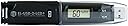
The Lascar EL-USB-2-LCD+ is a compact, USB-powered data logger designed for high-accuracy temperature and humidity monitoring. Featuring a clear LCD display, it records over 16,000 data points with customizable sampling rates from 10 seconds to 12 hours. With ±0.5°C temperature and ±3% RH humidity accuracy, plus dew point calculation, it’s perfect for professionals needing reliable environmental insights. Its 1-year lithium battery and free PC software make setup and long-term use effortless.
| ASIN | B001J5BEQY |
| Battery Description | Lithium |
| Best Sellers Rank | #109,197 in Industrial & Scientific ( See Top 100 in Industrial & Scientific ) #206 in Thermometers |
| Brand Name | Lascar Electronics |
| Color | Multicolor |
| Customer Reviews | 4.0 out of 5 stars 72 Reviews |
| Included Components | High Accuracy Data Logger |
| Item Height | 1 inches |
| Item Weight | 100 Grams |
| Manufacturer | Lascar |
| Mounting Type | Tabletop |
| Temperature Accuracy | 0.5 degrees Celsius |
| UPC | 887553510879 715933116185 |
| Unit Count | 1 Count |
| Upper Temperature Range | 80 Degrees Celsius |
| Voltage | 3.6 Volts |
W**E
TEMP & HUMIDITY DATA LOGGER
This item was received in two days after ordering through Amazon Prime. It was received packaged very well and without any damage. I installed the software and inserted the data logger into my laptop and found that the setup was very easy and intuitive. To test the unit, I operated it indoors for almost a month, recording data points every five (5) minutes. Downloading and plotting the data was as easy, if not easier, as setting up the software. The data was plotted in a graph format showing all the fluctuations of the temps, humidity, and dew points inside my home during the month of January 2012. I really liked the results. I intend to use the data logger to record/track the temp and humidity variations inside a solar kiln that is used to dry lumber sawn on my sawmill. I hope and expect to be able to see trends that will allow me to determine when I can remove the lumber from the kiln without having to frequently open the kiln doors to test the moisture content of the lumber. I realize that this will take a few cycles of recording moisture content of the lumber compared to the data logger's results to be able to make somewhat reliable relationships between the lumber moisture content and the data logger. The data logger appears to be very well constructed, operates nicely, and I believe will resolves some concerns I have with the kiln operations. I hope to be able to begin proving this soon. I will be installing the data logger in my kiln today and start recording data beginning at noon today.
J**.
Easy to set up!
Does exactly what it should. Easy to set up and use with accurate tracking.
S**R
Lefties - This One's For You
Lascar EL-USB-2-LCD Humidity, Temperature and Dew Point USB Data logger works well enough for our purposes. We needed a way to track temp and humidity in several rooms that contain electronics and computer equipment, including a machine room with a rack full of fiber channel RAID drives. Press the button on the data logger and the LCD displays the current temperature. Consecutive button presses display the current humidity, highest temperature, lowest temperature, highest humidity and lowest humidity. That part is easy and works well for the session (hours, days, etc.) while you are logging data in one area. Lascar uses EasyLog software that works with Windows only. We use Macs, so we run their software in a Windows 7 virtual machine on the Mac using VMware Fusion 4. EasyLog is not very full-featured, and it lacks some features we wish it had. Before you can use the data logger, you must first connect it to your computer and set preferences in the software. Once setup is finished, unplug the USB and place it in the room of your choice to begin logging. When you are ready to stop logging, plug the USB into the computer and launch EasyLog again. You will be able to save the file for later reference, or you can export to Excel, but you must have Excel installed, or the software will not allow you to save an XLS file. This is a disadvantage for anyone who does not have Excel on their PC, but who would like to export an XLS file for use elsewhere, such as on their Mac or another PC. The EasyLog software generates a chart that graphs temperature, humidity, and dew point, each in a different color, over the span of time logged by the device. As you move your cursor across the graph, a tiny readout at the bottom of the chart displays values in whole numbers. You can zoom in to get more detail on any part of the graph. There is no provision for saving a screenshot or a PDF of the graph or a zoomed section of it. The native file can only be read by EasyLog. You can print a copy of the graph, but I'd prefer to save a PDF (not an option in their software). The previously mentioned ability to export to Excel is the only other option. Since the LCD can display highest and lowest values, you might think the EasyLog chart would display the peaks, but it does not. You can mouse around looking for them, but a print out does not list them. A chart of a day or more will not be granular enough for you to accurately determine values in a print out. By the way, once you've connected the wand to the computer and started the software, the data will be erased from the wand. We try to remember to manually record peak values from the LCD before connecting to the PC. When you're finished saving the graph in EasyLog, you might think you could just unplug the device and be ready to start your next logging session, but you'd be wrong. Before you can begin a new session of logging data, you must step through several screens of the software's setup menu again and answer the same questions each time. EasyLog does not remember all of your preferences from session to session. For example, we like to start the logging session when the single button on the wand is pressed, but we have to select this option each time since it is not remembered. Even though we never set "alarms" we still have go go through that part of the preferences each time. The software is a little dumb, but I like the device, so I took off one star for the software's maddening limitations. This last point may be a plus for left-handed users, but right-handed users will notice the LCD display is upside down if you hold the wand in your right hand. Oh, well. I guess you can please some of the people some of the time, but you can't please all of the people all of the time.
M**5
Great product
Information about the device: Accompanying software was easy to install. Data sync was straight forward as well. The instructions were simple to follow. It tracks temp, humidity and humidity. Recording interval e.g. every 30 sec, 5 mins etc is adjustable. As expected, the shorter the recording interval, the more data is saved and quicker the USB fills. It takes a little more than 1 month to fill the USB assuming data is recorded every 5 mins. My usage pattern: I didnt trust the reading on my thermostat because of its location and its age. I needed an independent device that monitors temp in a regular room. This device served me well, tracking temps every 5 mins for many weeks at a time. Its data was used to determine better settings for the thermostat, leading to higher energy saving. Energy saving has fully offset the cost of the device. I am a happy customer.
B**N
Not very consistent
I ordered two of these, with the idea to compare temperatures inside my camping van to the temperatures outside, to track the progress of my insulation project. However, prior to setting them up, I set them onto the table next to me at my desk, and they've been there for at least half an hour. One of the units reads that the current temperature is 78F and the other says 83F. Their humidity readings are at 37% and 34%. Granted, one of the units was shipped to me in a very battered box and had clearly been used before, so that may be a factor. The one that was in the battered box and used, the two halves of the device fit together nice and snugly, however the one that was new, the clip that holds the two halves together, lets them flop around a bit -- when the protective cap over the display is on, it takes up the slack, and there's no more wiggling. The product seems like it could be nice, maybe I just got one (or two?) bad units?
W**P
The best device for what it does.
I have never come across a gadget that is so easy to use as this data logger. Its like switching on a ceiling fan ! You just follow the screen prompts and it is ready to go. With 1 minute sampling rate it gives you a 11 day log window - I use it for auditing defrost cycles in frost free refrigerators and this device is simply excellent. The option of activating the unit using the onboard switch is also a big plus as you can set up the device on the PC and then put it on standby till you are ready to begin logging. This device also allows you to export raw data, graphs as jpg, pdf or excel files. All in all a very satisfying purchase.
ר**ל
Non-rechargeable battery is a weakness.
I bought a EL-USB-2-LCD+ from jameco electronics and it turns out they list a Lascar EL-USB-2-LCD non + as a +. I understand that people make mistakes and understand that. They offered to get a + (high accuracy unit and what I ordered in the first place) shipped to me but it would take 5-6 weeks, which I declined. They did sent me an rma sticker, etc. In the meantime, after having the unit logging for a week, the battery is apparently dead and the unit is not functioning and can not be detected by my computer. The unit is actually very nice and portable, but I'd seriously recommend thinking about the battery life.
C**P
Have owned 2 of these with one since 2010 and one from 2017--both work perfectly.
These are so great! I have one that I leave logging at home and the other is in my purse. The most frequent time I use the one in my purse is to show a manager what the temp is in a theater or office that is resulting in very unpleasant conditions. I've recommended these for years for small, private pharmacies as you need both the temp and relative humidity to verify proper storage conditions. You can set them to log temps from every1 second to as long as every 12 hours with the length of time setting the determinant of how long the data is logging. If you set it at every five minutes the logger will continue logging for 56 days; every 12 hours will log for a couple of years. It's very easy to insert the data logger into a USB port and launch the EasyLogger software that allows you to download the data records. Afterwards, you re-start the logging process. I recommend the setting at 5 minutes and to download the data every month for pharmacy records. It's best if the data is printed and the pharmacy staff note the date/time it's printed and sign their name for the log book. These require a 1/2 AA 3.6 volt battery. I've found the batteries are extremely long lasting. It seems that these are replaced about every five years or longer. Once one is changed another is ordered, so there's always one on hand. It's much easier to find batteries via the web then at a local store.
Trustpilot
3 weeks ago
1 week ago