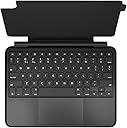
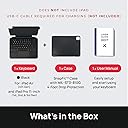
🚀 Elevate Your iPad Experience!
The BrydgeAir MAX+ Wireless Keyboard Case is a versatile accessory designed for the iPad Air and iPad Pro 11-inch models. It features a detachable magnetic case, a large multi-touch trackpad, and Bluetooth 5.0 connectivity, ensuring a seamless transition between tablet and laptop functionalities. With adjustable backlit keys and up to 3 months of battery life, this keyboard case is perfect for professionals seeking enhanced productivity on the go.


| ASIN | B0988BQH1R |
| Additional Features | Only independent keyboard/case combo with a native multi-touch trackpad |
| Antenna Location | Office |
| Best Sellers Rank | #554 in Tablet Keyboard Cases |
| Brand | Brydge |
| Built-In Media | Keyboard, Case |
| Button Quantity | 78 |
| Color | Black |
| Compatible Devices | Tablet |
| Compatible Operating System Family | iPadOS |
| Compatible Tablet Computer Models | Apple iPad Air (4th generation) |
| Connectivity Technology | Bluetooth |
| Customer Reviews | 4.1 out of 5 stars 377 Reviews |
| Enclosure Material | Aluminum |
| Generation | 5 |
| Hand Orientation | Ambidextrous |
| Item Dimensions L x W x H | 10"L x 7.65"W x 0.8"H |
| Item Weight | 840 Grams |
| Keyboard Backlighting Color Support | Single Color |
| Keyboard Description | Wireless |
| Keyboard Layout | QWERTY |
| Manufacturer | Brydge |
| Mfr Part Number | BRY4022 |
| Model Name | The Brydge Air MAX+ |
| Model Number | BRY4022 |
| Number of Batteries Required | 1 |
| Number of Keys | 78 |
| Number of Sections | 3 |
| Power Source | Battery Powered |
| Processor Count | 1 |
| Recommended Uses For Product | Office |
| Series Number | 4022 |
| Special Feature | Only independent keyboard/case combo with a native multi-touch trackpad |
| Style Name | iPad Air |
| Switch Type | Tactile |
| Theme | iPad Keyboard/Case with Trackpad |
| UPC | 850020315628 |
| Unit Count | 1.0 Count |
| Water Resistance Level | Not Water Resistant |
M**S
I changed my mind because of support
UPDATE: The keyboard stopped working about 10 months after purchase. The customer service wasn't bad, I had to provide my order details and a video of how it fails to power on. I realize it's only 30 day warranty but less than a year in, they told me they found liquid damage and debris. I've never gotten liquid anywhere near this device. And debris? I saw the photos they provided. Yes, it's possible I got some crumbs in the keyboard while eating. You're telling me the product can't handle that kind of usage? You don't get crumbs in a computer keyboard without it failing to function? So I am quite dissatisfied with not standing behind the product although I realize again it's only a 30 day warranty, because for the life of me I can't understand the liquid damage part, and can't accept that you can't get a few crumbs in there without it dying. And at this price. If it were a $35 keyboard case, I could probably deal with it. But not this way. Not doing business with this company anymore. It’s not as if I’m careless with my iPad but it takes a few bumps sometimes. Before I bought this keyboard/case, I had the aluminum version of the Brydge keyboard/case and it was great, lightweight, illuminated, all that, but if you actually DROP the iPad, you’re asking for trouble. Especially on tile or hardwood. In my case, I cracked the screen, got a new iPad and realized I needed something sturdier that has the same features. I wanted to remain loyal to Brydge and I did and I was very happy I did. It's really heavy anyway. ________________________________________________________________________________________- This is an AWESOME case/keyboard. The keyboard touch is perfect. It has a backlit keyboard. Battery life is great (I use it ALL day and do a lot of work on the iPad and I don’t even remember the last time I charged the keyboard). The port to charge the keyboard is convenient, too. That’s not the case with all cases. Yes, it is definitely going to add some weight. I don’t have a problem with that at ALL. I want to know I’ve got protection and I do, I feel comfortable that SHOULD I accidentally drop it, I have a much better chance of survival than with just about any other case I’ve ever had. It’s easy to insert and remove the iPad, it fits snugly, there’s really nothing I don’t like about this product. The only thing that’s even remotely inconvenient is when you open it up at more than 90 degrees and put t on your lap, it may fall backwards a little, the weight tends to want it to lean or topple. But that’s not the end of the world, it’s completely visible right at 90 degrees and believe me, I’m picky, I’d make an issue out of it if it really were a legitimate ongoing inconvenience. This product turns your iPad into a laptop for all intents and purposes. It’s great.
B**9
I'd buy it again
Shipping and Packaging: The product arrived well-packaged, securely enclosed in a sturdy box. Inside, the keyboard case was protected by a soft, padded material to prevent scratches during transit. The packaging was minimalistic but effective, aligning with the premium feel of the product. Assembly/Installation: Setting up the Brydge Air MAX+ was straightforward. The magnetic SnapFit case easily attaches to the iPad, and pairing the keyboard via Bluetooth was quick and seamless. The detachable magnetic design makes it convenient to switch between tablet and laptop modes. No technical skills are required, making the installation beginner-friendly. Product Quality and Features: The build quality of the Brydge Air MAX+ is impressive, with a durable, well-finished black casing. The keyboard keys have a satisfying tactile response, and the backlit feature is perfect for low-light environments. The multi-touch trackpad works smoothly, offering precise control and multi-gesture support, similar to a laptop experience. One of the standout features is the detachable magnetic SnapFit case, allowing flexibility in how you use your iPad. The keyboard itself is robust and feels premium, although it adds a bit of weight to the device. The wireless connectivity remains stable during extended use, and the battery life is commendable, lasting several weeks on a single charge. The design is sleek and professional, suitable for both work and casual use. However, the trackpad might feel a bit small for users accustomed to larger laptop touchpads. Overall Impression: The Brydge Air MAX+ is an excellent choice for iPad users looking for a versatile and high-quality keyboard case. Its detachable design, reliable wireless connection, and premium feel make it worth the investment. The only downside is the slight bulk it adds, but considering the added functionality, it’s a fair trade-off
R**N
Had Some Doubts, but it’s a Great Keyboard!
I was skeptical to buy this keyboard at first because there were some not so great reviews. Lots of people said it was too heavy and hard to get it to stand on its own. I have the iPad Air and have no trouble with it at all, it balances fine and even works well on my lap, not just my desk. Another thing I was worried about was the fact that it was Bluetooth instead of using the Smart Connector on the back of the iPad like the Magic Keyboard uses. However, I have had no problems with it. The keys are responsive with no lag. The touchpad works great, responsive as well, the only thing I don’t like is that you have to click it, you can’t just tap, but once I got used to it, it’s no problem. Another small thing is the keyboard size. I have the iPad Air so the keyboard may be bigger for other iPads, but it’s just a little small, nothing I wasn’t expecting and it’s still comfortable to type on. The keyboard does add some weight to the iPad. Again, I have the iPad Air so it is already lighter than the average iPad so the added keyboard weight was nothing much, but for another iPad it may become a little hefty. Other than those points, the keyboard works great and I love it! A great option if you don’t want to pay the money for the Apple Magic Keyboard, works great in my opinion!
E**0
For of Brydge's big talk, this is one bridge you don't want to cross
I'm so disappointed. Brydge spent a lot of time talking up their keyboard cases for the iPad Pro and while I knew there would be some tradeoffs going with the hinged model, I was hoping to find one of their cases (or any 3rd party case) that used the Magic connector. Sadly, there don't seem to be any that I could find. I decided to try this case anyway, because I'd heard good things about Brydge and so I had high hopes. Boy was I disappointed. This case has two parts to it - an actual protective case for the iPad itself, and then a keyboard attachment that fixes on magnetically and connects via Bluetooth. The protective case was basically impossible to put on and I was concerned about breaking my iPad, it was such a tight fit (I have the 2018 11'' iPad Pro). The case did mount to the keyboard attachment, but I quickly found that, because the case hinges like a laptop and doesn't fold like many iPad cases do, the result, when used in clamshell mode, was way off balance. For me it had no lap-ability. Extra disappointment. Then there's the keyboard+trackpad itself. Wow. Just wow. I spend a lot of time composing long-form text, and this keyboard is not only UNUSABLE, it felt cheap as hell. After using Apple and Logitech brand keyboard cases before, after trying a number of cheaper alternatives that were all lacking, I am pretty much set on the firm keys with good travel, a satisfying click, etc. This keyboard had none of it. The keys themselves are those squishy rubber keys you find on extremely cheap (like $10) keyboards, so squishy you can't really tell if they're pressing or just squishing under your fingers. The spacing was okay, but still somewhat awkward. And yes, there was a noticeable delay - for me - because this is a Bluetooth device. All in all, the actual, physical keys on the keyboard precluded any hope of using this thing for an extended period of time. The track pad....don't even get me started. They advertise compatibility with the various multitouch gestures, and the instructions indicated that the trackpad supported them, but I could not get any of them to work. The mouse itself also was weirdly laggy - it would lag behind and then suddenly catch up, making it effectively impossible to use. And no, the multitouch gestures never ended up working for me. I gave up on this thing after like an hour. Do not buy this unless it's a gift for someone you hate, or you literally never need to use the keyboard and mouse combo.
D**Y
High quality
Probably one of the best keyboard/cases you can buy for ipad. Fitment and detail is extremely nice, magnet is very strong, overall extremely well built product. Functions great and everything works just how it should. Seems durable as im not going to drop it to test.. keyboard/case is not light weight but it is not extremely heavy either and in my opinion i think it is the perfect weight due to the sense of quality you feel when holding. Before i got to the product the box alone indicated the quality of the product that was going to be inside. Cons: instructions not included, no where states your able to use your ipad (fast charger) to charge keyboard since it does not come with charging cable or charger block.
J**O
Case
Great case love it
K**.
One of few non-folio stand keyboards... if you can get one that works. + Poor Feedback/Interaction
Zagg doesn't even make a keyboard case that opens like a laptop for the iPad Pro 11, I had one for the iPad 7th Gen. However, I love the design of this over that and the magetic attachment with trackpad! The Problem? To start, supply seems to be extremely limited. Best Buy estimated 6+ days to get me the product. So I ordered through Amazon instead. I returned that unit because Best Buy got an update and ended up delivering in 3-4 days instead. I wish hadn't returned the Amazon unit because the one from Best Buy has been nothing but problems. Seemed dead out of the box. So I charged it for about 7+ hours using a PD Charger. It would not power on nor pair with bluetooth. No LEDs would blink at all. After some time I got the backlike to turn on but it would go on and off on it's own and still no ability to pair to even verify charging. You CANNOT check battery life without being paired. I placed another order through Amazon after an entire day of trying to troubleshoot. I let it charge for another 8+ hours and tried 2+ other chargers and nothing for the longest time. One last effort (probably my 20th+ time tryng to pair) and the blue pairing light FINALLY blinked. I had to try 6+ times after pulling off charger again. All good right? No. The trackpad doesn't work well and stops working. Backlight still blinks. Caps Lock has a green LED that is flashing? And if I turn caps lock on, it turns itself off. Documentation is POOR. Google searching from other users is even worse because it's like no one has this keyboard. Brydge makes no documentation on what the different LED actions do besides red led = powering off and green powering on and blue for pairing. Is the blinking Caps Lock green something? Okay, Maybe a firmware update? Well, it did get noticed and I hit next. ... and the app closed. But it told me once process starts, don't touch keyboard. Problem is, I have no idea if the process started. No feedback on keyboard to say it's thinking or updating and the app when I opened it up wanted to update again. Which means plugging/unplugging power cord... but it told me before not to touch keyboard. If it is doing something, I may brick it by unplugging? Again, no way to no because NO FEEDBACK. I will update IF the new replacement keyboard that I ordered from Amazon is a better experience but at this point, my confidence is drastically low in Brydge. Which I hate to say because I wanted to like it! Brydge seems to be still doing laptop style keyboards where everyone else uses the non-stable folio kickstand you can't really use on your lap. It's not even like this keyboard is cheap! UPDATE: The new keyboard paired immediately. I still see weird things like no caps lock light but it’s more reliable. One of the few options that are built well enough with a case if you want a laptop style experience! I raised it one star but the poor documentation and confusing and bad experience with little to no direction on getting help still keep it a couple stars off. While this doesn’t speak fully to product itself, it can make for subpar experience if something goes wrong.
C**D
Great keyboard for iPadPro 11"
This is the 4th keyboard I have tried for my new 2021 iPadPro 11" (3rd gen.). I tried the Apple Magic keyboard and both Logitech keyboards. This is by far the best. Came assembled, iPad fit in nice, connected with BlueTooth flawlessly also.The special function keys are a plus the Apple Magic keyboard did not have. Keys feel normal, trackpad has no dead spots I can see. A little heavy but will protect the iPad in case of a fall. Two negatives: no connection to power grid on iPad, need to charge keyboard with USB-C connector (supplied) and there is no instruction manual either on-line or in package that is useful. I'd like to know what that center function key (little globe) is for. No response to 3 emails and 2 phone calls to company over 5 days. Can the special function keys be reprogrammed? No info.
R**U
Trackpad not responding, keyboard not sealed
There is a space between the top part of the keyboard and the charger, you can see the charger plug metal part from the top, this are spacially should be sealed. After connecting and upgrading, the trackpad is moving by itself, sometimes not responding to the touch properlly. Typing is impossible since it moves the marker backwards, so the letters appear in a random order. Amazon forced the refund without possibilitie of replacement, what makes another 2 3 weeks until receiving the money and the new item.
M**T
Nothing beats a Brydge!
I've seen a lot of tablets come and go for myself and my family. I've tried quite a few different keyboard brands and all were disappointing until I bought my first Brydge. Other keyboards lose their Bluetooth connection every other day, or refuse to stay charged for more than a week. A Brydge will keep it's connection forever and hold a charge for 6 months or more. I will never buy any other brand, they are the best I've seen.
D**N
Beinahe perfekte Taststatur fuer iPad Pro 11 Zoll
Ich hab mir vor einer Woche die Brydge Air Max+ fuer das iPad Pro 11 gekauft und moechte fuer euch die Tastatur in dieser Kombination bewerten. Die komplette Bewertung wurde mit dem Brydge Air Max+ geschrieben, weshalb man einige Schwaechen relativ schnell bemerken koennte. 1. Die TASTATUR ist an sich sind gut. Die Tasten sind zwar kleiner als man von PC Tastaturen gewohnt ist, jedoch hat das originale Magic Keyboard das gleiche Problem. Der Tastenanschlag ist fuer mich in Ordnung, aber ich hab bisher keine hochwertige Tastatur benutzt. Diese ist womoeglich am ehesten mit einer Laptoptastatur zu vergleichen, da sie in Grunde exakt dies ist. Zudem gibt es auch extra Funktionstasten und Hintergrundbeleuchtung der Tasten, die man in 3 Stufen einstellen kann. 2. Das TOUCHPAD ist fuer eine iPad Tastatur riesig. Sehr verwunderlich, weshalb Apple das nicht selbst so gemacht hat. Es funktioniert die meiste Zeit, ebenfalls auch Gesten mit mehreren Fingern. Manchmal spackt es rum, aber ich hatte das nur 3 Mal. Falls das passieren sollte, einfach neu verbinden oder per Brydge Connect App aktualisiern, wenn man dies noch nicht getan hat. Bei mir funktioniert es meistens gut bis sehr gut. 3. Die KONSTRUKTION ist trotz des Plastikgehaeuses solide und haelt das iPad sicher. Es besteht aus einer magnetischen Huelle, die man magnetisch an der Tastatur befestigt. Diese Art der Befestigung ist ziemlich stark und so wird das Tablet vermutlich nicht durch aeussere Einwirkungen abfallen. (Ich hab es beim Scheiben extra nochmal getestet und egal ob kopfueber oder um 90 Grad gedreht, nichts faellt ab!) Ausserdem unterscheiden sich das iPad Air und iPad Pro 11 bei der Gehaeusegroesse minimal, weshalb Cases normalerweise nicht kompatibel mit beiden sein koennen, wenn man genau sein will. Jedoch wird diese Tastatur auch als kopatibel mit dem 11 Zoll iPad gelistet, weshalb ich auch dieses Geraet hier bestellt hab. Stimmt nur leider nicht zu 100%, da man es sehr schwer aus der Huelle bekommt. Nach mehreren Versuchen ist es mir noch immer nicht gelungen, da es knarzt und ich nichts beschaedigen wollte. 4. Das LAYOUT ist nicht auf Deutsch, sondern wahrscheinlich US. Ich hab es deswegen auf US gestellt, damit zumindest die Beschriftung stimmt. Dadurch entstehen zwar keine Probleme fuer mich, da ich in Pages nutze und Umlaute durch die „Automatische Korrektur“-Funktion durch das schreiben von „ae“ anstatt von „ä“ schreibe, weil ich nicht immer wieder die digitale Tastatur nutzen moechte. Ist schon etwas umstaendlich, wie man an dieser Rezension sehen kann. FAZIT Das Geraet ist mMn. die die beste Bauweise einer iPad Tastatur. Stabil, platzsparend und einfach gut. Das DE Layout sollte es bei der MAX+ geben, was in meinem Fall die bessere Wahl gewesen waere. Wer das verkraften kann, ein iPad Air besitzt, die 40 Euro umbedingt sparen moechte oder das schuetzende Case moechte, sollte sich diese Tastatur UMBEDINGT anschauen.
S**A
Awesome addition to my iPad Pro
I just love it. Turns the iPad into a very portable small 'laptop'. Ipad can be easily detached so perfect for all of my use cases. Perfect for travelling around and leaving the laptop home. But the ensemble is quite bulky and heavy.
D**Z
Excelente producto
Realmente convierte tu iPad en una Laptop, además de proteger tu equipo con su funda fácil de remover por su sistema magnético
Trustpilot
3 weeks ago
1 month ago