🎯 Master your multi-device setup with one sleek switch—because your desk deserves the best.
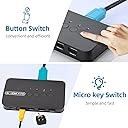
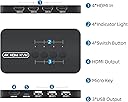
The DGODRT 4-Port HDMI KVM Switch empowers professionals to effortlessly control up to 4 computers using a single 4K monitor and shared USB peripherals. Featuring 4K@30Hz resolution, dual switching methods (push button and wired remote), and broad OS compatibility, it delivers a clutter-free, efficient workspace without the hassle of driver installation or external power. Ideal for offices, creative studios, and tech-savvy multitaskers seeking seamless device management and stunning visuals.


| ASIN | B092PWBV1D |
| Actuator Type | Push Button |
| Best Sellers Rank | #90 in KVM Switches |
| Brand Name | DGODRT |
| Circuit Type | 4-way |
| Color | Black |
| Connectivity Protocol | Hdmi |
| Connector Type | Plug In |
| Contact Material | Abs |
| Contact Type | On-on |
| Control Method | Remote, Touch |
| Controller Type | Push Button |
| Current Rating | 1 Amps |
| Customer Reviews | 4.1 out of 5 stars 747 Reviews |
| Included Components | HDMI KVM Switch, KVM Cable, Wired Remote, User Manual |
| International Protection Rating | IP54 |
| Item Dimensions | 6.3 x 5.51 x 3.74 inches |
| Item Height | 9.5 centimeters |
| Manufacturer | DGODRT |
| Material Type | Acrylonitrile Butadiene Styrene |
| Model | KS604H |
| Mounting Type | Plug-In Mount |
| Number of Items | 1 |
| Number of Positions | 4 |
| Operating Voltage | 5 Volts (DC) |
| Operation Mode | ON-ON |
| Switch Type | Push Button |
| Terminal | Insert |
| UPC | 751031441859 |
| Unit Count | 1 Count |
| Wattage | 5 watts |
E**H
Best 4-Port KVM Switch Ever. A MUST have.
Very impressed by this KVM. Ir comes with 4 dual split HDMI/USB cables that cost more than the whole thing itself. It was super easy to set up. connect the split end cable to a HDMI port on your PC and the other to a USB 2.0 port on your PC (output). The other end of that cable goes to HDMI 1 (input). Repeat process for 3 additional computers. This device lets me share 1 wireless keyboard and mouse and 1 monitor with up to 4 computers. It works on Windows, MAC, Linux and even a media box. The KVM is very small and even comes with an external switcher. Have not experienced any of the issues the negative reviews state. It just works. I got an open box one for $27, and it if dies in a year, who cares. For the price, I'll gladly get another. Have tried KVM switches that cost over $100 and they don't work as well as this. If you are worried about a mess of cables, I tied my up with Velcro cable wraps so its out of the way. If you want an easy way to share multiple devices with one monitor and one keyboard/mousse, wired or wireless, this is the one to get.
C**A
WOW I am glad I finally upgraded from my old VGA KVM to this
I had been using my TrippLite VGA KVM for years and putting up with a pretty terrible picture for such a long time. Finally after realizing nearly all my regularly used machines had HDMI natively, I ditched all the VGA cables and dongles and this little generic (model HK401, no brand name at all) arrived today. The improvement in video quality when using this KVM was IMMEDIATE. I'm so pleased with this thing and it was very reasonably priced (under $60). It's so small I couldnt even believe it was a 4 device KVM, but here it is driving 3 PCs of mine, 2 Macs, one Linux and one I use for when my laptop is upstairs, and it works amazingly, no issues. Audio passes through to my monitor for the active device, meaning no more need for an external pair of speakers. So much less clutter on the desk now. Pros: - it's tiny! You can see in the first picture how it compares in size to my old TrippLite KVM. - No external power supply needed. Another win for this device that I didn't even realize I wanted. Grabs power from the device(s) you are controlling, and has no problem powering my keyboard with backlight and optical mouse. - Less expensive than other HDMI KVMs I've looked at and much less than my old VGA one. - Provides an incredible picture at least compared to my previous VGA KVM. - Love the controller cables, obviously they are some proprietary format with HDMI on one end but on the other is both HDMI and a USB port. Cables feel sturdy but flexible and I like the greenish/cyan color. Cons (not many, but a few) - When pushing the button to switch inputs on the unit it sounds a little hollow. A very minor nitpick. - I'd probably prefer it to be a little bigger actually, if it means all the cables could be on one side (i.e. the back). As it is, the HDMI ports are one of the long sides of the unit, and the USB inputs are on the other. I ended up just placing it on my desk sideways until I tidy it up the cables more (second picture). Or maybe I'll leave it as is. - Finally, I do wish it came with an HDMI-HDMI cable to connect up to the monitor. Presumably they assume you're already using at least one HDMI device, I'm probably a pretty odd case in that I was not. Overall though I'm very happy with this purchase, whatever company made it should stamp their name all over it because they made one great product!
M**Y
Cannot recommend - updated
Update: Not giving it a week - this morning, it would not recognize my work laptop at all. This is going back. I got this on a whim while purchasing something else - mostly b/c I needed to add more ports (previously had a JideTech 2-Port for the last 3 years) and this seemed a good deal (roughly what I paid in 2020 for twice as many ports). HOWEVER In three years, the most trouble I had with the previous one was its wonky "switch" and even that functioned well probably 99% of the time. So far, in just one day, I've spent around 15 minutes total toggling between inputs and finally having to switch my monitor off and back on again for it to get a signal from this box. This is pretty much an absolute killer for me, as I don't feel I should need to do this _EVERY TIME_ I sit down at the desk, regardless of whether or not I am switching an input. I'm going to take a week or so to see if I can find some reasonable fix for this, or probably send it back. Glad I didn't toss the other one out yet.
S**.
Fantastic value for the $$. Works flawlessly and easy setup.
I have come to not expect much from cheap Amazon electronics, but this was a DEAL. It works flawlessly and I can switch between my four computers easily. I saw in the reviews that some people had a lag, but I think that is their equipment because mine switches fast. The remote allows you to hide the cables and just bring out the switch. Sure, it would be better if the remote was wireless, but it is not a big deal to me. You couldn't find a better deal for the $$. The only negative I have is that the cables could be a little longer, but this was an all time best buy for me.
E**S
HDMI output stopped working after 6 weeks, fixed after disabling HDR mode in TV
The DGODRT KVM switch worked for 6 weeks without issues. Today I cannot get any HDMI output from the switch from any of the 4 input ports that I had previously used. The blue LED on port 2 is also not illuminating when selected. The USB functionality is ok. Unfortunately this item is now outside of the return/replacement window. Updating my review from 1 to 4 starts after doing some additional debugging. Turns out one of my PCs enabled HDR mode on my 4K TV when I upgraded the graphics card. Not all of my PCs support HDR. When I turned off HDR mode in the TV and the PC that had HDR enabled the switch and the TV were able to work again. Port 2 sill has a flaky LED otherwise would give it 5 stars.
C**Y
worked great
At the moment I'm only using 3 of the 4 available ports. A raspberry pi 4, a mini pc running ubuntu, and a win 10 laptop. Switching can take a few seconds, it is not instant. Depending on you needs you may want each device to use its native audio. If for example you want audio from PC #1 but you are working on PC #2. In my case I want the audio from each routed through the switch. My monitor HDMI monitor does not have a speaker so there were two options. One would be to use a black box to strip the HDMI audio from the feed from the splitter to the monitor and connect that to external speakers, this needs a clunky box, a power source and a few extra cables or Option 2 which I chose, that is a USB DAC in the spare USB port of the switch and plug that output into external speakers.
C**N
KVM device
Not very good quality. The circuit fails on a simple task, such as updating the keyboard and mouse combo. I should have added that I worked for 2 decades in the IT field services. Your device is lacking in proformance, but there are work arounds. I now have to turn off one computer to get the mouse and keyboard to work for the second computer. KVM's are designed to allow multiple computers to be operated at the same time with the use of these devices. No refund necessary.
T**5
Good KVM and very durable
This is the second one I've purchased. The original lasted more than 5yrs. No screen flicker like some other cheap KVMs. Easy to mount numbered switch makes hopping back and forth between machines quick and easy. Instant switching.
Trustpilot
1 month ago
2 weeks ago