๐ Elevate your desk game with vibrant control and lasting comfort!
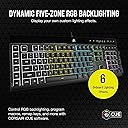
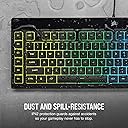
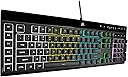
The Corsair K55 RGB PRO is a wired membrane gaming keyboard featuring five customizable RGB lighting zones, six programmable macro keys with Elgato integration, and IP42-rated dust and spill resistance. Designed for PC, Mac, and Xbox, it includes a detachable palm rest for ergonomic support and dedicated media controls, all managed through Corsair's iCUE software for personalized performance and style.


| ASIN | B08Y78FFR9 |
| Additional Features | Backlit, Spill Proof, Wrist Rest |
| Antenna Location | Gaming |
| Best Sellers Rank | #1,779 in Video Games ( See Top 100 in Video Games ) #152 in PC Gaming Keyboards #4,772 in Computer Components |
| Brand | Corsair |
| Built-In Media | K55 RGB PRO Gaming Keyboard, Quick Start Guide, Safety Leaflet, Warranty Card |
| Button Quantity | 110 |
| Color | Black |
| Compatible Devices | Gaming Console, Laptop, PC |
| Compatible Operating System Family | Windows |
| Connectivity Technology | USB-A |
| Customer Reviews | 4.3 out of 5 stars 923 Reviews |
| Enclosure Material | Plastic, Rubber |
| Global Trade Identification Number | 00840006631798 |
| Hand Orientation | Ambidextrous |
| Item Dimensions L x W x H | 19"L x 6.58"W x 1.42"H |
| Item Weight | 1.79 Pounds |
| Keyboard Backlighting Color Support | RGB |
| Keyboard Description | Membrane |
| Keyboard Layout | QWERTY |
| Manufacturer | Corsair |
| Mfr Part Number | CH-9226765-NA |
| Minimum Required Operating System Version | Windows 10 |
| Model Name | K55 RGB PRO |
| Model Number | CH-9226765-NA |
| Number of Keys | 110 |
| Number of Sections | 1 |
| Power Source | Corded Electric |
| Processor Count | 1 |
| Recommended Uses For Product | Gaming |
| Series Number | 9226765 |
| Special Feature | Backlit, Spill Proof, Wrist Rest |
| Style Name | K55 RGB PRO |
| Switch Type | Rubber Dome |
| Theme | Gaming |
| UPC | 840006631798 |
| Unit Count | 1.0 Count |
| Warranty Description | 2 Year Manufacturer |
| Water Resistance Level | Water Resistant |
A**R
Nice keyboard. Responds perfectly. Lights are bright if you want them to be.
This keyboard took some getting used to as I went from an LG soft click type keyboard to this one. After a couple days I got used to it and I love it. The wrist wrest is a bonus and so helpful! I like how I can change the colors. You canโt change each individual key but instead change each section. I type kind of fast and have no issues with accidentally hitting other buttons. I have small hands too so it works well. I donโt use the side macro keys much. Iโm sure others would like that feature. I can go without those keys. Itโs not too crazy sophisticated but not too cheap either. I play games with it and the response and speed is perfect and on point. Itโs a good keyboard for those of us simple folk who arenโt keyboard savvy or uptight and just wants a keyboard that works well with games(plus the added RGB lighting bonus).
J**I
Comfortable
For the price this thing works great for my hands. Keys are relatively quiet, which I prefer. RGB lighting is a tiny bit confusing at first since you adjust it by zone but got the hang of it rather quickly. If it holds up longer than my other keyboards then this will be the best one I have had.
A**N
Decent quality for price!
This item has a few macro keys, as well as multimedia keys for easy audio control. Coming with a wrist rest, this unit is comfortable at multiple angles, from lap use to desk use. With a fairly sturdy build, RGB sections (4 overall which DOES limit the onboard capabilities, however still a feature not always seen in a keyboard of this price.) With a decent set of switches, the unit has quality components, as well as bright LED's. This keyboard also allows for custom macros. It uses USB to connect, overall the cord is a standard insulated cable. The design is geometric, with hard and pointed edges, however the wrist guard adds heavily to comfortability. Overall the keyboard is not too heavy allowing for average one handed handling. I would definitely pay this price for a keyboard of this quality again.
N**H
Works well with my setup.
Worked even after I accidentally spilled my tea all over it. Is durable, functions well, no problems with connection, fits on my smaller desk well, and I have no issues reaching the keys.
N**L
Gaming essential
Awesome keyboard
J**.
Works as I need it.
The G keys on the left side drive me a bit crazy and take a while for me to get used to. This keyboard is nice for what I need and solid. Not as loud as my previous mechanical, which my wife complained about being so loud when I was typing a lot. I have no issues with this keyboard. Even has media and extra functions on the top left, I haven't really fiddled with. Still not used to a keyboard needing a software update, tho. The RGB can be altered and controlled through the ICue app
J**N
Not worth buying, don't make my mistake.
I've had this keyboard 7 months, it has started losing power randomly, keys start double tapping due to the "membrane" design (aka cheaped out), and my brightness will randomly just go yo zero. I've cleaned this thing so many times, swapped 3 different USB ports, and updated firmware and ICUE software constantly and can only come to the conclusion this keyboard is a piece of trash that couldn't even make it 12 months. The original problems started about 4 weeks in and were super infrequent. Now my D,E, and space keys all keep double tapping about every 4 to 8 taps. Wouldn't reccomend, tried to give it a chance but not worth.
B**A
Quiet keyboard! But requires extra software to set up macros and color
Previously I had an old CyberPower keyboard that came with my PC and decided to replace it when half the keys started to become unresponsive. This keyboard compares very differently! The plastic feels very smooth and velvety instead of hard plastic, the keys are quiet and feel nice to press on because they give slightly more resistance (specifically on the space bar). It took me a bit to get used to it, but it works amazing! I personally don't use the included wrist pad, but it was very easy to put on...but also very easy to snap off, best to not let it dangle or be on the edge of the table. The only issue is the app that is required to change the colors. I already had iCUE due to my mouse being corsair, but after I configured the color it doesn't seem to change it or just reverts back to the basic white/blue. It also requires a secondary software to program the stream keys, which is just another thing to download on top of the list. While I hate downloading extra software, the keyboard does it's job as it should for only being $50.
A**R
A keyboard for both professionals and casual gamers
This is arguably one of the best keyboards and a value for money purchase for both gamers and professionals alike. Tip: Pony up a little bit more and go for the K55 RGB PRO, all the characters except media keys are backlit which makes a big difference in appearance versus having opaque characters and RGB backlighting. iCUE feature one of the best RGB lighting technologies on the market so take advantage of it PROS ===== 1) Six separate macro keys to program practically any set of commands - you are limited to your imagination. One of the first macros I programmed was to bring up the Calculator app. TIP: Use it to bring up webpages, chunks of text/code/data you need to repeatedly use - this can be very useful for coders (NOTE: There is a character limitation....1-2 paragraphs of text which should be enough for most people)...etc. 2) Corsair's iCUE app allows a great deal of customization. Practically any key on this keyboard can be programmed with a macro for anyone who has an extensive number of macro functions they need quick access to. iCUE is available as a free download you can get from Corsair's official website. 2) Alternatively, you can program in macros without iCUE using the circular M key but it's more convenient to go through iCUE. 3) For anyone who cannot stand keyboards that alert your neighbours that you are busy using your computer, this is a great, quiet option. Types like a quality keyboard. 4) High-quality plastic backplate. Most keyboards use plastic backplates and Corsair has not compromised on Quality here. It feels nice to the touch. 5) Font used for characters on keyboard is not hideously aggressive so professionals can comfortably use this for work. 6) Yes, backlighting can be turned off if you wish. 7) 2 more RGB lighting zones versus the standard K55 RGB 8) Comfortable textured, plastic wrist rest. CONS ===== 1) The Corsair logo and media keys are not backlit - I am nitpicking 2) No per key RGB lighting - be realistic, getting good per key RGB lighting at this price is very difficult to find. FUN TIP: In case anyone was wondering, yes you can program that lock button at the top of the keyboard to lock Windows, not just the windows key but actually lock your Windows OS at the push of a button instead of hitting Win+L - for anyone who is not aware. Use iCUE to assign the Windows Lock macro to that button. Personally, I do not need to have the Windows key locked, so this is a better use of that key for me. You can program it to any key that you prefer.
W**Y
Even wennen aan de toetsen links maar werkt perfect
M**N
CORSAIR K55 RGB PRO Membrane Wired Keyboard - Worth the Purchase.
โข CORSAIR K55 RGB PRO Membrane Wired Keyboard โข Ordered it, came on time, no damage. I already had one before, and it is very reliable and performs well. I am not a hard core gamer, so this keyboard works quite well for me. It is sturdy for being all plastic. The key response is good. It has RGB, that is controllable with their iCue free software, but for me, RGB is not important, but it does help a bit if the room light is turned down while working the computer. Corsair provides key replacement via their website, for a nominal price. - I suggest to order the max number of keys for about $15 USD (price may have gone up by now), because the cost is the same for one key or the max number of keys. Corsair will notify you if the keys are in stock or not. Corsair service is responsive and reliable as well.
A**5
ุญูู ููู ู ู ู ููุงูููู :)
ุงูููุจูุฑุฏ ู ู ุชุงุฒ ูุนู ูู ูู ูุงุณุจ ููููู ูู ุ ู ุง ุนููู ุฃุญุฑู ุนุฑุจูุฉ ุ ููุณ ู ููุงูููู ู ู ุงูู ุตูุน ุ ูู ุจุฑูุงู ุฌ ุชุญู ูู ู ู ู ููุนูู ูู ุฒูุฏ ู ู ุงูุฎูุงุฑุงุช 4/5 ูู ูุงู ู ููุงูููู ูุงู ุงุญุณู ุ ูุจู ุงูุดุฑุงุก ุดููู ู ุฑุงุฌุนุฉ ููู ูุชุฌ ุนูู ุงูููุชููุจ :)
Y**A
fait le taf.
fait le taf, frappe agrรฉable pour un clavier ร membrane.
Trustpilot
1 week ago
2 days ago