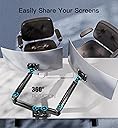
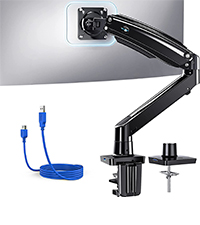
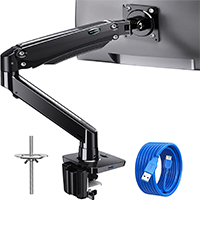
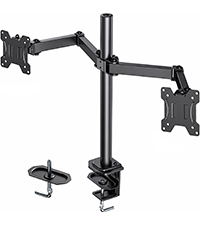
🖥️ Elevate your dual-screen game — because your workspace deserves the upgrade!
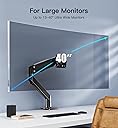
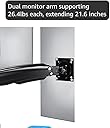
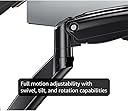
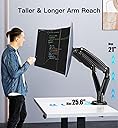
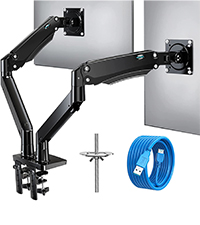
The HUANUO Dual Monitor Arm supports two ultrawide monitors from 13" to 40", each up to 26.4 lbs, with VESA 75/100mm compatibility. Featuring full-motion adjustability—swivel, tilt, rotate—and height extension up to 21", it offers ergonomic customization for professional and gaming setups. Integrated USB ports and cable management keep your desk tidy, while versatile mounting options ensure quick, secure installation. Built with durable metal and praised for smooth gas spring adjustments, it’s the ideal balance of premium quality and value for demanding dual-monitor users.


| ASIN | B08CXJPQG9 |
| Best Sellers Rank | #625 in Computer Monitor Arms |
| Brand | HUANUO |
| Color | Black |
| Compatible Devices | Monitor |
| Customer Reviews | 4.6 out of 5 stars 2,141 Reviews |
| Enclosure Material | Metal |
| Manufacturer | HUANUO |
| Material | Metal |
| Maximum Tilt Angle | 30 Degrees |
| Maximum-Supported Screen Size | 35 Inches |
| Mfr Part Number | HNDS12 |
| Minimum-Supported Screen Size | 13 Inches |
| Model Number | HNDS12 |
| Mounting Type | Tabletop Mount |
| Movement Type | Articulating |
T**Y
Great brand, I have two models
I have the single arm widescreen for my wife and the double arm widescreen for myself. These are great. There are a few caveats. If you want two 35" side by side, it might be a tight fit, they may not fit if you want them high up.... for ultrawides definitely going to be pushing it. I have a 35" ultrawide and a 27" normal aspect ratio monitor and I can fit them side by side if they are adjusted a bit lower than I want them. At the height I want them (eye level, I am a 6'4 man though) I use the widescreen horizontal and the turn the normal AR screen vertical and I game on the widescreen and use the vertical one for webpages/etc while gaming. as you can see from my picture i can probably get more wiggle room by moving the mount over to the right further and extending the widescreen further out. but I don't still dont think it would be enough for a horizontal side by side without dropping the height a little. which if I really cared I would do, but I'd prefer to have them eye level in this configuration. They work for my needs but any larger and I would have to move the arms down to have them side by side even with one vertical. How well will two normal AR 35" screens fit side by side? I'm not sure I think they will fit but you may need to lower them a bit below eye level. actually another user with what a picture of what looks like fairly large wide screen monitors side by side but as you can see from his picture the monitors are only like an inch or two off the desk. as a 6'5 man with a relatively low desk it takes up a lot of length just getting them to my eye level. That's fine though I don't mind having one vertical. these are the best ive seen that weren't several times the price level. If these wont work for you nothing reasonably priced will (at the time of this review). That said these are the most accommodating and best well built gas spring dual arms I've used. If you really want two screens horizontal side by side and your use case is bigger than you think will work, you may want to consider putting them on individual arms instead so you can space them further apart. That said, these arms are very good build quality. the gas spring in them is powerful, I have my wife's older pretty heavy dell ultrawide on a single arm one and it lifts it with ease w/out being topped out on the adjustment. You will have to push the arm down to the desk all the way to find the adjustment for the spring. I think a lot of people don't realize this and think it's not up to lifting their monitor because you can tighten it up some out of the box for heavier monitors. The arm should be able to accommodate any modern monitor given how light they've gotten and some pretty heavy older ones. all the adjustments are smooth and easy to do, the least smooth adjustment is the vertical tilt that happens right behind where the vesa bracket is, but its still pretty decent. the swivel and height of the gas spring are effortless. it looks nice, it feels heavy and durable. I'm an i.t. guy and ive used a lot of monitor mounts and these are well above average quality. Just need to decide if you want a double mount or two singles for your needs. id not recommend anything cheaper or anything pricier. this brands higher model/widescreen ones are the ones you want price/performance they are the sweet spot
J**N
Handles Two Ultrawides Like a Pro
The HUANUO 13 to 40 Inch Dual Monitor Arm for 2 Ultrawide Monitors is seriously impressive. I was concerned about stability with larger screens, but this mount handles the weight without sagging or drifting. Once it’s set, it stays locked in. The arms move smoothly and make it easy to fine tune height, tilt, and positioning for a clean, ergonomic setup. It completely freed up desk space and gave my workspace a much more professional look. Installation was straightforward, the clamp feels secure, and the build quality feels solid and durable. If you’re running two larger or ultrawide monitors and want something stable and adjustable, this is a great choice.
D**S
Very good monitor stand with some minor issues to be aware of
The TLDR of this review is that this monitor stand works great and is worth the purchase. There are a few minor issues with the installation and arms that prevent me from giving it the full five stars but overall I'm very happy with it. Let's start with the good. They are made out of metal and not plastic (there are some removable plastic parts for cable management). They look high quality and honestly I was surprised at how nice they were for the price point. The clamp works like a charm to fasten it to your desk and I have zero worry about stability. I didn't use the grommet so I can't speak to how well that works (Too afraid to ever drill a hole in my desk). Finally, some have complained about the usb extenders, but I personally really like them. It gives me two free usb slots that I use to plug in my wireless keyboard/mouse dongle. If I wanted to be really picky, the usb cables provided were usb 3.0 and not 3.2, but for my purposes (keyboard/mouse dongle) I don't need the faster transfer speed so I'm happy with them. A benefit is that since they are ultimately just usb extenders, you can always buy two 3.2 ones for $10 on Amazon and use those instead of the ones provided. On to the not so good... As others have said, the instructions on how to install these aren't very clear. I was able to get it together without pulling my hair out, but I definitely had a few moments scratching my head trying to figure out the next step. All in all, I spent maybe 30 minutes putting it together so not too bad. The biggest problem was finding out how to adjust the tension for the two arms. It is not clear at all that you are supposed to push down the arm to expose the tension screw to use the Allen wrench on. I nearly broke the thing trying to adjust a different screw that was definitely not supposed to be moved! Speaking of the arm tension, my god are the arms tight when they arrive. I literally had to sit on the arm to bend it enough for the tension adjuster to become exposed. That was not a comfortable experience... Another unfortunate element of this monitor stand is that I found even at the loosest setting, the arms were still a little too tight to move my monitors easily. Admittedly my monitors are probably on the light end of the spectrum, 24" and weighing less than 10 pounds, but that is in the range specified on the store page so I expected it to be a little easier to move. Fortunately this is only an issue when moving the screens up and down, which I rarely do. Moving them side-to-side or rotating them is simple and convenient. The final downside: as others have said, the nature of these stands mean that they will not work well directly against a wall. There may be some confusion on the part of others though, because as far as I'm aware, this is inherent in the design of any pivot monitor -- you always need clearance in the back for the arms -- so I don't think it's fair to give them a bad score for that. Regardless, my desk isn't against my wall so this is a non-issue for me. Overall! This is a good monitor stand. For the quality and stability, I think it's worth the price. My wife assumed that these were in the $150-200 range when she first saw them, so let that be an indication of their quality. I also really like the 2 usb ports in the front, which is pretty unique among other monitor stands I've seen on Amazon. My only big gripes are the poor instructions for the tension adjusters, and that the arm tension is a little too tight even at it's loosest setting. Despite that, I will happily keep these and would recommend to others.
B**Y
An incredibly well engineered and well built dual monitor bracket setup. A bargain for the quality
This is an incredibly nice dual monitor bracket, especially for costing less than $100. Honestly, this is probably a lot heavier duty bracket than I really needed for my dual monitor setup........but, since my monitors were slightly heavier than the 20lbs each that the next model down from these same folks was rated at, I decided to go with this model. The parts are very heavy duty, well made and fit together perfectly. The amount of adjustment is amazing. I was very impressed and it takes a lot to impress me. Every part you could need is included, as well as the tools you will need to do the assembly as well. The instructions are easy to read and cover everything if you study them and pay attention. As others have mentioned, there is an adjustment screw in the upper arm that is only revealed and can only be adjusted once the bracket system is fully assembled and installed. You have to push the upper arm down and then it will be easily revealed. Once you see the adjusting screw, it will be marked to turn one way to lower the upper arm and the other way to raise it. They give you the proper Allen wrench to fit this adjusting screw and it works very well. My two monitors are only about 27" wide and each weighs about 22lbs. You could easily accomodate much wider (and taller) monitors. I think I remember that it said up to 40" wide and quite a bit heavier than these. Seeing how well built and heavy duty this dual monitor bracket is, I can see where that would be no problem at all. Seldom, have I been as impressed with a product of this nature, as I am with this one. I would strongly recommend this bracket to anyone wanting to go to a dual monitor setup. This bracket setup even has removable plastic covers to help route and hide the monitor cables for a cleaner look. I am very happy with my purchase. See pics below
D**L
Appears to be very well made, easy to assemble, and reasonably priced.
I used this to mount a 34" Dell ultrawide and a 27" Benq 16/9. I saw pictures others posted with the parts loose in a box. As you can see from my photo it was very nicely packed. The stand is very easy to put together. I do have a lot of mechanical experience but I would say the average person can assemble the stand without any trouble. I mounted mine to a engineered wood "tech desk". There is a privacy panel so I could not use the clamps and had to to drill a hole to mount it. It feels very secure. Mounting the monitors is straightforward. You remove the current stand, add the 2 top screws to the VESA holes, and the monitor slides onto the VESA plate. Make sure you orient the plate so the "U" shaped channel is facing up and the screw holes are facing down. You can then screw in the bottom screws. I highly recommend adding the 2 bottom screws before tightening the top screws. This keeps the top screws from lifting out of the U-slot and the monitor falling. I have not uses the cable management yet but it looks like it will be easy to use. Plenty of room for the typical cables used with monitors. When you attach the arms to the base you do not need to tighten the set screws a lot. Have them tight enough that you can move the arms with a very little resistance and they are not able to move on their own. When it was assembled and the monitors were mounted, it was very easy to adjust. I was able to easily push the arm down to adjust the tension. When doing this, do not push on the monitor. It could damage the monitor. Always push on the arm. If you are having trouble and using the clamp mount, simply mount it to the front of you desk, loosen the tension, and then move it the the back. If you are concerned with doing this after the monitors are mounted, you can push the arms down, loosen the tension until it is easy to move the arm, then mount the 1st monitor. Take care to make sure you do not attach it and let go until you know it will not push the arm down and damage the monitor. You can then increase the tension until it stay put but you can still move it. The same goes for the vertical pitch of the monitor. You want to hold the bottom with 1 hand and loosen the tension bolt with the other. Get the monitor set where you like it and then tighten the bolt. Do not try to force the monitor to move without loosening the bolt. You could damage the monitor. I have installed quite a few of these over the years, and have wrenched on cars at a high level (professional racing and for fun) my whole life, so I think have a pretty good idea of when items like this are well made. I would not hesitate to recommend this stand to family and friends.
J**Y
Sturdy, adaptable, and clean looking
Purchased for setup with two 32 inch monitors for my work computer and also bought a 2nd one to recreate the same setup at home for remote working. If you've read the other reviews and questions, you'll know the instructions aren't the best, but sufficient to get the stand assembled. I read enough comments here to understand the process to adjust the counterbalance for the weight of my monitors. Judging from the amount of adjustment I had to do to keep the monitors from springing up when released, I would say the stand will probably handle every bit of weight claimed and maybe more. As others have mentioned, this can't be placed too close to a wall because it will restrict the positioning of the monitors. With 32 inch monitors, I had to pull my desk at home about 7 inches from the wall for clearance. With smaller monitors, you might need even more space to bring the monitors together. I didn't see the stand has USB ports in the base before I bought it, so it was a nice extra. Depending on what you want to plug into them, you might want to verify the orientation of the plugs before you secure them in and mount the stand on the desk. I didn't and I have a thumb drive that fits, but I would turn the port over to make it a little easier to take the drive in and out if I were installing it again. Removing the monitors and stand from the desk to turn them over now is more hassle than I want to mess with since it isn't absolutely necessary. Internal routing of the monitor cables was easier than I expected. The covers in the upper part of the arms have a single screw holding each of them in, while the covers in the lower part can be removed and replaced with a simple squeeze of the tabs. All in all, the stand gives me what I wanted: easy adjustability while reclaiming some desk real estate.
L**P
Everything I wanted in an adjustable 32" monitor arm
I have several dual and single monitor arms, and would buy them again. They mount to virtually any type of desk with several options. A 2" desk edge is perfect. A flat edge desk will require drilling a hole for surface mount. Very Sturdy, Very Capable of making even the heaviest monitor neutrally boyant and fully adjustable in every dimension. Can take about an hour to install, espically if you have not done it before. Even the tools were in the box.
D**T
Not the most versatile mount out there
This mount is not as versatile as I though it would be. You are limited by how close you are to the wall and the fixed base of the arms. It does a good job as a mount but it's fixed base doesn't allow you to position it how you want if you're desk is against a wall.
S**D
المنتج رائع و عملي جداً ذو جودة عالية
V**5
Ein super Haltearm für zwei Monitore!
Leicht zu montieren und durch die Druckgasfedertechnik lassen sich die Monitore spielend leicht nach Wunsch verstellen! Super Konstruktion!
G**.
Solid product
Set up in about an hour, no major issues except the USB cables don't seem to fit as shown in the instruction but as I wasn't using them it didn't cause me any problem. The arms and desk C clamp hold the monitors very securely, move freely and feel very solid. My only concern was that I had to tighten the bracket plate holding the monitor vertical to the absolute limit to prevent my main monitor 'drooping' even though it is weighs 20% less than the limit given.
A**J
Actually works!
So many VESA mounts on this website claim support for 32"+ monitors with weights up to 12kg, and the majority of them just don't even come close. I tried both of ErGear's offerings and they entirely failed, stemming from their very cheap-feeling construction. Figured I'd spend a little more and give this HUANUO arm a try, and hey, it actually works. It is solid metal throughout - the base is extremely steady, and the arms are very robust. The best part's the tilt mechanism that absolutely won't give whatsoever when fully tightened, which is great for my monitor that's quite bottom-heavy. The USB extenders built into the base are a great addition, and work wonderfully for discrete receivers if you have wireless peripherals. Can't fault it!
D**N
GASP! AMAZING!
I was sort of skeptical about how this product would work - I am unfortunately one of those people who equate $$$ = Product Quality (Trying to break that mindset). Once I received the product in the mail, I was relieved to see how sturdy and sleek it looked. Assembly, as a few other pointed out, were difficult and the instructions were vague and not completely clear to understand - After step 1, the rest of assembly was not overly strenuous or complicated. Once assembled and positioned in place, my monitors were upright and not sagging! It was so easy to maneuver and make the slightest of adjustments - This has helped with my neck tension as I did not have my monitors at eye sight level - They also raised my monitors which has the worst placed VESA mount ever..... at the very top.... so essentially any monitor stand I have, my monitors still "drag" against the desk, but not with this mount!!! This was absolutely worth the price and quality is great - I do have to give a little knock against it.. The "pads" don't really work and it did scratch my desk quite a bit (Wood) however, where I positioned it, you won't see it - but if and ever I remove the stand the desk is sort of mangled; I wished I had put my own padding down.
Trustpilot
3 weeks ago
5 days ago