Desertcart purchases this item on your behalf and handles shipping, customs, and support to Nicaragua.
๐ Secure your space with next-level wireless control!
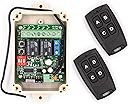
The Solidremote 12V-24V Secure Wireless RF Remote Control Relay Switch KIT-1 offers ultra-secure rolling code technology with over 18 quintillion code combinations, a highly sensitive -113dBm RF receiver for long-range and stable performance, and dual independent relay channels for versatile device control. Its IP55-rated enclosure ensures reliable outdoor and indoor use, while supporting a wide 12-24V AC/DC input and switching up to 10A per channel. Ideal for garage doors, lighting, and home automation, this kit includes 2 transmitters and a receiver for easy installation and enhanced security.


| ASIN | B01JGDV8UM |
| Best Sellers Rank | #89,526 in Tools & Home Improvement ( See Top 100 in Tools & Home Improvement ) #7 in Garage Doors |
| Brand | Solidremote |
| Brand Name | Solidremote |
| Coil Voltage | 12 Volts |
| Connector Type | 3-pin Terminal Block Connector |
| Connector type | 3-pin Terminal Block Connector |
| Contact Current Rating | 10 Amps |
| Contact Material | Steel |
| Contact Type | Electrical |
| Contact material | Steel |
| Contact type | Electrical |
| Current Rating | 10 Amps |
| Current rating | 10 Amps |
| Customer Reviews | 4.6 out of 5 stars 1,641 Reviews |
| Included Components | 1 x 202U receiver + 2 x TX134 remotes + 1 x instruction sheet |
| Manufacturer | Solidremote |
| Maximum Switching Current | 10 Amps |
| Maximum Switching Voltage | 24 Volts |
| Minimum Switching Voltage | 12 Volts (DC) |
| Model | SR-RCS-202U |
| Mounting Type | Wall Mount |
| Mounting type | Wall Mount |
| Number of Terminals | 3 |
| Operation Mode | Manual |
| Part Number | KIT-1 |
| UPC | 708296998994 |
| Unit Count | 1.0 Count |
| Wattage | 120 watts |
A**R
Good one
easy to install, nice ...
A**R
ู ูุชุฌ ุฌูุฏ ุฌุฏุง
ุงุนุฌุจูู ุงูู ูุชุฌ ูุชู ุชุดุบููู
J**A
Funcionalidad perfecta y buen alcance.
Todo perfecto para controlar puertas elรฉctricas e iluminaciรณn exterior. Solo tienen que mejorar el instructivo que no es muy claro.
S**R
Simple but effective
I have purchased a v5, a v6 and now a pair of extra remotes. The v6 has not been installed yet so my comments are regarding v5 only w the newer remotes. One of the original v5 remotes was crushed by traffic so I purchased the v6 with the intent of using the remotes w the v5 unit and keeping the v6 unit as a backup. I then decided I would use v6 in another project so bought a pack of the spares anyway. But before the spares arrived I had already programmed the v6 remoted to my v5 and they are working fine. (More on that below.) I'm pretty sure I have an older review on the v5 so I'll just throw a few points out here. First, i have it installed inside an aluminum trailer (to turn on interior and exterior lights A=interior B= Exterior C= Both) but it still has pretty good range and reception. Batteries last a long time. Set up, even utilizing relays to handle more amperage, was very simple. This has been working flawlessly since 2019 (now Q2 2024). PROGRAMMING NEW REMOTES - I don't recall having any issues programming the original remotes, and I'm betting that would be true of the new v6 unit, however linking newer remotes to the older units may require changing the remotes 'mode'. This is not stated very clearly, if at all, in most documentation or videos. I don't have all of the details but here's the basic idea. When you press one of the buttons on an original remote does it blink once and go out, stay on for a longer moment, or blink several times? This is an indication of its 'mode'. When you get new remotes the mode is likely set to the default mode at the time of its fabrication, thus different from an older model, and you probably see the new remotes flash differently from your old remotes. You need to get the new one to match the old one. To change the mode you hold the C+D buttons at the same time until you see the remotes light come on/flash, let go of C+D and press A. You should now see a different pattern when you press a button on that remote. If you are 'lucky' that's the one that matches your base unit so you should try to pair them again following the documented (simple) process. If the unit and remote didn't pair up then try changing the remotes mode again. I had to change the modes many times before they finally linked up. Not sure if it makes a difference but I also tried pressing the B and C buttons (after C+D) in case that did anything special since the C+D> A just plain didn't work after the first few tries. It can be frustrating but after a couple minutes of feeling like I was getting nowhere it eventually worked. Overall a great product! UPDATE June 2024 - I ended up adding the additional standalone remotes to the same v5 controller and found that they were already in the correct 'mode', unlike the remotes that came with the newer v6 unit (described above). This is neither a plus nor a minus since it just depends on your situation as to whether you'll need to adjust the modes or not for pairing. If i had wanted to pair them with the newer v6 unit then I'd likely have needed to change the mode.
D**.
Great installation video available on Utube
Works and way better than all the cost of a complete new garage door opener
G**G
ูู ุงุณุชุฎุฏู ู
ูู ุงุณุชุฎุฏู ู
A**A
Calidad a buen precio.
Mรกs que satisfecho.excelentw producto.gracias.
Trustpilot
2 weeks ago
2 weeks ago