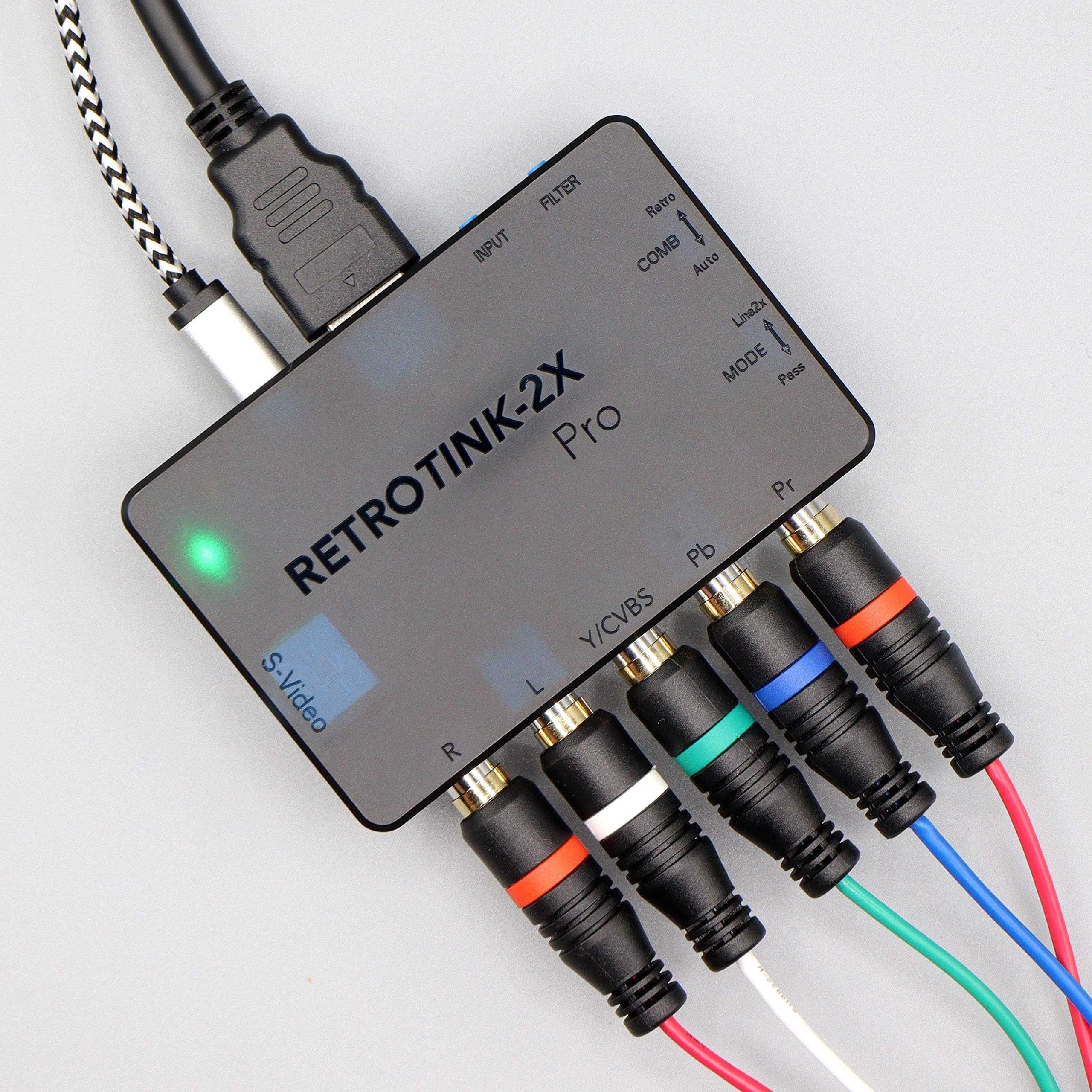
RetroTINK 2X Multiformat
Product ID: 251818024
⚡MicroUSB firmware updates
📺Supports multiple legacy inputs
🔄Zero-lag line doubling
🎮 Elevate your retro gaming—because classics deserve crystal-clear glory!
The RetroTINK 2X Multiformat is a compact, lightweight video scaler designed to convert legacy console signals (240p/288p/480i/576i) into smooth 480p HDTV output with zero lag. Supporting Component, S-video, and Composite inputs, it also passes through 480p content for newer consoles. Firmware updates via microUSB ensure ongoing performance improvements, making it the ultimate upgrade for retro gaming on modern displays.
| Customer Reviews | 4.5 out of 5 stars 25 Reviews |
S**Y
Get this for your PS2, u gonna be amazed =)
I heard about Retrotink long time ago and didnt bother buying from them...until when they launched this box that improves picture quality on legacy consoles, like the Playstation 2 (infamous for having very little games in Progressive mode) and the original Xbox. Didnt expect any miracles, and I have been watching videos on youtube to see if it convinces me, so when I installed it and set it on Linex2 like they told me in the manual I was shocked how good my games looks now. I mean Wow!! Also, with the help of the Mclassic hdmi that improved even further the picture quality, u can say that Retrotink grinds and Mclassic polishes :P I uploaded images of the game Shadow of memories and u can see on Eike how contours and sharpness are improved drastically on him. I put text on all the images when or when not using mclassic/Retrotink and having or not having Linex2 on the Retrotink. Recommend having "Linex2" than "Passthru" on the Retrotink and on the Mclassic on mode "Retro" (blue light) for the best settings. "Filter", I really dont use scanlines and with "Comb" I have it on "Auto" on the Retrotink. One thing on video settings on tvs (mine is Sony oled), I have something called "Wide mode" to fill out the screen horizontally but then the image becomes compressed so characters become dwarfs...haha, what u can do then (if your tv has it) is to go to Home > Settings > Display > Screen, select Wide mode and then at the bottom "Vertical size" lights up and put it to Max, in that way the characters are no longer dwarfs ;) Depends also if the game has some bars top and bottom, so games that are 4:3 can be cropped top and bottom, althou not by much. Play around to fit your preference. Like for instance Silent Hill 2 look great in that way almost fills my screen like to were 16:9 ^_^ Hope this review helped, good luck!
P**K
Believe the hype
It's fantastic. Was able to get rid of my trinitron before moving which is a god send if you've ever lifted one of those 100+ pound beast of a tv. This is an absolutely fantastic replacement to an old CRT. My older systems (Genesis, NES, N64, SNES, Saturn) with RGB out (some have to be moddeed) using hdretrovision cables and the retrotink 2x pro all look pretty fantastic on modern tv's now. I dig the scanline mode on it. I'm playing on a 65 inch 4k tv. If you're looking for a way to playing your old school games in a modern fashion, this is the way to go.
E**D
Given as a gift, but I won't be using it.
This was purchased on Amazon and given to me as a gift, and I dont want to be rude by asking them to return it. I will allow for the possibility that my unit is faulty, but I have to review based on my experience. The Good: Compact, just the right amount of features and inputs for someone who wants to play old games and watch old media on modern displays. The Bad: -The scanlines look wrong. -Composite looks worse when using this device than just running it straight into the display, and it introduces ghosting to the image that isn't normally present. - Component seems about the same with or without this device, and I didn't bother testing svideo. I have seen a lot of good reviews on YouTube, but as far as I can tell you are better off either using the inputs on your display if they are available or just investing in a cheap upscaler. One star for the form factor and features, and one star for the fact that it seems like a viable (and really expensive) solution to upscale component to HDMI. If you are reading this I hope your experience is better.
B**L
Perfect for PS2 owners!
Perfect for PS2 owners! I paired it with the mClassic. Couldn’t have been happier.
H**4
Works Great, worth the money for what you will get out of it.
Does what it's supposed to. It's best to look up in depth youtube reviews for all the details, and what version of the product would work best for you. With the main feature of it being a line doubler and lag free imput device to play older consoles on a HDTV. Many HDTV don't handle analog signals well and you can have up to 2 frames a second imput lag. On top of that many don't handle 240p and other resolution types below 480i & 480p properly without blurring the picture. So many people complain about older consoles looking like crap on non CRT HDtvs and that is a major reason why. I went from having my N64 hooked up directly to my TV to this and besides it playing smoother, it looks so much better then it was. Add a composite and/or component switch to make switching devices easier, and less wear on your cables. Great product, this plus good quality cables are a must have for your retro gaming set-up.
Trustpilot
1 month ago
2 days ago