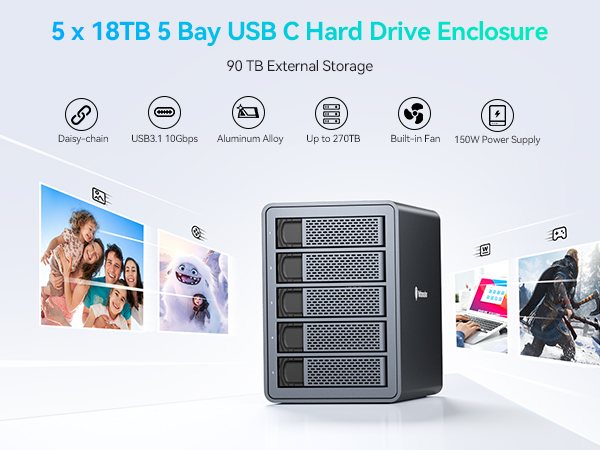
![Yottamaster 10Gbps 5 Bay USB C Hard Drive Enclosure Daisy Chain, 150W Aluminum 3.5" HDD Enclosure for 3.5 & 2.5 Inch SATA HDD/SSD up to 5x18TB, Non-RAID DAS Daisy Chain 270TB Storage Expansion[FS5C3]](https://m.media-amazon.com/images/I/71KyBGngB8L._AC_SL3840_.jpg)




๐ผ Elevate your data game โ storage that works as hard as you do!
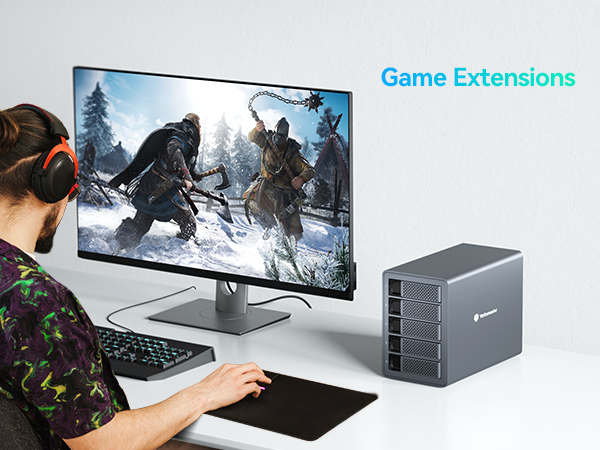
The Yottamaster FS5C3 is a professional-grade 5-bay USB-C hard drive enclosure delivering ultra-fast 10Gbps transfer speeds and supporting up to five 18TB SATA HDDs/SSDs for a total of 90TB. Its daisy chain capability allows expansion up to 270TB by connecting three units. Crafted from aluminum with an efficient cooling fan, it ensures reliable performance and drive longevity. Compatible with both Windows and Mac OS, it offers versatile, non-RAID direct-attached storage ideal for demanding data professionals seeking scalable, high-capacity solutions.


| ASIN | B08DLTKXCP |
| Best Sellers Rank | #867 in Enclosures |
| Brand | Yottamaster |
| Built-In Media | 1 X 5 Bay Type C Hard Drive Enclosure, 1 X Data Cable, 1 X Power cord, 1 X User Manual, Screw Kit |
| Color | USB3.2 Daisy Chain |
| Compatible Devices | Laptop |
| Customer Reviews | 3.6 out of 5 stars 73 Reviews |
| Data Transfer Rate | 10 Gigabits Per Second |
| Enclosure Material | Aluminum |
| Hard Disk Form Factor | 3.5 Inches |
| Hardware Interface | USB Type C |
| Hardware Platform | Windows |
| Item Dimensions L x W x H | 10.43"L x 5.39"W x 7.87"H |
| Item Weight | 4.54 Kilograms |
| Manufacturer | Yottamaster |
| Material | Aluminum |
| Memory Storage Capacity | 90 TB |
| Mfr Part Number | Yottamaster FS5C3-GB-GY |
| Model Number | FS5C3 |
| Product Dimensions | 10.43"L x 5.39"W x 7.87"H |
| Supported Devices Quantity | 5 |
| Unit Count | 1 Count |
| Warranty Description | 18-Month |
W**B
This just works!
I know what you're thinking. I thought the same thing. You're wondering if you should trust a brand you've never heard of. Yes, absolutely. If you need a non-RAID enclosure that is reliable and very quiet, you really can't go wrong with this. It is solidly built, fast, and is easy to use. I've bought off-brand drives and enclosures in the past, and I have to say they were only as good as what I paid for them. The Yottamaster is well-priced and is at least as good as some name-brand alternatives. Don't hesitate to give this a try if it meets your needs. Like me, you'll end up pleasantly surprised.
L**K
If I didn't use ZFS my data would be gone
It works fine for a day or two, then drives drop out and throw IO errors. Then I need to reboot the enclosure (not the OS...FreeBSD never needs to be rebooted) and zpool-online the disks again. I can't even get through a full scrub or resilver without more IO errors, let alone have it work reliably overall. I tried this on FreeBSD with ZFS, and I see others have the same problems I had when using Linux. I'm guessing in Windows you just don't notice until your files are gone, and then you can't tell it's the enclosure, not the disks. Do not buy...you will lose your data, or at least hours of your life.
A**G
Great with a few short comings
This is for the 10Gbps version - The build quality is good, nice weight to it, the bays are plastic though. The lights are not annoying at night, and the fan is quiet, though some of my drives make noise now, there is no vibration dampener, so when a hard drive does a starting seek or what not, it will definitely be heard. Speeds are great, I did multiple transfers simultaneously to test if it was worth it to get this more expensive version. Four drives were sending data 180-210MB/s each to SSDs, I noticed it would dip to zero if I have Windows Write Policy enabled to cache it, and choose the Better Performance option; I now left it to only have the Better Performance option (WD Easystore 14/18TB drives). It does NOT read 4Kn drives, I had shucked an old 3TB Seagate Desktop Plus drive, and it read 2TB as offline space and 750GB as unallocated, I would have risk using DDM or format the entire thing so put it back as external USB. The fan automatically goes up, doesn't get loud. Temps it's maintaining on my drives are 40c, when a drive is in use, it's 42c; could probably go lower if I placed the enclosure in a more ventilated area - temps before drives were shucked were 51c/55c. Got this because it turns back on after a power outage and the speeds advertised. Final notes: Bought used-Like New, was missing the manual but that can be obtained online, also missing some screws. The instructions listed here to update the sleep firmware are outdated and confusing. On their site just get the one for the 4/5 bay enclosure, however it did not work. Their support takes a long time to respond - I'm STILL waiting for their updated guide, been over a week now. But with that said, my enclosure does NOT go to sleep, wondering if previous person already updated or since I have sleep disabled on Windows 10, if that's affecting it. Either way, no complaints. Also, don't be like me and blindly plug in the USB-C cable without looking at the back, I thought the unit was broken because I kept re-plugging into the port labeled "hub".
J**.
The Perfect Enclosure for a Data Hoarder like me!
I am getting more into building my media library, and have several hard drives full of data, but my PC only has 4 SATA ports, which means I can't plug in all of my drives at the same time. This device allows me to plug in 5 Additional Drives using one USB connection, and if I get a 2nd one, then I can actually plug that one into this one, and still not need an additional connection on my PC. This unit looks great, doesn't make too much noise, and actually works quite well! So far I am loving this device, and am planning on ordering a 2nd one soon!
R**D
Second times the Charm??? (Revised Review)
8/2023 - The company finally reached out to me and offered to refund or replace the unit. I'm going to go ahead with a replacement and see how things turn out. I am upgrading my review from one star to three stars for now since they do seem to want to make things right. Once I get the new unit I'll update my review again with what I find. I'm really hoping things turn out much better as I really liked the unit. 7/2023 - I bought the system in June and by mid-July it was breaking down. I've tried to contact the company for support but so far no luck. No response to any of my emails and trying to call only gets me sent to V-mail. I tried to go to their website and got 404 errors. I tried to include the 404 errors as screenshots but Amazon won't let me. After 6 attempts to call and email, I have not gotten any response. The last drive bay has quit working altogether. The other 4 bays drop constantly. I've tried to see if I could disable the sleep mode (bad thing to add to a drive hub) so far with no luck. I would not recommend this product to anyone.. If you have one that works luck with getting service..
A**R
Enclosure forces drives to sleep on both Windows and Mac. Takes a few mins or longer to wake them.
I was using this with a 5 drive set-up on both Windows and Mac OS. Windows 10, and Mac OS Big Sur 11.4. The positives: The enclosure is quiet and kept all of my drives cool enough (~80-90 degrees Fahrenheit). USB-C was nice (and rare for this size enclosure at this price), and R/W speeds were ~240 mb/s. The box is fairly small, and the drives were secured without issue. I consistently transferred the connection with this enclosure between two devices, sometimes on the same OS and sometimes on different OSes. Never had an issue with hot-plugging, or OS recognition. That is about the end of the good. The negatives: Cheap materials, even if it is machined aluminum. No soundproofing inside. I didn't need it, but if your drives are loud, then good luck. The most annoying part of this enclosure, though, is the fact that it goes to "sleep", forcing the drives to sleep as well. Sometimes all of them, and sometimes only the ones that aren't in constant use. And there's no way to turn that off. AT ALL. In my Mac system settings, I've selected to "never put the hard drives to sleep" -- so this shouldn't happen. Yet it still happens, and it isn't the OS's fault. This wasn't a problem with my old QNAP DAS, and it isn't a problem with my newer (replacement for this) 8-bay OWC enclosure. For some reason, as many other reviewers have mentioned, this enclosure just puts the drives to sleep. If that doesn't seem like a big deal, read on. Because if you are someone that plans to use this to access media on an HTPC or streaming device (i.e. Plex, Jellyfin, etc.), the drive sleeping is ANNOYING. Videos take minutes to load, sometimes throwing failures that they cannot be played. On other DAS and NAS enclosures, they take seconds (or less) to load. Folders (on both Mac and Windows) take minutes to load with this enclosure, sometimes freezing the OS (or Finder / File explorer) in the meantime as the enclosure slowly wakes up and brings the drives back online. I thought it was going to be a non-issue for me; or at worst, a small issue. But the drives go to sleep every 15-20 minutes (unless you are constantly using/browsing the specific drive that you are needing to access). And even if you use just one drive and that specific drive isn't asleep, the others likely WILL be. It got to a point where trying to load media information on my streaming device would take minutes. I couldn't even scroll through my media because folders were just grey, default icons. I could click on a video and instead of seeing a description, play button, etc, I would be met with a buffering sign because the media hadn't been accessed yet (because it couldn't). It got to the point where I began to expect to see a 'buffering' icon anytime I wanted to access anything on my HTPC. For those of you using Plex, you'll be seeing a lot of blank posters, artwork, descriptions, etc. For those of you doing video work in After Effects or Premiere, good luck. Would not recommend buying unless you plan to use this as housing for your backed-up files, which you plan to access maybe once every few weeks.
B**R
ZFS Pool Issues
Maybe it's just me, but I'm having a nightmare of a time with this enclosure. Before you comment, I did follow the arcane instructions to disable the sleep feature of the firmware. However, it seems to be impossible to tell if this feature is in fact disabled or not. There is no indication that the feature change was successful after 'clicking ok' in the last step. There is no indication of firmware being updated or anything. My personal setup is with Ubuntu Server 24.04, using all five drive bays in a ZFS Pool. At first it seemed to work just fine, though transfer speeds seemed to be a bit on the slow side. I have confirmed that it is configured to use the USB 10G capability, so it should not be an issue. My problems started when trying to replace a drive in the ZFS pool. During the re-silvering process other drives started to spontaneously drop off of the pool and fail. I finally got the new drive resilvered after several attempts, but then my pool had one other drive that became unavailable. I scrubbed a couple of times and had many, many errors (which I have never seen before in this pool). It finally completed a scrub with another drive becoming unavailable. Looking at both these drives with smartmontools, it appears they have experienced some DMA errors, possibly associated with ICRC LBA which might imply cabling, or the backplane (in this case, the enclosure). I'm currently trying to replace one of the drives that went unavailable during the initial resilver, in the hopes that I can salvage this ZFS pool. I've reached out to Yottamaster, but haven't gotten a response yet. Thus, I'm here in the review section to see if I can get some attention. I don't want to buy a different enclosure, as I know most are based on the same chipset... but I might have to if this one gives me this much trouble.
I**N
NAS can be overkill - works great for my Plex media server
I was digging deeper into NAS setups and I realized it was way more than I actually needed - I already have my Plex Media Server set up on a miniPC, I just needed to expand my storage capacity. This is a sleek product with a solid build - have had it for 3+ months and no issues, it's running most of the time with no disruptions. Highly recommend.
A**S
Vale a pena demais
Muito bom!
R**T
Good hardware let down by dodgy firmware
Bought a pair of these (which I'm about to return) to replace some Orico enclosures that only suffer from bad airflow. Physically these are very nice, the cooling is a lot better, and the (no key) locking bays feel nice and secure. Build quality is really nice, and they *feel* very good. Sadly they are unusable. Despite anything you may find online there is no way to turn off the sleep timer on these (non-RAID) - directly contacting Yottamaster had a reply from them stating that they do not support that option, and the official software / firmware for this does nothing. Additionally plugging known good drives (Toshiba 10tb) in has resulted in generating actual SMART disk errors on most of them (even to the point of Linux marking them as read-only) - this was not related to the drives being awake or otherwise, and placing them back in the Orico bays (and a new Orico bay that I just bought for data migration) has resulted in no further errors (where they were gaining up to 20 errors per day!!) If they sort out these issues then I really like them - the features would make them very useful if they fix these issues - but I know I won't be buying from the brand again as a result of this...
M**L
Avoid - will constantly corrupt your drives!
Avoid at all costs. As others have said - used as a straightforward DAS and once under load for a while it will corrupt at least one drive requiring a reformat and loss of data. Thus useless for Plex etc. Return window is only 90 days and customer service is a joke - email to a Chinese rep who stopped replying after the first two emails - have been trying every couple of days since but donโt hold out hope. Now an expensive paperweight and shelling out for a more reputable brand - should have done that it the first place. Choose something else.
B**K
Some slots won't open
The product looks nice, however I couldn't open 3 of the 5 slots. Therefore I will be returning it.
Trustpilot
2 days ago
1 day ago