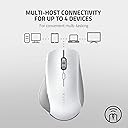
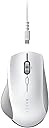
🖱️ Elevate your workflow with precision and power — the Pro Click advantage.
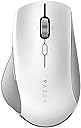
The Razer Pro Click is a high-precision ergonomic wireless mouse designed for professionals seeking comfort and efficiency. Featuring a 16,000 DPI 5G optical sensor, multi-host connectivity for up to 4 devices, 8 programmable buttons, and an extended battery life of up to 400 hours, it seamlessly blends productivity with long-lasting performance in a sleek white design.


| ASIN | B08C2T22VT |
| Antenna Location | Office |
| Are Batteries Included? | Yes |
| Are Batteries Required | Yes |
| Battery Average Life | 400 Hours |
| Best Sellers Rank | 8,594 in Computers & Accessories ( See Top 100 in Computers & Accessories ) 247 in Mice 4,374 in PC Consoles, Games & Accessories |
| Box Contents | Manual, Razer Pro Click, USB Cable, USB Dongle |
| Brand | Razer |
| Brand Name | Razer |
| Button Quantity | 8 |
| Colour | White |
| Compatible Devices | Laptop, Personal Computer, Smartphone, Tablet |
| Connectivity technology | Bluetooth, USB, wireless |
| Customer Reviews | 3.7 out of 5 stars 529 Reviews |
| Enclosure Material | Plastic |
| Global Trade Identification Number | 08886419332657 |
| Hand Orientation | Right |
| Hardware Platform | PC |
| Item Dimensions L x W | 12.7L x 8W centimetres |
| Item Weight | 0.11 Kilograms |
| Manufacturer | Razer |
| Manufacturer Part Number | RZ01-02990100-R3M1 |
| Model Name | Pro Click |
| Model Number | RZ01-02990100-R3M1 |
| Mouse Maximum Sensitivity | 16000 Dots per Inch |
| Movement Detection | Optical |
| Movement detection technology | Optical |
| Network Connectivity Technology | Bluetooth, USB, wireless |
| Number of Batteries | 1 C batteries required. (included) |
| Number of buttons | 8 |
| Operating System | Windows |
| Pattern | Single |
| Power Source | Battery Powered |
| Product Features | Ergonomic Design |
| Product Finish Type | Matte |
| Product Warranty | 1 |
| Range | 10 meters |
| Special feature | Ergonomic Design |
| Style Name | Pro Click |
| Unit Count | 1.0 count |
R**D
Best mouse I've had
I buy a lot of computer mice. Just find it hard to get properly comfortable I guess. The Pro Click has one very big flaw, no USB C charging and needs you to use a cable that is effectively proprietary. That said, the battery lasts and lasts and lasts. I think I've charged it once this year. But for comfort; this is the real deal. No other mouse has ever felt so easy and natural under my hand. I have smaller hands than average, so Logi's otherwise excellent MX mice are just too big, and I was beginning to despair at finding that perfect premium mouse. This thing is the perfect weight and has wonderful glide and accuracy. The finishes are all premium too.
K**N
Known battery issue - Avoid.
First the pro: Great mouse. Feels great in the hand, especially if you're coming from something like a Logitech Master - the ergonomics are slightly softer, but I adjusted very quickly, and I now much prefer the profile of the Click. Polling rate is great - you can definitely feel the difference coming from a lower polling mouse like the Master series. Battery life seems fine, I get a good week before I have to recharge. The Meh It uses the incredibly over developed Synapatic software, which, for a mouse, is totally unnecessary. It also auto-downloads which I always find irritating. It uses a proprietary Micro-USB connector which is cheap and IMO, typically immoral from these companies. While it does look nice when connected - it matches the profile of the mouse - it does mean it's very difficult to use any other cable. The BAD. This mouse has a fault which I was unaware of until I searched around a bit. It can suddenly stop working for no obvious reason. Sometimes when it runs out of charge, but sometimes just out of the blue. The mouse will be completely unresponsive. The issue has something to do with the mouse battery. I believe specifically the charging circuit. There is a very easy fix for this - but it involves removing the skates to get to 3 star screws (standard iFixIt kit should have this), and literally reconnecting the battery clip from the board - the mouse then comes back to life. Of course, removing the feet is a very delicate operation - use of a reflow heat gun helps here, although a hairdryer will probably get the job done eventually. It IS possible to replace the feet without any damage that would cause it to be unusable, but you need to be VERY careful about lifting the skates without removing the harder adhesive underneath. I managed it, but this is hardly ideal, especially when you consider finding replacement skates appears to be impossible. Conclusion: Great mouse, but completely ruined by this fault. Once you know what you're looking for, a LOT of people online have had similar issues - there are a lot of YouTube and Reddit posts about this. I would completely steer clear of this mouse - I have only had it for 5 months. If the problem happens again, I am not confident I can replace the feet again without causing it to be unusable.
M**S
Mouse with a Secret Weapon for Creatives
After 4 iterations of the Master series of rodents, there's a new productivity king. It fits the hand better than its competitors and is highly accurate. For Photoshop, CorelDRAW (or Inkscape and Gimp, or any vector or bitmap aps) and general web browsing this Razer Pro Click is superb allowing you to track precisely and select things I used to miss on first and second attempts. But it's big secret weapon is the programmable tilt scroll wheel. Mine's set to page up and page down. This makes navigation so much easier. Productivity is through the roof. And despite buying a Master 3S at the same time, this is the one that my hand (large sized) gravitates toward. The only gripe is the pattern on the scroll wheel tickles the index finger if you press only lightly on it. On the face of it, the notion that programming the buttons, scroll wheel and tilt seems daunting from the photos Razer show in their ads, but spend 5 minutes playing with the associated app - Razer Synapse - and it's a doddle. It even has an internal garage for the optional USB wireless dongle, unlike you-know-who. It has beaten the Master, hail the new king of productivity.
W**D
Rely nice work mouse, with a couple of major annoyances
The mouse feels and looks great and is very comfortable for a long day in front of the computer. Its very precise on both 2.4 and blue tooth. and was super simple to set up. But I do have two annoyances with it. The scroll wheel is vertical and has a flat profile, where as the mouse is tilted slightly, this means my finger when scrolling isnt flat on the wheel and could feel better if the wheel was more rounded over or tilted over to match the actual mouse. Secondly. Why the f does it have a micro usb cable with a deliberately proprietary connector shape! in 2021 not using usb C for a premium high end electronic device is a joke. So now I have another cable that only does one thing and if i loose or break it I have to buy a new overpriced, obsolete cable rather than use the one that works for everything else on my desk. In hindsight I would have got the mx master just for usb C over this.
J**N
Exceptional all round mouse, with awkward charging.
The ergonomics, sensor and build quality of the mouse are top not, absolutely no complaints. In the time I’ve had it, it has never been close to running out of charge. The weight is worse on paper than it is in practice, while not as lightweight as alternatives such as the Viper, the ergonomics and shape make up for it. Make no mistake, this may be a productivity mouse but that isn’t it’s only use. My only issue is the charging cable as the included micro usb is extremely snug when trying to charge. It would be nice to have a wireless charge version of this mouse.
A**R
Not ‘quite’ as good as Logitech
Bought this to replace a Microsoft sculpt (excellent but Fragile) and couldn’t justify a Logitech MX (superb but expensive). This is ok, mouse performance is good, looks great. Not as ergonomic as the microsoft but works better. Scrolling not as good as logitech but cheaper. Also beware, tracking on a felt desk oad isn’t great, works. Fine on a hard surface or mouse mat though Probably should have paid the extra and got the Logitech MX in hindsight
C**C
Great...when it works
I've had this mouse for almost a year now. It's great when it works, but there are 2 massive issues with it. First, why I think it's good: * Nice click to the main buttons. It's light with just enough feedback. * The scroll wheel has a nice texture to it which makes it easy to use * Very comfortable. I use it throughout the work day and don't have any issues with strain or anything * Subjective, but it looks great and matches the rest of my equipment * No yellowing or and doesn't easily stain so far Now why I don't recommend it: * The charging port and cable are unique to this mouse, so if the cable stops working or you lose it, then you're completely screwed * The mouse can randomly stop working and cannot be switched on or charged. This can be fixed if you have a T6 screw driver to open up the mouse, but most people won't bother Finally, support in the UK from Razer is basically non-existent. So sadly, I think this is the last time I will buy a Razer product.
A**N
Great mouse for office working
Does everything I need to for office work. Previous mouse gave me some minor wrist pain and since purchasing this mouse, pain no longer an issue. Battery life is also very impressive.
S**Y
La meilleurs souris que j'ai eu
Après plusieurs mois d'utilisation je peux faire un retour éclairé sur le produit. C'est la meilleurs souris que j'ai jamais eu, tout simplement ! Je l'utilise quotidiennement pour le travail et occasionnellement pour le jeu (pas de FPS), elle est parfaite, le DPI est réglable, il n'y a pas de retard dû à la connexion 2,4 ghz (j'ai une carte wifi / bluetooth 5 sur un pc fixe) et l'ergonomie est bien pensée (main de taille moyenne). Petit point gênant au début, les boutons intérieurs page suivante / précédente sont souvent activés involontairement quand on n'a pas l'habitude, en prenant la souris avant d'ajuster sa main au dessus. Mais après quelques jours d'utilisation on prend vite le plie ! Dernier point, la durée de vie de la batterie est excellente conforme à la description du produit. Razer, pour moi c'est un sans faute !
P**J
Does not work well with MacOS despite the claims
Almost every day I use the mouse in Bluetooth mode I will need to forget the device and reconnect to it. It's a shame because the mouse if fantastic otherwise (size, material, build quality). But its negligent to release a work device, claim it works with MacOS and then provide no driver or software support for it.
P**.
Subpar quality mouse with Razer logo painted on
Paint started bubbling and flaking off on the hand surface after just one year. Razer warranty claims this is normal wear and tear. Avoid this, bad quality product. Also has subpar range, receiver has hiccups 2-3 meters away.
A**S
So far so good!
So far it seems a pretty good buy. Works well. Tracks well in any surface (table and bed in my case). Razor Synopses 3 software is needed to customise the side buttons but the options are very limited like for example in MX master 3 series, you have multiple options for side buttons including closing a windows but this one doesn't have that . Still it has decent customisations and i use the side buttons for double click feature. Battery let's see how long it lasts. I have a pretty average size hand and the mouse fits just perfectly in my hands. Look wise this mouse looks more premium, clean and elegant than the more shoddy looking MX master series although I have a suspicion that the white colour might start to get dirty later on, let's see. 2.4Ghz connectivity so far is quick and has no issues.
A**W
Bad quality mouse
It just stopped working.
Trustpilot
1 month ago
2 months ago