Buy anything from 5,000+ international stores. One checkout price. No surprise fees. Join 2M+ shoppers on Desertcart.
Desertcart purchases this item on your behalf and handles shipping, customs, and support to Nicaragua.
💼 Elevate your data game — storage that works as hard as you do!
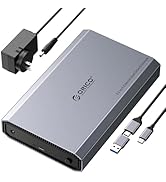
The ORICO USB 3.0 External Hard Drive Enclosure supports 3.5/2.5 inch SATA HDDs and SSDs up to 20TB, delivering up to 5 Gbps transfer speeds with UASP acceleration. Featuring tool-free installation, broad OS compatibility, and a rugged ABS build with anti-shock protection, it’s designed for professionals seeking reliable, high-capacity external storage with energy-efficient operation.


| ASIN | B00GAML7OK |
| Best Sellers Rank | #23 in Enclosures |
| Brand | ORICO |
| Built-In Media | 1*3.5 inch hard drive enclosure |
| Color | Black USB 3.0 |
| Compatible Devices | Desktop |
| Connectivity Technology | USB |
| Customer Reviews | 4.5 out of 5 stars 6,528 Reviews |
| Data Transfer Rate | 5 Gigabits Per Second |
| Enclosure Material | Acrylonitrile Butadiene Styrene (ABS) |
| Hard Disk Form Factor | 3.5 Inches |
| Hardware Interface | USB 3.0 |
| Hardware Platform | Linux, Mac, PC |
| Item Weight | 0.24 Kilograms |
| Manufacturer | SHENZHEN ORICO TECHNOLOGIES CO.,LTD |
| Material | Acrylonitrile Butadiene Styrene (ABS) |
| Memory Storage Capacity | 20 TB |
| Mfr Part Number | ORICO 3588US3-CA-BK |
| Model Number | 3588US3 |
| Supported Devices Quantity | 1 |
| Warranty Description | 12-month |
L**A
Excellent drive case with external power
I have a few of these SATA drive cases and never found a reason to look for any other. They open easily, drives slide in-and-out without much resistance, yet hold the drive firmly in place. Having the external power supply is critical for me to be sure enough power is delivered to the drive at all times and never rely on a USB plug for clean power. Also critical for me is having one of the most important yet simple features: a power off/on switch! I hate it when a drive starts spinning or becomes energized the moment it is plugged into a USB port and that's never a problem with this case. This drive case has paid for itself tin time and convenience. Definitely something I will be buying again!
N**Y
Great enclosure for the price
This enclosure works perfectly and was ready to go in less than a minute. It's a tool-less design so all you really have to do is slide off the cover, pop in your drive, and close it up. My drive sat a bit loose in the enclosure, but they provide two foam pads (one thick, one thin) to make the fit more snug. I stuck the thick pad down on the lid towards the end away from the ports, and it immediately stopped any rattling and clunking when moving it around. The lid feels a bit too easy to slide off, which isn't terribly confidence inspiring. However it still seems to hold well even if the latch disengages. I wasn't able to feel much wiggle room when I pulled on the cover, you have to slide it all the way out for it to come off. For the price, I'll give it a pass on this point. In the enclosure my hard drive mounts like any other removable storage, and it fully supports SMART. The drive supports USB 3 over its USB-C port, which is more than sufficient for my mechanical drive. Using the included USB-A to USB-C cable, I hit about 150 MB/s read speeds, which is pretty close to the drive's performance over SATA. I didn't bother to test write speeds since it's an SMR drive, so it would be limited by the drive itself. I noticed read speeds dropping after a few benchmarks, though I'm not sure whether that's because of the enclosure or the drive itself. The drive will even go into standby after a period of inactivity, just like it did when I had it in my desktop. Do note that pressing the power button will cause the drive to immediately power off without confirmation. It doesn't unmount or wait until it's finished writing, it will instantly cut power to the drive. I wished it would've taken at least a long press to power off. To summarize, I'm pretty happy with this drive, and it seems to be one of the few nicer enclosures that supports USB-C.
J**R
Great price and easy to use
Works great and is easy to use. I have a smaller Orico for my m2 drive too and they both work perfectly.
V**R
Excellent enclosure with one very minor cosmetic complaint
I bought this to provide a more protected and dust-proof environment for my Toshiba 5TB backup drive. Installation was ridiculously easy, and my drive sits in the enclosure securely with no rattling, despite not using the supplied rubber pads. The on/off button has a positive click when actuated. The red LED drive activity light blinks when read/write is happening, while the blue LED indicates the enclosure is powered on. I just used this to do my weekly PC backup, and it functioned flawlessly. I have only one minor complaint, in that the layout would have been better had the cable ports been located at the rear of the enclosure, in order to facilitate better cable management. Of course I could turn it around, but then the power button and LEDs would be less accessible or visible. Reluctantly docking one star, though in truth I would rate it at 4.5 stars overall. I highly recommend this drive enclosure at the very reasonable price I paid for it, if you don't mind the cables being a bit intrusive.
M**R
Great quality that works perfectly fine.
I just pulled a 3 TB HDD from my machine as I upgraded. It works fine, but I didn't want to burden the power supply anymore, while I do have an M.2 alternative. This enclosure is the best solution to create a backup drive that sit on the desk, and is used to have a redundant copy of all the data. The plastic/ metal combination is very well made and it's very sturdy. The charger gave me a hard time trying to install the socket head to the brick, but it wasn't a deal breaker. The USB cable has ample length and works great. The drive was a bit loose inside the container, but the manufacturer thought of that so they included a sponge with double-sided tape that you can put where it's needed, and it works. One more thing, the pamphlet doesn't tell you how to open the incluser correctly. Please slide it horizontally and don't pull it up (as the sketch on the pamphlet shows). It slides out.
J**N
Works Great!
Works great with Desktop or Laptop Drive. Easy to use. Awesome price!
N**D
Great 3.5" Enclosure
I purchased this product in hopes of being able to access files off of my five-year-old desktop that died nearly two years ago. Initially, I was hesitant to try this because I thought that the hard drive in the PC had failed and I’d just be wasting money. I was pleasantly surprised by the Orico 3.5” Hard Drive Enclosure. The package comes with a few items inside. You get the enclosure, a power cable, a USB 3.0 cable, an instruction manual in both Chinese and English, and two foam strips. I believe these require external power because of the 3.5” drive. A 2.5” drive in an enclosure does not need external power. The instruction manual is accurate and helpful, but it is for new drives. You do not have to follow this manual if you’re using an old drive from a PC as I was. The build quality of this enclosure is good. The material is a very sturdy plastic and the top of the case is metal, or at least feels like it’s metal. The bottom slides off and clicks into place with ease, but not easy enough that you should fear it sliding off unexpectedly. There is an LED power indicator on the front beside the power button. I took off the side of my old PC and blew out the immense amount of dust it had gathered. I pulled out the 2TB Seagate Barracuda 7200 RPM drive, blew off the dust that was remaining on it, and slid it into the enclosure. There is extra space on the bottom and left side of the enclosure once the 3.5 drive is in. This worried me because it may become loose; however, Orico provides two foam or foam-like strips with adhesive on the back. I just used one of the two on the bottom and the hard drive did not move inside when I tried to move it. Using the provided cables, I plugged the drive into a socket and one of my USB 3.1 (my PC doesn’t have any 3.0) type A ports. I pressed the power button and the LED indicator came on. I pulled up Windows Explorer and I was shocked. All of my files from my five-year-old desktop were there. I’ve only had this running for 6 hours as of my typing of this review so I cannot speak for long-term use, but if anything changes I will update this. Performance wise I’ve not done any true testing, but I do have some figures to look at. Please keep in mind I am using a five-year-old hard drive that has been sitting for two years. I was transferring all the documents, pictures, music, etc. from the Seagate in the enclosure to the Toshiba HDD in my desktop. During 5-10 GB transfers, I saw transfer speeds of up to 220 MB/s. There was some fluctuation, but I never saw the speed go below 130 MB/s. (Attached is an image of the result from CrystalDiskMark after format completed). Here’s a bit of advice for anyone who may not be too tech savvy and is hoping to do what I did. My drive had both a system partition and data partition since it was the only drive in an old PC. This annoyed me. Also, many folders and files could not be accessed whatsoever because of the security used by Windows. For me, this was fine. I didn’t lose anything that I didn’t already have backed up elsewhere. I could still access my documents, pictures, music, downloads, and could even see what programs I had installed and all their files. I’m currently formatting the drive because of the partitions and the inaccessible/unable to delete files. It isn’t hard and anyone can do it. Lifewire has great guides on how to remove the partitions and format the drive if you don’t already know how to on Windows machines. Make sure you back up all of the files you can/want to keep before you begin the process. Deleting the partitions and formatting the drive permanently deletes all the files on the drive. It takes a while (I’m currently at hour 3 and it’s at 95%), but it is worth it. It deletes the system files you may not be able to delete and frees up that space. I would recommend this product. It was one of the cheaper choices that I saw here on Amazon and it does its job well. I'm happy with it and hope to be happy with it for at least a year.
R**J
Decent enclosure. Lasted about 20 months.
I'm somewhat comparing this to my experience with the Inateck aluminum enclosure (B00UAA4J6G), which I have used nearly as long (17 months) as this and have several of those. I've always felt this drive performed differently, mostly exaggerated drive load times at times. Speeds for transfers seemed fine, but the general feel is that it's overall slower than the other brand I use. There are some reviews that note the enclosure has no mechanism to keep the drive in place. I have no issues with that, personally. I don't move my drives, they don't get bumped, and it's super-easy to add or remove a drive. No tools required. That's a plus in my book. If you move your external drives around or they can get bumped hard enough to affect the drive connection, this may be an issue. Aesthetically the enclosure looks nice and the plastic is fairly sturdy. Maybe midgrade thickness. Not cheap, thin plastic. The power toggle button needs to be pushed in order for the drive to power up each time you cut or lose power. For instance, if you shut down your PC at night and the drive, you'll have to push the button on the enclosure for the drive to come back online. This is different from my other enclosures. The reason I'm writing this review is because the enclosure appears to have failed or is on its way to total failure. I tried transferring some files from one drive to another and shortly after starting my transfers seemed to freeze, computer i/o wait went through the roof and persisted until I killed the affected drives. After some troubleshooting: command line vs file manager transfers and swapping drives and enclosures, this enclosure is the common denominator in the problem behavior. It seems to be a decent-enough device. I would not buy it again, though.
R**I
Bom e veio rápido
O produto é muito bom, é uma marca reconhecida pela qualidade, preço razoável. Apesar de importado, veio rápido sem problemas.
J**Y
Simple and reliable. does exactly as stated, recommended for £20.
Does exactly as it says on the box!. Fitted a 4tb drive, and works straight away. Its left on 24/7 and the drive powers off after a while to save power and hdd life. Perfect for external hdd backup drives. Probably not so good for things such as nas and xbox/ps as it does auto power off and there is no way to change that feature. Even under heavy use, the drive and case does not seem to get too warm, with the hdd reporting only 42c (wd blue drive). This can be run from any 12v supply, and i have powered this directly from my pc power supply, and am not using the included mains power supply (i just cut the end off the included psu and use the barrel jack and a 3a in line fuse to one of the molex outputs on my pc psu).
J**E
Simple to install and looks good too!
This device is so simple to use…just slide the cover off, insert your hard drive, put the cover back on, and power it up.
A**R
Five Stars
This product is best fpr for pocket drive.... Its very fast data transfer.......... Pc to drive....
D**G
Stopped working after a month
Stopped turning on after a month.
Trustpilot
5 days ago
2 weeks ago