Buy anything from 5,000+ international stores. One checkout price. No surprise fees. Join 2M+ shoppers on Desertcart.
Desertcart purchases this item on your behalf and handles shipping, customs, and support to Nicaragua.
⚡ Elevate your command center with the Ferrari of keyboards — speed, style, and control in one sleek package.
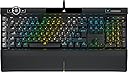
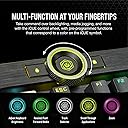
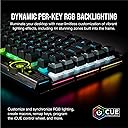
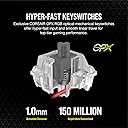
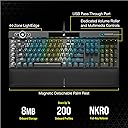
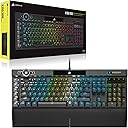
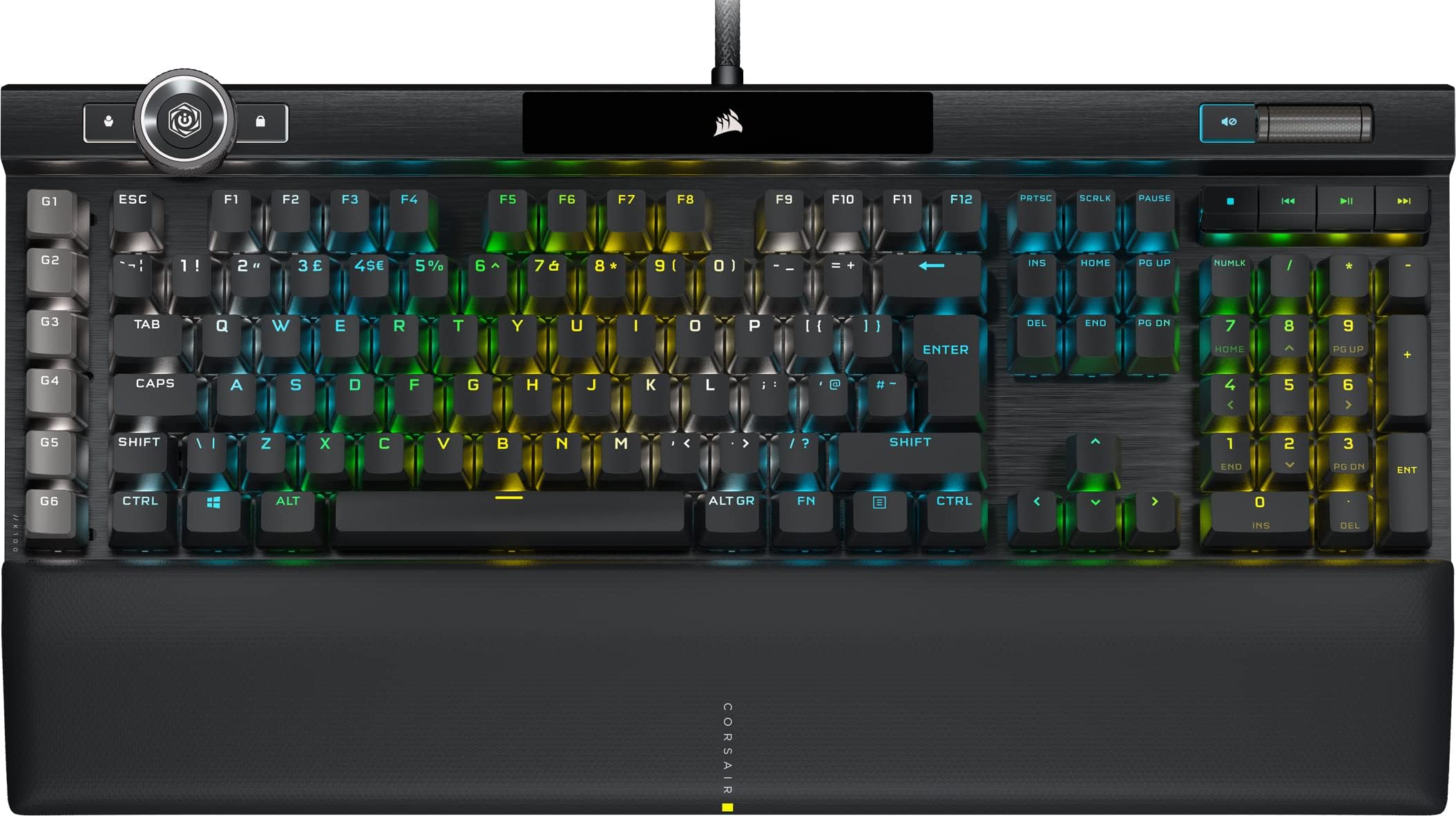
The CORSAIR K100 RGB is a top-tier gaming keyboard featuring hyper-fast CORSAIR OPX optical-mechanical switches with 1.0mm actuation, a durable aluminum frame, and advanced per-key RGB lighting including a 44-zone LightEdge. It boasts CORSAIR AXON Hyper-Processing Technology for ultra-low latency with 4,000 Hz polling and key scanning, plus six dedicated macro keys fully programmable via Elgato Stream Deck software. Designed for professionals and gamers seeking premium build quality, customizable controls, and immersive lighting effects, it includes a comfortable leatherette palm rest and a multifunction iCUE control wheel for seamless command.


| ASIN | B08K2Y17QS |
| Antenna Location | Gaming |
| Best Sellers Rank | 4,255 in PC & Video Games ( See Top 100 in PC & Video Games ) 203 in PC Gaming Keyboards |
| Box Contents | Keycap Puller |
| Brand | Corsair |
| Brand Name | Corsair |
| Button Quantity | 104 |
| Colour | Black |
| Compatible Devices | Laptop, PC |
| Compatible Operating System Family | MacOS, Windows |
| Compatible Tablet Computer Models | AAUB P30 |
| Compatible devices | Laptop, PC |
| Connectivity Technology | Wired |
| Connectivity technology | Wired |
| Customer Reviews | 4.4 out of 5 stars 503 Reviews |
| Enclosure Material | Aluminium |
| Generation | 1st Generation |
| Hand Orientation | Ambidextrous |
| Item Dimensions L x W x H | 47L x 16.6W x 3.8H centimetres |
| Keyboard Backlighting Color Support | RGB |
| Keyboard Description | Multi Functional |
| Keyboard Layout | QWERTZ |
| Keyboard Plate Material | Aluminum |
| Keyboard description | Multi Functional |
| Manufacturer | Corsair |
| Manufacturer Part Number | CH-912A01A-UK |
| Mechanical Keyboard Switch Model | Corsair OPX |
| Minimum Required Operating System Version | Mac OS 14 Sonoma, Windows 11 |
| Model Name | CH-912A01A-UK |
| Model Number | CH-912A01A-UK |
| Number of Keys | 100 |
| Number of Sections | 1 |
| Power Source | Cable |
| Product Features | Backlit |
| Product Warranty | 2 year manufacturer |
| Recommended uses for product | Gaming |
| Series Number | 912 |
| Special feature | Backlit |
| Style Name | K100 RGB |
| Switch Type | Corsair OPX Optical Switches: Hyper-Fast & Linear |
| Theme | RGB |
| Total USB 2.0 Ports | 1 |
| UPC | 840006624097 |
| Water Resistance Level | Not Water Resistant |
H**S
Best of the best
The quality of this keyboard is on another level. I mean, no one needs a keyboard this expensive but it's genuinely the best mechanical keyboard I've ever used, and I've used hundreds over the years. In the box you get some extra key caps that are textured and convexed - they're commonly used keys you use whilst gaming, and do genuinely help with with spatial awareness and hand placement. You also get a very nice wrist wrest in the box that neatly attaches with magnets. As for build quality, it's imaculate. There's not a single fault aesthetically and ergonomically. The multifunction dial in the corner is satisfying to turn and fondle and the mechanical elements are wonderfully tactile. The pressure you need to exert for a key press to be registered is a lot less than the majority of keyboards; it feels like a key needs only depress a few millimetres before a press is registered, which takes a little time to adjust to but is awesome in games once you do. I haven't found much use for the programmable dial yet but I'm sure others users will. There a few default configurations set up like adjusting the RGB brightness and a useful alt-tab shortcut feature. You can program your own functions too. I would comment further but I'm yet to mess about with it as I haven't had a need to do so. The programmable RGB effects are mindbogglingly vast and varied. Using software you can even layer multiple effects and can switch between multiple profiles at the touch of a button, located next to the dial at the top. They give me a bit of a headache so I have it set up fairly dimly with some keys brighter and a different colour. If you love RGBs you won't find a better keyboard, ever. There's only a few things that might be considered negative: that the key layout is slightly different and they're smaller to the standard, and that the macro keys require third-party software to function. There's only a slight difference in key cap placement but it's just enough that there's a learning curve. Typing felt very alien for the first few weeks and WASD movement was even more difficult; once my brain adjusted it was fine. In order to use the macro keys on the far left of the keyboard you are forced to have Stream Deck running, which is mildly irritating. It's genuinely the best keyboard I've used - the Ferrari of keyboards. However if you aren't that interested in the fancy features or hyper responsive keys you'd be better off buying one of those old school style industrial mechanical keyboards that are a fraction of the cost and use very similar switches.
A**.
Great keyboard.
Peak keyboard design Nice and weighty. Premium feel. Very fast, 8000hz. Nice comfort soft leather wrist rest. Way more comfortable than it looks, You get what you pay for.
P**F
So much Better than the K95 Platinum
I was really on the edge about whether or not to buy this. A keyboard over £230 Is a lot. This was to replace my 3 year old K95 - nothing wrong with it. I chose the Optical switches as I had the Cherry speeds with the K95 - Now let me tell you why this board is better The keys are so much smoother than the k95 for a start and the optical switches feel like the Speed ones but - they have lubbed the spacebar and enter key making them so much better. The actuation on this is 1mm from 1.2 on the speed switches which is incredible and very noticeable - if you think you pressed a key by accident then it will definrtly register. The keys are slightly smaller and more professional looking than the K95 and the wrist rest is pretty nice very comfy. Media keys are the same, volume scroll wheel is nice and the usual querks are useful RGB is nicer than the K95 because of the added bottom lighting but I preferred the top light bar on the K95 but that's just me. The scroll wheel - I don't know why Corsair did this but itis useless for now as iCue needs a serious update to incorporate this. Now is this keyboard worth the price? Well I would say no it is a great board and well improved over the K95 but they have added unnecessary things to justify the price 4000hz polling rate, The Axon processor, The Scroll Wheel I thing aroung the £180 mark would justify this but because I can sell my K95 I don't mind paying this. You won't regret this board
S**H
Decent enough, though expensive.
Having involuntarily retired my Razer Huntsman Quartz optical keyboard by spilling beer all over it, I had to source a replacement and the Razer wasn't in stock so I went for the Corsair. This review is therefore somewhat of a comparison to the Razer. Both use optical switches and both are considered "gaming" keyboards. Here goes: Features: The Corsair wins out by a mile. The keyboard has a multi-function jog-wheel, a volume roller and macro keys. Lighting and macros can all be selected without installing any bloatware and the keyboard itself has internal memory to store the selections. The Razer can't hold a candle to this, since to use any of its functionality you have to install the Razer Synapse software (see my review of that keyboard if you want to know more). The Corsair can do most of what you need it to do without any software intallation. The Corsair iCue software will give you extra features but I tend to avoid installing extra stuff if I don't need to because there are often unintended consequences and it makes troubleshooting harder. Full marks to Corsair for making the keyboard autonomous enough that such software is genuinely optional. The Corsair also has a proper USB passthrough so that you have a USB socket built into the back of the keyboard and that's very welcome. It's a genuine passthrough too - the keyboard cable is actually TWO USB cables - one for the keyboard itself and the other for the passthrough, so you're not sharing the same USB port on the computer for the two functions. The corsair also comes with plush wrist-rest that's nicely comfortable but a bit too "deep" for my taste. Maybe it will flatten out a bit during use. RGB: If that's your thing then the Razer and Corsair both have a wide range of lighting effects BUT if you want any proper control over those effects on the Razer keyboard then you need to install the bloatware. The Corsair has excellent lighting control without installing anything, though you can do more if you install the Corsair software. Build quality: Both keyboards are solidly built. Nothing on either feels "cheap". Neither keyboard is resistant to liquid-spillages and that's a shame but maybe there are reasons why such water-resistance can't be implemented on these keyboards. The Corsair has the fattest, most robust keyboard cable I have ever encountered. You could probably use it as a climbing rope if it were longer; seems like overkill, but it's impressive nontheless. Action and "feel": Oh man! The Razer wins this one by a giant margin. The action on the Corsair is OK... but nothing more than that. The product description claims 1mm actuation distance and that seems about right when using it, but - for me at least - the Razer has a far superior action and feel. Nothing - including this Corsair - comes close to it. If that's your biggest priority and you prefer a "clicky" keyboard then you'll want the Razer. The corsair just feels too sensitive and "sloppy" by comparison. The elevation on the Corsair seems inadequate. The keyboard doesn't tilt upwards enough even with the larger of the legs extended on the underside of the keyboard. Price and value-for-money: Both keyboards are expensive. The Razer is cheaper, but you get less for your money - apart from the gorgeous keyboard action, that is. Verdict: A decent optical keyboard that is good for gaming and pleasant enough for typing. Plenty of features that are available as soon as you plug it in, with more on offer if you install the software.
S**D
I love this keyboard so much!
I've had this keyboard on my wishlist for a good few months. Waited for Black Friday deals to kick in as it first popped on my radar last year but I didn't bite the bullet. Had it a day or so - absolutely love it. I previously had the Razer Blackwidow Chroma v2. Never had any issues with it, still working, still a solid keyboard. However, one option Razer doesn't have is to have both additional macro keys AND media keys - not sure why as both Logitech and Corsair offer options to cover this. So, after a few years and getting tired of having to use my additional macro keys as media keys, I decided to shop around and ended up here. The K100. Just to cover a few things the K100 has that the Blackwidow Chroma v2 doesn't: - One additional macro key - Media keys - Everything is backlit (i.e. the secondary functions of some keys) - The wrist pad is a bit firmer (but not uncomfortably so) which I do prefer I went for the OPX switches instead of the Cherry MX. I personally love them. The actuation point is perfect for me. It's fairly easy to get up and running with it, and you can save way more profiles than I'll ever need directly onto the keyboard. I love the way you switch too. The dedicated profile wheel/buttons in the corner are great. I don't typically have to use it much currently as I have iCue installed so it switches profiles for me when I load certain games, but I do like the fact that it's there and easy to work with. The finish on the keyboard also feels really premium, with that aluminium finish. It feels like it's gonna last and I have confidence that it will. I will say, the only area the Blackwidow wins is the sound. It definitely sounded a lot better and I do miss it a bit, but nowhere near enough to make me go back. Just one thing to be aware of: if you push the wristpad too far up, the magnets can cause some keys on the bottom to get stuck. To fix, just pull the wristpad closer to you (or away from the keyboard) by a few mm and it should sort it. I had this issue with the spacebar and it irritated me to no end until I found this quick fix on Reddit! All-in-all, amazing keyboard and would easily recommend it.
G**J
Almost 5 stars Watch out the spacebar catches on the wristpad, and sticks in the down position!
The keyboard is almost 5 stars. Almost. Why not? The issue with the keyboard they sent me was, in effect, an open box and not sold as such. The seal was broken, and the inner plastic has fingerprints on it. Now, did someone open the warehouse to have a look, or was it sent out and sent back? At first it was working perfectly; then the spacebar started to actually start to stick in the down position. I thought, 'Oh no, this is why it opens the box. Some have sent it back; a quick search online informed me that the K100 spacebar catches on the wristpad, resulting in the spacebar sticking in the down position! The fix is simple; you need to put some small spacers in between the wristpad and the keyboard to keep them separated. Now at cost, you should not need to do this, but it is an outstanding keyboard. PS: As an open box issue, I contacted Amazon, and they gave me a 20% discount.
T**M
An absolute delight to use
I got this as a replacement for my Corsair RGB K70 Mk II (Brown Switches) as keys stopped working in some regards, or pressing one key pressed that key several times, and other oddities like that. I had gone through about 3 of these keyboards all with the same fault, so I decided to go for this which uses optical switches. Several months later, I am still using this keyboard and it's working just as well as it did when I got it new. I love the palm rest that comes with it, it's kind of spongy with a rubberised layer to protect it, and it's much more comfortable to rest my wrists on than the plastic of the previous models. The keys are a tad bit more sensitive, but after getting used to them, I've found that I seem to be able to type faster without experiencing fatigue. Disabling certain functions of the G keys were a bit of a PITA, but as soon as I was able to do that, I've not had problems since, as I kept accidently touching these keys and activating some kind of macro, which would break the flow of my typing, or what ever I was typing, which as a writer and coder in my spare time, is not good. However since getting used to the keyboard layout, using the G-Keys as specific macros has been a breeze and using them has saved me a fair bit of time when doing tasks on the computer. The only problem I really have with the keyboard is that iCue is only compatible with Windows. I have since started using Arch Linux, and I don't think iCue is compatible with Linux at all, and the alternatives leave a lot to be desired, to say the very least. But as a keyboard it still absolutely works, and I'm very happy with it.
A**A
Be aware of unfair refurbished items being sold as new
While the keyboard is quite good, with very sensitive keys and a large amount of personalization (not only LED colors but also macros etc). You should be aware that some of the products sold by Corsair as new are not. This is consider unfair trading under the consumer protection, meaning it's ilegal. In my case, the box that arrived was slightly damaged (cosmetic problem). I thought that was ok. Then I realized that some of the cables were not properly sleeved and one of the cables showed some minor defect (typical if it's been used). Up to here nothing functional, so I didn't thought about complaining. Then one of the keys started to misbehave (not working when clicked or activated by itself). At this point I went to pick the Keycap puller to try to fix the problem, and it's when I realized that neither the keycap puller nor the FPS and MOBA keycap sets were included. Finally confirming my suspicions about the item. It is completely ok to sell refurbished items, even for similar/same prize as new, but this must be ALWAYS advertised. I opted to pay more to get it brand new as I had bad experience with a refurbished one, but at least in that case they were upfront regarding the condition of the item. I have to say that Amazon accepted exchanging the item free of charge, however this kind of behaviour is not admissible, much less for a keyboard for which you are paying more than 200 pounds. If you buy this item check it as soon as you received it to confirm that is actually brand new and all the pieces are included.
A**R
Super Tastatur
Trotz Nummernblock nicht zu groß sieht gut aus und man kann alle Tasten belegen wie man es will
L**F
Approved
Had the earliest verwion of K70 before this. Such an upgrade but the same familiar feeling. Approved.
Y**1
manifique , super pratique, le top
manifique remplace mon ancien corsair qui , au deballage, avait une touche qui sautait et la touche virgule marchait pas... la ca marche impec tres pratique la molette et le controle volume, la gestion des led independament pour chaque touche... on peut meme desactiver les led arriere par exemple bien car ca se refletait sur ma tv, plus besoin de petit tissus etc . Attention il prend 2 port usb le logiciel prend un peu de temps car bcp de fonctionalite le toucher est vraiment tres trs bon par contre clavier bruyant donc 2 etoiles pour ca mais pour les autre . moi perso j'aime bcp mieux quand c'est bruyant : je sais si j'ai tapé ou pas etc et tellement mieux que membranne.... pour les jeux tres tres reactif meme si les 4000hz je teste meme pas
N**R
Very comfortable keyboard
I only changed the W,A,S,D keys to the textured ones for gaming. LED lights are great, sync with icue no problem, everything perfect for a keyboard of this price. I was impresses with the premium build quality, well recommended. This was the UK version QWERTY layout.
A**E
Top
Sehr coole Tastatur. Jedoch wie üblich bei Corsair, viele Probleme mit iCUE.
Trustpilot
1 week ago
2 weeks ago