


🎨 Elevate your 3D design game with precision and freedom!
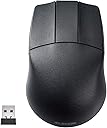
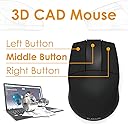
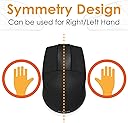
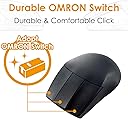
ELECOM’s wireless 3D-CAD mouse is engineered for professional designers seeking precise control without distractions. Featuring a blue LED sensor that tracks on almost any surface, a no-scroll-wheel design to prevent misclicks, and a switchable 600/1200 DPI for adaptable accuracy, it offers ambidextrous comfort and a reliable 2.4GHz wireless connection up to 32 feet. Built with durable OMRON switches, this lightweight mouse is optimized for Windows and Mac environments, making it the essential tool for focused CAD and animation workflows.

| ASIN | B07W3STDLR |
| Additional Features | Small Receiver |
| Antenna Location | Office, Home, Telework |
| Battery Average Life | 20 months |
| Best Sellers Rank | #2,021 in Computer Mice |
| Brand | エレコム(ELECOM) |
| Button Quantity | 3 |
| Color | Wireless |
| Compatible Devices | Personal Computer |
| Connectivity Technology | Wireless |
| Customer Reviews | 4.2 out of 5 stars 436 Reviews |
| Embellishment Feature | Logo |
| Enclosure Material | Plastic |
| Hand Orientation | Ambidextrous |
| Hardware Platform | Mac, PC |
| Item Dimensions L x W | 4.3"L x 2.8"W |
| Item Weight | 63 g |
| Manufacturer | ELECOM |
| Mfr Part Number | M-CAD01DBBK |
| Model Name | M-CAD01シリーズ |
| Model Number | M-CAD01DBBK |
| Mouse Maximum Sensitivity | 1200 dots_per_inch |
| Movement Detection | Laser, Optical |
| Movement Detection Technology | Laser , Optical |
| Number of Batteries | 1 AA batteries required. |
| Number of Buttons | 3 |
| Operating System | Windows 10, Windows 7, Windows 8.1, Windows XP |
| Power Source | Battery Powered |
| Range | 32.0 feet |
| Special Feature | Small Receiver |
| Style Name | Modern |
| Theme | Office, Home, Telework, Cafe |
| Unit Count | 1 Count |
| Warranty Description | No |
B**8
Short: it’s cheap and good for panning/orbiting. I like it.
What it is NOT: - high quality feeling materials - highest dpi and refresh - modern gaming mouse - a super precise tracker. It not a fast feeling mouse if you’ve used a decent mouse before. What it IS: - surprisingly ergonomic - super simple to use - decent switches - exactly what you want in a CAD mouse BIG NOTES: 1. It isn’t ergo in the modern sense, but it is rotund and fills the palm. 2. Without the wheel your hand is free to hold it more freely. Again, shocked it’s this comfortable. 3. I actually like the use of batteries for a niche item like this. I can rest assured I will always be able to use it even when they stop making it. 4. It would be even better if I could still get the wired one….. 5. The dpi switch actually is weirdly handy. 6. The LED is indeed blue.
S**N
Ideal for CAD, Comfortable for Lefties
I picked up the ELECOM 3D-CAD Wireless Mouse for animation work, and it’s surprisingly effective. It doesn’t have a scroll wheel, which took a bit to get used to, but it actually helps avoid accidental zooming or panning something that can be really annoying in animation software. The tracking is smooth and precise, with adjustable DPI (600/1200), which makes frame-by-framework easier. It's also ambidextrous and lightweight, so it's super comfortable during long sessions even for left-handed users like me. If you want a no-frills, comfortable mouse that’s great for precision tasks like animation or rigging, this is a solid pick. Just don’t expect it to handle scrolling-heavy tasks.
C**E
Best value 3 button mouse I've found
If you can cope with the loss of your scroll wheel and the ergonomics of a brick, this really is a fantastic value for someone in need of a 3 button mouse. I'd buy it again, though I hope I won't have to.
M**N
Amazing for working 3D models in Blender
After using my regular mouse in blender, I noticed my fingers were getting sore constantly "clicking" in the scroll wheel so I purchased this mouse with a dedicated middle mouse click. It has been a complete game changer - I no longer have finger fatigue from working in blender! The wireless is snappy with no lag as long as the mouse has a relatively close connection, I did notice MINOR wireless connection issues when I plugged it in behind my computer but when in the front ports it works great. Highly recommend 5/5
M**N
Works well for Maya
I have a Mac and needed a three button mouse for Maya. I have an Apple Magic Mouse but was unable to get the settings on it to work with Maya, I even bought another mouse with a middle scroll button and this didn't work so I had to return it. I found this ELECOM mouse and decided to go with it because it was the only mouse that had distinct three buttons and was wireless. This mouse performs well, no lagging, and is pretty durable. I dropped it down the stairs and one of the buttons popped out of place but I was able to push it back in and it still works great. (Buyer hint: It's worth making two trips so you don't drop your electronics from trying to carry too much!) Cons: This mouse does not scroll, it's in the name and it's true. So if you are using this mouse and need to scroll up or down, you'll need to use your mouse pad which is no big deal for me. If you have a newer Mac you will also need a USB converter so that it can plug into your computer, but you should already be aware of this.
C**Y
Just what I was looking for
It's hard to find a 3 button mouse without a scroll wheel, this one fit the bill. It's modeled after a classic design, it's fairly lightweight and is a nice size for human hands. The 2 speed settings switch is fine and are 2 good speeds. I recommend this mouse if you are looking for a wireless or wired version of a 3 button mouse without a scroll wheel. Human mammal approved.
C**J
Doesn’t work with USB -C converter
I would like to use this mouse on my laptop that has only USB-C ports. Tried to use with help of USB-C hub but doesn’t work. The manufacturer should supply usb-c port for this mouse or to convert in bluetooth. This is a great mouse for usb-a port
B**N
Great CAD Mouse
The mouse design has a better feel than my 20 year old IBM CAD mouse. I was extremely happy to find someone making a real 3-button CAD mouse.
T**O
これで満足
もう数少ない3ボタン、CAD使いにはこれしか無い コスパ最高だし無線、使用してて不便を感じない
P**D
Good product
Good product. using since 15 days, working fine, Good quality. Best for cad designers, cad mouse. Size is perfect, feels ergonomically perfect to hands, no stress on hands. Bit costly.
T**G
Very Good Product
its a bit wider than i like... but overall pretty good
コ**ガ
安く買えました
このお値段なら良いと思います。 問題無く使用できます。
S**O
安定のエレコム製CADマウスで満足
職場の共用CAD PC用に購入しました。 CADで図面を描く際に、今までは共用PCに用意されている有線のCADマウスを使用していましたが、性格上潔癖症な為、今までは嫌々使用していましたがこの機に個人のCADマウスを購入しました。 結果、無線であり自分専用のマウスなので気持ちよく使用できています。 また、クリック感やマウス感度も良く使用した感じについても、満足できています。 使用していての耐久性については、オムロン製のボタンのためそこまで心配はしていませんが、もしダメになっても¥そこまで高いものではないので、買い替えになるかなと思います。 他のレビューされている方でマウスホイールがないので評価を下げている方もいらっしゃるようですが、個人的にはCADマウスはそういうものだと割り切っているので、私は不便には感じていません。 質感としては申し分ないので、おすすめです。
Trustpilot
2 days ago
1 month ago