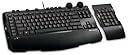
๐ฏ Level up your workspace and game zone with the SideWinder X6 โ where power meets precision.
The Microsoft SideWinder X6 Gaming Keyboard is a versatile, high-performance keyboard featuring a detachable keypad, 90 programmable macros, and two-color adjustable backlighting. Designed for both professional productivity and immersive gaming, it offers seamless mode switching, dedicated media controls, and ergonomic customization to enhance every keystroke. Backed by a 3-year limited hardware warranty, itโs the ultimate tool for millennials who demand style, function, and adaptability in one sleek package.
| ASIN | B001DWI4FM |
| Additional Features | Backlit |
| Antenna Location | Gaming |
| Brand | Microsoft |
| Built-In Media | USB Cable |
| Button Quantity | 87 |
| Color | Black |
| Compatible Devices | Gaming Console |
| Compatible Operating System Family | Windows |
| Connectivity Technology | USB |
| Customer Reviews | 4.4 out of 5 stars 183 Reviews |
| Enclosure Material | Plastic |
| Global Trade Identification Number | 00882224707626 |
| Hand Orientation | Ambidextrous |
| Item Weight | 1.53 Pounds |
| Keyboard Backlighting Color Support | RGB |
| Keyboard Description | Gaming |
| Keyboard Layout | QWERTY |
| Manufacturer | Microsoft |
| Mfr Part Number | AGB-00001 |
| Minimum Required Operating System Version | Windows 10 |
| Model Name | AGB-00001 |
| Model Number | AGB-00001 |
| Number of Keys | 90 |
| Number of Sections | 3 |
| Power Source | Corded Electric |
| Recommended Uses For Product | Gaming |
| Special Feature | Backlit |
| Style Name | Contemporary |
| Switch Type | Rubber Dome |
| Theme | gaming |
| UPC | 882224707626 |
| Unit Count | 1.0 Count |
| Warranty Description | 3 Year Limited |
M**1
Fantastic Product
I purchased this with the intention of replacing my all wireless Keyboard and Mouse set up I have had for years. Buying this with the Sidewinder X8 Mouse I was very happy with the feel of the entire Keyboard. Having my first lighted keyboard is fun for playing late at night, and is easy to find and use the keys in the dark. During the day I will turn the backlighting off in the hope that if I do that the lights will stay functional longer. (Note: My previous mouse and keyboard set has lasted over 6 years of moderate - heavy use) The keystrokes are just the right amount of resistance for me, and did not take long to feel comfortable with. The macro commands are easy to set up and come in handy with various different programs. The primary reason I chose this keyboard over others was the movable number pad. I am always a fan of versatility so when I saw that I was sold. I have tried it on the left and right and have decided to leave it on the right side for the time being. (Note: I am right handed) I will happily recommend this keyboard to anyone from a gamer to a business professional. The sheer amount of functionality is daunting at first, but given some trial and error you figure it out and everything is smooth from there. Besides who wants a simple keyboard?
A**R
Great Keyboard
Let me start by saying I have a thing against Microsoft anything, but I also have to be fair. I have had a Logitech 15 and more recently a Saitek Cyborg. Both of these had issues. With the Logitech the letters on the keyboard started to wear out and the Saitech had issues with sound and the space bar got stuck over time and the keys were horrible to press on. Also this must have had the worst documentation of all time. So I replaced it with this Microsoft keyboard as I swallowed my pride and my dislike for Microsoft. I have to say that even though the sidewinder does not have all the bells and whistles of the other two mentioned, one forgets about it for these reasons. The keyboard is smaller and the lighting is well lit and soothing. You can move the number pad to the right or left. The keys on the board seem rather sturdy. You can also program you keys to what you need and there is something called cruise control so when you press this key you can continue the action of that paticular key without holding it down. There is a volume control and lighting brightness that works well. I still feel that a USB slot would have come in handy, but this still seems like a quality keyboard and so far I like it more than I thought I would.
T**N
A great keyboard.
I do moderate amounts of gaming on my PC and this keyboard suits my needs perfectly. I like the ability to remove the number pad to make the keyboard smaller. The action on the keys is great and gives good feedback, great for writing a paper or for gaming. The tuning knobs for the keyboard are very useful, as are the media buttons on the top. The arrow keys and the WASD keys are very comfortable to use. The backlight is also a cool feature when I feel like gaming in the dark. I can't comment on how easy the macro keys are to use because I don't use macro keys, but they never seem to get in the way, so an A+ for placement. Overall a good all-around keyboard. Some may prefer the action of mechanical keyboards, but this keyboard beats every keyboard in its price range.
W**G
Excellent Gaming Keyboard w/ a Hint of the Dark Side.
Positives: Packaging of the keyboard was excellent, but it could have been improved on with a window to tease potential buyers. The keyboard looks absolutely fantastic with its new bold stealth fighter like design or it can be associated with Darth Vader. It is the gaming keyboard for Sith lords! The number pad is detachable and the magnet that holds the two parts together is pretty strong so you will not detach it by accident. This is my favorite design and the main reason why I chose this keyboard over all other gaming keyboards. The keyboard has a flat laptop like design which may or may not be what you want. There is a dial / wheel for the back light and also for the volume! I highly prefer a dial / wheel design over buttons. The back light has a true red color while the back light for macro keys are amber. Has a few media keys and also has a calculator key (on the detachable number pad). Has cruise control, mode switching, macro keys, etc for gamers who may chose to utilize those. 3 year warranty! (Logitech G15 - 1 YR | Razer keyboards - 1 YR | OCZ keyboards - 1YR | Saitek - Hard to find..., but either 1 or 2 YRs) Negatives: The keyboard has a flat laptop like design with less gaps between keys, than standard keyboards. This makes me look down to see where I am going to type much more often compared to normal keyboards. Perhaps with more time I will get used to the X6, but I prefer typing on the G15 compared to the X6. The esc key is not above the ~ key whereas the esc key is above the ~ key on probably all other keyboards. This is one of the more annoying aspects of this keyboard. The reason is Microsoft decided to make the F keys longer than normal... Would be nice to have switchable colors so it can match certain desktop setups, such as a blue back light. I would prefer green since it is the color of good ol' paper back money. :) Yes, I would also very much like a dark green lightsabre instead of a red/blue. Might accidentally snap the connections between the keyboard and number pad (be careful). There is no keyboard feet/legs/stands on the top back side so you cannot adjust the height. It may take some getting used to for some users. I'm not sure on the exact number of keys that can be hit simultaneously, but so far I have had absolutely no problems in any game. Edit: Just found out it does indeed have a moderate sized flaw in that the user cannot reload while crouching and moving at the same time... Notes/other thoughts: I went from using a Logitech G15 (blue) to this. The G15 was a great keyboard, but it was quite long and I never used the LCD. I loved the volume dial / wheel on the G15 so getting another keyboard with the dial / wheel was a must. The X6 keyboard is isopropyl alcohol (rubbing alcohol) friendly unlike the G15. I ruined the pain job on two G15 keyboards since just a bit of isopropyl alcohol can make the paint smear. Since the X6 does not have a LCD screen I would love to one day try out the dishwasher method to clean the keyboard. This cleaning method worked well with other standard keyboards, including a Saitek Eclipse, but I was too afraid to try it with the G15 (LCD). I would imagine pairing the X6 with the Microsoft sidewinder mices would give a better gaming setup in terms of having a uniform look. I have not tried and do not intend to try out the macro keys so I am unfamiliar with how well it functions and if the software is user friendly. If needed to be the number pad can also function as macro keys. It would be awesome if the detachable number pad was wireless so I would not have to reattach it to use it. Conclusion. The Microsoft sidewinder X6 is an excellent gaming keyboard geared towards users who want a keyboard that has a cool stealth fighter or Star Wars dark side look, and also is bundled with a lot of gaming and practical designs. The most distinguishable feature compared to other gaming keyboards is the detachable number pad, for the user that needs a little extra space. There are a few downfalls (i.e. laptop/notebook flatness w/ lack of adequate space between keys) or conflicts with user preferences (i.e. back light color), but overall I would give this keyboard an 8.5/10. *The biggest downfall is the lack of feel while typing which makes me have to look down in order to find the correct keys. A huge negative for gamers who need to react quickly in a competitive setting.* Edit: Listed in the negative section, but... "Just found out it does indeed have a moderate sized flaw in that the user cannot reload while crouching and moving at the same time..." I would take another star off of my review for this reason, but unfortunately I cannot edit the number of stars.
T**M
4 years in, still going strong
I rarely write reviews, however after 4 years of perfect use I figured that if any product deserves a review this keyboard does. I am going to start with the bads so that this review does not seem biased. * keys are slick offering very little grip. Oil from your fingers does seem to build up on them making them incredibly slippery * after about 3 1/2 years the function button that changes between macro settings seems to bug out at times and won't work properly * the "on the fly" macro recording does not seem to work well or if it does it is quite complicated * there is no 10 key rollover, and some key combinations do not work (for instance ctrl+w+r as in couch walk forward and reload in your average fps) * the F keys are not placed exactly like your average keyboard, they are shifted slightly and elongated * No usb/audio connections on the keyboard * occasional lag on volume adjustment * Magnets used to connect number pad are strong and will occasionally cause random things to stick to them So now that I have the bad out of the way let me say this keyboard has blown away EVERY expectation that I had for it. I have used this keyboard extensively for the last 4 years spending honestly probably more time on my computer then I really should have. To give you an idea as to how much use this keyboard as seen over the last 4 years here are some numbers that will depress you 400+ hours in Bad company 2 80+ days (2k hours) in World of Warcraft 60+ hours in fallout 3 10 days(240 hours) in aion 15 days(360 hours) in rift 30 hours assassins creed II 15 hours assassins creed 70 hours borderlands 20 hours half-life 2 20 hours just cause 2 100 hours L4D2 20+ hours in Guild Wars 2 beta Not to mention huge amounts of typing that has come from using this keyboard to do everything from order things off of amazon to prove people wrong on the internet (har har).I have gotten TONS of use out of this keyboard and realize I should probably re-evaluate the amount of time I spend in front of a monitor. Now here are some of the things that I really like about the keyboard * detachable number pad...I like a lot of space for my mouse and honestly don't have a large desk area for it. being able to remove the number pad provided me with the extra space offered by a 10 keyless keyboard without actually having to give up my number pad. * Size, I felt this deserved another bullet because unlike a lot of other "gaming" keyboard on the market this is much close to the size of a standard keyboard and not some huge Goliath that is going to take over your desk and make your mouse feel inadequate. * volume knob...I don't think I will ever buy another keyboard that does not have this feature, that is how awesome it is. No more Shift+up arrow or whatever to adjust volume, just twist the knob * Media keys, I know almost every keyboard has some form of media keys now but the placement on these are great. They actually stick out in the back slightly making them very easy to find even when not looking. * macro system, while complicated it is VERY good. It even allows you to do some neat things like add delay and has an "auto-run" feature that will press a series of keys over and over again * The style of the F keys. It can take a little while to get used to but it is nice that they are just a tad wider than your normal F keys. I used to have trouble using them for the occasional keybind...no more * back light, not only is it red (because blue is soo main stream amirite?) but the knob allowing you to adjust it is kinda cool. Now I will admit that I almost never adjust the light...just crank it up and leave it but it is something that is fun to play with from time to time * after 4 years I still have 100% key function. The keys are obviously not as light as a mechanical keyboard however they do still all work after 4 years and TONS of use. * Calculator button on number pad. It is nice to have, I do use it * ease of connection for number pad. If you are concerned that connecting the number pad will be a pain, don't be. * also ZERO key wear. I have one tiny spot on the left top corner of my s key that has worn though the coating, other that that every key shows little wear (although there is some glossing) * Somewhere between standard keyboard keys and laptop keys. They are not totally flat with almost 0 travel like laptop keys but they are also far from the full size long travel keys that are more conventional. If you prefer typing on a laptop to type on a standard keyboard you will probably like this keyboard. * With proper setup attaching the number pad to the left side can result in "hot-key heaven" I hope you enjoyed my review and that it has helped you with your purchase.
S**E
Nice keyboard!
My previous keyboard was a G15 (it died) that I loved. I was very skeptacle when purchasing a MS branded keyboard having been a fan of Logitech for so long.. I'm glad I made the switch. Probably my favorite thing about this keyboard is the detatchable number pad. With my large mousepad and G13 already taking up space I didn't want a large keyboard. So being able to remove this (it has no cables) is a great feature. The volumn controls work very nicely and feel really smooth. They keys I wasn't so sure about as they are about 1/2 the height of a regular key, but after a few days of use I really really like the feel of typing on this keyboard. The "W" has a couple bumps on it, which is a nice little touch for FPS games when you are going back and forth between typing. The WASD keys also have some extra lighting to them. Being able to easily fine tune the backlighting is pretty cool too. It has no stands built in for those who like to angle their keyboard as most keyboards do. I found this odd but I don't use them myself. I did not buy this keyboard for the macro functions but they seem to work just fine.
J**R
Love it!
Love it! I definitely--still can't spell that word right!--do. The illumination is great, especially at the letters, their are a number of Illuminated keyboards out their, but only the Saitek Eclipse 3, the G19, or simply this Keyboard. The keys are great, though I have noticed I'm just a smidgen more prone to typos, no biggy, I play more than type anyway :D The macros are great, enough to make great use in Sacred 2--if it'd run anymore under Windows 7 GRRR--and a few other games. The nobs, I have to admit, I don't use :) I have a Logitech MX Revolution, and the button original assigned to page flip works great for volume control! So yea. Love the detachable Numpad, and switchable on the fly. Makes it so much easier to type out those bloody serial keys with numbers. Left hands great for numbers it seems >.> So far, I've yet to have any problems with it. XP, to Vista 32 Ultimate, to Windows 7 Professional RTM 64 bit. Works like a charm through and through, installing Intellitype only improves upon it. I've always like Sidewinder products, makes me miss my old Sidewinder Joysticks. Now if only I can get trackballs from microsoft again... sigh. (Oh, and five key presses work great! well didn't have any problems LOL!)
C**R
Great Board!!
Pros: Great sleek look. Keys feel just right when typing (not clunky or loud). The option of moving the number pad to the right or left is great. Macros work great when setup. Volume and color brightness controls work awesome. Everything works as it should. Perfect for gaming. Cons: The red back-light color is o.k., but for me I would have preferred a blue or white. The hand rest pad at the bottom of the keyboard is a little wide - comes close to overlapping the front edge of my keyboard pull-out tray. Macros and some other special keys take some time to get setup. (these are just my opinions and personal preferences) Other: All-in-all this is a pretty sweet board and well worth the money. If you are looking for a new keyboard, definitely give this one a try, you won't be disappointed (unless you are extremely anal about these kinds of things)
Trustpilot
3 weeks ago
1 month ago