

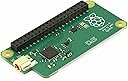
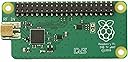
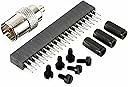

Raspberry PI TV HAT DVB-T/T2 PI TV HAT DVB-T/T2
Product ID: 218774007
📡High-definition signal reception
📺DVB-T/T2 support
⚙️Compatible with Raspberry Pi
📡 Tune into the Future of Entertainment!
The Raspberry Pi TV HAT DVB-T/T2 is an internal TV tuner designed for Raspberry Pi, enabling users to receive digital terrestrial television signals. With support for DVB-T and DVB-T2, this compact device allows for high-definition viewing and seamless integration into your existing Raspberry Pi projects.
| ASIN | B07JKH36VR |
| Best Sellers Rank | #686,467 in Electronics ( See Top 100 in Electronics ) #715 in Digital-Analog Converters |
| Brand | Raspberry Pi |
| Compatible Devices | Television |
| Customer Reviews | 4.5 out of 5 stars 668 Reviews |
| Global Trade Identification Number | 00707565827195 |
| Hardware Interface | PCI Express x1 |
| Item Weight | 34 Grams |
| Manufacturer | RASPBERRY |
| Mfr Part Number | RB-TVHAT |
| Model Number | 180-6177 |
| Operating System | Raspberry Pi OS |
| Style | Classic |
| Style Name | Classic |
| UPC | 707565827195 |
| Unit Count | 1.0 Count |
E**O
Chiaramente per chi conosce il raspberry
Ho il raspberry 3 b2. La modalità di montaggio del decoder è semplicissima, si collega al GPIO. Ho adattato il case per collegare il decoder, perchè il mio chiaramente non aveva l'uscita per l'antenna. Un foro con il trapano e via il gioco è fatto. Il mio raspberry monta Libreelec come distro. Quindi ho installato TvHeadend e poi da interfaccia Web ho fatto lo scan dei canali, aggiungendo le picon (icone canali). Rispetto ai decoder usb esterni (esempio AverMedia), provati su Openelec la configurazione è automatica. Non devi installare driver con istruzioni ssh e lato Tvheadend web la configurazione è semplicissima (nelle versioni precedenti il processo era più complesso). La cosa bella è poter configurare TvHeadend nelle App Android per vedere la Tv in streaming nel cellulare. Unica nota dolente è il connettore (adattatore) Antenna alla scheda. Un po' deboluccio, appena tocchi il cavo antenna, si stacca.
B**E
Fantastic price, fantastic product
I just installed a RasPi 2 on my downstairs TV running LibreElec/Kodi and found out that this was available - so I thought I'd give it a try. I'm very impressed. Installation is not too hard, just plug the extension header into the RaspPi's header, then add the TV hat. In my case I had to remove the top of my case but that's no biggie. For me, in LibreElec all I needed to do was go to their repository, get TVheadend Server and then use a laptop to set it up. As many people will tell you, use the pihut guide, it really is the best (although on my first attempt I couldn't get many channels, so I reinstalled and tried again scanning for everything and it worked better that time!) - So top tip would be break open a cheap SD card and install a vanilla version of your OS/back up your OS before attempting set up as undoing TVheadend settings is a complete nightmare! Also note, I don't think the TVheadend server 'web' interface shows live video on Windows machines (at least, it didn't on any of mine!) Once the server was set up, I've just installed TVHeadend client on all the Kodi devices in my house and am now able to stream or record TV from wherever I am on my network. One final 'be aware' - the first device to log in to the server is in control of it (unless a pre-arranged recording is happening) so you'll only be able to watch channels on the same DVB multiplex on any additional devices (e.g. only BBC channels if you are recording BBC TV) All in all, worth the £7!
J**B
Fungerar perfekt
Snabb leverans och lågt pris. Förpackningen var platt när jag fick den, men innehållet var helt. En liten varning bara är att kolla instruktionerna innan du fäster hat:en på din Raspberry Pi, jag gjorde misstaget att fästa den upp-och-ner på min Raspberry Pi Zero. Då startar inte din Raspberry Pi alls, vilket räddade mig. Annars har den fungerat felfritt. Rekommenderas!
B**K
Fantastyczny
Urządzenie działa bez zarzutu. Świetnie radzi sobie zarówno w systemie Kodi, jak i na innych dystrybucjach Linuxa.
W**Z
Nun auch DVB-T2-Empfang
... mit dieser kleinen Receiverplatine und einem RaspberryPi4B. Der kann das in Deutschland ausgestrahlte HEVC(/h.265) selber decodieren und auf zB. einen angeschlossenen HDMI-Monitor wiedergeben. Allerdings ist die Installation der Software (LibreELEC, tvheadend, PVR-Client) eher etwas für Fortgeschrittene. Hat man das aber hinbekommen funktioniert es super - vorausgesetzt man hat ausreichenden Empfangspegel.
Trustpilot
1 day ago
2 months ago