🔌 Elevate your workspace with the cable that connects your world in 4K clarity!
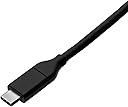
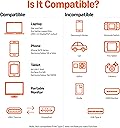
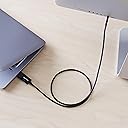
This 3-foot bi-directional USB-C to DisplayPort cable supports 4K resolution at 60Hz with 5 Gbps data transfer speed. Compatible with a wide range of devices including MacBook Pro/Air, Thunderbolt 3, and DP-enabled monitors, it offers plug-and-play convenience without extra drivers. Built with durable polycarbonate and ABS materials, it ensures long-lasting performance and tangle-free use.
| ASIN | B081VK7Q94 |
| Best Sellers Rank | #4,466 in Our Brands ( See Top 100 in Our Brands ) #71 in Computer DisplayPort Cables #83 in Thunderbolt Cables |
| Brand | Amazon Basics |
| Brand Name | Amazon Basics |
| Cable Type | Display Port |
| Color | Black |
| Compatible Devices | Tablet |
| Compatible Phone Models | Samsung |
| Connectivity Technology | DisplayPort |
| Connector Gender | Male-to-Male |
| Connector Type | USB Type C |
| Customer Reviews | 4.3 out of 5 stars 2,123 Reviews |
| Data Transfer Rate | 5 gigabits_per_second |
| Ethernet Cable Category | Cat 5 |
| Frequency | 60 hertz |
| Included Components | Cable |
| Indoor Outdoor Usage | Indoor |
| Item Shape | Round |
| Item Weight | 0.04 kg |
| Manufacturer | Amazon, this product may originate from China or Vietnam |
| Model | UTC-DP-B-L |
| Model Name | Bi-Directional Cable |
| Number of Items | 1 |
| Number of Pins | 24 |
| Other Special Features of the Product | Tangle Free |
| Outer Material | Polycarbonate and ABS |
| Part Number | UTC-DP-B-L-3FT |
| Recommended Uses For Product | Connect Devices |
| Special Feature | Tangle Free |
| Specification Met | RoHS |
| UPC | 192835001960 |
| Unit Count | 1 Count |
A**K
Bidirectional worked for me
It's incredible how hard it is to find something that goes from a GPU to a portable monitor that accepts a signal on a USB-C port. 99.9% of the time such a thing isn't needed, so I'm glad this exists at all. I have an Arzopa 13" 2560x1600 portable monitor that I use with my laptop, but mostly use it at home under my main monitor. The problem with the Arzopa monitor is that it has a really dodgy connection if you use mini HDMI as the input and would flicker constantly or fail to work entirely. I didn't know that was the problem until I read a review here on Amazon, which sent me on a quest to find a way to connect it to my desktop via DP, since I have 3 of those and only 1 HDMI (already used). It seems the HDMI port was a checkbox rather than something they wanted people to actually use. Anyway, the cable works and it fixed my problem!
D**T
Works Great with Lenovo TB4 Workstation Dock DisplayPort to USB-C Display
I have two Samsung M8 Smart Displays; for inputs they support USB-C/Thunderbolt or (micro) HDMI. My Lenovo P15 Gen 2 laptop is attached to a Lenovo Thunderbolt 4 Workstation dock which has 1 Thunderbolt, 1 HDMI, and 2 DisplayPort outputs. The monitors individually work fine when attached to the Thunderbolt connection, but since they don't support daisy-chaining I can connect only one of them that way. Connecting the 2nd one to HDMI worked, sort of, but the HDMI-connected display would change resolution and end up as the primary display whenever the laptop's power profile would turn them off after a period of inactivity. I had other displays connected to the dock's DisplayPort ports previously and did not experience any issues, so my search for an option to connect from DisplayPort to USB-C turned up this cable. And I'm happy to say that it seems to have worked as I hoped!
J**O
Increíble útil y fiel
Fantástico, conecté mi monitor Samsung Oddysey a mi laptop mediante este cable y no perdí calidad de imagen en absoluto.
A**Y
Used for Dual Monitors - DP on PC to USB-C-DP on Monitor
The PC this is used on has one HDMI and two DisplayPorts. The two monitors are Dell 27" 4K and both have two HDMI ports and one USB-C-DP (DisplayPort Alternative Mode). I used HDMI on one monitor and a Plugable active DisplayPort (PC) to HDMI (monitor) adapter/converter for the second monitor. It worked, but the second monitor would not wake up after waking the PC from sleeping. I had to unplug the DisplayPort cable and plug it back in to get it to work. I replaced the DP to HDMI adapter with this AmazonBasics bidirectional DP to USB-C-DP cable and the issue is resolved. The monitors now work as they should. It's interesting that, to my knowledge, there are no single directional DisplayPort to USB-C-DP cables. A single directional cable will not work in the scenario because those cables only send video output from USB-C-DP on the PC to DisplayPort on the monitor. This AmazonBasics cable sends video output either way. It's an awesome product for an awesome price.
A**N
Does not work!
Unfortunately did not work for my SFF pc. I am using this to display on my arzopa monitor and I cant get nothing to display. Just a FYI for anyone who has a Arzopa monitor. This is the second cable I tried now..... on to the next
K**N
Beware the shortness
Ordered the 3' cord thinking that would be sufficient. Really needed just a few more inches, so was forced to reconfigure my layout to accommodate. The cord performed fine but I wasn't happy with the changed set up and broke down and bought the 6' cord (very happy now btw). 5 stars since I can't fault the product for my own mismeasurement, just be mindful of the length that you need and it's best to err on the longer side.
C**R
Don't try to disconnect it
I had previously given this product a 2-star review, thinking that it was not capable of 4k@60Hz. But a better cable I also bought didn't work in my setup either--it turned out the problem was I was trying to hook up a DisplayPort 1.2 monitor to a DisplayPort 2.1 computer. But I still take a star off because the release button to disconnect it was hella stuck. I guess it's fine if you're never planning on unplugging it, but this cable is a Stage 5 Clinger.
C**.
Quality cable, but I needed to perform additional research - due diligence
I purchased the Amazon Basics Bi-Directional USB-C to DisplayPort Cable, 6-foot version with the hope of “USB-C full featured” capabilities, which means you can use that single port to transfer data, audio, video, and power. My issue is my connection begins with the computer's Graphics Processing Unit (GPU) DisplayPort to my external portable monitor that has a “full featured” USB-C port. The VESA DisplayPort standard is a device that can draw a maximum of 0.5A at 3.3V, which is not enough power supplied to the USB-C port on the monitor. If you have the reverse scenario, I believe the (computer) GPU USB-C port would power the (monitor) DisplayPort. Regardless, the cable provides excellent signal and video quality. I am happy with the purchase.
A**.
Działa zgodnie z opisem
Kabel działa bez problemu z laptopem HP Elitebook G3 na zintegrowanej grafice Intel 520 i obsługuje rozdzielczość 3440x1440 przy 100hz. Displayport jest podłączony do laptopa, a USB-C do monitora. Polecam
G**O
Quello che cercavo
Volevo collegare il mio PC windows al monitor Apple studio display. Questo cavo ha risolto il mio problema, anche se pazialmente. Non funziona la webcam e nemmeno l'audio, ma il segnale video arriva, ed è quello che più mi interessava. Il tutto con una spesa davvero modica! Soddisfattissimo!
M**L
Casi un año conectando y desconectando a diario, como el primer día
Me pasé al Bi-Directional después de que el otro cable de Amazon Basics (el Unidirectional con conectores grises) me dejara tirado a las dos semanas. Y la verdad es que ha sido un acierto. Lleva ya casi un año enchufado a mi MacBook y un monitor 4K de 27", y funciona como el primer día. Lo conecto y desconecto varias veces al día porque me muevo con el portátil, y antes con otros cables notaba que al cabo de unos meses empezaban los problemas. Este ni se inmuta. Tiene un clip en el conector del DisplayPort que hace que quede bien fijado en el monitor y no se suelte. Ojo que si tu monitor tiene el puerto un poco hundido, puede costar un poco sacarlo, pero para mí eso es más ventaja que inconveniente. De los mejores cables que he tenido para esta conexión. Y mira que he ido cambiando cada medio año.
首**藤
映像出力の安定性が高い
PCと外部モニターの接続に使用しました。4K解像度や高リフレッシュレートの出力においてもチラつきや認識不良がなく、安定して映像を出力できています。ケーブル自体もしなやかで取り回しやすく、デスク周りをスッキリさせやすい点も好印象です。 高価なケーブルと比べても遜色ない実用性があり、コスパに優れた一本だと感じました。日常的に外部モニターを使う方や、安定した映像出力を求める方には十分おすすめできるケーブルです。問題なく使えているので、また同じものを選ぶと思います。
A**R
fonctionne avec mon pc (CG RTX 4090) vers mon écran LG ULTRAFINE 5K 27"
Ce câble me permet de connecter sans problème mon PC, à partir du display port 1.4a de ma carte graphique RTX 4090 vers le port thunderbolt 3 de l'un de mes 2 écrans LG UltraFine 5K 27, qui était jusqu'alors réservé à mon mac mini M2. Avec une qualité d'image nickel, en 60htz. Ce alors que je pensais devoir finir par changer ma carte mère ou ajouter un module asus thunderboltEX, actuellement à 127 EUROS. Ce câble n'est pas assez mis en avant lors des recherches alors qu'il rendrait bien des services.
Trustpilot
2 weeks ago
1 month ago