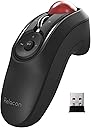
🖱️ Elevate your workflow with precision and style — the trackball mouse that means business.
The ELECOM Relacon Handheld Trackball Mouse offers an ergonomic, ambidextrous design with a sensitive 2.4GHz wireless connection and 10 programmable buttons. Featuring adjustable DPI settings up to 1500 for precise cursor control, it reduces wrist strain by enabling thumb-operated navigation. Its durable artificial ruby bearings ensure smooth, low-maintenance tracking, compatible with Windows and MacOS systems. Powered by included AAA batteries, it’s a sleek, professional-grade tool ideal for managers and creatives seeking efficiency and comfort.


| ASIN | B07ZKL66GY |
| Antenna Location | Gaming |
| Are Batteries Included | Yes |
| Are Batteries Required | Yes |
| Best Sellers Rank | #9 in Computer Trackballs |
| Brand | ELECOM |
| Button Quantity | 10 |
| Color | Black & Red ball |
| Compatible Devices | Desktop PC, Laptop |
| Connectivity Technology | Wireless |
| Customer Reviews | 3.8 out of 5 stars 3,836 Reviews |
| Enclosure Material | Plastic |
| Hand Orientation | Right |
| Hardware Platform | PC, Mac |
| Item Dimensions L x W | 1.61"L x 4.41"W |
| Item Type Name | ELECOM Handheld 2.4GHz Wireless Thumb-operated Trackball Mouse, 10-Button Function with Smooth Tracking, Precision Optical Gaming Sensor, Left / Right Handed (M-RT1DRBK) |
| Item Weight | 2.7 Ounces |
| Manufacturer | ELECOM |
| Model Name | Relacon |
| Model Number | M-RT1DRBK |
| Mouse Maximum Sensitivity | 1500 Dots per Inch |
| Movement Detection | Optical |
| Movement Detection Technology | Optical |
| Number of Batteries | 2 AAA batteries required. (included) |
| Number of Buttons | 10 |
| Operating System | Mac OS X 10.7 Lion, Windows 10, Windows 7, Windows 8.1 |
| Power Source | Battery Powered |
| Range | 10.0 meters |
| Style Name | 2.4GHz |
| Unit Count | 1.0 Count |
| Warranty Description | 1 year manufacturer |
J**N
No mouse is perfect, but this one is darned close
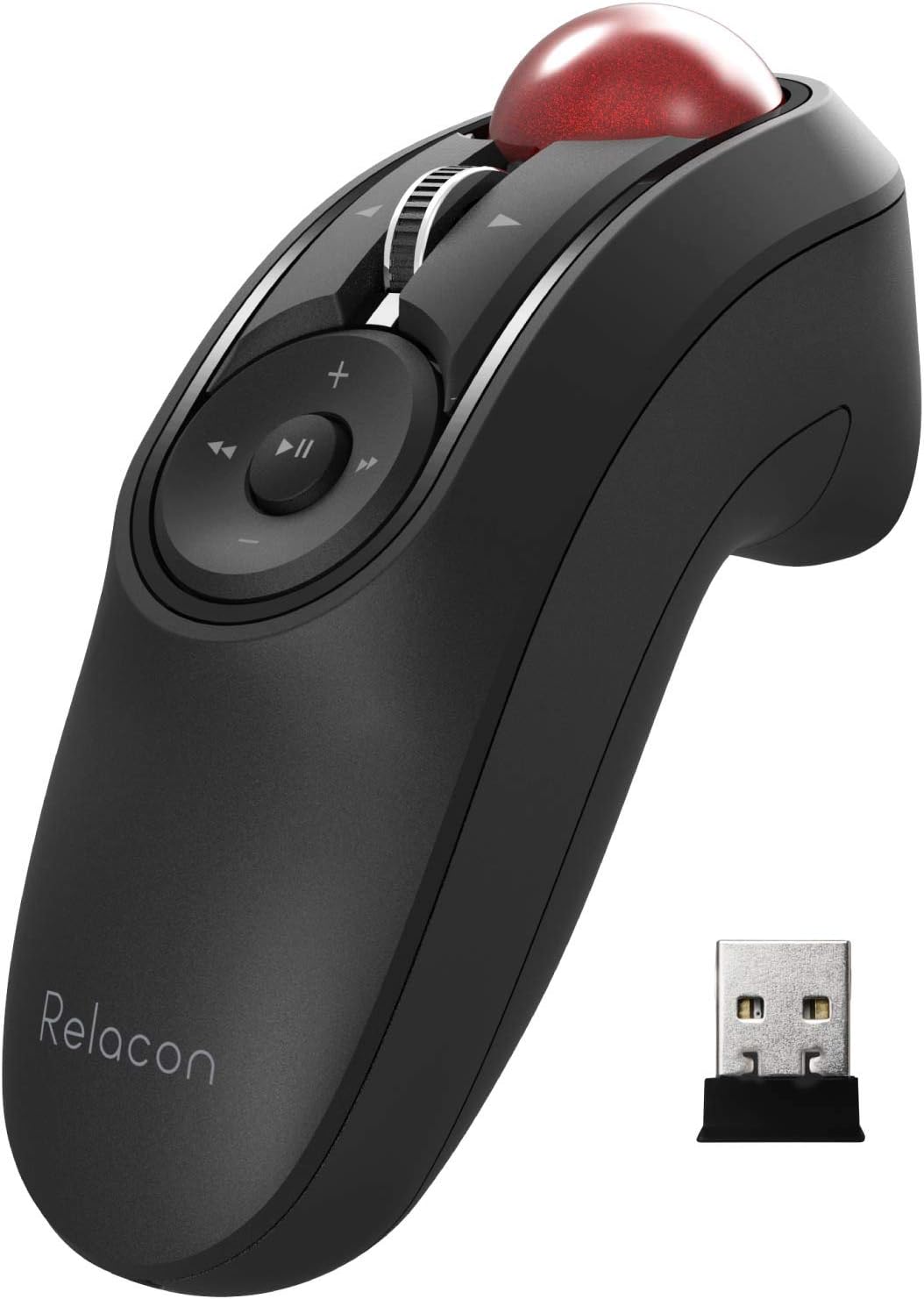
When I read the other reviews, I worried that the ball might fall out when you turn it upside down, but no, it is not like that. I set this thing on the table on its side without the cradle and I have no problems. What people are talking about is if you drop this, then maybe the ball will pop out like the Logitech (and every other brand's) trackballs do. I don't know, because I like this too much to let myself drop it. Before going any further, let me stop and just say that I love this mouse. I have only had it a couple of days, and it is about as quirky as I am, but this mouse is really and trully everything I had hoped it would be. First, keep looking back at the price, which is amazingly affordable. Second, take a look around and the nearest similar device is a bulky version with a finger loop hole and basically everything to signal that it is for videogaming and not for the office. By contrast, this is like the classiest possible way to control your laptop during a presentation. If you had this, connected to a Macbook, controlling Powerpoint, people would assume it is some hot new tech they never heard of, rather than an actual obscure company with an idea that is bold and forward-thinking. That is if they even notice it, being so compact and discreet. For anyone with limited mobility, this could be a really enabling device on a whole other level. The quiriest detail is also it's coolest feature once you master it, and that is the variable speed control beside the "on" switch. I never knew there would be such benefit to changing my mouse speed conveniently. This will be the key to enabling maximum mobility with this mouse. There is one small drawback. I have medium-sized hands, so there is one motion that requires two hands, which is to move from side to side. You have to push down the scroll wheel and then roll the ball. That is the only feature I found here that requires two hands, excluding the moves that require that I hit shift on the keyboard before a mouse move. However, if you are planning to work with this thing up to an hour strait, then you should anticipate switching hands or fingers to keep from getting a cramp. When I do switch hands and fingers, I am able to manage and not cause that type of cramping. Doing this also helps you to find the most relaxed sort of default ways to hold this. One way is if you slide your hand back, so that your first and second fingers are only at the very edge of each trigger button, then that promotes a hand position that is curled at an angle very close to the natural resting postion of your hand. One final considerataion is that your success with this mouse will be linked to the task you most hope it will benefit. I got this almost entirely for graphic design, because the mousepad on my Macbook is not working ideally for my workflow, and the stylus-type pads are for drawing more than for designing. With most devices, the challenge is threefold. First, it is very easy to summon the left click on the Macbook trackpad, to the extent that it is so annoying and constantly in my way that I forget it's also a quick access to certain features. With this mouse, I am suddly actually using that left click and noticing it's options and benefits. Secondly, when I pull my finger off the Macbook trackpad, my cursor position is subject to a slight jump. That is a problem in precision graphics, and even the Wacom tablet or IPad with the Apple Pencil are not safe from this hiccup without a fair amount of finesse. This mouse solves that problem the second you get your ideal mouse speed calibrated, and get oriented to the device. The weight of the ball means the cursor absolutely only wiggles when you touch the trackball. This is the precision I needed. I can get used to the muscle memory of pressing the trackball to make it zoom in/out, and the two handed side-to-side movement is not too bad once I got in the habit of switching hands. Why would you want to switch hands, you ask? Well, welcome to your new reality, because you don't have to be ambidextrous to use this mouse with either hand. That is another reason I feel this would be a really great and affordable solution for enabling people who may have limited mobility. If you don't end up liking this mouse, it could only be because of a very limited number of reasons. Maybe you want to use this for many hours a day without changing up your grip or which hand you use, then this may not be the most comfortable mouse, unless you learn how to master that looser grip that I explained earlier. Another of the limited reasons you might not like this may be because of the size. This is probably most ideal for small-ish hands and least ideal for really large hands. My average-sized hands are maybe a small bit larger than what is ideal for this. Really, the bottom line is that if you are a person who wants to hold your mouse in your hand, not working it on the desktop, then I am convinced that this is the model to get, especially if you want it to be discreet. But that is why this seems like such an ideal mouse for giving a presentation, because it is nice and small in your hand and not like the handle-bar look it would have if it was the most ideal comfort for a large hand. Some reviewers commented on this mouse, feeling that it was too light and not sturdy. Well, think of this as a mouse, because this is a...well, a mouse. It is equal in durability to the average mouse you have seen. This is not a piece of sporting equipment like a Wii controller that offers a rubber cover because it expects betting mistakenly tossed. Please do not toss this mouse. This is a tool that is sleek and designed for a professional who wants to whip their cursor around their monitor screen with an impressive sense of command and agility. This is my ultimate mouse. Oh yeah, and the button to calibrate the speed is what you hold down to get the mouse to sync with your other gear. This can confuse you when you return to your Bluetooth menu on your laptop and click the old icon, which takes you nowhere. Again, hold down that calibration button beside the power switch on this mouse, and it will pop up in your menu as a new Bluetooth option. There are so many amazingly well-thought-out features in this device. A feature that I really love and did not expect, is that I can control my music on iTunes or Spotify in the background, while I am designing on Affinity software, without having to summon the player window to appear in front of my graphic window. The circular play controls function independently of which app window is in front. I mean...wow...really and truly, this thing checks every box I could have hoped for. We should be grateful they did not make this thing heavy for no reason, or three times this cost for no reason. This is simply a great product for a great price. I am thrilled with this purchase! Put the batteries in it and the weight is perfect!
M**E
Fixed! - Stopped working after 90 days
First I noticed a terrible delay on the volume up/down button (connected to Windows). Now the trackball doesnt work either. Intermittently one or the other will work for awhile. Not a distance/range or battery issue. Overpriced, feels cheap. The trackball works ok, but loses contact if you tilt either direction past 45 deg. The trackball rattles too.I felt it was overpriced but enjoyed using it for increasing/decreasing volume from 10 ft away, or sometimes making a simple adjustment with the trackball. (its no good for any precise work) Now that it is intermittently failing, I regret wasting money on it. ---> Try the Kensington Orbit instead! edit 7-13-24 It's been working normally. I think the issue was related to interference from another 2.4 usb device. Needs further testing. This product works well. The buttons could be better. Price is fair I think based on the overall reliability so far. Thanks for developing this. We need more devices like this, and more feedback on them so they can keep improving!
H**R
The Ultimate Ergonomic Daily Mouse
Used for 2 years now, have dropped it plenty of times, the ball has come out multiple times, but there are no visible marks or damages to it, it still works great, and it is always extremely comfortable. Will be buying a second eventually in case my first ever poops out because I can not see any using any other mouse anymore. Seriously ergonomic since you can use your mouse in your lap and does not demand you rest your hand/wrist on a desk. This is even better than the upright, Shark-fin mice. It does the job during games but definitely takes some getting used to. The biggest complaint is the DPI buttons location, which tends to accidentally get pressed. An inconvenience. The other button placements, like right and left click, are extremely intuitive and comfortable. Overall, takes getting used to, but once you do, this is the ultimate mouse for ergonomics on your arms.
S**X
First trackball experience. Loving it. UPDATE 08/27/24 IT STOPPED WORKING
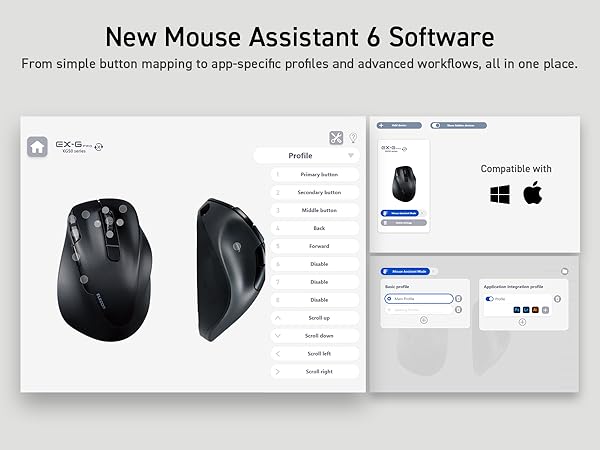
This is my first foray into the world of trackball mice. Ive had this now for about 20 days. As a pc gamer and someone who uses their pc also as a home theater pc, with my 15+ years of experience with tech, I must say, Im very glad I decided to try out this method of cursor control. Most of my time on a compooter is spent lying in bed where using a traditional mouse just isnt as conducive to comfort and ergonomics. Its great not having to have a flat smooth surface in order for it to function properly. I love the fact that theres dedicated media controls that my pc automatically recognizes them as such. My gaming background includes LOTS of controller time so using my thumb to move the cursor comes naturally as if I was using a joystick. +overall design is great. very ergonomic and makes for a lot less strain and fatigue on the hand +dedicated media controls are a big plus + i dno what it is about the trackball but it looks cool as heck and after a good application of oil from my face(google it lol) and a little break in period it is now very smooth and I can get pretty precise with it if i have to. + theres a program for it you can download that lets you assign different functions for keys and a few other options like "flying scrolling" that allows you to automatically continuously scroll up or down by quickly scrolling up or down. works good. + some people seem to not like the stand that it came with but i love it. yes, the mouse just rests on it and its not secured to it by any means, but for me thats preferred as I can quickly snatch it up and put it back without having to fuss. im also not constantly bumping into where its placed so its not constantly falling off - not usbc rechargeable - if you buy the bluetooth model theres only bluetooth and no usb receiver for 2.4ghz like a lot of wireless mice have. itd be nice to be able to choose depending on circumstance. i prefer 2.4 as theres better connection and i only use it on a pc and not a tablet or phone. -trackball doesnt like staying in place and must be used in a upright position in order for it to work smoothly. if you hold it in your hand sideways the trackball has room to play and shifts a bit out of its hole. you can hold it upside down and it wont slip out but it does shift a bit. i understand there might be a design limitation here but itd be nice to be able to hold it in any position without the trackball somewhat slipping out of its slot a bit. - the scroll wheel does not make smooth complete rotations on the upward scroll. i actually returned the first one i bought because i thought it was defective but the second one is the same. as youre scrolling the wheel up you come to a point of mushy resistance that takes about two thumb scrolls to pass through, then it gets easier for a couple scrolls, and then then the resistance comes back. Ive never experienced this on a mouse before. I really wish this thing had a QUALITY scroll wheel, as it's one of the most used features for me. maybe one of those magic magnet scroll wheels like logitechs mastr mx has. this is not to say its bad, just wish it didnt do that mushy stuff upwards. - the scroll wheel button is starting to not register clicks as easy. having to push harder now - scroll wheel itself does not have side clicks where you can shift the wheel to the side and itll register input. what they did was include a button on each side of it that the computer registers as side clicks. works, but if the scroll wheel had the side clicks those two side buttons could be used for something else. Overall Im very glad with this purchase and would buy again. The design has room for improvements, and itd be nice to see some of the bigger names offer a product like this. The price seems a bit high but without any other quality options on the market its kind of to be expected. Update 08/27/2024 - welp, i kinda figured this would happen based on the reviews. it died last night. the button on the right of the scroll started sticking and becoming hard to actuate. the scroll wheel had been getting screwy. i would scroll but it would do a scroll back up, meaning i would scroll and stay in the same place. noticed last night that the scroll wheel had become off center. once i corrected that it started scrolling right and the button to the right of it became easier to use. but then the buttons just stoppped working. it connects to bluetooth but none of the buttons work. ive never encountered this on a bt input device before. it makes me feel like some of these are programmed to die after a certain time so ppl keep having to replace it. companies have been caught doing this kind of thing before. ended up ordering the non bluetooth version. lets see if that one fairs any better. i bought the bt version thinking I could use it on my laptop as well but i only used it a couple times like that since i bought it. if the non bt version does it too then i can almost guarantee this company has its products programmed to fail for profit. which would really suck because this thing is almost perfect. my only complaint is the build quality.
D**O
Better than alternatives, but still not perfect
I was using a different trackball mouse before this that had a few issues which this one overcomes. With that previous version, you couldn't right-click and operate the trackball at the same time (because right-clicking was done with the thumb). Also, the right-click buttons would fall off after a few months of use, rendering it inoperable. This version solves the first problem (left- and right-clicking are both done with the index finger) and hopefully the second (although I've only used it for a couple of weeks, so can't be entirely sure yet, but it doesn't seem like it will have the same issue). However, it has a different problem of its own, which is that the trackball is not held snugly in place, so when you tilt it in any direction or move it too suddenly the mouse cursor will jump around randomly. This makes it difficult to do precision work with the cursor. Overall it's functional, and the extra buttons for browser forward/back, play/pause, and volume control are useful, but the actual cursor control is clunky and frustrating.
H**N
junky and hard to control
The functionality itself is fine but the problem is the hardware. The ball inside the mouse is not secured down and even holding it dead level causes the ball to jump around while rotating it which leads to the cursor jumping around on screen. It has good ergonomics this is inherently the shape that Playstation and Nintendo Wii use for controllers so it's following a common form factor that's widely approved of. I also did not notice any lag the response time was good but this didn't matter because the accuracy was terrible. I disagree with the summary that said this was good for gaming the accuracy is terrible as I can't imagine trying to click on things in a game with this or trying to aim, that sounds like a special challenge to give to game streamers but not ordinary people who want to enjoy games. The price is also unreasonable for the cheapness of the product. $60 U.S. for cheap plastic, a few sensors, and a circuit board that talks to bluetooth should be under $15, these are very common parts purchased for a few cents each and low labor effort to assemble.
M**Z
Eleom Handheld Trackball Mouse
I really like this mouse in a lot of ways, but there are other times when I've struggled with it, and I've ended up not using it as my daily mouse (I keep it on hand in case my daily mouse dies, like my Logitech finally did). I could see it being great for specific situations (like the listing that shows using it with a laptop at a non-desk location, using as a media controller, etc) but as my everyday mouse at my desk it just didn't work out. I've been using a trackball super happily for about 5 years, so all of the pros and cons below I'm approaching as already being a trackball user. (If you're not already a trackball user... hang in there. Once you get used to it it's GREAT.) PROS ------ - Can hold it in really any position, and it doesn't have to be up on your desktop. I just held it down in my lap a lot, or next to my side when I'm using a standing desk, but you can also rest your hand on the edge of the desk in different positions too. Even set your hand on a luxurious pillow if you want. :D - It's ambidextrous, so it works great for righties and lefties. I'm not ambidextrous myself at all, but if my right wrist is really bothering me I can switch to my left hand; it slows me down a little, but I'm still perfectly able to keep doing what I was doing. - Super flexible in that it allows you to hold it basically however you want. I wish I could adjust the curve of the underside (like have the finger groove hold my other fingers further back) but I don't know how you'd possibly make that adjustable), but just being able to not have your wrist on a desk is a pretty big deal by itself. I've had a lot of wrist pain over the years and this DEFINITELY helps. - Programmable buttons are nice! I don't need them mostly and even the ones I would use (like the back and forward web browsing buttons) I just forget they exist, but if I used it for a long time I'm sure I'd eventually make use of them. It also has a tilting scroll wheel... I had to look up what that even was for, but turns out it's for scrolling horizontally. The more you know! :D I never used it, but it's often just nice to have more options rather than less with anything. - The driver/controller program for it lets you set which button does what, and things like your scroll speed and how to make the wheel do a speed-scroll, plus there's a DPI controller on the mouse itself. CONS ------- - Switching between mousing and typing is just prohibitively annoying. Because it's not on the desktop, every time you want to type two-handed you have to either put the mouse completely down or set it on its stand. And if you're holding down in your lap like I do it you're reaching up and down a ton (which to be fair you'd be doing to reach the keyboard anyway). I just wound up doing a lot of hunt-and-peck typing with my left hand only, which made me remarkably slow at what I was doing compared to what I was doing with my previous trackball. - The stand is basically there to hold the mouse when not in use, but it's a little bit precarious. If you set the mouse down carelessly, it might slide off. I've knocked it off by jostling my desk. My cat's knocked it off. (Why is my cat on my desk? I'd also like to know this!) I'm working in a room with carpeted floor so it hasn't been a serious problem, but if I was using this in my previous workplace with concrete floors, it'd be extremely broken by now. This issue AND the problem mentioned above could be solved by a more substantial base where you could set it (and it would stay) that could turn it temporarily but SECURELY into a desktop mouse. If the stand allowed you to more easily actually USE the mouse while it's set there, it'd become like 90% easier to work with it when you also have to type. - Precision work (like for instance trying to draw or erase an area in Photoshop) was surprisingly difficult. I'm not sure why; I've been doing that work with a trackball mouse for years, so maybe this one's just a bit more sensitive or the ball's a little looser? I really had a hard time producing any sort of non-wobbly line, and no amount of fine-tuning the speed or DPI or anything really helped. - It's a little small, so if you have huge mitts it might be too little for you. For reference, I typically wear a medium in latex/nitrile gloves, and a large in outdoor type gloves, and it fits my hand pretty great. I think smaller hands would probably be fine also, I just think it might be uncomfortable for folks with really big hands. - If you need to get the trackball out to try to clean out gunk, it's surprisingly hard to get it out. It is surprisingly EASY to get it out however if it's knocked on the floor. - I really needed this to have a storage space for the USB dongle, like my old Logitech did. That one you could store the dongle inside the battery compartment; this one's a little weirder shaped but it has an entire base that could have had, if not a screw-top compartment or something, a little slot built into it. I don't think it's terribly overpriced or anything for what it is, but an upgrade on the stand design would make it so much better. In summary, it's a good mouse and if you've got problems with your wrist and don't need to switch constantly between mousing and typing, it's worth a try. For me after about four days of trying I've switched away to another type of ergo desktop model (wish me luck lol) but I'll have it on hand if I need it. Possibly all bagged so I don't lose any components. :D
I**R
Great to varying your mousing routine, would buy again!
Ergonomics wise, it's great. It allows me to mouse with my wrist off the desk and at any other angle to avoid repetitive or stationary mousing which for me causes stiffness in the wrist. Holding it for long periods (1+ hrs) leaves no strain. Accuracy wise, it's about the same as when I'm using my Logitech thumb trackball for desktop apps. I do not due a lot of graphics work where precision mousing is needed. For gaming, despite the DPI settings available on the Relacon and in-game sensitivity settings, it's hard to use for gaming. This is the same for my Logitech thumb trackball. It's just hard to allow for sweeping movement (e.g., large movements across a GUI hud in an RTS or flick maneuvers in FPS) while also allowing for precision pointing (e.g., small RTS GUI buttons, precision aiming in FPS). For gaming, I just go back to using a traditional mouse. Wireless range is not great on the Releacon: 15 ft when I start getting dropouts. My Logitech thumb trackball gets me easily 20ft. I'm still only a month on the Relacon's included AAA batteries so it's likely a wireless transmitter limitation so keep that in mind if considering for presentations. Mouse wheel allows for middle clicking but is not great for scrolling. It has discrete scrolling (e.g., it stops at demarcations as your scroll the wheel) but it only responds if you scroll medium to slowly. If you rapidly scrolls the wheel, the scroll events never register. So if you like scrolling the wheels endlessly to traverse a long document, the Relacon will frustrate you. Aside from that, I love the Relacon as an addition to my pointing needs. I tend to use it for leisure time instead of work. I love that the device fits in my pocket and can be grasped with a single hand without needing another hand to adjust it perfectly into your grip. The space between the red trackball and the mouse wheel is rigid and your thumb naturally rests there so you don't accidentially move the mouse. I have even slept with the relacon still grasped in my hand because of this!
Trustpilot
2 weeks ago
5 days ago