Desertcart purchases this item on your behalf and handles shipping, customs, and support to Nicaragua.
🎮 Power Up Your Play: The Ultimate Multi-Charger for Switch Pros & Joy-Cons!
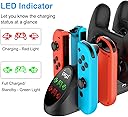
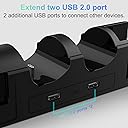
The FASTSNAIL Switch Controller Charger is a professional-grade charging dock designed to simultaneously charge up to 4 Nintendo Switch controllers (2 Pro Controllers and 2 Joy-Cons). It features built-in intelligent circuitry for overcharge and short circuit protection, ensuring safe and efficient charging. The dock connects seamlessly to the original Nintendo Switch dock via 2 USB 2.0 ports and includes LED indicators to display charging status. Its compact design organizes your controllers neatly, making it a must-have accessory for any serious Switch gamer.


| ASIN | B082SJQZ8G |
| Best Sellers Rank | #7,463 in Video Games ( See Top 100 in Video Games ) #38 in Nintendo 3DS & 2DS Accessory Kits |
| Brand | FASTSNAIL |
| Built-In Media | 1 X Charging Dock for switch, User Manual |
| Color | Black |
| Compatible Devices | Nintendo 3DS, Nintendo 64, Nintendo Switch, Nintendo Switch 2, Wii U |
| Compatible Phone Models | Nintendo Switch/Nintendo 64/Nintendo DS/3DS/Wii U/Wii |
| Compatible Power Plug Type | Type C |
| Connectivity Technology | USB |
| Connector Type | USB Type C |
| Current | DC |
| Current Rating | 2 A |
| Customer Package Type | Reinforced Packaging" or "Shock-Resistant Packaging |
| Customer Reviews | 4.2 out of 5 stars 2,365 Reviews |
| Enclosure Material | Metal, Plastic |
| External Testing Certification | Não Aplicável |
| Form Factor | Stand |
| Included Components | 1 X Charging Dock for switch, User Manual |
| Input Voltage | 5 volts |
| Item Weight | 0.18 kg |
| Main Power Connector Type | 2 Pin |
| Manufacturer | FASTSNAIL |
| Mfr Part Number | NT167 |
| Model Name | NT167 |
| Model Number | NT167 |
| Mounting Type | Stand |
| Number of Items | 1 |
| Output Current | 1 A |
| Output Voltage | 5 volts |
| Power Plug | Type C |
| Power Source | Corded Electric |
| Special Feature | Charging Indicator, Fast Charging, Multi Device Charging, Short Circuit Protection |
| Special Features | Charging Indicator, Fast Charging, Multi Device Charging, Short Circuit Protection |
| Total USB 2.0 Ports | 2 |
| Total Usb Ports | 2 |
| Unit Count | 1 Count |
| Warranty Description | 1 Year Manufacture |
| Wattage | 10 watts |
| Wired Charging Connector Type | USB Type A |
B**E
Works well - A great take on the Switch charging dock, with some things to consider.
First, I'd like you to consider that this is a charging dock that works and works well. But there are some quirks, that some people may call features, which would be helpful to know about, for a person thinking about buying this thing. Let's go over the good stuff. you're wanting to buy this to charge your pro controllers and your joy-cons, and this device is totally going to do the heck out of that. There is a handy charging indicator on the very front of the thing, which will tell you exactly which controllers are charged and which ones are not. You are able to charge up to two official Nintendo Pro controllers, and up to two sets of joycons, which can be mixed or matched. I have a third party joy-con set, which this charger has been able to successfully charge very dependably. This doc attaches to the end of your Nintendo switch dock where the two USB ports are. cosmetically it appears to be just about a perfect match. The two ports protruding from the end of this charging dock exactly match up with the two ports on the end of the Nintendo switch dock. This charging dock has no power of its own, only the power provided from the USB ports of the Nintendo switch dock, and that is only when the Nintendo switch is actually docked in the dock. So here are the quirky things. First if you are the type of person who takes your switch on the go or in handheld mode whenever your Pro Controller runs out of power, you might be disappointed to find out that the charging dock is not charging your Pro Controller when your switch is not docked. This is not an issue for me, as I almost exclusively play my switch docked. Secondly, while the USB plugs which protrude from the end of this doc match exactly with the ports on the Nintendo switch dock, they slide out with incredible ease, whether you want them to or not. There are some ways to work around this, and I'll discuss those in just a moment. The charging indicator lights on the end of this dock are super bright. And I don't mean like regular super bright. I mean like, you're going to have trouble playing video games if this thing is anywhere where you can see the super bright lights while you're looking at the screen. They are bright to the point where it is really distracting. So now let's talk about my workarounds. For the bright lights that I just mentioned, I fashioned a little flap from gaffers tape, which is matte black, which I simply flipped down over the lights, and flip back up whenever I want to look at the lights to see which controllers are charged. For the USB ports coming unplugged all the time, which they do because it takes a certain amount of force to plug a controller into this dock - not a bad thing, you want these things to stay put when they're charging - at first I used my gaff tape to hold the switch dock and this charging dock together at the point where the USB connectors meet, just a strip on each side seemed to do the trick. but the more I use this, the more I realized that the tape was not going to be a long-term solution. Being the type of person who is always looking for the opportunity to void a warranty, I opened up the case and drilled a few small holes into the sides of the dock, so that I could attach some zip ties through the dock, and then wrap them around the bottom of the Switch dock. Someone could probably pull off the same thing with velcro cable ties, but I went with this approach for now. It's actually more permanent than I'm comfortable with, but my switch stock is actually fastened to my shelf, so it doesn't really go anywhere anyway. The solutions will not be for everyone, and as such I really think that for some people, this is not a good option for a charging dock. But, being the hardware tinkerer that I am, I feel comfortable suggesting that this is a great option for someone who wants a little something unique and isn't afraid to hack on it a little to make it their own. You might could use some double sticky tape or command strips to keep both your switch dock and this charging dock from sliding apart, but again, I feel pretty confident in saying, that doesn't seem like a long-term solution for this issue. Overall I am super happy with my purchase, because I had a pretty good idea what I was going to be doing with this when I bought it in the first place.
D**G
Functionality is key
Fantastic product and worth the price! This review is for the newer Switch 2/1 compatible charging dock with cable. The listing, as described by the manufacturer, states the pro controller dock is not compatible with PDP pro controllers, but as you can see in the picture I shared, it clearly is charging the PDP Afterglow wireless switch 1 pro controller. The pro dock connectors do take a little finessing and a firm push with a clicking sound to ensure connection is fully made and charging begins, but that also goes the same for a licensed Nintendo Switch 1 pro controller. No complaints here. It does charge joy-con 1 and joy-con 2 controllers without issue. How practical and convenient! I could see where with joy-con 1 controllers the small connector on the dock where the controller contacts the dock connection point could get bent and damaged if not properly handled with care when inserting and removing a joy-con 1 controller, but just be careful with your expensive Nintendo controllers and there shouldn't be any issue. The real genius in the engineering of this product are the button controls on the unit that allow you to not only change the color of the light display, which you can turn off, but also the button control to turn on and off the actual charging function. This allows the front display lights to completely turn off if you are watching a movie or want the room dark and not have any distracting lights. I will say the dock on the back does have a warning label that the cable provided with the product must be the only cable used and it must be used with the Nintendo Switch 2 dock. That being said, if you don't have both USB ports open on the side of your Switch 2 dock, you may be out of luck. I did not test the included Y cable with an alternative power source such as a 2 USB port wall plug.
A**R
Love it
Works great, except two of the joy con chargers are just really tight and you have to use some force to push them in.
M**L
Not perfect, but hard to beat that price.
Tough to beat something that charges 2 pro controllers and two joycon sets with an additional two USB ports for anything else for only 20-ish bucks. It definitely has some flaws, though. As other reviews have already pointed out, that display is way too bright, and never shuts off. It's always green unless something that needs charging is connected, in which case the corresponding icon turns red until fully charged. It always being on would be annoying enough, but as I said it's so. darn. bright! The reviewer who suggested putting gaffers tape over the display was a genius. You can still barely see the icons through the tape, and it sticks on perfectly fine. I highly recommend doing this. If this company or any other refines this design, I would suggest cutting the brightness of the display by at least half, and making the display shut off if nothing is connected or if whatever is connected is fully charged. The other issue is the flimsiness of the item. After it's connected to the docking station, it can still be bent forwards and backwards at the point of connection. If you aren't careful or accidentally move the dock or charger enough while it's connected, you might damage your USB ports. Again, if this design is ever revisited, it should be made to fit more securely to the dock so that if you move one, the other will move with it as if they were the same single piece. Also, because of this fact and that it's rather light, you have to hold it down while removing any controller from it, otherwise you -will- lift the thing up and possibly damage the USB ports. So, essentially, once this thing is connected, treat it delicately. Despite these issues, I still have to recommend it. I haven't seen anything capable of what it's capable of at any price point, let alone one as low as this. It's just a shame that obvious flaws were ignored. With what probably would've been 1 dollar more in manufacturing cost, this item could have been absolutely perfect.
C**T
Works with NES style Switch Controllers
So I decided to take a chance and try this charging station out even though at the time there were no reviews on if this worked with the NES controllers. Let me just say it does indeed work with the NES style Switch controllers. That being said, they do extend beyond the bottom of the charging stand. All I did to "fix" this was have the front edge of the charging station hang off the edge of my shelf. This gave the controllers space to fall below the level of the charging station. There are no problems with stability or anything, I'd say that maybe 3-4 inches hangs off, and it is not a deal breaker for me since my Switch isn't in a frequently traveled area, so no need to worry about it getting knocked off. I do have the Hori Nintendo Switch Split Pad Pro Controller, which is a fine product by the way if you have larger hands and they cramp when holding onto the smaller standard joycons, and the switch will not fit into the charging dock with them on since this charging station is meant to be used with the smaller standard joycons. This also isn't a big deal, I just take the left side off before putting the switch into the dock. One of the main reasons why I liked this dock is that it has 2 USB ports on it. So while it does take up both USB ports on the dock, you do not lose those ports, so I can keep my GC controller hub plugged in at all times still. Final point, make sure to somewhat firmly press this charging station into the switch dock. I didn't really press them firmly together and it didn't work initially. After getting it plugged in completely I have been having zero issues.
D**D
Bad quality
it's really flimsy, nothing stays connected. if you have a fan going in the room, it'll blow the controllers off connection. plus the original controllers that came with the Switch were not getting recognized, only some of the extra ones we bought were able to get charged and got recognized by the system.
D**R
Great product works good
Great Seller, Great Shipping, Great Product. Really pleased with purchase.
M**L
Yes but no
Design is nice and I overall like it but.... it only charges one controller at a time. I thought it would charge everything equally but seems to only charge one row at a time. Maybe it's to charge them faster idk but it can cause an issue when trying to charge numerous things at once, say for a party. I now basically use it as just a docking station for my controllers rather than an actual charger. Who knows maybe I had a defective one not sure. Over all as a docking station it works well.
S**R
Amazing product
I love this charging station! It just plugs in to the end of your switch doc, dose not require any additional cords. works amazing!
H**U
super gut !! 👍
Super alles passt und funktioniert 👍! Anstecken einstecken und gut ! Sie leuchtet bei den dementsprechenden Controller solange rot bis er fertig geladen ist rot . Wenn er fertig geladen ist und leuchtet dan grün!
C**E
Top
S'adapte parfaitement sur la Switch 2. Toutes mes manettes au même endroit.
M**T
A Great Addition for your console
This add on which I purchased for my switch 2 is a great piece of kit that allows for extra handsets to be stored and charged and at a great price
G**N
parfait
Fonctionnement parfaitement. Un très bon rangement, permet d'avoir la console avec les manettes chargées.
Trustpilot
2 weeks ago
1 month ago