Desertcart purchases this item on your behalf and handles shipping, customs, and support to Nicaragua.
🔒 Elevate your security game with 4K precision and smart alerts—because your peace of mind deserves the best.
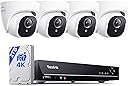
The REOLINK 8CH 4K/8MP Home Security Camera System delivers ultra-high-definition 4K video with advanced person and vehicle detection, powered by a simple PoE setup. Featuring a pre-installed 2TB HDD for continuous 24/7 recording and expandable storage up to 16TB, this system supports up to 8 cameras and offers seamless remote access across all major platforms. Ideal for professionals seeking reliable, crystal-clear surveillance with minimal false alerts and easy installation.


| ASIN | B0811V48LG |
| Best Sellers Rank | #28 in Surveillance DVR Kits |
| Brand | REOLINK |
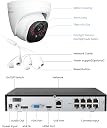
| Built-In Media | RLN8-410*1, D800*4, NVR Power Adapter*1, HDMI Cable*1, USB Mouse*1, 1m Network Cable*1, 18m Network Cable*4 |
| Camera Description | Front, Rear |
| Color | White |
| Compatible Devices | Cameras, Laptops, Personal Computers, Smartphones, Tablets |
| Connectivity Technology | Wired |
| Customer Reviews | 4.3 out of 5 stars 1,072 Reviews |
| Focal Length Description | 4.0mm fixed |
| Frame Rate | 20FPS |
| Hardware Interface | Ethernet, HDMI, USB, VGA, eSATA |
| Item Dimensions | 11 x 12.7 x 14.8 inches |
| Lens Type | Fixed |
| Manufacturer | Reolink Digital |
| Memory Storage Capacity | 2 TB |
| Mfr Part Number | A-K8-800D4 |
| Model Number | RLK8-800D4 |
| Night Vision | Night Vision |
| Night Vision Range | 100 feet |
| Number of Channels | 8 |
| Operating System | iOS, Android, Windows, Mac OS |
| Optical Sensor Technology | CMOS |
| Other Special Features of the Product | High Efficiency Video Coding, day-and-night-camera |
| Power Source | DC |
| Recording Mode | Continuous recording, Triggered by motion |
| Signal Format | IP Network |
| Special Feature | High Efficiency Video Coding , day-and-night-camera |
| Total Usb Ports | 2 |
| Unit Count | 1 Count |
| Video Capture Resolution | 4K 8MP (2560 × 1920) |
| Video Input | RJ45 |
| Viewing Angle | 87 degrees |
W**L
Great System for a Small Business
For reference I have worked in I.T. for over two decades and have installed security DVRs before. But I honestly believe anyone with the ability to follow simple instructions and capable of minor troubleshooting should find this system very easy to install and use. This is the first DVR I've set up that provides POE to the cameras via the built-in switch. This greatly simplifies and cleans up the installation. Many of the problems I see in these reviews can be fixed via simple troubleshooting. I haven't actually had to contact Reolink support so I can't really comment on how available or helpful they are. I just wanted to point out a few of the negative things I've seen posted and offer a few tips/explanations. Cameras/Channels cutting out - When you're running your cables in the ceilings and walls, steer clear of electrical interference. Don't let the network cables touch existing wiring or things like light fixtures. Also avoid heat - like ductwork if at all possible. This can all mess with any kind of network traffic and especially 4K video feeds. It can certainly be more difficult, especially if you've never run wiring before but it is definitely worth the extra effort to route the cables properly. Complaints about video quality - I can verify this NVR absolutely records in 4K. The streams that you watch on your phone/PC/monitor are reduced quality for performance purposes. Even the "Clear" setting isn't near 4K. To access the full 4K video, you have to download the recorded files. This too can get confusing because unless your computer/device has a 4K GPU, you may not be able to play the files with a native media player. I installed this unit at a satellite office out of town and have not exported any files directly from the NVR but I have downloaded files remotely. These files are typically 1 to 3 GB in size. To edit or crop the videos, you will need a video editor capable of working with 4K video. This also allows you to remove the slight fisheye effect of the wide angle lenses if desired. The clarity of the video is outstanding for a system in this price-range. Frame captures are near photographic quality if you have good lighting. All of that said, if you do not have the resources to actually work with 4K video, I highly recommend setting the cameras to a more manageable resolution like 1080P. The files are smaller and just about any modern computer can work with them. These settings can be adjusted and you can change them back at any time. Complaints about outdated software - I'm not sure where this is coming from. The apps for mobile devices are as good if not better than those we've used and continue to use for more traditional DVRs. The Windows app works perfectly as well. I have no complains whatsoever. Perhaps if you're having trouble viewing the feeds, the upload speeds at the location of the NVR may not be sufficient for the resolution settings you're using. Limited camera positions - the cameras are tight in their housings but you can rotate and tilt them within the housing. You do need to install the plate close to the angle you want but someone reported that it has to be perfect and that's simply not true. If you're way off you would run into problems but I would guess you have maybe 15 to 20 degrees of play in either direction. Overall I am impressed with the quality of this system. The video is excellent quality and the night vision works great as well. Again, I have no complaints so far. I just ordered two more cameras to add to our current installation. If anything changes and we begin to have problems I will definitely be back to add to this review.
A**M
Great Quality Video
These cameras have great quality and were easily installed. The night vision is good and they seem reliable as cameras go. My Reolink app keeps disconnecting from my system, but I can’t fault the cameras. I am not a techie, but I think these cameras are worth the price.
C**L
Good system
It was my upgrade from Zosi. App works very well. Cameras are clear and crisp. 4 stars only because initial set up isn’t as easy as they said.
A**R
Amazing product, top of the line!
Setup was very straightforward. Image quality is clear and consistent. Plenty of settings to customize. Would definitely recommend
A**R
Outstanding
Efficient throughout, easy to install and use
M**.
Basic POE security system, exactly what I needed. *updated*
Wired is always better, IMHO. The wi-fi models offer lots of frills and monitoring options. I just wanted something that records and I can check if an issue arises. Hooked it up, plugged it into HDMI-2 input on monitor and have added 2 cameras so far, no issues. Upgraded the firmware to latest, file needs to be written on a flash drive formatted FAT-32 on a Windows computer. I couldn't get it to work by writing it with my Mac, maybe you can. Drive is a little noisy, shouldn't be an issue to replace when it dies as it looks like it's just treated as storage and the OS is just firmware on the controller board. I'm going to order the Amazon Basics Wireless Mouse as suggested in the "Ask A Question" section, will update if it works or not. No interest in checking on the web or using a phone app to access it. This thing just uses a HDD with spinning discs and basic processor, probably not going to be a great experience. I appreciate that we don't HAVE to hook this up to our home network and let it on the internet. I'm giving 5 stars because it was exactly what I was looking for. If you need it for on-the-go access and serious security threats it may not be a 5-star experience. Picture is clear. Night vision works great. Waterproof connectors are nice. Cables are nice but unlikely to be long enough for all your cameras so now is a good time to learn how to wire an RJ45 plug. Good news is they now have "pass-through" connectors which make the process a helluva lot easier. https://www.amazon.com/gp/product/B098DX9RJ9/ref=ppx_yo_dt_b_search_asin_title?ie=UTF8&th=1 When attaching the cameras to the mounting rings be sure to turn hard enough to feel a click. Trying hard to think of a "Con" but I researched these and watched some videos so there were no surprises. I'll update the review with wireless mouse info and anything else that pops up. *update* The Amazon Basics wireless mouse linked above works perfectly. Plugged the receiver into the front USB port, turned on the mouse and that was it. I turn the mouse OFF when done using it because battery will die a slow death and someone could potentially start playing with the mouse but not know it's "live". With the input on a different source they could potentially click on something to negatively affect the NVR. Anyway, yay for the Amazon mouse!
S**J
Motion detection is a joke.
I have adjusted motion detection to exhaustion. Too high, alarms constantly, too low I can walk in front of the cameras and no alarm. Timing motion areas lower at night, higher during day, and the motion detection zones are a joke. I have tried motion detection zones on the app, the windows client and nvr. NOTHING, THESE MOTION DETECTION ZONES DO NOTHING. I tried everything I can think of, the only thing that works is pointing the cameras to a limited area. Even pointing the camera to a limited area in an outside area, the camera will alarm if a cloud goes by. I have tried phoning support four times actually talking to a human. Limited English speaking support is painful, just getting them to understand my email address took minutes. I told them that when an alarm goes off on dvr there is an "ERROR" code shows on the DVR. Support says that is the way it was designed "ERROR" means there was an alarm, I thought it was a joke but another support member that spoke better English confirmed that it was true, apparently "ERROR" was their way of telling you there was an alarm. The camera quality was great but if you are depending on motion detection you can spend the day reviewing false alarms.
R**K
Worth the money
Really enjoying this. I will say this systems is not as user friendly as a ring system but I like having a NVR and not relying on subscription service. The cameras are great. High quality video
A**R
Worth buying
The best camera i have ever used 👌🥰
E**.
Easy to install! And perfect quality
Really good and easy to install! Highly recommended
A**I
Good quality system
My installer who installs security cameras for a living, had never installed a Reolink system before and was very impressed with the product. He commented, he wished he had Reolink for his home.
A**M
Top-Notch ⭐️⭐️⭐️⭐️⭐️
This cameras has excellent video quality and is easy to set up. Reolink OP❤️
C**T
Camera issue
One of the cameras was not working. Had to go through their warranty on the brand-new system because already installed rest of the system
Trustpilot
3 weeks ago
1 week ago