🖤 Power your projects with timeless clarity and zero compromise!
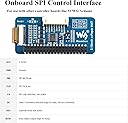
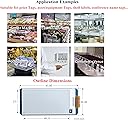
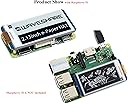
The 2.13inch E-Paper HAT V4 is a sleek, energy-efficient black & white e-ink display designed for Raspberry Pi and Jetson Nano. Featuring a 250x122 resolution and SPI interface, it supports partial refresh and ultra-low power consumption, making it ideal for long-lasting, battery-friendly DIY projects. With onboard voltage translation and extensive developer resources, it’s the perfect compact display to elevate your tech creations.


| ASIN | B07Z1WYRQH |
| Best Sellers Rank | #166 in Single Board Computers (Computers & Accessories) |
| Brand | waveshare |
| Built-In Media | 2.13inch e-Paper HAT, RPi screws pack (2pcs), PH2.0 20cm |
| Compatible Devices | Raspberry Pi 2B, 3B, Zero, Zero W, Jetson Nano |
| Connectivity Technology | GPIO |
| Customer Reviews | 4.5 4.5 out of 5 stars (572) |
| Item Dimensions L x W x H | 1.18"L x 0.79"W x 0.79"H |
| Manufacturer | Waveshare |
| Mfr Part Number | 2.13inch e-Paper Display HAT |
| Model Name | 2.13inch E-Paper HAT V4 Version |
| Model Number | 2.13inch e-Paper Display HAT |
| Operating System | Linux |
| Processor Brand | ARM |
| Processor Count | 1 |
| RAM Memory Technology | LPDDR2, LPDDR4 |
| Total Usb Ports | 1 |
| UPC | 778365986658 |
S**Y
A Brilliant Addition to Your Raspberry Pi Projects
The 2.13-inch E-Ink Display HAT V4 Version is an amazing little display that brings a whole new level of functionality to your Raspberry Pi projects. The display is sharp and clear, with excellent contrast that makes text and images pop—even in bright light. What I love most about it is the low power consumption, making it perfect for projects where battery life is crucial. Setting it up was a breeze. The installation process was straightforward, and it integrates seamlessly with Raspberry Pi, giving you a crisp, high-quality display for a variety of applications. Whether you're using it for status updates, weather displays, or a simple digital signage project, this E-Ink display delivers beautifully without draining your power. The screen refreshes quickly and the fact that it’s e-ink means you can use it for a long time without worrying about power-hungry screens. Plus, the compact size makes it versatile and easy to incorporate into any project. If you’re looking for a reliable, energy-efficient display for your Raspberry Pi, this 2.13-inch E-Ink Display HAT is a must-have. It’s affordable, easy to use, and perfect for a wide range of DIY projects.
D**.
Ideal for all of your pwning needs
As this is the V3/V4 display, it may take some searching to find an image that is meant for it. Older images may be written for the V2 display. It just took me a little bit longer to setup, but I 3D printed a resin case for it and there have been absolutely 0 issues after months of use. It's a great little screen. There is plenty of space in the margins for additional plugin information to be displayed.
Q**N
Great product!
The Waveshare v4 e-ink display exceeded my expectations! Crisp and clear visuals, easy to set up, and low power consumption. Perfect for DIY projects or as a secondary display. Five stars for its reliability and performance.
M**E
It works on pi zero wh with right drivers
It’s not exactly plug-and-play. I had to follow the instructions on the OEM site and use the example drivers to get it working. Once that was set up, I was able to display what I wanted, including QR codes, with the help of ChatGPT Python scripts. However, I had to provide a working example for it to process correctly. It also requires root permissions or running the script in a sudo virtual environment (venv). Once displayed, the screen is clear, requires no power to maintain the image, and QR codes are crisp and easily scannable.
D**E
Works as expected using the V3 Demo
I struggled to figure out what version these are, I purchased 2 of them for use with Python on a Pi Zero. Turns out they are V3 use the example demo: epd_2in13_V3_test.py and you will get good results and be on your way to programming your display.
W**E
Worked great for about 3 weeks...
After about 3 weeks of perfect function (fast updates, easy python scripting, etc) it went black. Completely black and it will not respond to clear or update commands. It was great while it lasted. I should add that it sat in a protected location and nothing changed, physically or otherwise, between working perfectly and not working at all. Update: I found the problem - it was me. :-( The display still works great - changing review from 1 to 5 The display is crisp and sharp and updates quickly using python libraries.
M**B
Low-Power, High Clarity—Great for Projects!
Super crisp text with almost no power draw. Perfect for data dashboards or battery-powered builds. Easy integration with Raspberry Pi using the Waveshare libraries.
R**T
Usage is painful
Getting this thing to work was extremely painful as the instructions are scant. Some of the "data sheet" is actually wrong, and some information is hard to find on WaveShare's website. However, I did get this to EVENTUALLY work as seen in the photo. The command information isn't complete. It really needs to be gone over with an engineer that speaks something other than Chinese, preferably English so more people can use these things with something other than the examples provided. The product isn't quite clearly marked on the device as to the version, so I had to assume I had the black and white version, as the box suggested (which, to be fair, turned out to be true, which is what I wanted). The information also doesn't indicate that the device can't really handle just dumping your image data to it... it needs to be fed into the device a little bit more carefully. But, I eventually figured out how to display an image. Also, the device doesn't quite work as advertised, as one of the commands is supposed to change the update direction from X to Y, but that doesn't seem to matter, as no matter what setting I used, the picture displayed the exact same way (I was expecting one to screw up the image and the other to display correctly unless I fixed my X,Y pixel data). Also, height/width should really be defined, as the document uses this for the commands, but without some fiddling, I wasn't able to determine width actually meant shortwise, with the ribbon cable on the right (as in the picture), and height meant the other way. This makes sense if you turn the device counter-clockwise from the image, but doesn't make sense otherwise. You could make your image work either way, depending on how you distribute the pixels, but the advancement always seems to be in the "width" or Y direction, not the X, despite any command to the contrary you give it. For all of these reasons, this gives it a 3 stars, but it doesn't mean, if you need a screen for your electronics project you shouldn't buy it. It works beautifully when you figure it out.
M**P
This works to build a new pwner if thats what you are looking for.
L**E
Me like, it make screen for raspberry pi
D**S
Works perfect w my Pi Zero W no issues
S**L
for what I needed :)
W**E
it works
Trustpilot
2 weeks ago
2 months ago