Buy anything from 5,000+ international stores. One checkout price. No surprise fees. Join 2M+ shoppers on Desertcart.
Desertcart purchases this item on your behalf and handles shipping, customs, and support to Nicaragua.
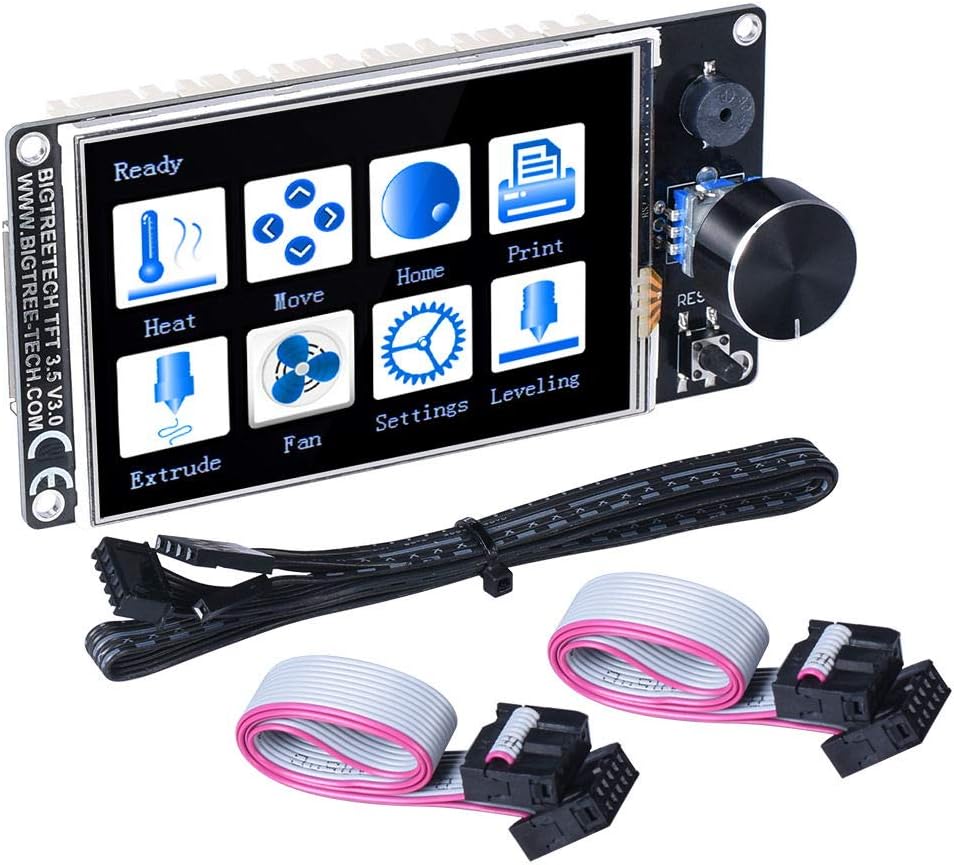
🚀 Elevate your 3D printing game with BIGTREETECH’s smartest display yet!
The BIGTREETECH TFT35 V3.0.1 is a cutting-edge 3.5-inch graphic smart display controller featuring a powerful 120MHz 32-bit ARM Cortex-M3 CPU. It offers dual work modes—UART serial touchscreen and classic 12864 LCD—switchable with one button, ensuring maximum versatility. Designed for broad compatibility with popular 3D printer motherboards like MEGA2560 and SKR series, it supports easy firmware upgrades via SD card and includes reserved ports for WiFi modules, filament break detection, and automatic shutdown, making it a future-ready essential for professional and enthusiast 3D printing setups.
| ASIN | B07VWF4W3J |
| Best Sellers Rank | #126,396 in Industrial & Scientific ( See Top 100 in Industrial & Scientific ) #2,322 in 3D Printer Accessories |
| Brand | BIGTREETECH |
| Brand Name | BIGTREETECH |
| Color | black |
| Customer Reviews | 4.4 out of 5 stars 394 Reviews |
| Display Type | TFT touchscreen |
| Included Components | BIGTREETECH TFT35 V3.0.1 |
| Manufacturer | BIGTREETECH |
| Material | PCB |
| Material Type | PCB |
| Model | TFT35 V3.0.1 |
| Operating Temperature | 25 Degrees Celsius |
| Part Number | 1 |
| UPC | 778601687783 |
| Voltage | 5 Volts |
D**H
Fantastic product!
I have used these in several prusa bear clone builds, and love them. Have started doing my own firmware builds, and it very easy to do. Dual functionality with Marlin screen and touchscreen works great, never had any problems with either.
T**S
ST7920 128x64 Simulator Incomplete
Nice little device for sure, super clean look and feel. In version .26 it has incomplete emulation of the st7920 so it does not yet work with klipper or any other firmware that depends on the character generator behavior. as of April 2020 there is a pinned issue on their github that makes me feel this will be resolved soon. Even if BTT doesn't do the work some part of the community can.
J**D
Works good.
Once you get the software sorted it works great. No issues with it at all. Nice and easy to see. Easy to use lite pressure is all that is required.
G**.
Working on cr10 with skr mini e3
So once you get it working it's really nice but you di have to print a custom holder or case for it because the knob is in a different position. I've only been 3d printing for 1 week so if you have a little common sense and not afraid to just try different things you should be able to get it to work with your cr10. Haven't seen anyone on here post about that printer so if you have it here is what I did to get it to work. Connect the original cable as is and the second cable with 5 pins add to the end going into the monitor 5 male to female jumpers. And when you plug it into tft and rs323 make sure you plug into rs323 the opposite pin if what it is on the mother board. So when you're looking down in your motherboard the pin thats the far left one plug into the far right one on the board when you're looking down. Its still takes about 3 seconds when switching between touchscreen and led to connect. It says not connected for a couple of sec and goes away and works perfect. So good luck and just tinker until it works just don't short it. And don't give it a bad review because your didn't research and see that its a pain to install. Too many people giving it bad reviews because they were lazy and didn't even read the comments
B**.
As Expected
Functions perfectly. I needed the 12684 LCD feature to able to properly use the Filament Change script in Cura, but I wanted the Touchscreen feature for everything else. I love it.
J**S
Old school, new school, pretty cool
So cool. I can use the old fashioned mode to access calibration and tuning, and have available the advanced touchscreen features as well. In Marlin, set LCD screen type to REPRAP_DISCOUNT_FULL_GRAPHIC_CONTROLLER Note: connection to a bigtreetech tango 1.0 worked properly when EXP1/EXP2 cables were plugged according to the keying on the ribbon cable. TFT mode is not possible to the Tango. Connection to a makerbase mks gen L required the removal of the keying on one end of each cable and one end of each cable must be rotated. You know it needs to be swapped when screen stays blank and rotating the encoder reboots the display For TFT mode, use the tft header (5v/gnd/tx/rx) and run reset to the rst pin on icsp header.
A**R
Piece Of Garbage
If You Expecting To Get A Product That Actually Works, I Would Try Another Brand. After Trying All 6 Firmware BINs They Had, None Of Which Actually Worked, It Ended With A Menu Screen To Choose Touch Or Classic, And That's All The Screen Does. No Support, No Responses On The Forums, CS Doesn't Exist, And From What I Have Seen On The 3D Printing Tech Forums, This Version Of The Screen Has Been Having Known Issues For Over 5 Months. AVOID THIS PRODUCT.
Z**C
Great product!
Very easy to set up and easy to use. Just be sure you update the firmware and icons with the latest versions on Bigtreetech's Github before using it to print.
J**L
Una maravilla
Va de lujo y fácil montaje en una Ender 5 plus
E**S
Monté sur une Alfwise U20 pourvue d'une SKR V1.4 Turbo de la même marque
L'écran est qualitatif. La sensibilité est bonne. La surface d'affichage est parfaite. Hormis quelques problèmes de mise à jour de firmware de l'écran, tout est parfait et facilement configurable. Le firmware est customisable sous Visual Studio Code (de la même manière que MArlin).
P**R
TFT-Bildschirm
Die Funktion ist einwandfrei, lässt sich an verschiedenen Bords anschließen. Gutes Produkt.
F**7
Funziona alla grande
Funziona alla grande, è un pò delicato, ma funziona molto bene
M**A
skr ile birlikte güzel kombinasyon
güzel çalışıyor
Trustpilot
3 weeks ago
2 weeks ago