Buy anything from 5,000+ international stores. One checkout price. No surprise fees. Join 2M+ shoppers on Desertcart.
Desertcart purchases this item on your behalf and handles shipping, customs, and support to Nicaragua.
๐ต Elevate your workflow with ergonomic wireless freedom โ because your wrists deserve the best.
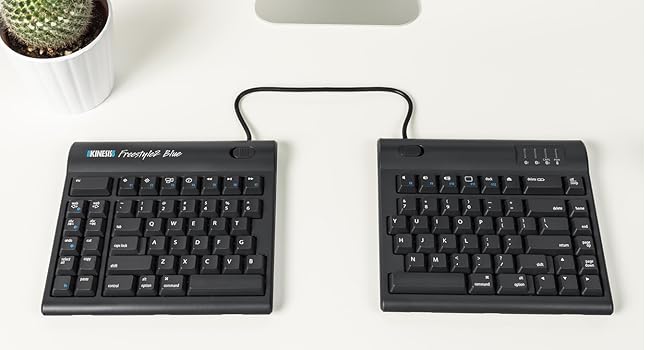
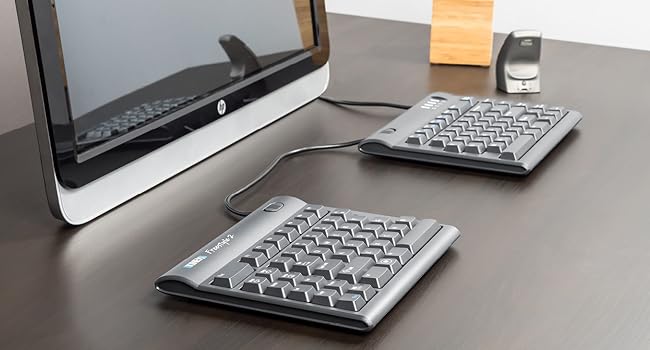
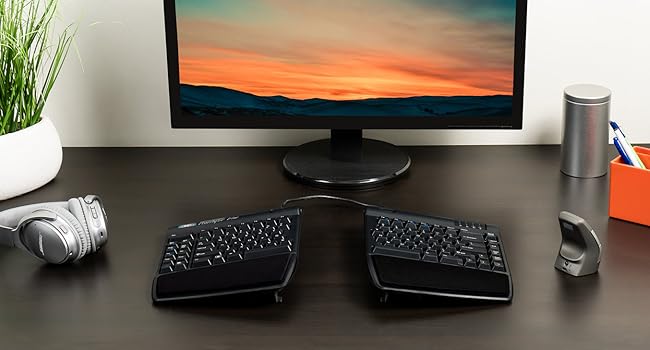
The KINESIS Freestyle2 Blue Wireless Ergonomic Keyboard features a 9-inch adjustable split design to promote natural hand positioning, reducing strain during extended use. It supports multichannel Bluetooth connectivity, allowing seamless switching between three devices, and offers 94 low-force tactile keys for comfortable, precise typing. Compatible across Windows, Linux, and Android platforms, this lightweight, portable keyboard is ideal for professionals seeking ergonomic comfort and versatile wireless functionality.


| Additional Features | Bluetooth, Wireless |
| Antenna Location | Office |
| Asin | B00NMVJZ1E |
| Best Sellers Rank | #440 in Computer Keyboards |
| Brand | KINESIS |
| Built In Media | USB Cable |
| Button Quantity | 94 |
| Color | Dark Gray |
| Compatible Devices | PC |
| Compatible Operating System Family | Linux, Windows |
| Connectivity Technology | Bluetooth |
| Customer Reviews | 4.0 4.0 out of 5 stars (661) 4.0 out of 5 stars |
| Enclosure Material | Lightweight plastic or metal |
| Global Trade Identification Number | 00607998800294 |
| Hand Orientation | Ambidextrous |
| Item Dimensions L X W X H | 16.4"L x 9.4"W x 1"H |
| Item Weight | 2 Pounds |
| Keyboard Backlighting Color Support | Single Color |
| Keyboard Description | Multimedia |
| Keyboard Layout | QWERTY |
| Manufacturer | Kinesis |
| Mfr Part Number | KB800PBBT |
| Minimum Required Operating System Version | Windows 7 |
| Model Name | Freestyle2 Blue |
| Model Number | KB800PB-BT |
| Number Of Batteries Required | 1 |
| Number Of Keys | 94 |
| Number Of Sections | 2 |
| Power Source | Battery Powered |
| Style Name | PC Layout |
| Switch Type | Tactile |
| Theme | Ergonomics, Computer Accessories |
| Unit Count | 1.0 Count |
| Upc | 607998800294 |
User
Great customer service & ergonomic design!
I love that this keyboard enables me to position it as I need to ensure proper alignment of my wrists. Significantly decreases discomfort in my left wrist comparted to when I use a regular keyboards. I have used other ergonomic keyboards, but the split design of this keyboard allows me to tailor the angles to meet my needs. The keyboard was easy to connect to both my computer and my cell phone. The directions for using Bluetooth were easy to follow. Additionally, the company provides top-notch customer service. I had an issue with the power port. The company quickly replied and help me resolve the issue, and went above and beyond to ensure I was happy with the outcome. I would highly recommend this keyboard.
User
Not perfect but getting pretty close...
I already have used the older Freestyle 2 for years and love it. This keyboard has the same strengths -- and most of the same drawbacks. Strengths (apart from the obvious of the split keyboard and the wireless connectivity) include:- it is straightforward to pair this keyboard via Bluetooth (Linux and Windows both work; Linux can be a bit more troublesome)- the ability to switch "on the fly" from one Bluetooth pairing to another is a nice touch (really convenient if you work with two computers side-by-side)- the J and F keys have ridges (finding the correct hand position by touch becomes important given that the two halves of the keyboard can be spaced arbitrarily far apart)- nice LED indicators for 'Caps Lock', etc.- while the keys are not silent, they are not excessively loud either- the connector which can be used to hold/tether the two halves together is easily released using switches on each half- portability: the two halves can be conveniently packed into a backpack or bagReasons I'd give it a 4.5 instead of a 5 if that were an option: from my perspectives, shortcomings include:1. the absence of a physical insert key (only accessible using a Fn combination)2. the size of the keys (the keys are approximately laptop-sized keys, not regular full-sized keys)3. the keyboard itself is not backlit (I find this especially useful when working in relatively dark conditions)4. the placement of the 6 key on the left half of the keyboard (this is fine if one uses the LH for 6 but I find myself stabbing into empty space with my right hand... while this can be relearned over time, it is hardly ideal...)5. the wired USB connection is only for charging (if you're just trying to get something done, Bluetooth pairing can be a hassle -- e.g., this isn't the "go-to" keyboard if you want to plug into a headless server and quickly deal with something)Bottom line: overall, the wireless is well worth the minor price differential between this and the wired Freestyle 2-- well worth the additional money. If you want to take care of your hands and wrists, this keyboard should certainly be on your "short list" of those under consideration.
User
Good Ergo, Some Flaws
I have broad shoulders and during an ergonomic assessment they recommended this keyboard to better align my wrists so they are straight and not at an angle. It's better than the normal keyboards but still not quite wide enough for my body given the cord in-between the 2 keyboards. They could easily make this a few inches wider so it fits anyone.It does take a bit to get used to the keyboard being split. It's a brain thing and my brain adjusted pretty easily after less than a day. The first couple of hours I had to slow down a bit but my brain figured it out pretty fast. The bumps on the home keys are not pronounced so I do sometimes find my fingers are misaligned but that of course is simple to fix.The Kenisis Pro is easy to set up and use. On the PC, it does require you go into settings and connect via bluetooth. It generates a Pin. One downside is when the battery runs low and it needs to be recharged, it stops working completely and you must reset the bluetooth connection and generate a new pin. I needed a 2nd keyboard (my system has a screen lock so I needed my other keyboard to get past that). It did last more than a week, possibly 2 on one recharge so I'll try charging it in this weekend to see if that keeps it from having to be fully reset.The first one they sent had connection issues and stopped working, requiring me to turn it off and on a few times a day. I requested a new one and it arrived the next day and I shipped the defective one back so very easy.Overall I am happy with it. I hope as they improve it they can add a bit more length to the cord between the two sets and also fix the need to reset the bluetooth connection. A light to warn battery is getting low would also be helpful.
User
Relieved My Shoulder Issues, Nice Key Actions, Flawless Bluetooth
My main reason for considering an ergonomic keyboard is that the top of my shoulders are literally knotted and painful from using computers for many hours a day. I have a number of keyboards, one of which is the Microsoft Natural Ergonomic Keyboard 4000 v1. While the MS 4000 helps a bit in opening up my shoulders compared to a regular keyboard, the key action is downright horrible (note that v1 is has stiffer key actions than later version of the MS 4000). I considered other one-piece ergonomic keyboards, but eventually decided that only a fully split keyboard will allow my shoulders to be laid back and not "rolled forward" as my chiropractor described it. After using it for a few days now, I can fully attest that the split position is truly better for me than a one-piece ergonomic keyboard.Other positives are the Kinesis Freestyle 2 Blue: (1) The key actions are really nice, with a fair bit of travel (not the laptop-like shallow travel), not noisy (though audible in a quiet room, it is quiet enough to use on a conference call on speaker phone without being distracting), and light enough so you don't feel like you have to "hammer" it like it does on the MS 4000. (2) The bluetooth connection is flawless: I have connected it successfully on first try to a linux system (Ubuntu 18.04), a Mac (even though this is a PC version; the key works fine too, with the "Windows" key automatically mapped to the Apple "Command" key), and of course a Windows machine. I had doubts about Bluetooth in general, but the implementation here is flawless, both in pairing and also in normal use. I never had a lag or missed letter issue, even after power savings mode had kicked in (it wakes up quickly). Another factor I considered is the size: it is small enough to toss into a computer bag to bring to a cafe or library, for the times when you want to spend a few hours pouring out your thoughts. A one-piece ergonomic keyboard would be awkward to bring outside the home or office, whereas this one can travel with me.Other users mentioned the row of keys on the left are not useful, or some keys are too far or not in expected places -- I don't have any issue with that. On the day that I received the keyboard, I paired it with my Linux machine and typed the first chapter of Carlo Rovelli's Seven Brief Lessons of Physics in one sitting, in order to get a feel for the keyboard. Result: no slow down except for a few times I tried to hit the "b" key with my right hand and hit the table instead. Otherwise, no real adjustment needed, and this is now my daily keyboard.Any downsides? No wrist support or padding included, but for me it is not an issue. I also have a pair of Smart Glove that for me tend to work better when I want something under my wrist. As I mentioned, my main issue is shoulder tightness and pain, so sufferers of wrist or carpel tunnel issues might consider the accessory kit essential.When I consider the cost of the keyboard to be equivalent to a couple of chiropractor visits, the cost is a very fair price. I can now prevent my shoulder issues rather than spend the money to get it "fixed".(Kinesis also makes a version with mechanical keys -- you can even choose the type of Cherry switches, and with programmable key mapping as well. So for those who are willing to spend the bucks, I would highly recommend taking a look at it.)A word of praise about the vendor: my keyboard was sold by askergoworks.com, and while the listing did not say it'll be shipped by Amazon Prime, the keyboard arrived in 2 days. Kudos to them for such a quick shipment.
User
works but with tons of room to improve
First of all, this split keyboard works! I feel more relaxed in typing with my shoulder opened. However this product has tons of rooms to improve.- The connection button is on the bottom of the keyboard. Apparent this is not a very smart design.- The keyboard is bulky. Too big and too thick.- The keyboard should have slope to make hand more comfortable.- The wire connecting the two parts are too thick and hard.- There is no need to make the joint that connecting the two parts.- The bluetooth connection setting is not designed friendly.- The keyboard is loud.- The locater on F and J keys are too small to feel.- The keyboard is ugly.- The keyboard is too expensive.- It is a good idea to have a travel bag. It supports three bluetooth devices, people may take it to use at home, at office ... why not make a travel bag that can hold it?- I hope there is wireless connection between the two parts.- Using the normal keys to control which device to control is a bad design.Unfortunately this is the only split keyboard that I can find in the market. I buy it for my shoulders ... I will see if that really helps.I don't know the battery life yet.
User
Super great keyboard with horrible fatal flaw
This keyboard is ergonomical, yes. The split shape, good key feels, nice. Bluetooth multiconnect? That's the reason I got it, so I could use it seamlessly with two different computers, switching with the press of a button, and that works too.Except.Use this keyboard for any length of time and it is going to slowly drive you crazy. Every once in a while - say once in a couple of hours - it will randomly pause while you are in the middle of typing, wait two seconds, and then whatever the last key you hit before it paused will repeat a bunch of times. Wait four or five more seconds and it reconnects and you're OK! The other thing it'll do is just randomly lose connection. No pop-up, no light, just suddenly and inxeplicably becomes unresponsive. The only cure for that one is to turn it off and back on again with the power switch on the back.These two annoyances start out as minor and weird, but over time, you will grow to really really hate the damn thing. It was a hundred bucks! This is undoubtedly some flaw in the bluetooth implementation, and if you read through all the poor reviews of this keyboard you'll find others have had the same issues. For YEARS. Obviously Kinesis is not interested in acknowledging or fixing it.I'm about to replace it. It still works exactly as well as it did when it was brand new, but I just can't take it any more.
User
Almost there ergonomically, but the bluetooth connectivity makes it a no go
I WANT TO LOVE THIS KEYBOARD. It is the most comfortable I've used, which is important given that I have arthritis that makes typing painful. My only complaint there is that it still takes a lot of force to type.However.... the bluetooth keeps disconnecting. The keys repeat, skip, or are delayed. Anything between my bluetooth antennae and the keyboard- lamps, phone, mouse- impact its function. Switching between devices is laggy enough that I often end up having to reset the connection and reconnect the devices again, which kind of defeats the purpose. I had to moderate a chat for work and had so much lag, skips, and repeated keys that I ultimately had to switch to a travel keyboard to finish the session.And I likely could have returned it, but didn't realize that you can only use the included charging cord. the 'regular' ones that I keep on my desk voided the warranty. I had my eye on the more expensive one, and was 'testing' this one out to see if the brand was worth the risk- at this point, I don't think so. I hope to revisit it as it gets improved, but for now I've broken down and bought another Logitech K860, which seems to be the one I can't find anything to beat.
User
Great bluetooth ergonomic keyboard that can switch between multiple devices.
With the tenting accessory it's a great ergonomic keyboard. Native Mac layout and labels, with an additional forward delete key which is a plus for me. I also like the big Esc key after a couple days of adjusting muscle memory. Pressing FN switches between F1-F12 mode and special keys mode (volumes, play/pause etc.) with LED indicator which is also very nice. It does not have numeric key pad thus has smaller size, which is exactly what I want but might be a concern for some people.It connects easily with MacBook and can be used to wake up MacBook and input password. Also works with Windows but with Windows and ALT key in reverse positions. There're lots of ways to remap keys in Windows so if it's an issue it can be easily sovled.All in all, it has none of the different small issues I had with other wireless keyboards and I'm very happy about this.The best part is, it can switch between bluetooth connections with 3 different devices. I recently started using it with a MacBook and a Windows laptop connected with the same monitor. With 2 bluetooth mouses I can switch between two computers relatively easily. It works as well as a USB switch box and without wires the deal with. I used a few USB switch boxes before for keyboard and mouse, and they all had occational issues, but I have not had switching issue with this keyboard so far.It really satisfies all my needs and I feel lucky to find this one.
User
It draws a lot of attention
Everyone I meet likes the design concept. I did not buy the accessories yet and just have the base model. I find it very convenient compared to regular keyboards and keeping my hands further apart does help reduce strain. It works with Windows 10. I liked the concept of multiple bluetooth channels. It did not pair with my Samsung Galaxy 5 and I have yet to try it out with other versions. I have trouble with the placement of delete and backspace which causes me to accidentally swap the operations. I gave it only 4 stars because of the price. I would like to purchase the accessories to test them out buy am unhappy having to pay so much for plastic accessories that may or may not help.I was very happy with the Seller
User
Amazing keyboards, needs accessories for purchase
My wrists used to hurt with regular keyboards, but since I bought this keyboard, my wrists have stopped hurting. I like the separation and the tilt. It makes typing really comfortable. I also like how I can seamlessly switch from connecting to my macbook pro to my macbook air to my ipad. I'm very happy with this purchase. The only thing I am slightly unhappy about is how additional accessories need to be purchased. Without the additional accessories, the keyboard is too low and flat.
User
I wish I bought this years ago!!! LOVE IT!!
Bought: Mar 2, 2021.Review: June 14, 2021Use: daily (9-5pm + 7pm-11pm = 12hrs per day, almost every weekday + occasionally on weekends).This is it everyone! I have tried over 10 "ergonomic" keyboards over past few years at various jobs + purchases of my own. I will never go back to a 1 piece keyboard again!! split keyboards are the way of the future and also the way to save your body from the stress of typing all day.the pain I experience in my hands, wrists, arms, shoulders neck and back have dramatically improved. Is it gone completely? no. but I didn't expect this since I have chronic conditions that are likely to be a part of my life ongoing. But this keyboard was a huge help to keep me working and help with pain mitigation/pain management in a non-invasive and also non-pharmaceutical way. I love this thing. the reason I decided to write this review today was because today was the first time I actually had to charge my keyboard after the initital charge required when it arrived the first day. So it has been going strong for just over 3 months. AMAZING! I also absolutely adore the shortcut keys on the left hand side. the Bluetooth connection has lost connectivity to my PC only a few times (2-3), and it is super simple to reconnect. A non-issue for me. DON'T WORRY ABOUT HOW HARD IT WILL BE TO GET USED TO THE SPLIT KEYBOARD!!!I ITS NOT HARD AT ALL!!! You will find you have adapted to it within the first few days, and for me it was a breeze, barely experienced any "culture shock" moving to the split keyboard. I have zero affiliation with this brand. I just want them to succeed! My only wish is for there to be zero cord connecting the two keyboards. Otherwise it is an incredible keyboard which has been a major investment in my health. Absolutely adore it. Will never go back to the others!!
User
excelente
execelente
User
Kinesis can do better and have done better
Not really up to expectation for Kinesis. The parts are not good quality at all, especially the Pivot Tether. The keys are not as good as the Advantage2 neither is the lay out. howeve, the ability to adjust the distance of the key pad is great. Can feel my body is more at ease when using this keyboard. Still worth the buy, but Kinesis can do better and have done better.
Trustpilot
1 month ago
3 days ago