



H5040 gateway+ 1 sensors
Product ID: 136808681
Details
- BrandGovee
- ColorWhite
- Compatible DevicesSmartphone
- Power SourceBattery
- Product Dimensions4.88"L x x
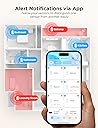
📱Instant app & email alerts
📶Connects up to 20 sensors
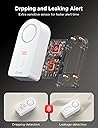
🔔100dB loud adjustable alarm
💧 Stay dry, stay ahead — the ultimate smart water guardian for your home!
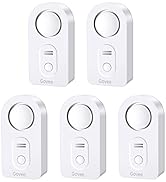
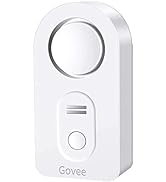
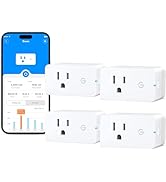
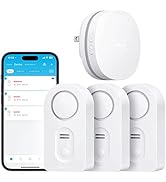
The Govee H5040 Gateway+ with H5054 sensors is a smart water leak detection system that connects up to 20 sensors via a dedicated WiFi gateway. It delivers instant app and email alerts, features a loud 100dB alarm with adjustable volume and mute, and allows sensor location naming for quick leak identification. Battery-powered and easy to install, it’s designed to protect your home with real-time, networked water monitoring.







| ASIN | B07QP153GT |
| Audible Noise | 100 db |
| Best Sellers Rank | #46,539 in Tools & Home Improvement ( See Top 100 in Tools & Home Improvement ) #43 in Water Detectors & Alarms |
| Brand | Govee |
| Color | White |
| Compatible Devices | Smartphone |
| Control Method | App |
| Customer Reviews | 4.3 out of 5 stars 2,645 Reviews |
| Item Dimensions L x W x H | 4.88"L x 3.66"W x 2.87"H |
| Manufacturer | Govee |
| Mfr Part Number | B5040105 |
| Model Number | H5040+H5054 |
| Mounting Type | Tabletop Mount |
| Number of Batteries | 2 AAA batteries required. (included) |
| Number of Items | 1 |
| Number of Packs | 1 |
| Power Source | Battery Powered |
| Product Dimensions | 4.88"L x 3.66"W x 2.87"H |
| Sensor Technology | Contact Sensor |
| UPC | 741663591664 706597349828 |
| Unit Count | 1 Count |
K**E
Great sensor
Works great in my well pit. Instead of having to constantly check when it rains to make sure my sump pump is working I can just leave this sensor in the well pit and if my sump pump gets plugged this will alert me.
M**K
What it does is invaluable for peace of mind......
First off, the product works exactly as described. Pros: 1. Setup was very simple and easy. note: I have a multi band mesh Wifi system (VELOP) , so it was not an issue at all about the 2.4GHz band the product mentioned about. 2. Once you download the app, the product practically walks you through adding additional units. 3. Adding additional sensors is practically as simple as pushing the button at the bottom of the receiver and pushing the remote sensor button to sync up. 3. Additional units show up on the app with a serial number- You can rename it to the location where they are located--making it easy to identify. FYI....I bought the base unit that comes with a single sensor and then bought an additional 2 - 5 pack unit to be spread out around the house to detect any issues. 4. shows the battery level of each sensor. 5. Receive email alerts when there is a leak. I tested it by placing the unit directly under 3 teaspoons of water and it alerted me immediately. 6. Sensor on the top was also tested by adding two drops of water and it started making the loud sound. Cons: 1. There is no test button to check if the unit is working or not till you do what I did before and the email alerts do not add TEST in the body...so you might get worried when you see an email after few days. ( one way to avoid is to not rename the unit till it tests good ...so the body of email would read Unit..XXXX reported leak . Once validated that all works, rename it the way you want and from then on email body would come with the right name. No big deal. 2. Would like to see the app show different colors for different sensors and highlight with a red box to show for easy view... Again no big deal. Overall a fantastic product to buy for peace of mind.
G**E
Impressive, would buy again. (Take time to read other reviews to make your installation easier.)
We bought this sensor kit with some extra sensors two weeks ago to help monitor the house while we were on vacation. Setup was easy after an hour of unnecessarily confusion. Included batteries worked fine, it's a new installation so I cannot comment on battery life. The manufacture's directions are unclear ... THANK YOU to the Amazon reviewers who wrote terrific explanations to help the rest of us. How well does the Govee app protect privacy? This is not an accusation, it's just an unknown. So I didn't want it installed on the phone I use everyday. Here's an option that also makes it easy to connect to the required 2.4 GHz wifi: I installed the app on an old iPhone that's connected to our router's 2.4GHz "guest WiFi". Using the old phone, and after struggling with the unclear directions, the Gateway connected to guest WiFi and all six detectors paired to their gateway. I also assigned the detectors to location names (e.g. "Water Heater"), so any alerts would immediately direct me to the problem. Then I tested one detector; SUCCESS!!! The audible alarm sounded immediately. Then, within a minute this email arrived: "Your "H5054_48C5" has detected water leakage. Check the area soon to avoid water damage." Glad that the alert system works, I know there's a problem somewhere, but that cryptic serial number doesn't help to find it. Suggest that Govee add "location" to their alert messages. So I like this product. If Govee adds clarity to the installation directions and alert messages they would fully earn a five-star rating! ****
S**K
It works, be patient
The instructions are pretty weak. It took me several tries to get everything connected. The key is connecting your phone to 2.4 and then connecting your phone to the gateway and then connecting up your sensors. After that everything was great. The app works fine for me. Tested out a sensor and it sent an alert to my phone. Running the latest IOS.
Z**Z
East to install; works with Alexa
Excellent : one of the easiest hub to pair with the water leak sensors. I paired 10 sensors with one hub, it was easy to do. I tested each sensor with water, all 3 locations, 2 probes at the bottom of the sensor, and one dripping probe on the top. All worked just fine. Every time I tested each sensor, got a push notification on the phone and as well as an email. There is a 90 seconds time out after the alert, meaning , that you won't get another alert for 90 seconds if you keep repeating the leak tests. I guess that is there to minimize the alerts and a smart way to do it. I renamed the sensors based on their location. No issues so far. I plan to test the system every month for next couple of months, just to monitor its performance. So far, no issues. Sensors are very loud. Even if the wifi stops working, sensors would still sound and are loud enough , and it can’t be ignored. I kept each sensor at the highest volume setting ( default), as this is one noise/sound/alert you don’t wanna ignore. It pairs with Alexa, enable “Govee Home” skill in Alexa or just go to any water sensor setting in the Govee app, and link Alexa with Govee. Then set up “ routines” in the Alexa app. Alexa would notify whenever there is an alert from Govee or any leak. Govee app also notifies via push notification and as well as send an email. Hope this helps. I plan to add more sensors, and I know some people have added more than 10 sensors on a one hub. But I would buy a new hub, as it’s cheap and I do not want to overload a hub by adding more than 10 sensors to it. And it’s also not recommended by Govee. The way I see it, why overload one hub by adding more than 10 sensors to it and compromise its functionality. Just add one more hub for more than 10 sensors and have a peace of mind that it would work when you really need it to be.
B**H
Very Unreliable, and horrible app
This product is VERY unreliable. After a lot of frustration following some pretty bad instructions, I was able to finally get this to work. I got the alarm to trigger by licking my finger and placing it across the leads. The alarm sounded, the app caused my phone to vibrate, and I received a notification email. I did this a few times and I was happy with how it worked. I then unplugged the gateway from my test location and moved it to my desired location. I waited for it to connect to WiFi and did my test again. The alarm sounded but it did NOT trigger the app alarm or the email notification. I tried several times using different sequences of turning plugging in/out the gateway, opening/closing the app, re-pairing the leak detector. Sometime it worked, but most of the time it didn't. I couldn't find any consistent way of getting it to work every time. Also, the app seems to be very out of sync with the gateway and the leak detector. When I unplugged the gateway, at times the app still said it was connected. And if I removed the batteries from the leak detector, the app still said it was connected with full battery. If anything is not connected, the app should tell you, but it doesn't, leading to a false sense of security. The app is also very confusing and has almost no documentation. I'm using this to detect hose and filter leaks for my 100 gallon aquarium. If there is a leak, I need to know right away so I can fix it, and I have no faith at all in this device. I will be returning. Spend the extra money and get one that works.
E**.
Please read my recommendation
I received the item and a box of five more sensors about an hour ago. I am professional at home construction, including the plumbing trade. Here's what I found. After setting up the first sensor to the internet, I proceeded to place that one under my kitchen sink. I looked under the sink with a flashlight and didn't notice anything on the bottom of the sink cabinet, so I slid the sensor to the back of the cabinet. On doing so, I felt a dampness on the palm of my hand as I placed the sensor. There was a film of water on the bottom of the cabinet. I waited to see if the sensor would go off, as it did when I tested it by wetting a finger and putting it across two of the terminals on the bottom of the sensor. Well, that film of water did not trip the sensor. Wondering why, I placed the sensor on a flat piece of plastic on my work bench and I could see there is a 1/16 inch or so of space between the sensor probes and the flat plastic sheet I put it on. That's the problem right there. A film of water on the bottom of a cabinet will not set the sensor off. The probes will not contact the water surface. Here's what I did. I removed the little rubber plugs from each of the four feet of the sensor. Use a sharp object. I placed the sensor on a piece of sand paper on a very flat surface. Rubbing down on the sand paper I sanded the plastic feet down to the same level of the metal probes under the sensor. Now the probes will touch the surface the sensor is resting on. I tried the sensor under the sink again and it immediately tripped the water alarm. A slow drip will not make a puddle of water in a cabinet. It will most likely coat the bottom of the cabinet as it's being absorbed into the wood or leaking out at the seems of the cabinet. Something about kitchen cabinets: The bottom of kitchen and bath cabinets is usually made of cheap particle board or some material equally water absorbent. A small drip will not form a puddle of water as you might think. The bottom of the cabinet will absorb a small water leak, like a very slow drip, for MONTHS. Probably until the bottom of the cabinet is ruined. You will be able to tell by the bottom of the cabinet sagging down. But here's what I do with my sink cabinets. I put a heavy bead of caulk around the edge of the inside of the cabinet where the bottom of the cabinet meets the sides. Then I apply two or three coats of varnish to the bottom of the cabinet (we're talking INSIDE the cabinet here). What this does is make the bottom of the cabinet somewhat water proof, enough that the cabinet material will not absorb a small leak. And a larger leak will run out the FRONT of the cabinet, rather than down the seams between the bottom and sides of the cabinet. And you will notice it before damage is done. Now, the Govee setup. I did find the setup a little confusing I'll admit. Especially when setting up to the internet. The app wanted me to connect my phone to the wifi of the gateway unit that comes with the sensor. I'm thinking, do I want to do that? And lose my home wifi on the phone? I ended up backing out of the setup. But going back into the app again, I found it was working. I pushed the buttons as directed and setup the 6 sensors I had without issue. As you do each one, and are looking for it in the app screen, pull down the screen to refresh it and you'll see the device you connected. I gave four stars because: The directions could be a little more precise with the wifi setup of the gateway. The sensor probes should be lowered to pick up any amount of water. Note: The first sensor I installed saved me a big headache had the dripping fitting decided to break sometime down the road. This one find paid for the sensors I put in today. An overall excellent product. Just sand down the feet. UPDATE: 6/29/21 - I had a sensor alarm in my bathroom vanity sink cabinet. I removed the stuff stored under the sink and didn’t see anything around the sensor. I moved the sensor and carefully felt the area with my fingers. With no visible water, the area felt slightly damp to the touch. I took a closer look at all the plumbing with a flashlight, and sure enough, one sink supply connection was the slightest bit wet. Maybe one drop per hour. My description above on how I modified the sensor probes to touch the surface (floor, etc.) had allowed the unit to alarm well before any water started to puddle and soak into the wood and ruin the cabinet. I highly recommend these water sensors and that you modify them as I suggested above.
M**S
Ok but
Very easy to setup if you follow the directions. Read directions before starting. Tested all 6 sensors (multiple times) and push notifications and email come within 10 seconds as well as the sensor alarming. My phone has a "do not disturb" time but I allow these alarms to come through and they do. If you contact their support you have to know you a communicating with a company probably in China. There is usually a 1 day delay and the answer they provide sometimes misses (like they don't understand or translate your question right). Now the not so good part of this system. I took batteries out is a sensor for 24 hours. The app never reported it offline or bad and still showed it with full battery charge. The Govee response was "Hello customer, since you have take out the battery, the sensor has no battery to upload its status. The status would be the previous one before you take out the battery." I don't know if a sensor were to go bad if you would ever know about it. The Govee response was "Sorry for any confusion. There is no such a report now. The gateway and the sensor will keep communicate with each other if the distance is OK. If the gateway lose wifi connection, you will see the error message on the app"
M**G
Productazo!!!!
Resolvio todos mis problemas con fugas avisandome en tiempo real cualquier accidente
Trustpilot
2 months ago
3 days ago