Buy anything from 5,000+ international stores. One checkout price. No surprise fees. Join 2M+ shoppers on Desertcart.
Desertcart purchases this item on your behalf and handles shipping, customs, and support to Nicaragua.
🚀 Elevate Your iMac Experience!
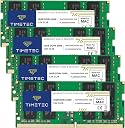
The Timetec 64GB RAM Kit (4x16GB) is a high-performance memory upgrade compatible with Mid 2020 and Early 2019 iMac models. With a speed of 2666MHz and a lifetime warranty, this DDR4 memory ensures your iMac runs smoothly and efficiently, perfect for professionals and creatives alike.


| ASIN | B07RTHKVDZ |
| Additional Features | Lightweight |
| Best Sellers Rank | #124 in Computer Memory |
| Brand | Timetec |
| Column Address Strobe Latency | 19 |
| Compatible Devices | Desktop |
| Computer Memory Size | 64 GB |
| Customer Reviews | 4.6 out of 5 stars 1,389 Reviews |
| Data Transfer Rate | 2666 MHz |
| Form Factor | SO-DIMM |
| Manufacturer | Timetec |
| Memory Form Factor | SODIMM |
| Memory Generation | DDR4 |
| Memory Speed | 2666 MHz |
| Mfr Part Number | 78AP26NUS2R8-16GK4 |
| Model Name | Timetec |
| Model Number | 78AP26NUS2R8-16GK4 |
| Number of Pins | 260 |
| RAM Memory Technology | DDR4 |
| RAM Size | 64 GB |
| Special Feature | Lightweight |
| UPC | 765441341814 |
| Voltage | 1.2 Volts |
| Warranty Description | Lifetime |
H**A
Works Great! Saved Money!
I was due to purchase a new iMac. I had a 2013 iMac with 32gb and I am a graphic designer. I don't do video or super large files, but I do have a lot of Adobe products open at the same time for work. I did not want to buy the new Mac Studio + Mac Display because it would have been almost 4000+ for that set up. Again, I don't need something super powerful... also Apple has not announced a new version of the iMac. I purchased a 2020 iMac 5K for 1600 and purchased 2 16GB sticks from Mimetic for a total of 32GB. Install was easy and computer booted u like a charm. It is so fast and perfect for what I need. Saving money feels great. Thank you Timetec. Planning to purchase another 32gb for a total of 64GB on my 2020 iMac. Should last me for at least 5 years.... the 2013 lasted me much longer than expected.
M**N
Handled The 7 hour Memtest like a pro on my 2019 iMac 21.5 with an upgraded i9 9900 2-2TB SSD
After initially choosing to go with the widely recommended and twice as expensive OWC memory initially for my 2019 iMac with an upgraded 2tb ssd and 2tb m2 and the Intel i3 replaced with an Intel i9 9900. I wanted limited risk and bulletproof. After crashes and freezes and lots and lots of troubleshooting I finally figured out that my intial set of memory was kicking errors. Long story short I requested my first replacement set 4 months ago and now I have my 4th set on the way from that other company. Meanwhile, after three sets of competitor ram kicked out errors I decided I was done with that. After overanalying between these and others and went with Timetec for Mac. First things first I popped them in, reset the PRAM and SMC then fired up the rugged 6+ hour 14 test MEMTEST86+ overnight that had caused the OWC sticks to buckle over and over. When I woke up in the AM these had passed with 0 errors, show up ok in system settings and function BETTER than the OWC that came highly recommended (The OWC registered 14, 400, and 77 errors over three sets). If you're on a budget or just want something that you know will work with your Intel iMAC buy these, save your self cash, seat them correctly, reset PRAM and live happily ever... well it's technology, so enjoy a few solid years with your faster computer! Oh, and if you made it this far and are wondering, yes I upgraded the processor on my 2019 iMAC 21.5, as well as both hard drives and upgraded memory. I also tossed in a laptop fan for extra air movement. Yes, it all works just fine without issues. It gets warm when I'm working it hard, but I have TG Pro controlling fans and all seems to be fine. Also, I'm still waiting on my fourth replacement set to arrive going on week . I think it's been over three weeks since I sent back the last faulty set. Thank you Timetec for helping me out of that nightmare.
P**G
Easy installation
Fast, effortless addition for my iMac.
A**T
Boost Your Macs Memory and Save Money!
I bought this memory to upgrade my new 2018 Mac Mini. Apple charges a $600 premium to purchase the Mini with 32GB installed, with this memory kit and a few tools you can upgrade the base 8GB model to 32GB for about $150, saving yourself $450 (as of May 2019). After the memory was installed, the Mini booted right up and works perfectly, the system reported the correct amount of RAM in both the summary and detail pages (see photos). Now, this is not a simple upgrade. First, it requires three different Torx security wrenches in somewhat unusual sizes (security wrenches have a whole in the center, regular Torx won’t work). Second, working on a Mac mini (or any Apple product) requires careful and delicate skills, the wires and connectors are very small, and if you aren’t careful you can brake things. I’ve worked on older Minis before so I knew what I was getting into. Fortunately “iFixIt” gives detailed step by step instructions and videos on the process, you should watch the video to see if you’re comfortable doing the upgrade (they rate it as “Moderate” difficulty). That said if you can follow directions, have patience, and are comfortable with small parts, it can be done and you’ll save a lot of money. All in all a very productive and cost saving upgrade, and everything works great!
J**Z
Easy To Install and Works Very Well!!
These worked perfectly in my 27" Imac year 2020. Super easy to install and everything booted without a hiccup. There is a delay after you power up for about a minute. After that it starts up normally. Now I have 64GB of Ram in total and my machine is moving much faster. Very happy!
S**B
It works with Mac Mini 2018 but...
Good price, fast shipping, decent RAM. The site proclaims it is built for the Mac Mini 2018 but my 2018 Mac Mini no longer can extract system information from the apple logo in the upper left corner and selecting "About This Mac". The only way you can see the system information is to work through the Utilities folder. Once you bring up the system information that way, if you select the "About This Mac" from the upper left desktop again, you get an error as seen in my attached image. So, something is up with the way Mac recognizes this RAM. It is not quite perfect but it does work/function as 16 GB of RAM. This was an upgrade from 8 GB and I plan on keeping it. It's just odd system behavior.
O**N
Work on 2020 Mac 27 inch
No problems to install, when powering up will take a little time then comes up like normal. I read information 128 GB of memory. I have open up to 8 apps at a time with no problems. Adding more information, I had a problem with my computer crashing after heavy use of graphic programs and window and Linux Mint up at the same time. I made report to apple and underline problem was buffer getting almost 40 GB and crashing, after a while I closed some programs and problem went away. Contact company and told to change one chip at a time and after doing this I found one that crashed. They sent be returned mailing label and sent new chip out when they received my faulty one. This was after a year and no question ask just proof of purchase. Amazon has good history report and found all my info. They back there product, using full potential of my Mac.
T**D
2020 iMac 27" now with 40GB RAM
I purchased this to add to the existing 8GB of RAM installed in a 2020 iMac 27" (i7, 512GB SSD) I purchased a few days ago. The RAM was installed per Apple's prescribed arrangement (Slots 1 and 2 with this 16GB x 2 and 3 and 4 with the original 4GB x 2). After powering on the iMac with the new RAM installed, it takes ~30 seconds for the system to check it before it will begin booting - during that time, the screen will remain black and it will appear that pushing the power button did nothing to turn on the system. Give it a moment. After booting into Big Sur, I checked the RAM to see if this combination was running at full clock speed. Good to go: 40 GB @ 2667 MHz. This has greatly improved performance of the computer. I use Parallels Virtual Machine every day for work. My former main system was a 2020 MacBook Pro 16" i9 with 16GB of RAM. This worked great but the iMac now with 40 GB of RAM allows me to avail to the VMs a lot more memory. I'm very pleased with the iMac now that it has the RAM upgrade. Time will tell how reliable it is but being Hynix, I doubt there will be any issues. For anyone interested in the performance difference between the iMac 27" with upgraded 8-core i7 (desktop) versus the 16" MacBook with 8-core i9 (mobile), the iMac is faster. I haven't bothered yet with benchmark tests to quantify the difference. I can tell just from using programs I'm intimately familiar with that it takes less time and GUIs have a little extra pep in their step. Fusion360 renders significantly quicker, Parallels VMs boot and run even faster - and that isn't to say the MacBook does these jobs poorly. I will save use of the MacBook for when I have to work in the field. UPDATE: I just purchased an additional 32GB (16GB x 2) kit to replace the 4GBx2 that remained, taking it up to a total of 64B. This RAM (new and old) has proven rock solid in every day, strenuous use. I would definitely recommend it for iMac owners.
C**T
easy to install
Took 2 days to delivery from the time we ordered, lighting fast ,good product, compatible with iMac late 2020. No issues so far, installation was very easy and straight forward, save heaps of money . I strongly recommend this product to IMAC users.
E**I
Turbo Upgrade für Intel Macs
Passt für Mac (Intel) von 2022. (wenn es nach dem Einbau hängt, dann einfach Option+R Tasten zusammen gedrückt halten, dann läufts). Damals war Ram für Mac unbezahlbar. Nachdem ich unsere Büro Macs von 8 auf 64 Gb aufgerüstet habe, wird auch im Schnitt 48-52 GB genutzt (und das nur Office Apps ein paar Browser Fester, Messenger und PDF Tools.), dafür läiuft der Mac spürbar schneller anders als beim Windows, nach Aufrüstung.
J**O
SPD (Serial Presence Detect) indisponible pour l'odinateur. Innacceptable !
Il est vraiment dommage que les données SPD (Serial Presence Detect) soient indisponibles sur ces cartes. Ce qui signifie que le système se trouve dans l'incapacité de faire les adaptations nécessaires pour un fonctionnement optimal, et qui peut aller (au pire) jusqu'à un dysfonctionnement. Je n'ai découvert cela qu'après quelques jours d'utilisation, et je me trouve donc dans l'impossibilité de renvoyer ce produit. Mais je regrette de l'avoir acheté. C'est à la limite de l'arnaque. je comprend mieux la différebnce de prix.
A**O
Ottimo prodotto
Le ho utilizzate per ampliare al massimo la memoria del mio Mac 27 pollici del 2019. Le vecchie RAM non andavano più il computer, faticava un po’. Adesso letteralmente “vola” quindi sono molto soddisfatto.
G**E
Timetec ram for Mac
Trustpilot
1 month ago
2 months ago