Buy anything from 5,000+ international stores. One checkout price. No surprise fees. Join 2M+ shoppers on Desertcart.
Desertcart purchases this item on your behalf and handles shipping, customs, and support to Nicaragua.
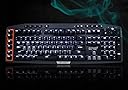
⌨️ Elevate your game with precision, power, and style — the G710+ means business.
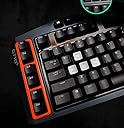
The Logitech G710+ Mechanical Gaming Keyboard combines 110 anti-ghosting keys and 26-key rollover with tactile Cherry MX Brown switches for high-speed, quiet responsiveness. Its dual-zone adjustable white backlighting highlights essential keys for low-light environments, while 6 programmable G-keys enable complex macros and game-specific profiles. Designed for serious gamers and professionals alike, it features dedicated media controls, USB passthrough, and robust build quality, making it a reliable centerpiece for any high-performance setup.
| ASIN | B009C98NPY |
| Additional Features | Backlit |
| Antenna Location | Gaming |
| Best Sellers Rank | #63,247 in Video Games ( See Top 100 in Video Games ) #2,880 in PC Gaming Keyboards |
| Brand | Logitech G |
| Built-In Media | USB Cable |
| Button Quantity | 110 |
| Color | Black |
| Compatible Devices | PC, Mac |
| Compatible Operating System Family | Windows |
| Connectivity Technology | USB |
| Customer Reviews | 4.1 out of 5 stars 1,547 Reviews |
| Enclosure Material | Plastic |
| Generation | 3rd Generation |
| Global Trade Identification Number | 00097855089007 |
| Hand Orientation | Ambidextrous |
| Item Dimensions L x W x H | 20.7"L x 9"W x 2.4"H |
| Item Weight | 4.8 Pounds |
| Keyboard Backlighting Color Support | Single Color |
| Keyboard Description | Gaming |
| Keyboard Layout | QWERTY |
| Language | English |
| Manufacturer | Logitech |
| Mfr Part Number | 920-003887 |
| Minimum Required Operating System Version | Windows Vista |
| Model Name | Logitech G710+ |
| Model Number | 920-003887 |
| Number of Keys | 26 |
| Power Source | Wired |
| Recommended Uses For Product | Gaming |
| Series Number | 920003887 |
| Special Feature | Backlit |
| Style Name | Retro |
| Switch Type | Tactile |
| Theme | Rainbow |
| Total USB 2.0 Ports | 1 |
| UPC | 097855089007 803982743855 |
| Unit Count | 1.0 Count |
H**S
Better than Razer Black Widow 2014
--Brief-- Great keyboard, the number of G keys are perfect - not overdone like others, where most will never use more than whats provided here. White light is nice and goes with any light theme your gaming rig has. Keys feel very high quality as does the entire, heavy keyboard. Volume is a huge bonus as is wonderful software - best in the industry with easy backup. --About my experiences with Mechanical Keyboards-- I've only bought Razer and Corsair mechanical keyboards before - I was naive enough to think that Logitech wasn't up to the challenge but I was wrong. I bought this from a competitors website after a great sale, I thought I'd try it out. I expected it to be worse than the Razer from some reviews, but then found out those reviews were people being fanboys because when you set them side by side, you actually cant feel a difference with the keys at all other than switches. Switches with Razer are their own thing vs Logitech which uses an international proved standard. --Pros-- - Keys dont wobble as much as Razer and identical to Corsair. Although the quality feels exactly the same with all 3 of them to be honest. - Design is my absolute favorite, it looks so freaking nice compared to my other mechanical high end keyboards. This is now my primary for my main rig. The sides remind me of a ultra modern tank, it looks stealthy and clean. The orange looks better in person, and the whole thing shines bright like a diamond.. pay up Rihanna! - Multiple key brightness means that you can have 5 levels of brightness for your arrow keys (awsd too) and the rest of your keys separately so if you're playing all night and your eyes hurt but you want to at least see your arrow keys for reference - you can just keep those on which is fantastic. - Quality is top notch. Linus Tech on YouTube points this out to how impressive it feels, it's heavy which is great because it's made of quality. A TANK literally can run over this thing (not that it matters, how often is your keyboard going to be ran over by a tank? lol). -Software with Logitech has always been my favorite - its why their gaming pads, and other gaming PC things are always #1. It's just sooo easy, works every time, and so many options on the fly. Plus you can back it up which is great. --Cons-- -Having multiple colors is nice, if you feel like going green for a month - you can quickly do that with other keyboards. Heck if your GF wants to use the keyboard too you can set her color scheme to hot pink on M2 so she pressed M2 and it's all customized. This keyboard can do all that but the color scheme which sucks for this price range but thats how they all are unfortunately. -The brightness levels dont stick per profile or even when you reset your computer so when you bring down the brightness then go to restart your PC, they're back at max settings. I believe this could be changed simply by software update from Logitech. It is annoying if you like it more dim as I do. --CONCLUSION-- My primary keyboard, I just absolutely LOVE the design and the quality is the same as other high end keyboards. My only thing is there's only white, but at least white matches with absolutely every color scheme (mine being blue lights in my rig). The volume is something everyone loves immediately along with the simple G keys, there's not a million of them which is a good thing. Paired with a gaming mouse - you can't go wrong. Again - This is now my main keyboard, I absolutely love it a lot and would highly recommend it. If money is no option than spend a bit more for the new colored version.
J**N
A tank of a keyboard - maybe not pretty, but definitely functional.
Bought this as my first mechanical keyboard, and it is absolutely great so far. I had originally planned on buying a Corsair Vengeance K70 keyboard, but decided to go with the G710+ with MX Browns instead for the price and macro keys. So far, this guy is great, even if it's not necessarily as pretty as the K70. Features: 1) 5 levels of backlighting, with an option to have your WASD and arrow keys backlit differently than the rest of the keys. This is neat when playing an FPS, but not necessarily particularly useful. Being able to change the brightness levels is great though, as if I'm gaming during the night I don't want light being blasted into my face, but I still want to be able to see my keyboard. 2) 6 macro keys with 3 sets of memories, along with a macro recorder - with the Logitech software for the keyboard, it's easy enough to rebind the macro keys to other keys in order to use them in games. While I don't use these keys that often, they're great for productivity (opening Explorer, Office programs, etc.) and for remapping annoying controls (I have controls normally bound to 7-0 or on the right side of the keyboard bound to the macro keys). Recording macros is super easy, as the entire process consists of pressing MR, the macro key, performing the action, and then pressing MR again. This means that it's possible to record macros on the fly, for instance if you need to bind a combo or text action to a macro button in the middle of something. The macros also can be saved to specific games that you pick in the software, meaning that when you load up a game, it automatically switches macro bindings to that game's settings. 3) Cherry MX Brown switches with O-rings - these guys are so much quieter than MX Blues, although they're not exactly quiet. However, I love the feel of these switches - they're tactile, like the MX Blues, but have a nice slide as opposed to a click. Coming from a rubber-dome keyboard, I'm used to bottoming out when I type, but I'm getting used to not having to do that now. 4) Media keys - there are some standard Play/Pause, Stop, Previous, Next, and Mute buttons, along with a volume roller. The roller doesn't have bumps when changing volumes, but as long as you're listening or watching the volume slider this isn't really an issue. 5) Game mode - press a button to deactivate the Windows key. I haven't had use of this, since I never accidentally press the Windows key in game. 6) USB Passthrough - you can plug your mouse or any other USB device into the passthrough, and plug the keyboard's 2 USB plugs into your computer. This avoids any potential latency issues of using the keyboard as a hub, although it does mean the keyboard uses 2 ports on your computer. Things I liked: 1) MX Brown switches with O rings are quiet compared to blues, and give just enough tactile feedback without being too clicky. 2) The keyboard is really heavy, and very sturdy feeling. However, this means I can't really use it on my lap. Not a big issue. 3) The wrist rest is comfortable, although it is sometimes a bit too low to actually rest my wrists on. 4) The backlight level can be changed, so I often leave my keys dim at night. 5) The macro recorder is incredibly easy to use, and the software's ability to change macros depending on games open is really useful. Things I didn't like: 1) The macro keys have a bright orange plastic bit around them, which doesn't really do anything for the keyboard except make it look a little uglier. 2) The symbols and alternate keys are below the characters on the keyboard, which can be confusing for those who don't touch-type. 3) The shiny plastic parts of the keyboard gather dust pretty quickly, and the keyboard also does not come with a key remover, meaning that if you try to take off your keycaps, you have to buy your own.
T**S
A Review From a Non-Gamer
Starting Point I've had this keyboard for just over a week and feel like I can give it an honest review. I'd like to start with a few things to keep in mind while reading my review: 1. This is my first mechanical keyboard. The only previous experience that I have with them is a Cherry POS keyboard that was used at a retailer I worked for. 2. I originally wanted a Das Keyboard with blank keys ( Das Keyboard Model S Ultimate Soft Tactile Mechanical Keyboard ), but it was tough to pass up the G700+ when it came down to $99.99 3. I don't play computer games (or at least haven't yet). 4. I work from home and use my keyboard 8-12 hours per day, although I do not spend the entire time typing. 5. My old keyboard is a Logitech MK710 that came with a mouse Pros and Cons Here is a quick list of the pros and cons for those who don't want to read the entire review. I'll try and cover each one in more detail further down. Pros: 1. The keyboard feels great to type on. 2. The keys sound quieter than I expected 3. Macro keys are easy to program and the software seems pretty stable Cons: 1. Backlighting is slightly inconsistent and is faded out on some keys 2. There is a strange "pinging" sound that I get when I type quickly 3. The wrist rest feels kind of cheap compared to the rest of the keyboard Verdict: I recommend the keyboard to anyone who wants a cherry brown switch mechanical keyboard and won't mind some inconsistent backlighting. I give the keyboard 4 stars because it works as I expected it to but it didn't blow me away. First Impressions: The first thing I noticed about the keyboard is how crisp it looked. I love unpacking a new toy--err--tool, so unpacking it and removing the plastic is a big part of the experience for me. It's hard to give something a chance if it does not suppress the buyer's remorse feelings right away. Most Logitech products seem to present themselves well visually. I don't mind the orange ring around the macro keys or the branding printed on the keyboard, although I know that some people are turned off by it. The wrist-rest was about the only physical part of the keyboard that looked and felt a little cheap; although, it is hard for me to describe what a high-quality wrist-rest should look and feel like. The cable is nice and long and splits into two USB plugs for about the last foot of the cable. There is a USB port on the top of the keyboard next to where the cable comes out which is nice to have available. Macro Keys: Like I wrote at the top of the review, I don't play computer games so I cannot comment on the functionality of the keyboard for gaming. I did find that the software is pretty easy to use and has a bunch of pre-loaded profiles for different games. I don't really use the macro keys but have programmed one of them to type "Select * from " every time I hit it. I frequently poke around in databases and it is one of the most common things that I type, so it seemed like a good use of a macro key. I've been thinking about setting up one of the macro profiles to be strictly SQL keywords, which may be useful. I do occasionally hit the macro keys accidentally when using a shortcut involving CTRL or SHIFT, but that is likely just due to the fact that I've never had anything to the left of those keys anyway so I developed some bad habits. The Sound of Typing: I knew that mechanical keyboards are noisy by nature and that brown switches were supposed to be quieter. I wanted quieter keys because I take notes during conference calls and don't want to be ridiculed for overly-aggressive typing. The keyboard is definitely quieter than I expected and gets even better the more I learn to type without bottoming out the keys. I guess the combination of brown switches and the rubber o-rings really helps cut down on keyboard noise. The Feel of Typing: I love typing on this keyboard. The whole reason that I started looking for a new keyboard was wrist pain that I developed and blamed on having to type increasingly harder on my old keyboard. It is nice to be able to just touch a key and know that it will work rather than worrying about if it will get stuck or just decide not to work at random. This is my first mechanical keyboard so I cannot compare the way it feels compared to other mechanical boards. My only previous experience with cherry switches was a cherry POS keyboard with cherry blues. I didn't do a lot of typing on it since it was in a retail environment. Backlighting: Before I purchased the keyboard, I read many reviews about the backlighting being inconsistent across the keys and sometimes failing all-together. I haven't experienced an issue with the lights failing completely; however, I do agree that the backlighting is not as nice as I would expect. As others have mentioned, the secondary characters on the keys don't really light up and some of the keys seem to be brighter than others, regardless of the brightness setting. I did not originally want a backlit keyboard, so poor backlighting does not affect the functionality of the keyboard for me, but I thought it was worth mentioning for others who are specifically looking for backlit keys. The only real annoyance the backlighting creates for me is the OCD part of me that can't stand things that are not uniform, but appear to have been intended to be uniform. At a very minimum, the poor backlighting makes the keyboard look a little cheap--which is not good for a product that carries a $150 price tag. Strange Pinging Noise: I mentioned that there is sometimes a strange "pinging" noise that comes from the keyboard. I don't know how else to describe it or if it is a normal noise. It doesn't seem related to any individual keys; it seems like some sort of an echo and it only happens when I type really fast. I don't know if I am bottoming out the keys more frequently and that they are traveling further back up but it can be an annoying sound. All the research that I did prior to buying this keyboard has created an obsession that will likely lead to future keyboard purchases, so I may be able to find out if the sound is normal or unique to me. Summary: This has been a great first mechanical keyboard so far and I definitely don't regret getting it, especially for the $100 price. I would recommend it to anyone who doesn't really care about the quality of the backlighting. If you want/need perfect backlighting (either because of the desire for backlit keys or you can't overcome the OCD annoyance of having the keys not light up uniformly) then you may want to look elsewhere. If you've made it this far, thanks for reading. i hope that my review was helpful.
J**E
For me (at this time and place) the perfect keyboard.
I have been using the G710+ for the better part of a month now and I feel it is fair to give it a review. After venturing into the mechanical keyboard world with an Azio Mech 4 (pronounced: complete dung) a 9 months or so ago from my trusty Logitech G-15, I found I missed several features from the Logitech keyboards. At the time when I bought the other mechanical there was not a mechanical gaming keyboard offered by Logitech. This has all changed and I was very elated when I found this G710+ for sale. This keyboard has (almost) all of the features I am after in a gaming keyboard while offering up mechanical switch action which is so nice and solid feeling. My azio mechanical was so loud that my wife who shares an office with me would constantly complain about the clacking sound it would generate. The G710+ comes in at much less on the "clack" scale but do not believe for a second that this is a "quiet" keyboard, not even close when typing with normal/hard force. No worries though for me since this thing has such a solid feel and the typing (and gaming) is so smooth that any sounds it makes is simply a reassuring action of this thing doing what it does. Let me be clear here on this most important part, this thing is silky smooth in regards to key action, I love the feel of this keyboard. The back lighting on this keyboard while being only cold white is very bright, I actually keep it running a setting or two below brightest and it is still plenty bright. Nice to know the extra brightness is there should I need it. I also like that I can control the WASD and arrow keys brightness separably, I did not think much of this feature on paper but in practice I find it moderately useful in FPS games. At first I thought having more color options for the back light would not hurt here but really the white looks good and fits the design well. The orange plastic on the left side by the G keys is not popular with some (and can be removed and repainted with a little work on your part, look it up if so inclined) but it does not bother me at all. The volume cylinder is a nice touch and saves space while still offering the satisfaction of a volume knob as opposed to volume buttons (I hate those). Really though did they have to go and switch the layout of the special characters to below the numbers along the top row (and use a strange font for them to boot)? With all of this said I feel this is by far the best keyboard available now (for me). I can see some areas where they may revise this keyboard and make it slightly better (a screen perhaps, I like some of the functionality of a screen but is it worth the increase in footprint?) but as it stands today this is one fine gaming keyboard with the best mix of features, style, design and functionality out there. As with the G-15 the G710+ is an auspicious start for Logitech's mechanical gaming keyboard line.
S**A
For the price, completely horrendous performance
I have a blackwidow basemodel keyboard. That is the feeling I am comparing with. When I got this keyboard, it was to replace my girlfriend's MK550. The MK550 had been disassembled, cleaned, and WD40'd. It was smooth but still hard to push down. The blackwidow I have is very nice, if not a bit plastic feeling. The keys push down very surely and solidly. There is play in the keys (they shift around) but they dont stick at any point. IMO the keys should be on rails, straight up, straight down, no wiggles. This keyboard feels entirely made of plastic even though the base feels solidly built. The thing is an ugly orange, which matches no one's color scheme ever. The cables are thick and unyielding, with a HUGE cable splitter halfway down, which makes cable management a nightmare. The keys are the worst problem, and are why i'm promptly returning the product. The keys feel like they are made of cheap disgusting plastic. They stick and there is friction the entire way down. You cant feel any sort of mechanical feeling. there is no click, no bump, and they bottom out far quicker than you would expect. It feels like you cant push them all the way down, or that they should be pushing down farther. I think logitech used very fat O-rings for the sake of silence and shouldnt have done this. The keys are made of this cheap plastic material, and it sticks to itself. As I said, if you slowly push down, the action isnt smooth. It should feel like a simple push on a spring. Instead, there is absolutely no difference between pushing this key down and pushing the keys on the MK550 keys down. Why is this 150 dollar keyboard feeling the same as a 30 dollar keyboard? Furthermore, the key force on my blackwidow is something like 45 grams, i think. The key force on the 550 is 65-80 grams. Why is a mechanical keyboard just as hard to type on as a non mechanical keyboard? Come on, logitech. I seriously expected better. I get that this is your first foray into the mechanical keyboard area, and as a loyal logitech customer, just as I told you i would, I bought your mechanical keyboard when you released it. But nothing excuses you from this level of quality. Not your incredible return policy, not your incredible customer service, and not my loyalty to you as a logitech fan. This is an attrocious product. BTW, logitech gaming software is a HUGE improvement over setpoint, but you need to be more consistent with features. Stop removing features. Where did alt+tab and windows+tab window switching go? Why are there 2 seperate versions of setpoint for my G700 and my girlfriend's G700? come on.
D**S
High quality, affordable mechanical keyboard
After an initial hiccup where I received a keyboard with a faulty switch, I've been very happy. I am not much of a PC gamer, but I ordered this because it was one of the few affordable mechanical keyboards on the market with stellar reviews. Pros: - The Cherry Brown keys are the perfect balance for me. I find the Blues too loud. The Browns are much quieter, but you still get that firm tactile feedback you want from a mechanical keyboard. - Even if you're not a PC gamer, the macro buttons can be put to good use for completing repetitive tasks. Combined with hotkeys and/or a good high end gaming mouse, this is definitely a keyboard that will satisfy power users. - I rarely look at the keyboard, but it's nice to have a backlight for quick location of certain keys. It is also very aesthetically pleasing. - This is a really nice looking keyboard. A glossy black base plate with sharp blacks and grays with your macro keys highlighted in orange. The look is a perfect balance between sleek minimalism and functionality. Cons: - These are not overt cons so much as a heads up re. quirks especially relevant to OSX and MacBook users. - The keyboard requires two USB ports to run and there isn't a lot of play between the two cables. If you're plugging into a laptop connected to a display on a new Macbook (I'm using my a less than year old Macbook Pro) this can be a problem since Mac only included two USB ports and they are on opposite sides of the computer (and the cables will not reach to simultaneously plug in). Not a problem if you have a USB hub on hand, but something to be aware of. If you have a computer that lacks adjacent USB ports (this is Mac trying to push everyone to Thunderbolt) or if you're already maxing out your ports, this will take up two ports that really do need to be close together - The keyboard plays nice with OSX as promised, but you *will* need to do some minor remapping. To get the command key and option key in the same position as an official Apple keyboard, you'll need to dig into the keyboard preferences. - In OSX Yosemite there is a weird quirk where the num pad is disabled in Terminal by default. I usually use iTerm where this isn't an issue, but there are a couple of things I prefer to do in Terminal and it's annoying that first time you reach for the num pad. A quick internet search will help you resolve it.
I**T
First time for everything.
This is the first time I have ever bought something and been so unimpressed, disgusted, and stressed out that I just wasted money on a purchase that has turned out to be completely unacceptable. Pros: The box smelled nice when opening it. Before I go into Cons, I will state that I have been using computers since they came about and have typed on so many keyboards in my life. For the past many years I have enjoyed the smooth soft typing that apple mac keyboards provide (for my macs). I type all day at work; code, IMs, emails, support letters… so my fingers know what they like. However my game machine is a PC, and I bought this keyboard in hopes it would adequately replace an aging keyboard that is faulting. People hyped "get mechanical" so I did. Big mistake. Cons: - The keys feel like they are lined with sandpaper when depressed. Scratchy, rough. You can kinda feel the actual tactile 'bump' that should exist in MX Browns, but with all the scratchiness, its lost. - You have to push straight down or the keys rub their sides and scratch or snag or just stop altogether. This has got to be the worst feeling keyboard since I programmed on a VAX machine in the 80s. - Noise. Cherry MX Brown = quieter mechanical?? Yeah, sure, compared to a jackhammer in your hands? It is loud, sounds like cheap plastic banging about, echos and makes me not want to type at all. Especially when it sounds like the whole thing is going to break. - The keyboard is abnormally thick. I thought brick keyboards were done with the Vic20. It is so thick it immediately induces carpal tunnel. - So it comes with a wrist rest to combat the thickness. However its short, and has a steep slope. It is also the matted plastic surface which makes it 'slippery'. Thus your hand slips down, which is an upward battle to keep your hand in place to reach the furthest keys. - The f-keys are in egypt. What is the fascination with putting useful keys so far away? Coupled with the difficult to reach number keys while playing a game, the f-keys are simply impossible to reach and use. (the esc key is beyond egypt) - The spacebar is sharp (its bottom edge). It angles away from you with this sharp edge, which is where I like to keep my thumb at the ready. I have developed a sharp groove in my skin in just the few days I've tried to get used to this keyboard. - All keys angle away from you. Without the back support feet turned up, the keys angle away. Making them different to use and see. With the support up, they angle straight up, like you are supposed to sit with it in your lap? - The backlight is very spotty. It doesn't cover everything on the keys. Long words and any "Shift" level symbols are unseen. - Even during the day with backlight on, all shift-symbols are a dark gray color on a black key making them difficult to see. I can recall thousands of functions, parameters and controls for programming, but I have never been able to remember which key makes the ampersand. Go figure. (not sure how people use a dasKeyboard). - The light to show you have the capslock key 'on' is on the complete opposite side of the keyboard. What fool thought that brilliant idea up. Same goes for the numlock indicator. Although at least numlock is actually nearby. Its still a stupid design. - Not a fan of the different colored WADS keys. I know where WADS is, my fingers rest on them almost exclusively. However when I begin to type out a lot of words and sentences I tend to glance down at the keyboard to keep refreshing my mind where all the keys are. Seeing the colored blocks on WADS throws me off overtime and I start mistyping, and slowing down. - Roller volume: Complete waste of engineering. External sound systems have their own volume controls. Games have their own individual volumes for sound sets. What good is a system-level volume control? - Cord is too short. Seems to be designed for people who jamb all their computer equipment in a pile with their monitor on top of their desk. I have my computer down to the left off the desk so my desktop is clear and quiet. Sure, I can use USB Extensions, but you have to use two of them to utilize its second usb port (like my microphone). TL;DR: I have never been so disgusted with a purchase before. This keyboard is completely horrible to me. I got sucked in by hype and "you have to get a mechanical keyboard" and now fully regret it.
S**E
Logitech WAS always on point ...
LATEST EDIT: So it appears you don't have to send the whole keyboard back as one of the other reviewers previously stated. I put in a ticket with Logitech and they sent me replacement keys free of charge. It definitely took a lot longer than I would have liked (about three weeks from the date I put in the ticket to the delivery of the keys), but I guess it's better than having to ship my whole keyboard. EDIT: I'll leave my previous review below, but here's my update to this product. I'm sad that the keys on this keyboard are so cheaply made. Several of the keys have now broken off and I'm now looking into a different keyboard to replace this one. Reading the other bad reviews it seems you have to send back the ENTIRE keyboard to have it replaced with no option to have a keyboard sent before you send yours. I used to be a diehard Logitech fan, but now I'll have to be on my toes when buying their products again. I can say everything else I've bought from them works perfectly so maybe this keyboard is just a fluke [hopefully!]. OLD REVIEW: I have four Logitech items [including this keyboard] and they all perform flawlessly. I also know they have amazing customer service. This keyboard is amazing. The feedback from it is great and I love the sound of it. Some might be put off by the clacking of the keys, but I think most will enjoy it. The keys are backlit, and you can actually control the brightness. I LOVE the fact that they have a key that can disable the Windows key. Previously I had to use a third party software to remap/disable it [which worked as intended] but it's great to be able to re-enable the Windows key for regular usage with the stroke of a key. The G-keys are cool, but I haven't really used them. The reason being, funny enough, I have three programmable keys on my Logitech mouse that I use instead. I'm sure with other games they might be useful, but for now, I'll stick to the extra mouse buttons. All in all, a great keyboard, and highly recommended. Happy gaming!
C**A
Lo mejor de lo mejor
No se podía esperar otra cosa, es mi primer experiencia con un teclado mecánico y lo único es que se extráña la "Ñ", y al tener que cambiar el idioma a español se complica un poco el uso, pero para el experimentado ya es pan comido. Como siempre Logitech 100% calidad!
E**O
Logitech G710+
Premetto che la descrizione del prodotto è errata: si tratta della tastiera meccanica Logitech G710+, come si evince dalla figura, e non della G710, come dichiarato nell'intestazione. Prima di acquistare il prodotto ho fatto alcune verifiche, contattando più volte il venditore, il quale, penso, mi avrà preso per pazzo! Si tratta, infatti, di un venditore tedesco, che su Amazon.de ha parecchie recensioni, tutte positive. Qui, su Amazon.it, invece, non ne ha nessuna, e la cosa mi preoccupava non poco, anche e soprattutto vista la recente notizia di account di venditori, soprattutto tedeschi, hackerati, e utilizzati per creare finte inserzioni su altri store Amazon. Ho contattato, allora, il venditore, sia via Amazon.it, sia via Amazon.de, sia usando un indirizzo email reperibile sul suo sito. Egli mi ha assicurato che il prodotto era affidabile, che si trattava della 710+, e che il prodotto era in condizioni ottime. Infatti si tratta di una tastiera usata per appena 4 giorni, durante i quali è stata esposta al Gamescom. L'articolo è arrivato in un imballaggio perfetto, e la sua confezione originale, completa di tutto, non aveva nemmeno un graffio. La tastiera è in condizioni ottime, e non presenta alcun segno di usura. Tutti i tasti funzionano al meglio, l'illuminazione non presenta alcun led non funzionante, e il passthrough USB 2.0 non dà alcun problema. Veniamo alla tastiera in sé: si tratta di una tastiera meccanica, gemella della G710, la quale monta, come switch, gli Cherry MX Blue. Questa, invece, usa i Brown. Si tratta di switch spesso scelti per chi utilizza il PC più per lavorare che per giocare, come è il mio caso. Essi hanno una forza di attivazione di 45g, un feedback tattile all'attivazione, e una corsa efficace di 2mm, a fronte di una corsa totale di 4mm. La forza necessaria ad arrivare fino in fondo alla corsa totale è di circa 55g. Si tratta di un tipo di switch che sto trovando davvero gradevole, e mi ci sono abituato quasi subito. Inoltre, venendo da una tastiera a membrana di livello basso, sto appezzando non poco la novità! Ancora, mi aspettavo che gli switch fossero più rumorosi, e la cosa mi ha piacevolmente sorpreso. La tastiera in sé ha una qualità costruttiva ottima, seppur la scocca sia di plastica. Una parte del rivestimento frontale ha una plastica glossy, l'altra, invece, ha una plastica matte. La retroilluminazione ha due zone indipendenti, una costituita dai tasti WASD e dalle frecce direzionali, e l'altra, invece, da tutto il resto della tastiera. Vi sono 5 livelli di illuminazione: 100%, 75%, 50%, 25%, 0%. Mi sto trovando bene a usare quello al 50%, che trovo molto gradevole, soprattutto la sera, mentre quelli al 100% e 75% trovo siano troppo brillanti, tanto da dare fastidio anche mentre si guarda lo schermo. Piacevole, inoltre, il feeling della plastica dei tasti, abbastanza ruvida sotto le dita. I tasti hanno una geometria concava che limita la deriva delle dita, cosa che trovo molto utile. Ci tengo a sottolineare che la tastiera ha un layout US, diverso da quello italiano. Sul sito della Logitech è possibile acquistare i kaycaps sostitutivi per passare al layout Italiano, ma, visto il costo della tastiera (70€ comprensivi di spedizione), e visto il costo del set di keycaps (25€ + spedizione), direi che non ne vale assolutamente la pena. La tastiera è dotata di 6 tasti G configurabili come meglio si crede, tramite il software adeguato scaricabile dal sito della casa madre. Inoltre, essa ha 4 modalità di funzionamento, a ciascuna di esse associata una diversa funzione dei tasti G, e, tramite software, è possibile definire alcuni profili di funzionamento; a ciascuno di essi viene associata una diversa combinazione di modalità. Insomma, la scelta, per quanto riguarda le modalità di impiego e il relativo comportamento della tastiera, è veramente vasta. Forse anche troppo, per quel che mi riguarda, non avendo particolarmente a cuore l'universo dei MMORPG! Ancora, essa dispone di una porta USB 2.0 sul retro, che ho utilizzato per collegare il mouse, e ridurre il numero di cavi a vista sulla scrivania. Proprio per via della presenza del passthrough USB, la tastiera necessita di due porte USB per funzionare: una dedicata alla tastiera in sé, l'altra, invece, al passthrough. Sul backplate della tastiera è presente una guida per portare un eventuale cavo USB all'utente, anche se non riesco a immaginare chi mai vorrebbe usare una cosa del genere! La tastiera arriva corredata di poggiapolsi, in plastica, removibile, che trovo particolarmente comodo, seppur esteticamente non eccelso. Ancora, ha dei tasti multimediali particolarmente comuni, nel mondo delle tastiere meccaniche, ma altrettanto comodi ed eleganti, e dispone del sempre più classico pulsante per disattivare il tasto Windows, dedicato alle sessioni di gioco più immersive. Insomma, ora come ora non riesco a trovare un punto a sfavore di questo prodotto, né del venditore. Mi riservo, però, di aggiornare la recensione tra una settimana, e ancora tra un mese, per vedere come si comporta nel tempo. Inoltre, ancora non l'ho provata in game, quindi non so dire come mi troverò. Corredata di 26 rollover keys, e 110 antighosting keys, dovrebbe comportarsi davvero bene. Francamente, suppongo che sarà tanto valida quanto lo è stata per scrivere questa (noiosamente lunga!) recensione!
A**R
Great Keyboard
I used this keyboard for 9 years without fail. The keys feel nice, but not as nice as some other mechanical keyboards, and are remarkably quiet for a mechanical keyboard. They are noticeably louder than a non-mechanical keyboard but very quiet on the mechanical side of things. The keycaps are finicky, too easy to remove, and hard to clean. The markings on the WSAD key have begun to wear off and are fairly smudged at this point. Macro support within Logitech's software was also dropped years ago, resulting in 6 useless keys along the left hand side of the keyboard. Another "feature" that was more annoying than useful in practice was the two USB ports for USB passthrough. It just got in the way to be honest. I've since replaced it as my primary keyboard but don't want to give it up. I might take it into work since it is quiet enough for an office while still being a mechanical keyboard.
T**7
The best keyboard I've ever bought!
I've bought a Red Cherry MX Corsair K70 and an Azio MGK-1 keyboard in the past. I must say this is the best keyboard I have ever bought in my life. You get a lot for the price. The macro keys work wonderfully, the macro profile buttons are very useful when playing different games in one sitting, the media keys work properly, the Brown Cherry MX feel is just perfect for people like me who look for a tactile experience when playing games but also have the ability to typewrite fast and efficiently. The brightness of the white LEDs is just perfect too. The Logitech Gaming Software works wonderfully with the keyboard as well. Also, the keyboard looks way much better in-real-life than on the pictures. I thought it looked like a toy at first, but once it's in your hands, you realize it is pretty heavy and firm for plastic and it looks badass overall. There is really not much more for me to add. It is the best keyboard I've ever bought. I highly recommend this.
A**O
Meravigliosa
Arrivata addirittura in anticipo, in 3 giorni dall'acquisto La tastiera la conosciamo un po' tutti nell'ambito gaming, è un must classico. Il feeling tattile è ottimo, ogni elemento dà l'impressione di resistenza seppur sia realizzata in plastica, non è un'acchiappapolvere come altri dispositivi simili il che sottolinea una buona qualità delle vernici. Ottimo anche il prezzo dell'usato pari al nuovo, con 69 euro compresa spedizione ho portato (anzi, mi hanno portato eheh) a casa una tastiera dalle qualità indubbie, leggendaria.
Trustpilot
1 month ago
5 days ago