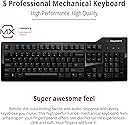
⌨️ Elevate your typing game—because your fingers deserve the best.
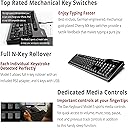
The Das Keyboard Model S Professional is a premium mechanical keyboard featuring 104 keys with Cherry MX Blue switches, known for their tactile and audible feedback. Designed for professionals and gamers alike, it offers exceptional durability with up to 50 million keystrokes, gold-plated contacts, and laser-etched keycaps. It includes a full N-key rollover via PS/2 adapter, dual USB 2.0 ports for device connectivity, and dedicated media controls, all wrapped in a sleek, minimalist design that complements any workspace.


| Additional Features | Multimedia Keyboard |
| Antenna Location | Gaming, Office |
| Asin | B008PFABI8 |
| Best Sellers Rank | #7,842 in Video Games (See Top 100 in Video Games) #602 in PC Gaming Keyboards |
| Brand | Das Keyboard |
| Built In Media | USB Cable |
| Button Quantity | 104 |
| Color | Clicky Tactile - Cherry MX Blue Switches |
| Compatible Devices | Computers or laptops with USB or PS/2 ports |
| Compatible Operating System Family | Linux |
| Connectivity Technology | PS/2 Adapter included, USB, USB 2.0 |
| Customer Reviews | 4.4 4.4 out of 5 stars (495) 4.4 out of 5 stars |
| Enclosure Material | Plastic or synthetic material |
| Global Trade Identification Number | 00855800001227 |
| Hand Orientation | Ambidextrous |
| Item Dimensions L X W X H | 18"L x 6.5"W x 1.5"H |
| Item Type Name | Professional Clicky MX Blue Mechanical Keyboard |
| Item Weight | 3 Pounds |
| Keyboard Backlighting Color Support | Single Color |
| Keyboard Description | QWERTY |
| Keyboard Layout | QWERTY |
| Manufacturer | Das Keyboard |
| Mechanical Keyboard Switch Model | Cherry MX Blue |
| Mfr Part Number | DASK3MKPROCLI |
| Model Name | Model S Professional Cherry MX Blue |
| Model Number | DASK3MKPROCLI |
| Number Of Keys | 104 |
| Number Of Sections | 1 |
| Power Source | Corded Electric |
| Style Name | Professional - Standard Key Caps |
| Switch Type | Clicky |
| Theme | Computing |
| Total Usb 2 0 Ports | 2 |
| Unit Count | 1.0 Count |
| Upc | 855800001227 796594220664 |
| Warranty Description | 1 year limited manufacturer warranty |
User
Absolutely amazing.
So I have never written a product review before. I have never felt the urge to sing the praises of a product like I do with the Das Keyboard. First, let me begin with stating that my profession requires a ton of data entry and when I am not at work I am typing up multitudes of papers for school. I do quite a bit of typing on a day to day basis and usually spend upwards of 8-12 hours a day in front of a computer, between work and school.For the past 10 years or so I have used terribly designed membrane keyboards that usually come stock with new computers. Due to my extreme amount of typing I have also developed a consistent pain in my fingers after typing for more than a few hours at a time. Due to this I decided to go ahead and bite the bullet and purchase a quality keyboard.After a few weeks of researching which switches would suit me best I finally decided on Cherry Mx blue switches as noise was not an issue and extreme comfort and tactile response were of utmost importance to me. I am the kind of person that will go ahead and spend the money up front on a quality product rather than going low-mid range and having to replace the product many times over. At first I thought the $120+ price tag on this product was ridiculous but after reading many reviews I decided to go for it.The keyboard arrived at my doorstep a few days ago and I have used it for 8-10 hours a day since then. I can report that it is by far the best keyboard I have ever owned and it has spoiled me for life. I love this keyboard so much that I will soon purchase another to use at work as well as home. The tactile response of the keys is superb and the build quality is second to none. It is very hefty and extremely sturdy.I do a fair amount of gaming as well, anything from your typical FPS games to MMORPGs. This keyboard does not disappoint when it comes to gaming, although I have a feeling the Cherry Mx Black switches would probably be a bit better, the Blues are more than adequate. Also, this keyboard is very professional looking and definitely looks like something that belongs on a grown adult's desk. The lack of gaudy lighting and neon green logos is refreshing.If you do a fair amount of typing in your day-to-day life please do yourself a favor and order one of these keyboards ASAP. The price tag may seem a little steep but once you type on one of these you will be spoiled for life and will never go back to cheap stock keyboards.
User
I have had this keyboard for two years now.
I have had this keyboard for exactly one year, and it has never let me down in any situation. The lettering on the keys have note even started to fade (I use this keyboard everyday). Once you put a couple thousand clicks on the keyboard, really starts to break in. Keeping that in mind I do game quite a bit so the WASD buttons are quite worn in, but it never has response issues, I went on there website and bought the WASD keys, and I think it was a great accessory, it was a little pricey, but I don't regret it. I got the blue keys, and personally I got used to the clicky sound very fast, and now it starts to help me concentrate on what I am typing on. As far as the glossy finish goes, I love it, after a couple weeks it always gets finger prints, and dust, but I always keep the cloth that is included with the keyboard under it so that I can always quickly pull it out and clean it, so that was never a concern for me.UPDATE:Well I have had it for another year and its still going well. All the letters on the caps have stayed on fairly well, and have yet to show any wear. I'm getting a little tired of having to clean the gloss finish on it though, the first couple of months it did not bother me but after you have cleaned it once a week for two years you start to see why a matte finish would have been nice. The MX cherry blues are still doing very good, and I do use this everyday being a student that is always writing essays, reports, and coding here and there. Not to mention I use this for gaming a ton on the weekends, and it is a real treat to use even after the amount of time that I have had it. I love the feel and sound of the MX blues, but sometimes at night people tend to get disturbed by the volume of the click, and it forces me to type with two fingers in order to keep the clicking down to a minimum.I have been looking at some other keyboards from das, but it seems like they are getting more expensive each year. I'm just not going to pay 180$ for a keyboard that has the same keys as a 75$ one. Yes, you could go on about how the German engineering is the reason why you are paying this price, and to some that matters, but I think for me 140$ is about all I'm willing to spend on a keyboard, so as of now I won't be picking up the new one. But if this shows one thing from Das, its that you get what you're paying for, especially after seeing the new one which looks like it has a aluminum frame. I would like to see a back lit coming from das, just simple white LED's should do the job, but when you code at night like some of us do I am always having to squint my eyes in search for the right symbol so a back lit keyboard would apply very nicely to that aspect.Overall Das is a very good company and they know how to do keyboards, but I just can't justify the cost. You can get a logitech g710+ with the same keys, and a back lit for half the price of the new one. Yes, you won't get the build quality that the Das has in the Logitech, but for half the price it just makes more sense to buy another logitech keyboard after the other dies.
User
Solid build quality, satisfyingly clicky, and of course, truly a joy to type on
I've been using this keyboard for roughly a month so far, and I love it. I'm actually finishing up a coding assignment consisting on over 1000 lines of Java, so I think I'm ready to give a fair review. Up until now, I've used laptop keyboards (MacBook Air, ASUS laptop, etc) and your standard $15 Office Depot fare. You know, the cheapest Logitech keyboard on the shelf. And all of those have been perfectly fine for my needs. Until now.I was talked into getting a mech keyboard from a friend who loves his. I took the plunge on this and boy was it worth it. The difference is akin to the going from cheap Walmart boots to top of the line work boots, or from a disposable razor to an expensive one with 5 blades, or a lawn chair to an expensive ergonomic office chair. Yes, the cheaper version will do the job, and you may even get used to it over time. But once you experience the higher quality offering, you'll appreciate the difference and be glad you spent more money in the long run.If you type a lot, you will really appreciate the "feel" that the keys have, and the satisfying clicky sound that each key has when you press it. You'll also appreciate the solid breaking point between "unpressed" and "pressed" that mechanical keys have. Overall, it is a much more ergonomic and enjoyable typing experience than with a non-mechanical keyboard. It is hard to explain unless you try it.If you spend a lot of time typing (like me), I highly recommend a mechanical keyboard. Given my experience with this keyboard so far, the solid construction, the sleek good looks, and the legendary reputation that Das Keyboard has as a company, I recommend this one. Remember to also pick up a wrist pad if you don't already have one - the keyboard sits up relatively high, and it's horrible for your wrists to type without one. You want your wrists to be completely level if possible when typing.When I bought this keyboard, it was around $125. Is it worth taking the plunge when you can "get the job done" for as little as $10? If you only use the computer occasionally, then no, it is probably not worth the extra $100+. If you use a keyboard daily for your job, hobby, or leisure activities, for several hours a day, then it is definitely worth it. Do you wrists and fingers a favor and get the best.EDIT: I've decided to revise this review, due to recent developments in the Mechanical Keyboard market. At the current price of ~$140, the Das Keyboard Model S is just overpriced. It's still a great keyboard, but in terms of value, is quite lacking. I would instead recommend a CM Storm keyboard, which use the same switches, but have an equally great build quality.
User
Somehow I'm typing even faster than I was before
This keyboard is amazing. I don't think the "clickiness" is as loud as others have stated, but that's all going to be personal opinion. I can say with certainty that it's far quieter than my buckling spring Model M keyboard! No doubt about it. That being said, I'm a very fast typist and I can report that this keyboard has actually got me typing faster and with fewer mistakes than either my regular ol' mushy work keyboard and my Model M keyboard. My fingers just glide across the keys. I have small to medium size hands, and the key spacing on this keyboard is perfect for me. In contrast, though I love the tactile clickiness of the Model M keyboard, I prefer this one a great deal more because its keys are not spaced as far apart from one another as the Model M. In fact, I love this thing so much that I'm digging into my own pocket to buy one for use at my office too.So I've purchased two of these in the past couple of weeks, but the first one that arrived (since returned) wasn't without a decent flaw right out of its box. I read the reviews here pretty thoroughly and hadn't seen this mentioned, though it's mentioned often in reviews for competing keyboards. When I would get typing very fast, there was a metal reverberation sound that would kind of echo as I was typing. It was particularly noticeable at the end of a sentence or paragraph when I'd pause. Clearly this was from the keys bottoming out on their steel backing plate, but it was not acceptable to me so I returned it for a replacement.I'm happy to report the replacement does not make this same sound; at least not nearly to the same degree as the one I returned and not nearly to a point where it's even bothersome. Users who are gamers or don't type as hard or fast will likely not even notice it, and likely wouldn't have even on the one I returned. Just something to be mindful of because, based on the long list of Amazon reviews, this is not normal for this product and it wasn't present with my replacement. This keyboard kept coming up in online reviews for best mechanical keyboards for typists, and I must say those reviews and "best of" lists were right on the money.
User
Best keyboard
I really like mechanical keyboards. I have also always liked the DasKeyboard brand. This model does not disappoint. In fact I am typing this review using this very keyboard. I like the Cherry Blue switches as I prefer to hear the clickie sound as well as feel the mechanical action. If you are someone that wants a quieter keyboard then get this model with the Cherry Brown switches. In addition this keyboard is heavy (for a keyboard) which is great. It is easy to push lighter keyboards around while just typing and so the weight reduces this from occurring. I also like the built in USB hub so you get extra USB ports and aren't simply taking up a USB slot on your computer system. This keyboard is being used with Linux (Ubuntu MATE) and works great, however I know it works equally well with Windows and MacOS. I also prefer full size keyboards and don't care for mini ones. I highly recommend this keyboard for gamers, professionals that do a lot of typing (programmers, typists, etc), or anyone who just wants a high end well made keyboard. It should be noted mechanical keyboards last longer, have better feel, and are easier on your fingers than cheap membrane ones. DasKeyboard has a great reputation for high quality products. This is a win-win product.
User
Das Best Keyboard Evah!
This is by far and away the best keyboard I've ever owned.Seriously, I can't say enough.I've had mine for a while now, and while this is going to sound dumb, it's just fun to type on. Let me explain.I type, all day, everyday. Work, home, school, wherever. Typing is what I do. At work, I can't use a Mechanical Keyboard because it disturbs my coworkers, and that's understandable. I know there are "quiet" mechanical keyboards out there, but the audible clicks are part of the fun.I'm old enough to remember a time when ALL keyboards were mechanical keyboards. No one made them any other way for years. So perhaps my sentiment toward this keyboard is partially nostalgia over all those years of playing Zork and whatnot. I dunno.But let's get to the nitty gritty as they say.1. This thing is built like a tank. Seriously, if I was ever in need of a bullet shield, or my home was invaded by roving marauders and lobbing scimitars at me, I might grab this as a defensive shield. WARNING: REVIEWER DOESN'T ADVOCATE USE OF THIS DEVICE IN ANY OTHER THAN IT'S INTENDED CAPACITY. But yeah, no seriously, I would grab for it....2. Did I mention that it's fun to type on? I mean seriously, it's like I'm ZeroCool and I'm up to something devious and frowned on by the "man" but ostensibly good for the rest of society. I can come home from work where I've been on a computer all day already, and really don't want to do anymore, and start typing on this thing, and suddenly my whole mood changes. I know, I'm weird, it's okay, I accept it. But, yeah, it's fun.3. Stylish and good looking. For the first time in my entire life, I became concerned that my other peripherals didn't match it. (NOTE: I got over it and didn't buy replacement peripherals for color coordination.) But, yeah, it did make me think about it. It's just cool looking. It's a perfect size form factor. It takes up just the right amount of space on the desk.4. IT'S HEAVY AND DOESN'T MOVE IF I BREATHE ON IT. I don't know if it's got additional weight in it because, reasons or whatnot, but yeah, heavy. Did I mention heavy?So in summary: *****, would buy again. Pleasure doing business. Yadda, yadda.Gotta go, need to see a man about a horse.
User
Appears to be decent keyboard, but appears they try to be too low profile.
The keyboard is working as keyboard should.Few problems:Glossy plastic, it will get smeared quickly.They keys feel too depressed into the case, and because of that you don't feel those blue switches as you should... and makes it easier to fat finger keys you didn't meant to press.This is coming from a guy that's been professionally around computers for last 30 years; This is 6th keyboard i've bought trying to replace my aging old ibm keyboard from early 90's. Sadly its a miss. Closest so far was logitech k845 with cherry blue mechanical switches - sadly the logitech one didn't even last 3 years before it began its spiral of failures...
User
Fantastic action, great keyboard.
UPDATE 9/23/20:I loved the original keyboard so much, I bought one for home use, now that I'm working from home (thanks COVID-19, now I hardly ever get to see anyone). It is just as awesome as the first. This is my third keyboard with 'clicky' keys. If you haven't tried one yet, you're really missing out. I bought the ones with blue keys, as they have what I consider the best 'feedback'...that is, resistance and give to pressure on an individual key. I hope that this one works out just as well as the others.If you've been dealing with a cheap keyboard, you need to get a good one. I don't know how many WPM I type, but I know it's fast. And there's not much worse than a crappy keyboard when your a good typist. Typing on this keyboard is heaven. Positive resistance, superb feel, I just love it. I wish I had bought it sooner. The ONLY thing I can say that I dislike is that the right side of the keyboard is heavy and sits nicely on the desk. The left hand of the keyboard is much lighter, and when I use the flip-down elevators underneath the board, the left side of the keyboard sometimes moves around a bit. When not using the elevators, the keyboard sits nicely in place. Anyone have any tips on keeping it from sliding around? Regardless, it is a joy to use. This is my second mechanical switch keyboard, and I love them both. The only thing now to consider is how long it will last. If it croaks early, I will update this review.
User
Decent but NOT like the Ultimate.
WELL.It is a DAS. That much I 'll give it to them. Unfortunately, a comparison between this product and the Ultimate Clicky which I also own can show that this iteration is totally inferior. The Ultimate not only has switches that respond much better to typing but also these switches are used in all the keys, including e.g. space bar and the other keys that have stabilisers.If you can, order the Ultimate model and buy additional keycaps to switch the keys if you so desire.The quality is there but I believe that for its' price you can get far better mechanical keyboards.A quick research shows that the professional keyboards use different switches (not Cherry MX) than the ultimate ones. If you are really picky, you should avoid it all the way and get a true Cherry MX experience. Because the Model S Professional, simply doesn't cut it.On the pros side, if there is one, it's a bit more quiet (I compared blue switches in both cases) than the Ultimate one - but if you are going for the blue switches, noise I think is not your main concern now, is it?
User
Straordinaria
La tastiera ha una qualità costruttiva eccezionale, la risposta dei tasti è precisa e veloce; ha un hub con due prese usb sul lato destro che restituisce le porte occupate dalla tastiera sul retro del pc (una per la tastiera e l'altra per l'hub); si tenga presente che questa versione ha gli switch MX Blu e che quindi produce un piacevole ticchettio durante la digitazione, se vi serve una versione silenziosa assicuratevi di acquistare quella con gli switch MX Brown. La finitura lucida è molto elegante (e viene fornito un panno in microfibra per eliminare le ditate a fine sessione).Il layout è americano, quindi non troverete i caratteri accentati.Perfettamente compatibile con Linux e Windows, se avete il Mac acquistate la versione specifica per Mac.
User
Très bien !
Très bon clavier, j'adore les switchs cherry et les blue sont justes parfaits. Le hub USB intégré est une bonne idée.Le confort de frappe correspond tout à fait à mon activité (programmation majoritairement.)
User
Click Click Click
This keyboard feels amazing. It's nice and heavy, so there is no sliding around to be had here. The keyswitches feel definite and the sound is delightful. What I don't understand is why they decided to go for two USB connections on the cable instead of connecting the keyboard through the existing hub that they must have included for the two USB ports on the side.The USB ports would also be better suited on the top of the keyboard instead on the right side, where they interfere with the mouse.
User
Fantastica
Prodotto perfetto, ottima qualità costruttiva. Sobria, minimale ed assolutamente funzionale e comoda per scrivere velocemente.Un altro livello rispetto alle tastiere da gamer.
Trustpilot
1 month ago
3 weeks ago