We remain fully operational. Our teams are working around the clock to ensure your deliveries continue safely.

DOWNLOAD THE APP


Customer Services
Copyright © 2025 Desertcart Holdings Limited
DOWNLOAD THE APP


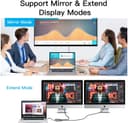
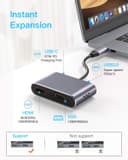
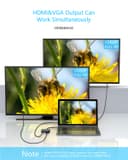

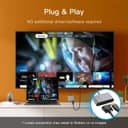


🚀 Elevate Your Connectivity Game!
The GIKERSY USB-C to VGA Adapter is a multifunctional hub that expands your USB-C port into HDMI, VGA, USB 3.0, and USB-C charging ports. It supports stunning 4K UHD video output and high-speed data transfer, making it perfect for professionals who need versatility and performance in their tech setup.


| ASIN | B07PG1HY2N |
| Best Sellers Rank | #667 in USB-to-VGA Adapters |
| Brand | GIKERSY |
| Compatible Devices | Laptop, Monitor, Tablet |
| Connector Type | HDMI, USB Type C, VGA |
| Current Rating | 1 Amps |
| Customer Reviews | 4.2 4.2 out of 5 stars (1,226) |
| Finish | Hdmi |
| Item Dimensions | 2.56 x 0.59 x 1.57 inches |
| Item Weight | 54.5 Grams |
| Manufacturer | GIKERSY |
| Model Number | JGS-9837 |
| Nominal Power | 87 Watts |
| Number of Ports | 4 |
| Package Quantity | 1 |
| Power Plug Type | Type C |
| Specific Uses For Product | Monitor |
| Unit Count | 1 Count |
| Warranty Type | Limited |
I**T
Worked well out of the box
After receiving the item, I tried all the ports and it worked as designed. I used it on a new Apple iPad Pro 11 (2020 model) and the HDMI worked, the USB C pass-through worked and the VGA worked. I thought the USB A 2.0 did not work but it was because my hard drive was formatted in NTFS and not the required FAT32 or exFAT. Make sure your drives are formatted so Apple products can see if you are using iPads. The housing is very sturdy being made out of aluminum and the dongle cable is much thicker and rigid than a standard cable so it should take a lot of abuse before it breaks. The connection at the base is very rigid. This is a great alternative to the $70 Apple HDMI dongle and it has more features.
L**M
Nice quality, works is great!
I got this for traveling. It works great! I can download content to my phone, hook up to a TV and watch all the shows I have on the phone. The image on the TV has all the resolution of the content as it was saved. I have only used the HDMI. So far, I have only used it to hook up from the phone to one device. It says it will output to more than one at a time and I would believe it would. The only draw back (and it wasn't a problem for me) is the instructions are nonexistent. The documentation that comes with it really doesn't say much. But to me it was clear where to plug in the phone, the HDMI cable and the power for the phone to keep going.
M**N
Very good, not perfect
I've been using this every week day from my home office for the past 6 months with Microsoft Surface Pro 7. My SP7 is running all the latest firmware and Windows 10 updates as of 8/3/2020. One of the limitations of the SP7 is the number of ports. The attached image shows this adapter plugged into the only USB-C port and directly below it, plugged into the only USB 3.0 port, is an eMeet c980 webcam. Also visible is the Logitech wireless keyboard + mouse adapter plugged into this hub. The keyboard/mouse combo does occasionally have some lag when plugged into the hub that I do not experience when it is plugged directly into the SP7 USB 3.0 port. Unfortunately, one of the issues with this hub is that the webcam will NOT work when plugged into this hub. This issue is not exclusive to the eMeet webcam, I have also tried this with a Logitech webcam and had the same issues. What does work great is the HDMI output. It works perfect connected to my 4k LG IPS monitor (27UD58-B 27) at 3840x2160 resolution. I have also tested it connected to a couple televisions and have had not issues there either. I have not tested the VGA port, but it is one of the reasons that I chose this hub because I do occasionally have to use my SP7 to present in conference rooms where VGA is the only option. The bottom line... Don't expect this to be as good as something larger and more high end like a Dell Universal D6000 dock, but if you are not port constrained, need a solid UBS-C to HDMI + VGA adapter, and need to be portal, then this hub is a great affordable choice.
F**N
Great Little Gadget
I bought this to connect my MacBook to my 27-inch monitor and it works perfectly. It’s easy to use and the USB port also allows me to use my normal mouse as well. I would recommend.
O**O
Rewriting a previous 1 star review - Excellent quality!!
I purchased the GIKERSY USB C Hub a week and half ago, rated it with 1 star and returned because the VGA port didn't work. The seller contacted me upon return, apologized for the inconvenience of the unit being defective and sent me another one right away. This time I plugged it in and worked as advertised. Apparently the unit sent to me originally was defective. I had to change my review and accept, the hub works perfectly. The company's customer service is awesome. I didn't contact them, they contacted me. I definitely recommend this hub. It works just fine.
A**R
Didn’t work out as planned for me
I purchased the adapter so I could connect my 2020 MacBook Air to an external VGA monitor, use that as my primary display, and at the same time have the ability to connect an additional USB 2 device if needed. The ability to have pass through charging for my MacBook was a plus. Unfortunately it didn’t workout that way for me. The pass through charging worked but the MacBook wouldn’t recognize a usb external drive plugged into the adapter’s USB port. Further, when the computer and monitor went to sleep, the monitor frequently would not wake, nor would the MacBook with mouse movement or keyboard click. I had to lift the lid of the MacBook to wake it and more often than not, had to disconnect and reconnect the adapter to get the monitor to wake. Changing some settings around didn’t help. So I returned the adapter opting for a straight usb c to vga adapter which worked without issue. Too bad. The price was right, it had a low profile, and was a nice expansion of the MacBook Air’s limited usb c ports.
O**L
Quality cord
The quality is very good and the color matches my MacBook Pro. It has an HDMI output and a VGA output that supports older displays. Because I use WiFi most of the time, I have no chance to use LAN port. USB ports are very useful when your laptop only has a USB C port. I connected the power adapter to the charging port, only one cable to my laptop, so there were not many cables hanging.
Trustpilot
2 weeks ago
2 months ago