Buy anything from 5,000+ international stores. One checkout price. No surprise fees. Join 2M+ shoppers on Desertcart.
Desertcart purchases this item on your behalf and handles shipping, customs, and support to Nicaragua.
🚀 Elevate your office game with A3 power and wireless freedom!
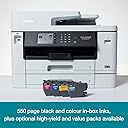
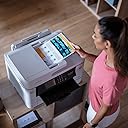
The Brother MFC-J5740DW is a versatile all-in-one inkjet printer designed for busy professionals and small offices. It supports A3 printing with high-resolution 1200 x 4800 dpi output and fast speeds up to 28 pages per minute. Featuring an intuitive 8.8 cm color touchscreen and wireless printing via the Brother Mobile Connect app, it streamlines your workflow whether at your desk or on the go. With generous ink yields and multi-function capabilities including copy, scan, and fax, it’s built to keep your business running smoothly and efficiently.
| ASIN | B0B2555B3D |
| Additional Printer Functions | All In One |
| B&W Pages per Minute | 28 |
| Brand | Brother |
| Built-In Media | MFC - J5740DW A3 Colour Inkjet MFP |
| Color | Black |
| Color Depth | 1 bpp |
| Color Pages per Minute | 28 ppm |
| Compatible Cartridge | [Brand]: Brother |
| Compatible Devices | Smartphones |
| Control Method | App |
| Controller Type | iOS |
| Customer Reviews | 4.4 4.4 out of 5 stars (175) |
| Display Type | LCD |
| Dual-sided printing | Yes |
| Duplex | Automatic |
| Hardware Interface | Ethernet, USB 2.0 |
| Ink Color | Black, Cyan, Magenta, Yellow |
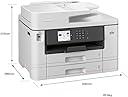
| Item Dimensions D x W x H | 39.8D x 53W x 37.5H centimeters |
| Item Weight | 20500 Grams |
| Maximum Copies Per Run | 50 |
| Maximum Copy Resolution Black and White | 6000x1200 dpi or greater |
| Maximum Copy Resolution Color | 1200 x 4800 dpi |
| Maximum Copy Speed Black and White | 28 ppm |
| Maximum Media Size | A3 |
| Maximum Print Resolution Black and White | 1200 x 4800 dpi |
| Maximum Sheet Capacity | 250 sheets |
| Maximum print Resolution Color | 1200 x 4800 dpi |
| Model Name | MFC-J5740DW |
| Model Number | MFCJ5740DWZU1 |
| Model Series | MFC |
| Number of Trays | 4 |
| Other Special Features of the Product | Auto-Duplex |
| Output sheet capacity | 50 |
| Paper Size | A3 NA |
| Power Consumption | 36 Watts |
| Print media | Envelopes, Glossy photo paper, Paper (plain) |
| Printer Connectivity Type | USB, Wi-Fi |
| Printer Output Type | Color |
| Printer Type | Inkjet |
| Processor Count | 1 |
| Resolution | 6000x1200 dpi or greater |
| Scanner Type | Flatbed |
| Series Number | 5740 |
| Specific Uses For Product | Office |
| Total USB 2.0 Ports | 1 |
| Total Usb Ports | 1 |
| Unit Count | 1 Count |
| Wattage | 36 watts |
A**R
I have been using an earlier version (MFC-J5370DW) of this printer for over 3 years and really loved it . . . until recently when it developed an ‘unblockable’ blocked Black ink jet., perhaps due to the inexpensive compatible cartridges I had been using throughout (advertised as “Will not affect your warrantee”). As I was in the middle of quite a large print run that needed to be completed I immediately ordered a replacement – at £279 it was easier than sending it back to Amazon and trying to reclaim on something that could be considered my fault. Next day the shiny, white replacement arrived (the MFC-J5740DW) and, so far, I’m loving it just as much as its predecessor. Apart from the colour I can’t see much difference between the two – except that, of course, the new one won’t accept my stock of cartridges that were used in the old one. I won’t list all the features that the printer possesses - they’re all in the product description – but the ones that stand out for me are: The rear feed which is very accessible and handles anything from envelopes, 6”x4” glossy print paper up to A3. The two paper drawers which save messing about when I switch from cheap, everyday paper to quality colour print paper. The fact that it has automatic 2-sided printing and scanning. The latter feature is great if you want to save old documents on a drive rather than in a box file. You just put the pile of documents into the very smooth automatic feeder and get a digital copy of both sides saved as separated pages in the right order. The supplied software that handles this includes outputs in pdf, png, and OCR formats. I belong to a club for which I produce an occasional newsletter. I design this in Publisher on A4 pages then tell the printer to turn into an 8 page A5 colour booklet. The first time I did this it was accompanied by a bit of swearing before all the pages were correctly ordered and orientated but having saved the print instructions I’ve used the same ones year in year out and just sit by while the printer churns out the required copies. Setting up the new printer was just as easy as for the old one. There is a decent screen which tells you what to do initially and also shows what to do if there is a (rare) paper jam. Connection to WiFi happened very simply once iI entered the router password. If the printer has a fault for home-office use it is that is quite large and heavy so you need to be sure you have somewhere to put it and also allow up to an extra 6” or so for the rear feed which angles out from the back when in use. In summary, this is a great workhorse for small businesses or the more demanding home user.
C**.
Je suis très très content de cette imprimante brother, je la recommande car elle fait son job à la perfection
D**K
I was in need for a more business orientated printer that could print at the quality I required and do it quickly. So far the MFC-J5740DW has delivered. It's the fastest inkjet that I've owned, which is a big plus for me as I'm using it in a production chain. The quality is well within my expectation, able to print small enough details that are only visible with magnification. Having three paper feeds to choose from is also useful as I can have letter paper, matt photo paper and glossy photo paper primed and ready to go. The elephant in the room is the reliance on genuine cartridges and the costs involved, but we all know we're getting subsidised hardware that we pay back slowly. For me, this printer is worth it. I can't speak to the wifi and printing from phones etc, as I have mine on a LAN. Network setup was simple. It is a little on the heavy side, but you can expect that from a printer this size. I've included a couple of pics of some of the printed media bonded to some pine board for scale building construction. In summery it's a great printer for my needs and I would buy one again.
B**T
Imprimante de très bonne qualité fonctionne à la perfection je ne suis pas déçu de mon achat reçu avant la date avec un transporteur au top
G**U
Très rapide facile à installer
Trustpilot
2 weeks ago
2 days ago