We remain fully operational. Our teams are working around the clock to ensure your deliveries continue safely.

Descargar la aplicación


Servicios al cliente
Sobre nosotros
Copyright © 2025 Desertcart Holdings Limited
Descargar la aplicación
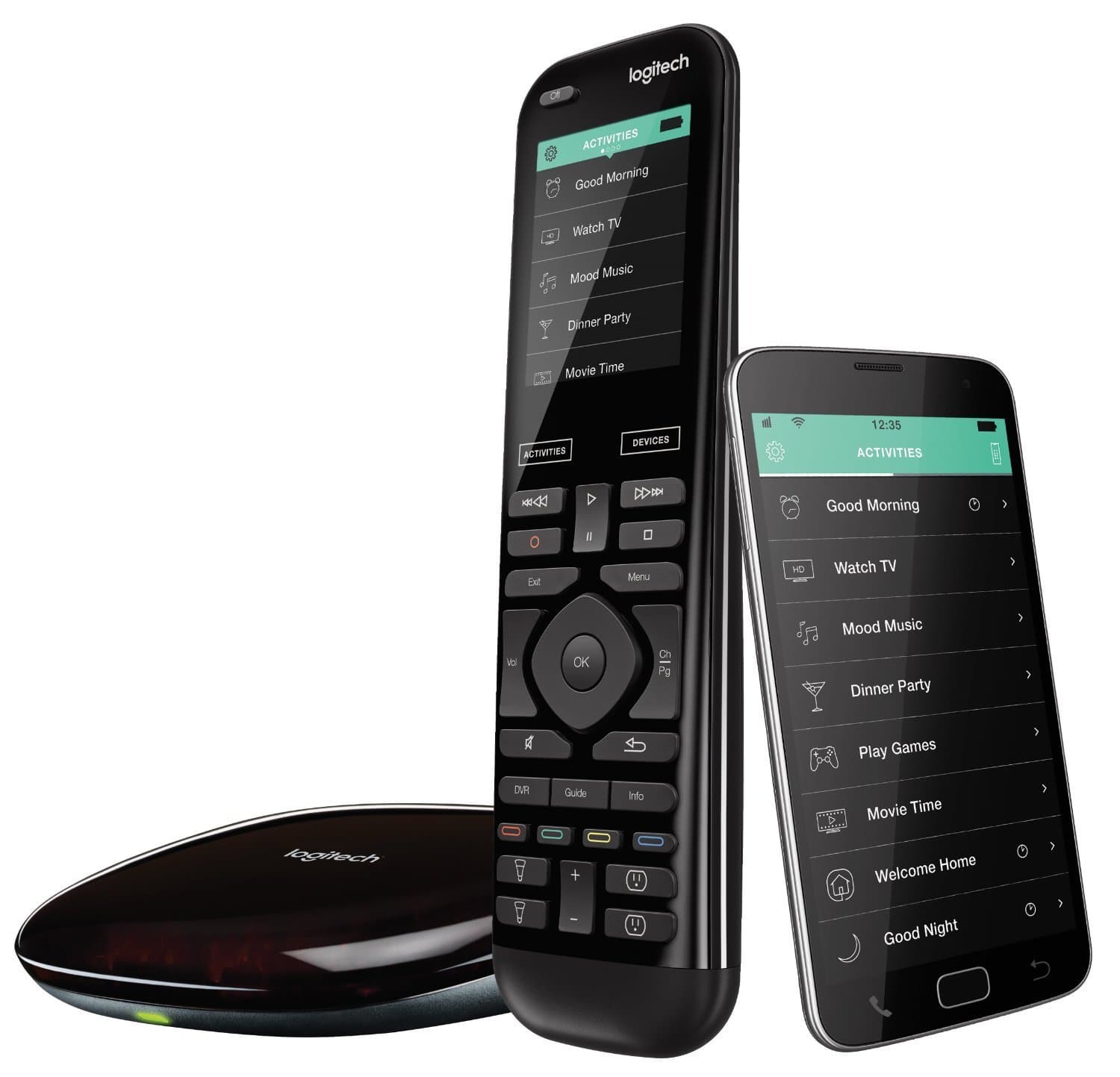



🎯 Own your smart home command center — because settling for less is so last decade.
The Logitech Harmony Elite is a premium universal remote system featuring a vibrant full-color touchscreen, Alexa voice control, and the ability to manage up to 15 home entertainment and smart devices. It integrates seamlessly with over 270,000 devices and offers one-touch Activities for effortless automation. The included Harmony Hub enables control beyond line-of-sight, while the companion app transforms your smartphone into a powerful remote, making it the ultimate solution for tech-savvy professionals seeking streamlined, sophisticated home control.
| ASIN | B07JBJMGBP |
| Additional Features | Voice Control, Touchscreen, One-Touch Activities |
| Battery Type | Lithium-Ion |
| Best Sellers Rank | #33,629 in Electronics ( See Top 100 in Electronics ) #1,613 in Remote Controls (Electronics) |
| Brand | Logitech |
| Color | Black |
| Compatible Devices | Multiple types of devices |
| Connectivity Technology | Bluetooth |
| Controller Type | amazon_alexa, android, ios, vera |
| Customer Reviews | 4.0 4.0 out of 5 stars (3,210) |
| Manufacturer | Logitech |
| Maximum Number of Supported Devices | 1 |
| Maximum Range | 30 Feet |
| Mfr Part Number | 915-000256-cr |
| Model Name | 915-000256-cr |
| Model Number | 915-000256-cr |
| Number of Batteries | 2 AA batteries required. |
| UPC | 603784243818 |
| Unit Count | 1.0 Count |
| Warranty Description | 90 days limited warranty |
R**N
Wonderful versatile programmable remote
Very well designed and practical universal remote. However it requires Internet connection to work. The device sends a signal to its own Hub via internet, and the hub sends the signal to the TV and other components. As a result the device does not have to point at the tv, but the hub must be located so that it is in sight of the TV. Since it is Internet dependent, there can be a slight lag from the moment you activate things with the remote and the signal turns on the TV. You must locate the hub such that it is directly in line with the infrared sensors of your devices, or you can use the small infrared devices and attach them to your devices with the sticky backing. In my case, I located the hub on a high shelf directly opposite my entertainment center, about 20 feet away. I was pleased to learn that if and when you want to make changes to your system, you can do that on line using the harmony app and you never have to touch the hub again. A TIP - when you make a change, if you use ALEXA as I do, you have to get ALEXA to learn that a change has been made. This is not as simple as it should be. First you use the Harmony app to get the Harmony Hub to learn the change. That is the simple part. After much trial and error as well as reading many blogs, I found that I could make changes work with ALEXA only if I unplugged ALEXA, and unplugged my WINK hub (which controls many devices), and then totally reset my XFINITY router using the reset button on the back of the device. Once the router had completed its reset, I then restarted the WINK. Once it had cycled up, I plugged in ALEXA again, and then asked ALEXA to search for devices. It was usually successful in finding the changes to the system. In one case, I never could get ALEXA to react to voice control for a specific group of Cree lights, even though the ALEXA app showed the lights as being recognized. To solve the problem, I ended up setting up 2 Alexa activities - one to turn them on, and a second to turn them off. Once the bulbs were in the activity, no more problems. The activity worked perfectly. Not sure if ALEXA would be able to control the bulbs by voice now or not, but since the activity worked, I did not even retry that. There may be an easier way, but if there is, I could not find it. In the initial set up (and later too), Harmony itself is easy to program, and can handle the startup sequence for the tv, amps, etc. If you are a techie you can use IFTTT to do other things, like turn on lights, etc., but this is more difficult. Instructions are available on the Web though, thus making this the most universal device since the early Monster remotes, which were fantastic programmable remotes that are no longer available from the manufacturer. And it is much more reliable than the Logitec remotes, which is their only serious competition at this point, and I have tested quite a few devices. It can handle almost any setup you can envision, and my personal setup is very complex. It works great, once you get used to it. The only weakness I have found is that you can accidentally affect a touch screen button when you are just holding it in your hand. I wanted to be able to control everything in my family room with both a hand-held remote and with Alexa. I was able to do so with this device. However, I had to purchase LIFX bulbs in order to use the built-in light bulb buttons on the remote. My Cree bulbs could not be programmed to work directly from the remote - at least if they could, I did not know how to do it. Perhaps use of IFTT would have achieved this, but I opted for the LIFX bulbs. The LIFX were very easy to link up (no other hub was required, whereas I had to use another hub for the CREE - I had chosen WINK which worked well but was a little difficult to link to everything. The LIFX bulbs linked directly to the Harmony Hub and I had no problems whatsoever with the linking to the hub, and therefore to the remote. This remote is simply excellent in my opinion - with the only small weakness being as mentioned before - sometimes you can trigger an action accidentally depending on how you hold this touch-screen remote. It recharges on its own well designed stand ( mention this because the big weakness in the Monster remotes was the poorly designed charging stand that often did not make good contact with the remotes, resulting in the Monster internal battery not being charged when you went to use the remotes). Monster (which, by the way, was 100% infrared with no internet connection required) had one feature not available on the Harmony - it had an 'error' button that you could use to cycle through your devices if one did not turn on or off - if you identified the device you could then shut that device on or off. With the Harmony, if something fails to turn on or off, you need to shut all devices off (except light bulbs) using the 'off' button at the top of the remote, and then restart the desired activity. This is very minor though - the problem is rare, and usually only occurs if my wife manually turns a device on or off instead of using the Harmony remote. In summary, this is a superior device, especially if you want to do something a little off the norm. Highly recommend the Harmony Elite system.
A**Y
Great device but setup is not very intuitive
I bought this remote after comparing it with other Harmony hub-based remotes. Although the price is very high for a remote, I decided to go for the Elite rather than the Companion -- for the ease of use. It took me a long time to get it set up to my liking, so I am sharing some of my learning based on a lot of trial and error 1- If you are going to use the PC application for the setup, make sure it’s on a laptop so that it can be brought in range of the hub (the hub, the remote and the desktop have to be in proximity of each other during a Sync) 2- It took me a while to understand how to Sync the PC with the remote. The Harmony remote has to be connected to a USB port of the PC for the Sync to happen 3- Multi-zone devices are considered as multiple individual devices. I have a Zone 2 on my Denon AVR and I had to create a 2nd Denon device. I also have an amplifier that directs music to 4 sets of ceiling speakers. This meant I had to create 4 separate devices. The device creation assistant could be much more helpful in querying the user for such situations. Luckily there is a lot of help available online. 4- There is an Activity setup assistant but you need to understand what the default Activities do. I have a Smart TV and did not realize immediately that I had to select “Watch Smart TV” instead of “Watch Movie” to watch Netflix over my Smart TV. The “Watch Movie” activity expects a source other than your TV (e.g. a DVD player) while “Watch Smart TV” accepts your TV as the source for content. Here is my setup: Samsung Smart TV Denon AVR with 2 zones Dish Network DVR Hopper Samsung Blu-Ray ATON DLA-4 multi-room amplifier connected with Denon Zone 2 Echo Dot to feed Amazon music to the system My suggestion on how to get it set up is the following: 1/ Charge the remote before you get started with the setup 2/ Capture the brand and model of your equipment 3/ Connect the Harmony Hub and connect the IR blasters if needed 4/ Download the Harmony app on your phone. Once installed, create an ID and password 5/ Download the Harmony software on the laptop and enter your ID and password 6/ Use the laptop to do the configuration: (a) Enter your devices (watching for multi-zone devices), (b) Enter Activities of your choice, (c) Pick your Favorite Channels, (d) Synchronize all devices (the remote must be connected to a USB port of your laptop at that stage - the cable is included in the box - this will likely include a software update), (e) Customize buttons if you wish, (f) Sync again, (g) Test the Activities and fine tune, (h) Sync again and sync also on the phone app. 6/ Once you are happy with your setup, and if you use Alexa, enable the Harmony skill on Alexa. Each Activity and each Favorite Channel becomes an Alexa "scene" that you can turn on/off. When you activate the skill, it allows you to choose/add/remove friendly names for these skills (e.g., “Netflix” for your Smart TV). You can then ask Alexa to turn on these Activities / these channels using their friendly name. For example, "Alexa, turn on Netflix" or "Alexa, turn on HGTV". I saw negative reviews of the Harmony skill but I am quite impressed with the quality of the integration. Some nice features: * although the buttons on the remote are preconfigured, they can be adjusted to whatever you want. (Note: I initially configured buttons for my Dish DVR DEVICE but it did not work. I had to configure the buttons for the Dish DVR within the "Watch Dish" ACTIVITY). * if you swipe top-down on the screen, it gives you access to a screen where you can use tactile commands. These commands can also be customized (e.g., one tap for Play and two taps for Pause) * once an Activity is set up, you can add more commands to it (e.g. adjust volume) Overall I am very happy with my purchase and would recommend this remote despite the high price. The remote itself is just the right size - fits nicely in your hand and the buttons are adequately located. The Dish DVR remote has many features and they are all covered by the Harmony remote. The touch screen does add real value in making the remote easier to use. I wish the setup was easier but there are tons of resources online and I found everything I needed with some Google searches.
F**I
Expensive
D**L
The Harmony Elite replaces an aging Harmony 550 remote and is a big improvement. Initial impressions: - the IR blasters are great. You can now hide away items like my TV provider's PVR. - since the hub is sending the commands to your system, not the remote, you don't have to point the remote at the home entertainment system till everything's running. Just click the activity and put the remote down. Eliminates a lot of confusion from having partially started up or shut down an activity. - you may need to tweak settings. My TV has a wired ethernet connection to the home network to feed the TV's Netflix app, but the default inputs on the Harmony remote do not include "Smart TV" for my model of TV (a 4K OLED set from LG). I got it working by downloading the MyHarmony app, which let me add the Smart TV input and train the Harmony remote using the TV's remote. - you can use your iPhone as a remote (free app). You can use your Apple Watch as a remote (a $3.99 app store purchase). - battery is rechargeable (a big plus) and battery life is a few days between charges according to reviews. It's too early for me to comment on battery life in our household, but I like the tradeoff. Our old Harmony 550 took 4 AAAs and went through a lot of them. And the charging cradle is attractive and unobtrusive IMHO. - haptic feedback: you can choose between three or four different slightly different touch feedback settings for the screen display. - helps extend the life of your other hardware. When you mix together different generations of home entertainment hardware, you need cabling workarounds, and any Harmony remote will let you mix and match inputs as needed. So I can send 4K video directly to my TV inputs while using my older receiver, which can only handle HD video, for the audio portion. - on the cost issue: your mileage may vary, but I think it's a pretty good value. You're buying integration with other home automation technologies, a hub that makes your activity settings work reliably, a decent remote, and a large database of compatible products. Everyone has a different threshold for what they are willing to spend on home entertainment equipment, but I think the reviews have been too negative about the price. If you are upgrading from an older Harmony remote, plan the transition by jotting down the details on each activity (the inputs used, primarily). It will save time. The Harmony Elite setup has an option for copying your old settings but I think my Harmony 550 was too old to do that, or at least, it required extra steps. I started fresh.
A**R
Product is defective I paid for the shipping for 2 ways,I never thought they have defective item, icontacted BIG SALES they said they will refund my money back for shipping if I send them invoice they pay only the item price not the both side shipping , they started to bring excuses about the policy , their product is defective and on the top of that they wanted to charged me 20% of restocking fee, BE AWARE they scam people save your money and time, this is not the way of doing business and scam people , even though it is company fault that their product doesn’t work and the customer had to pay 2 way shipping and end up loosing money and not having the product, shame on that business if I could I would rated BIG SALES company with zero star .......
G**O
Ótimo vendedor e produto de alta qualidade. Recomendo
L**M
I've used Harmony remotes for years and with a pretty complicated home theatre setup it's currently replacing 8 remote controls and has activities for a bunch of different devices. My chick and my kid would have no hope without it. I'm pretty happy we bought this high end model before Logitech pulled the plug. Hopefully the software remains available to make updates and changes in the future.
Trustpilot
Hace 3 días
Hace 1 mes