Desert Online General Trading LLC
Dubai, United Arab Emirates
Desert Online General Trading LLC
Dubai, United Arab Emirates


⚡ Power Your Productivity with Thunderbolt Speed!
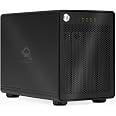
The ThunderBay 4 is a high-performance four-bay RAID storage enclosure featuring dual Thunderbolt 3 ports delivering up to 40Gb/s transfer speeds. It supports both 3.5" and 2.5" drives without adapters and offers user-configurable RAID levels 0,1,4,5, and 10. Included is a 3-year subscription to SoftRAID Premium, providing enterprise-grade RAID management software for reliable, scalable, and fast SSD storage solutions.


P**K
Off to a great start. Hoping to get 3-5 years of use on this
I'm a video producer and needed a more long term solution to buy single drives and 2 drive RAIDs over and over. Over the years I've used OWC, Lacie and WD drives so I'm familar with OWC and have never had a drive fail. After some research I decided to purchase this Thunderbolt 3 enclosure instead of a NAS solution (Considered a Synology). I also purchased my own drives (4x 10TB Seagate Ironwolf) instead of the Toshiba drives that are preconfigured on some Thunderbay products.Set up was a breeze and took about 30 minutes. Installing the drives was very easy and the Thunderbolt 3 connection is perfect for my 2018 Macbook Pro. I'll update this review as needed but after using for about a week here are my thoughts:PROS:✅Very quiet. I was prepared for some fan noise but the combination of the enclosure + 7200 RPM Ironwolf drives works great✅FAST! I just copied 400GB worth of footage from at Atomos drive in less than 30 minutes. NICE!✅STURDY. This thing is a beast. All metal construction. Drive trays fit seamlessly. I like the locking mechanism on the front and the flashing light monitoring.✅SoftRaid XT works great to setup and manage your array of choice. See below as to which version of SoftRaid you should use.CONS:❌I'm getting some bluetooth interference from the drive based on placement on my desk. It's about 3 feet away from my bluetooth keyboard and trackpad. I need to do some more placement testing to mitigate but bluetooth interference is a known issue with USB3 and (I assume) Thunderbolt devices.❌It wasn't clear which SoftRaid product to use. From what I gather there is SoftRaid Lite ($49, no RAID 5), SoftRaid ($179, full features) and SoftRAID XT (included with Thunderbay purchase, seems like all features). USE SOFTRAID XT AND YOU DON'T HAVE TO BUY A LICENSE. There's an activation code on the bottom of the Thunderbay for SoftRaid XT. I almost paid for the full license :\
J**O
An excellent drive dock!
Previously I had an OWC Drive Dock that held 2 drives, and it had a USB connection. That one would frequently disconnect, and thus it was totally unreliable. I decided to give OWC another chance, and I purchased the ThunderBay 4. I was hoping that it would be more reliable since it uses Thunderbolt 3 rather than USB. And yes...it solved all of my connection problems! I've been using it constantly for several months with my M2 MacBook Pro and an OWC Thunderbolt Pro Dock. It's been working flawlessly. Yeah, it costs a lot more than the 2-drive USB dock, but the reliability is worth it.Pros:• 100% reliable, no disconnects• Solid metal construction. It's heavy!• Thunderbolt connection is fastCons:• I wish the drives were easier to install and remove. They are held in by screws. I'd rather have a tool-less installation similar to a Synology NAS.• I wish it was possible to close the front panel without locking it with a key. I don't need that kind of security, and now I have to worry about losing a key. Right now I'm just storing the key in the keyhole. That's fine, but I'd prefer not to have a key at all.Those are some minor gripes though. I would still highly recommend this device. I'll give it 4.5 stars, and round up to 5.
R**Y
Very good!
It works great, but a pity that don't have a selector by hardware to create RAIDs, after de trial period of softRAID, you have to pay USD 150 a subscription year.
G**G
Flexible, Solid, fast and Quiet
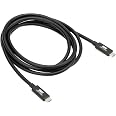
Feels solid, very well built. I have 1x2TB WD Black and 2x500GB Hitachi Desk Star drives installed and accessing each as independent, bootable drives. It accommodates 3.5 and 2.5 inch drives. It does a good job of isolating drive noise. Drive access and fan noise are barely audible, never heard drives spin up. How fast? I routinely copy 1+GB files from the WD Black to the internal SSD in a 2018 mac Mini. This copy takes about .25 seconds! I love that is comes with 6' Thunderbolt 3 cable. I'm using the built-in Display port to drive a second 24" monitor. Overall very happy.Cons:Pretty hard to find but:1. It's a light sleeper ;-) Super duper can't put it to sleep, while it does go into deep sleep when the Mini sleeps from the Apple menu, turning a monitor or Bluetooth mouse on or off wakes the box and spins up the drives.2. Used in a home office environment, the blue power led is really bright, as in flashlight bright! When it wakes up at night and all 6 indicators light up, wow! quite the light show!UPDATE 6-29-19I installed macOS Mojave on an external USB drive (WD Blue 2.5"/Inateck FE2010). That installation went wrong, ending with the 🚫symbol. Attempting to reboot failed, drive not visible.After installing the WD blue in the ThunderBay enclosure , the drive appeared in Disk Utility and after a successful First Aid run, it booted as expected. I suspect this means the ThunderBay is Apple APFS compatible, where the Inateck is not. Still lovin' the ThunderBay!
Trustpilot
Hace 2 semanas
Hace 1 mes