
Descargar la aplicación


Servicios al cliente
Sobre nosotros
Copyright © 2025 Desertcart Holdings Limited
Descargar la aplicación

⚡ Power, Ports & Performance — All in One Docking Dynamo!
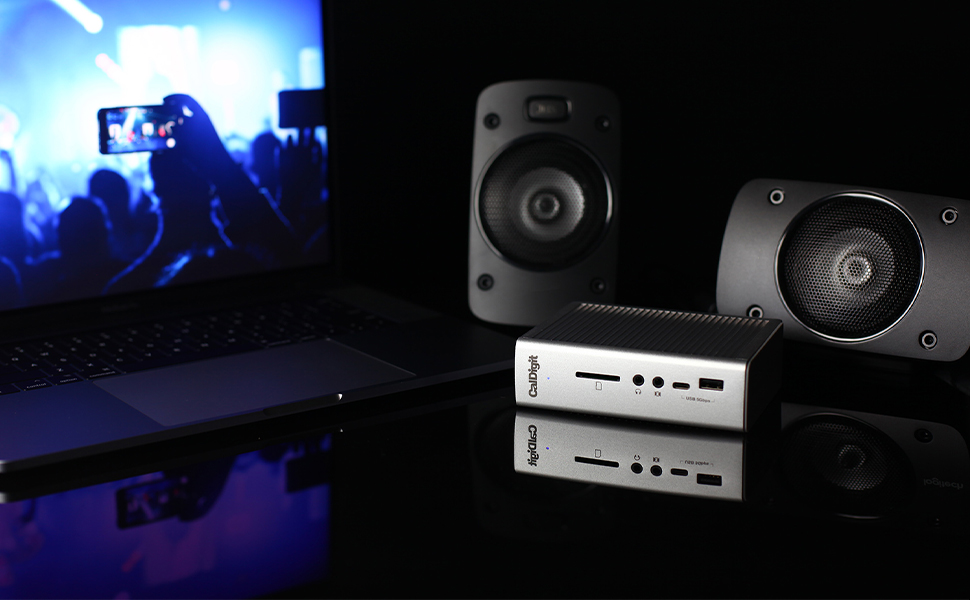
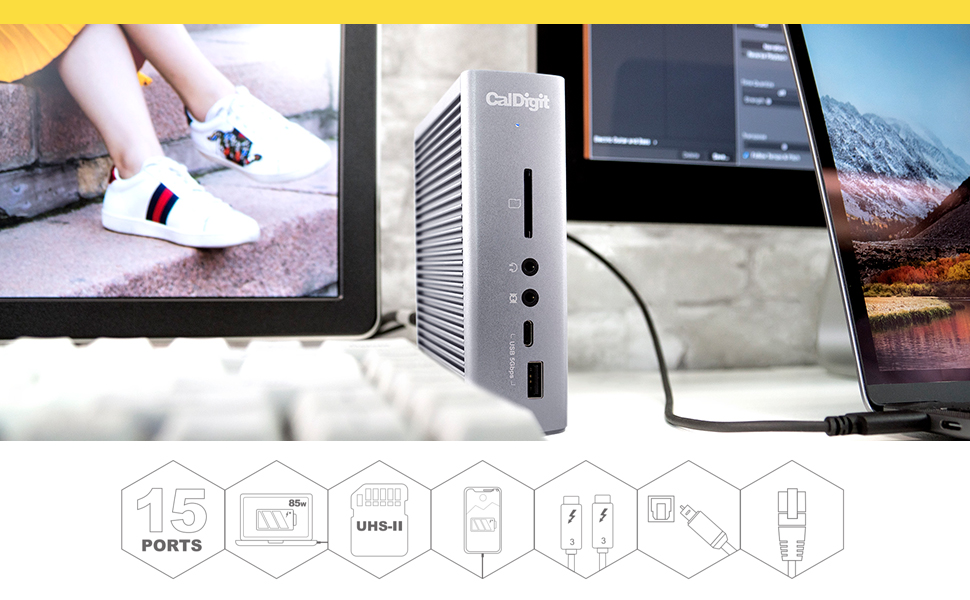
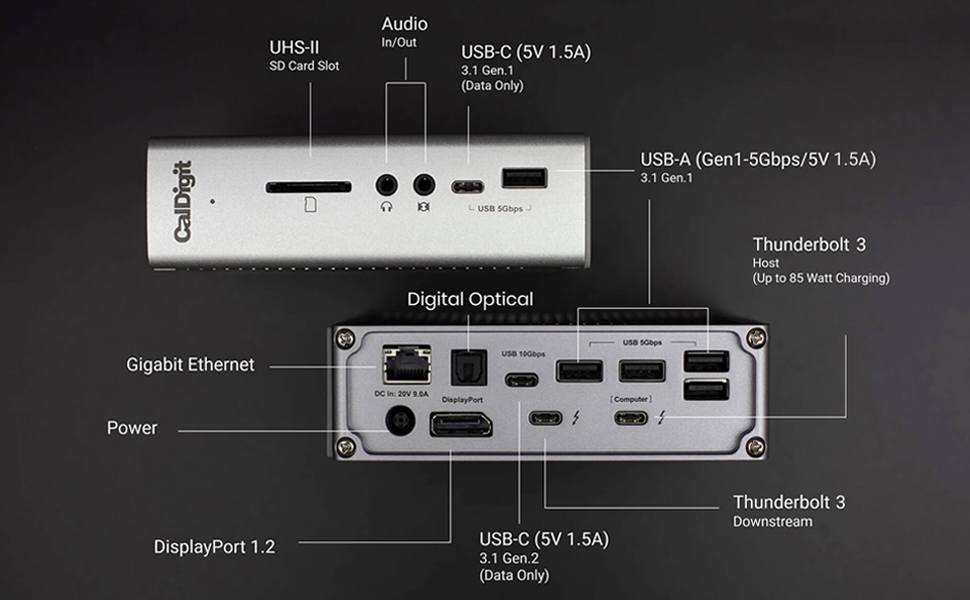
The CalDigit TS3 Plus is a premium Thunderbolt 3 dock delivering 87W laptop charging, 15 high-speed ports including dual 4K display support, USB-C Gen 2, and a blazing fast UHS-II SD card slot. Compatible with Mac and PC, its robust aluminum build and fanless design make it the ultimate productivity hub for professionals craving seamless connectivity and workspace elegance.


| ASIN | B07CZPV8DF |
| Best Sellers Rank | #8,364 in Electronics ( See Top 100 in Electronics ) #136 in Laptop Docking Stations |
| Brand | CalDigit |
| Color | TS3 Plus - Space Gray |
| Compatible Devices | MacBook Pro,Computer Or Tablet With Thunderbolt 3 Port,Computer Or Tablet With Thunderbolt 4 Port |
| Customer Reviews | 4.2 out of 5 stars 4,571 Reviews |
| Hardware Interface | Thunderbolt, Thunderbolt 4, USB 3.0 Type C, USB 3.1 Type C, USB 3.2 Gen 2, USB 3.2 Gen 2×2, USB Type C Hardware Interface Thunderbolt, Thunderbolt 4, USB 3.0 Type C, USB 3.1 Type C, USB 3.2 Gen 2, USB 3.2 Gen 2×2, USB Type C See more |
| Item Dimensions L x W x H | 5.03"L x 1.85"W x 6.1"H |
| Item Weight | 1.3 Pounds |
| Manufacturer | CalDigit |
| Number of Ports | 15 |
| Product Dimensions | 5.03"L x 1.85"W x 6.1"H |
| Total USB Ports | 7 |
| Total Usb Ports | 7 |
| Unit Count | 1 Count |
| Warranty Description | 2 Year Manufacturer |
| Wattage | 85 watts |
L**.
The Swiss Army Knife of Thunderbolt 3 Docks
About three years ago, after a bad experience with a competitor's docking station, I realized the CalDigit TS3 Plus was what I should have purchased in the first place and ordered one. I am a professional software developer using a 2018 MacBook Pro 15-inch to create iOS apps. For me, that means using lots of screen real estate and having lots of phones connected at once for testing. My main screen is a 30" 2560 x 1600 Dell U3011, with Dell 20" 2007FP 1200 x 1600 screens on either side, rotated to portrait mode. The TS3 Plus drives the 30" screen directly via DisplayPort and one of the 20" screens via a Uni USB-C to HDMI adapter. I'm also using the gigabit Ethernet port, most of the USB ports, and even the optical output port to drive an NAD D 3020 digital integrated amplifier that I use for audio. The TS3 Plus never ceases to amaze me in that all of this just works, with no fuss whatsoever, and all through a single cable, leaving the three other Thunderbolt ports on the computer for whatever else I can come up with. The screens go to sleep when they should and wake up when they should. The battery in the computer charges when it should and doesn't discharge when it shouldn't. The various USB devices charge and communicate. This was not true of the competitor's device, which would lose connection to the screens and periodically drain the computer's battery when it was actually plugged in. In fact, it works so well, I tended to forget exactly what was connected and moved my USB-C Time Machine backup drive from the TS3 Plus back to being directly connected to the computer. Why? Because I would forget to eject it before unplugging that one cable (!) to take my computer on the road, prompting a curt reminder from MacOS that I had committed a no-no. Of course, I could use a Post-It note as a reminder, but why bother when I have so many ports still available? The device also looks good, is solidly built from anodized aluminum like the computer itself and the ports are thoughtfully arranged to reduce cable clutter, with most of them out of sight on the back, where they belong, while retaining just what's needed on the front, where they are easy to reach, for devices that tend to be connected and disconnected frequently, such as headphones, memory cards and a few extra USB ports for anything else that might be needed. I recently had an opportunity to deal with their technical support when the power supply gave up the ghost after years of glitch-free service, and they were easy to reach and provided first rate assistance. In fact, it was so easy to contact them, with zero hold time and instant answering, it made me wonder if they were sitting around bored like those mythical Maytag repair people in the old TV commercials? If so, they are clearly doing something right with their products on the inside as well as the outside.
-**-
Works perfectly
For my "work" MacBook Pro, I had an OWC TB3 docking station for a long time. It was... okay. It worked but was a bit finicky, better than almost anything else available when I got it in 2020, but also more expensive than almost anything else back then. But it eventually died due to poor design - the power supply connection was not solid enough and started shorting out inside the unit. My needs are: External monitor (while internal is also on), USB support/power for keyboard, speakers and HD for TimeMachine, and 1Gb or better ethernet. I figured I should be able to get a cheap hub or dock to replace the OWC. But every passive unit (those without their own power supply) and even the powered odd-brand docking systems (Hyrta and Hagibis) were flaky when driving an external monitor and network during zoom calls. By then, I already had on my "personal" 2023 MacBook Pro a CalDigit TS4 (ThunderBolt 4), which is the successor to this model. That is a very very expensive, but super good, docking station. Most of the name-brand docking systems are basically clones of one reference design, including the OWC ThunderBolt 3 unit, but this CalDigit TS3 is, like the TS4, different. And since the "work" Mac doesn't have ThunderBolt 4, I got this. Like the TS4, this excludes build quality. And it works. No drama. Which is all I wanted. It is a LOT more expensive than the passive units (non-powered) I tried, but it hasn't glitched out at all in the two months I've been using it heavily.
J**Y
Fantastic port replicator, lets you do ANYTHING, compensates for poor Macbook Pro design
Apple really screwed up the Macbook Pro 13" design by providing only two Thunderbolt ports and no other ports at all. That's fine if you use your Macbook as a toy but if you are using it for work, you need monitors and peripherals and while "anything" can be plugged in to the Thunderbolt ports, that can only be two at a time. If you have two external monitors you can't even plug in the charger! I did a lot of research on port replicators for this laptop and there are very very few available that do a proper job. I wish I stuck with Dell. But I digress. In the end I chose this Caltech dock and I'm very happy. I can just plug in one Thunderbolt cable to my laptop, and I instantly have access to two external 1900x1600 Dell monitors, one of them turned sideways (the dock supports up to 4k with two monitors), my wonderful Cherry MX USB keyboard, my teleconferencing headset, a charging cable for the magic mouse and a bunch of other USB nicknacks. The dock has its own power pack and supplies power to the laptop so I can keep the laptop's own charger at a different location. Most important though is 2 monitors + power. None of the cheaper docks allow you to do this with the 13" Macbook Pro (unless you have the more expensive Macbook with 4 Thunderbolt ports). This dock is expensive, but not more expensive than the very few comparable ones and it seems to be the best one. With this dock I was able to re-use most of my existing cables and only had to buy one expensive special cable. The dock came with the dock-to-laptop cable. I could use my existing DP-to-DP cable for one of the monitors. For the other one I had to buy a Thunderbolt-to-DP cable. The dock has separate microphone and headphone jacks, which happens to be what my headset needs as opposed to the cellphone-style 4-tip single socket that the Macbook has. The dock has LOTS of USB ports, which made me very happy. I do not need any external USB hub. It's such a nice dock, I wish I could buy another one for the other location I use my laptop. But I only have one monitor there, so there are much cheaper alternatives. The high price is the only thing I don't like about this dock. FYI Apple does not do NEARLY as nice a job as Windows at remembering hardware configurations. Every time I re-dock I have to re-configure the monitor arrangement and re-select the Caltech audio device. That's not Caltech's fault, it just does not seem Apple was meant for serious work users.
D**1
Updated after 1 year: Works perfectly with MacBook Pro 2020
New review using the MacBook Pro 2020 (i7 Quad Core with 32GB of Ram, a 1 TB SSD, and 4 Thunderbolt 3 ports): I have been using my Macbook Pro 2020 and the CalDigit TS3+ as my "daily driver" for about a year now. I had some minor issues when using it with my Lenovo prior to getting my Mac, but they were resolved with some updates. It's an excellent dock and I have had no problems with it for the past year. The dock has never even been restarted. I'm listing all of the apps and CalDigit TS3 ports that I use to show how stable the combination is: I use my Mac for work and run several VPN's and remote connections to clients' offices, as well as all MS Office apps, Zoom, Edge and Chrome, Snagit, a time tracking application, Teams, and a few other apps. I also run VMWare Fusion once in a while when I have to use a Windows computer. That runs on a USB-C external enclosure from Plugable that is directly connected to one of the Mac's Thunderbolt ports. I have plugged it into the CD TS3 with no trouble, but as I don't use it often, it's easier to reach the port on the Mac. I have two older Dell displays, one 1920x1200, using the CalDigit TB3 to DisplayPort, and one 1920x1080, that uses the CalDigit DisplayPort to DisplayPort. I don't usually have my laptop open, but at times I want an extra screen to keep an eye on email and will pop it open with no problem, giving me a total of three displays. Both displays work exactly as they should. I use a Logitech MX Keys keyboard and the MX Anywhere 3 Mouse. The dongle for those is plugged into the front USB-C port using a C to A cable. There is a Logitech Brio webcam plugged into the front USB-A port. There is a Plantronics BT600 dongle plugged into a rear USB-A port. I have the Ethernet port plugged into a 1 Gb switch. Speed tests and file transfers work as expected. I have a Seagate 2TB Backup Plus external drive plugged into a rear USB-A port for Time Machine. The point is that it all just runs! The setup runs 24/7 as there are certain things that run overnight. The CD TS3+ keeps my laptop charged and runs everything with no communication issues or speed problems. As I don't have Thunderbolt 4, there is no reason for me to update anything...until I get a new MacBook in a couple of years! --------------------------------------------------------------------------------------- Old review from when I used it for my Lenovo laptop for about 3 months: I've only had this a few days, so I will just point out a couple of things. I am using Windows 10 Pro on a Lenovo Thinkpad X1 Yoga and it has the most up-to-date firmware and drivers available. The CalDigit support site is terrible for Windows users. Everything regarding drivers and firmware is for MAC only. It makes no mention of Windows. I thought that maybe I bought the wrong device until I looked at the product page and it does say it is for Mac and Windows. In fact, on the product page, it states: "The TS3 Plus provides up to 87W charging for Mac & Windows Thunderbolt 3 laptops. A firmware update is required. For more information, please visit our KB article here. The charging feature may vary depending on the design of your Windows Thunderbolt 3 laptop. Check with the system manufacturer for more information." When you click on their link, it takes you to a page that only provides Mac info. Even though they claim you have to update for Win and Mac, there's no mention of Windows on the page. I found a Windows firmware update for the device by doing a Google search, but I could not update the TS3's firmware. I received an error about missing software. Another Google search shows some info, but the link doesn't provide any useful info. I tried updating or installing anything I could find to no avail. So: The network jack wouldn't work. My keyboard, which is USB, wouldn't work. I was desperate. Finally, I found an Intel program called "Thunderbolt." I ran it and the TS3 started working. I really want to find a way to upgrade the firmware as it supposedly provides some functionality missing from the shipped version. Getting accurate monitor setup information is not easy. More to follow.
A**N
Slowly died over 3 years (USB ports stopped working)
I purchased this dock in February 2021 and would not recommend this product due to its inability to support Bluetooth peripherals and the lack of longevity for its USB ports. I don't have an exact timeline on things, but here's a breakdown of how this docking station slowly died on me: - First received. Works great! Connected Bluetooth mouse, Bluetooth keyboard, one monitor, a webcam, ethernet connection. Bought it with the intent of being able to quickly switch between my personal laptop and work laptop :) A little annoyed that I had to purchase an HDMI to displayport adapter, but I read enough reviews to know that was going to be a (fixable) issue. - First, minor sign of trouble: webcam feed was extremely buggy. My logitech webcam, connected via a USB A port, would flicker on/off consistently, very annoying. Since I didn't use my webcam too frequently, I decided to connect my webcam directly into my work laptop whenever I needed to use it. Slight inconvenience but wasn't a frequent occurrence. - Second, major sign of trouble: Bluetooth peripherals, including keyboard and mouse dongles, stopped working when connected to the docking station. When connected directly to my laptop, both items were fine, so I knew it wasn't the keyboard nor mouse. Did some troubleshooting with CalDigit and customer service said that their dock doesn't guarantee compatibility with Bluetooth peripherals. What?! That's.. strange. But ok, that's on me for not understanding its limitations. After doing my own personal troubleshooting and research, I decided to do two things: buy a USB-A hub with its own power delivery and to play with the location of the dock to see if I can lower any interference. Through trial and error, I realized the combination of both actions improved things immensely. My keyboard, mouse, and webcam were connected to my USB-A hub, which was then connected via USB-A port on the CalDigit. AND my docking station moved to reduce interference. Worked well for a long time! Again, annoyed that the USB-A ports didn't just work, but I also didn't want to spend $$ on a whole new dock at the time. The small investment in the hub ended up just buying me time. - Most recent and final of trouble: again, mouse and keyboard stopped connecting. Did basic troubleshooting. I tried plugging in the mouse and keyboard directly to my computer. Worked. I tried plugging in the mouse and keyboard back into the hub, then the hub directly into my laptop. Worked. Tried plugging the keyboard and mouse directly into different USB ports of the Caldigit. Nothing. Tried plugging in the keyboard and mouse into the hub then into all the different ports of the docking station. Nope. Tried plugging in a flash drive into my personal laptop and the computer read that. Tried plugging in the flash drive into all USB ports. Computer didn't recognize it. Figured at this point, all the USB A ports were dead :( I didn't want to buy a whole new dock, so I tried one last thing: i bought a new USB hub, but this time with a USB-C connection since, to my knowledge, all my USB-C ports were working. Got the new USB hub, plugged in all my stuff, plugged into the CalDigit, nothing. Similar process as described above; a lot of trial and error and plugging things in/out. That's when I realized my two unused USB-C ports also did not work. To tally: out of the 4 USB-C ports, 2 stopped working. out of the 5 USB-A ports, all 5 stopped working. I never used the SD card slot nor the audio ports, so I can't provide a status update on them. However, to have more than half of my USB ports stop working is awful. Shame - It's been difficult to find another docking station that had as many USB-C ports.
R**O
long lasting | reliable product | great customer support!
I ran into an issue with my CalDigit TS3 Plus docking station and reached out to their technical support. The support team was extremely helpful and patient, walking me through troubleshooting step by step. They took the time to understand my setup and ultimately helped me identify the root cause of the problem. The dock itself has been solid, but the customer support really stood out. It’s reassuring to know that if something goes wrong, there’s a knowledgeable and responsive team behind the product. Highly recommend both the TS3 Plus and CalDigit’s support.
R**N
Don't look at any other docks. You want THIS ONE!
*** IMPORTANT PRODUCT UPDATE AT THE CLOSE OF THIS REVIEW *** I am going to make an admission.... I have done paid reviews for Caldigit in the past. They are a company I discovered a few years ago upon researching power docks for my various MacBooks which I have seemed to upgrade with every refresh. Since I run a website dedicated to computers, they were happy to send me their products to review on my site. This is not a paid review. I actually paid $300 for this TS3 Plus dock. However, the point I want to make is that I did so based on my experiences with their other docks I have used (that are still going strong today). I also continue to use their products because their support is second to none. One of my older CalDigit docks failed well over a year ago. It was a problem with the power supply. CalDigit immediately sent me a new power supply at no charge. Then, over the past few months, I was having issues with the dock not powering on. After back-and-forth discussion with their customer support team via email, we discovered the problem was the Thunderbolt cable I was using and not the device itself. Over the years I have had many conversations with their customer support team and I find them to be exceptional. I want you to know this because you need to be assured by someone that when you buy a CalDigit product you are going to also be getting first-rate customer support that will honor the warranty behind your product. In the case of the TS3 Plus..... I wanted to get rid of my iMac and use my 2017 MacBook Pro instead. Why pay to have a desktop AND a laptop when you can use the MacBook Pro as both? Now I simply take the laptop off my lap, and with a single cable connection, I plug it into the TS3 and I have my laptop displayed across my 54" 4k television. With a multitude of USB inputs, I have a keyboard, trackpad, and scanner at my disposal. An optical wire goes directly from the dock to my Logitech surround system. In the front, I have a slot for my camera's memory card as well as an additional USB plug in case I want to quickly insert a flash drive. Yes, this is an expensive dock. And, this was oddly not my first choice. I like the form factor of the OWC Thunderbolt 3 dock similarly priced as this one. However, have you read the reviews on the OWC dock? They are horrific. Once I read those less-than-stellar reviews I had no issue going with CalDigit. I was already aware of the superior quality of their docks and judging from the positive reviews I have read on Amazon, I see I am not alone in my raves about this dock. It just works! If you need to find a really good display port to HDMI adapter for this particular dock, I have a really good recommendation. Do click on my name to find my reviews. UPDATE (7/2018): I had a hardware issue with this dock. I contacted CalDigit Support and they arranged to have it sent back to them. They kept in constant touch with me regarding the repair. According to CalDigit, there was nothing wrong with the unit and it was working fine on their end. Nevertheless, at my request, they sent me a new unit without question. I am continually amazed at my interactions with CalDigit support and it certainly seems they go out of their way to make certain the customer is happy.
M**D
Outstanding product quality but Amazing customer support!!!
I recently purchased an Apple MacBook Pro M4 Max, and was using this dock on a Mac mini but decided to start using it for the Macbook as I could just connect 1 port and it would charge my laptop and use the display port for my monitor and use the device in clamshell mode with just connecting 1 cable!!! Unfortunately I noticed that the ethernet wasn't working. Everything else worked perfectly fine but not sure what was going on. I tried everything from CalDigit's support website but nothing so I decided to reach out to support directly. I did all the troubleshooting steps CalDigit support instructed with no success! They then asked me to provide them with proof of purchase for a warranty replacement. I bought this thing back in February of 2021 so I told them I doubt it has support/warranty and that it had served me very well for many years! I provided the information and to my surprise they offered a 1 time replacement! I have used many of CalDigits products and I love them and the quality is great, I had never dealt with their support in the past, this is my first time and they were prompt and like I said, to my shock they offered to replace it even though I bought this early 2021! They're definitely getting 5 stars from a happy customer and I will be recommending them to anyone/everyone that needs docks!
Trustpilot
Hace 2 días
Hace 4 días