
Descargar la aplicación


Servicios al cliente
Sobre nosotros
Copyright © 2025 Desertcart Holdings Limited
Descargar la aplicación
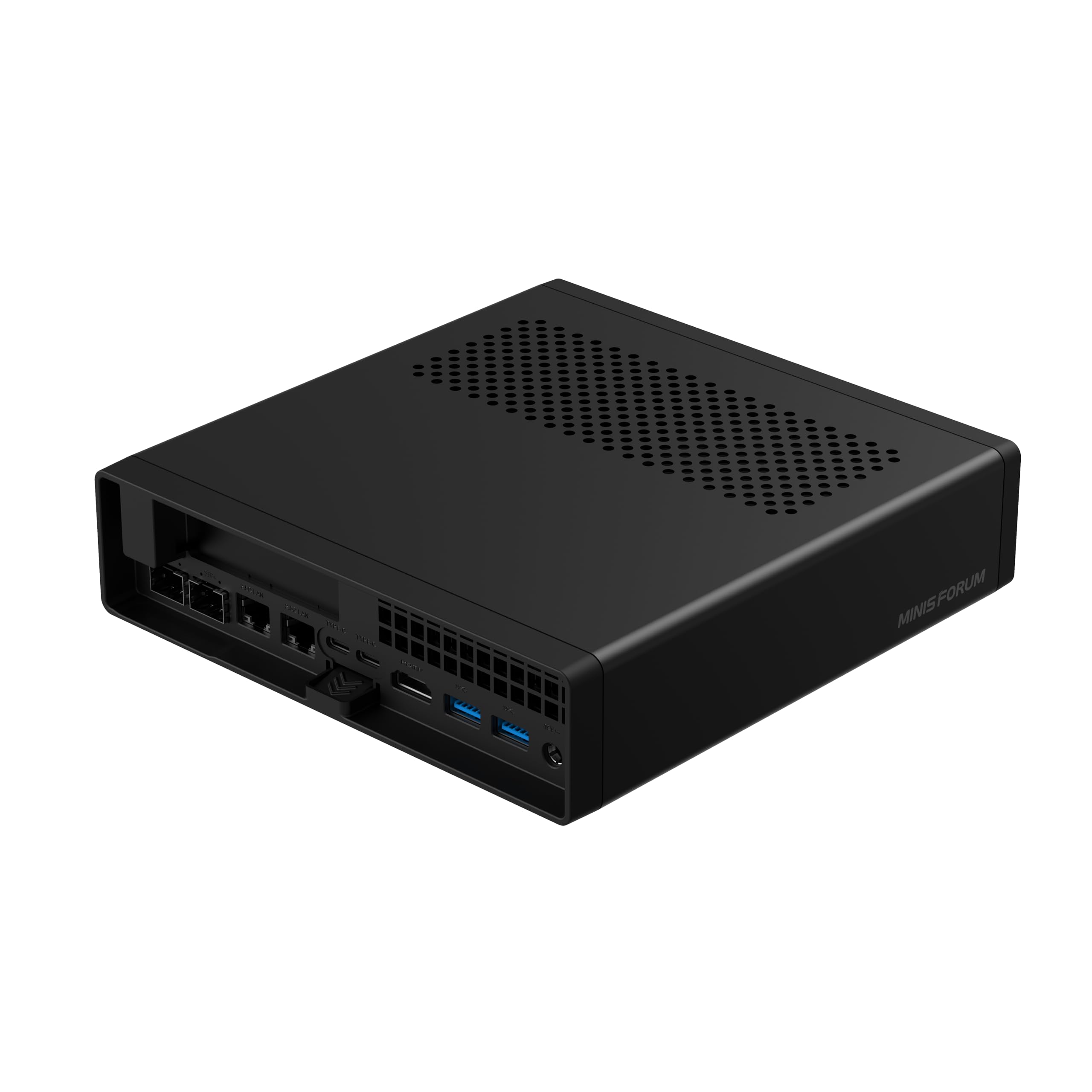
🚀 The Mini PC Monster: Power, Speed & Expansion in a Compact Frame
The MINISFORUM MS-A2 Mini PC packs a Ryzen 9 7945HX 16-core/32-thread processor with up to 5.4GHz turbo, 32GB DDR5 RAM, and 1TB NVMe SSD storage expandable via three M.2 slots. It features professional-grade networking with dual 10G SFP+ and 2.5G LAN ports, plus Wi-Fi 6E. The PCIe ×16 slot supports high-end GPUs or network cards, while advanced cooling ensures silent, reliable performance. Ideal for demanding creative, gaming, and home lab environments where space and power efficiency are paramount.


| ASIN | B0F99BPRHZ |
| Additional Features | PCIe × 16 Expansion |
| Aspect Ratio | 16:9 |
| Best Sellers Rank | #1,813 in Computers & Accessories ( See Top 100 in Computers & Accessories ) #55 in Mini Computers |
| Brand | MINISFORUM |
| CPU Model | Ryzen 9 |
| CPU Model Number | Ryzen 9 7945HX |
| CPU Speed | 5.4 |
| Cache Memory Installed Size | 64 MB |
| Cache Size | 64 MB |
| Color | Black |
| Compatible Devices | External Storage Drive, Headphone, Keyboard, Monitor, Mouse, Printer, Speaker, Television |
| Connectivity Technology | Bluetooth, Ethernet, LAN, Wi-Fi |
| Cooling Method | Air |
| Customer Reviews | 4.4 out of 5 stars 206 Reviews |
| Display Resolution Maximum | 7680 Pixels |
| Graphics Card Description | Integrated |
| Graphics Card Interface | PCI Express |
| Graphics Coprocessor | AMD Radeon 610M |
| Graphics Description | Integrated |
| Graphics Ram Type | GDDR6 |
| Hard Disk Description | SSD |
| Hard Disk Interface | Serial ATA-600 |
| Hardware Interface | HDMI, USB, USB Type C |
| Human-Interface Input | Buttons, Microphone |
| Item Weight | 3.02 Kilograms |
| Keyboard Layout | QWERTY |
| Manufacturer | Micro Computer (HK) Tech Limited |
| Memory Clock Speed | 5200 MHz |
| Memory Speed | 5200 MT/s |
| Memory Storage Capacity | 1 TB |
| Model Name | MS-A2 |
| Model Number | MINISFORUM MS-A2 Ryzen 9 7945HX |
| Model Year | 2025 |
| Native Resolution | 3840 x 2160 |
| Number of Component Outputs | 3 |
| Operating System | OS |
| Personal Computer Design Type | Mini PC |
| Power Plug Type | Type A - 2 pin (North American) |
| Processor Brand | AMD |
| Processor Count | 16 |
| Processor Series | Ryzen 9 |
| Processor Socket | Socket F |
| Processor Speed | 5.4 |
| RAM Memory Installed | 32 GB |
| RAM Memory Technology | DDR5 |
| RAM Type | DDR5 RAM |
| Ram Memory Maximum Size | 64 GB |
| Resolution | 3840 x 2160 |
| Speaker Type | External Speakers Required |
| Specific Uses For Product | Gaming |
| Style Name | Mini |
| Total Expansion Slots Quantity | 1 |
| Total Number of HDMI Ports | 1 |
| Total Usb Ports | 8 |
| Video Output | HDMI, DisplayPort |
| Video Output Interface | HDMI, USB-C (DisplayPort) |
| Video Processor | AMD |
| Wireless Compability | 802.11ax, Bluetooth |
| Wireless Technology | Bluetooth, Wi-Fi |
R**N
Ultimate home lab starter server
The Minisforum MS-01 is hands-down the best mini PC I’ve ever used for a home lab/server setup, and I’ve gone through more than a few (N100 minis, old Intel NUCs, used ThinkCentre tinies, etc.). This thing is a beast in a ridiculously small package. What makes it the “ultimate” for homelabbers: • CPU: The i9-13900H (or 12900H version) absolutely flies. Running Proxmox with a dozen VMs and LXCs (Pi-hole, Home Assistant, Plex, Nextcloud, WireGuard, etc.) and it barely breaks a sweat. Pass-through of the iGPU to a Jellyfin/Immich VM works flawlessly for hardware transcoding. • I/O is insane: Dual 10GbE SFP+ ports AND dual 2.5GbE RJ45. Finally a mini PC that doesn’t choke my network. The PCIe 4.0 x16 slot (x4 electrically) let me drop in a real quad-port 10GbE NIC without any compromises. • Expansion: Two M.2 2280 slots + one M.2 22110 + a U.2 NVMe connector. I’m running 12 TB of fast storage inside with zero external drives. Hot-tier, warm-tier, cold-tier—all in one tiny box. • Build quality & thermals: Surprisingly quiet under normal load, and even when I push all cores it never thermal throttles. The cooling solution is clearly over-engineered in the best way. • Power draw: Idle at ~18-22 W with everything running (Proxmox + services). That’s stupidly efficient for this much performance. Minor nitpicks (because nothing is perfect): • It’s not exactly cheap, but you get what you pay for. • The internal USB header situation is a little awkward if you want to run a Coral TPU or something similar. • BIOS is still getting updates—some early quirks with sleep/resume are mostly fixed now. If you’re tired of outgrowing every “mini PC” after six months and don’t want to run a loud 1U rack server in your apartment, the MS-01 is pretty much the endgame. I wish I bought two. Highly recommended for anyone serious about self-hosting or building a compact, high-performance home lab. 11/10 would buy again. Lots of ports,games ok, fast speed and easy to setup
K**M
A Little Monster
The "MinisForum" presents a visually captivating design, embodying both aesthetic appeal and substantial power. Upon closer inspection, I found myself intrigued by the intricate design of the device. It is evident that the construction is not only advanced but also exceptionally well-organized, reflecting a high degree of technological craftsmanship. The interior layout showcases a modular design that facilitates easy access and customization, indicating a thoughtful approach to user experience and functionality. Upon utilizing the computer, I was thoroughly impressed by its operational performance. The efficiency and speed with which it processes tasks demonstrate its formidable capabilities. Indeed, this device can be aptly characterized as "A Small Monster," conveying not only its compact size but also its impressive ability to handle demanding applications with remarkable ease. Overall, this computer represents a noteworthy achievement in modern technology, combining aesthetic charm with robust performance in a seamless package.
C**N
The best value homelab computer on the market!
After reading so much hype about the MS-A2, I couldn't wait to get my hands on one! I already have an MS-01 and MS-A1, so I was super excited to see how much the tech has evolved in the last year. The MS-A2 is essentially in the same case as the MS-A1, but packed with a lot more power! I was a bit saddened to see there is no USB4 support or Gen5 NVME and has just one HDMI video output . It does have two type-C USB 3.2 Gen2 10Gbps ports that support display port out, so you can add two additional monitors (for a total of three monitors at the same time.) It has two 2.5GbE ethernet ports. One is Intel-based, the other is Realtek based. In addition, it also has two SFP+ ports based on the Intel X710 network chip. The WiFi 6E and Bluetooth are from a Mediatek RZ616 m2 network adapter inside. It is now possible to get 64GB DDR5 SODIMM memory modules, so two of those DO work in this system for a total of 128GB of RAM!!! Of course, I had to get the Ryzen 9 version 9955HX, which has 16 cores and 32 threads. That CPU can turbo up to 5.4GHz! For storage, there are three M.2 slots that can fit either M.2 2280 (80mm) or M.2 22110 (110mm) NVMe SSDs. Yes, you can use RAID 0 or RAID 1 on them! It also includes an adapter if you want to use U.2 enterprise-class server storage drives. This Mini PC is no toy! The power brick is 240 watts! It's amazing how much power, performance and reliability you get for such a low price in such a small and quiet package! Yes, you can absolutely hear the CPU fan ramp up when it's under a heavy workload, but it is much quieter than the CPU coolers of yester-year! Opening up the system to work on it is just a push button away. No tools required! You push a button in the back and the entire case pulls off like a sleeve! There is an option to slot in a OcuLink PCEi card if you want to have an external GPU, though I'd just get a regular tower PC if that was my intention, personally. This is THE best value homelab computer available today! I am absolutely smitten with this workhorse!!!
A**R
Excellent for a home server, beware of LGA curse
I bought three of these for a "small" Proxmox cluster and sadly, one of them came with a mangled socket on account of its own protector coming loose while in transit and hitting the pins. I asked for a refund and proceeded to buy a new unit. However, the new unit had a different cooler on the back, there was no heatsink for the main NVMe and instead it came with a cooler for the VRM, which IMO is not as useful as the previous one. Also, the new unit did not come with the U.2 adapter, which is just unacceptable. All in all, these perform quite well, they come with 2 PCIEx4 NVMe slots (at least per the manual), allowing me to create a 6-drive Ceph cluster. They do support 96GB of RAM, but could not find the option inside the BIOS to make it run at 5600Mts, as advertised; I'm limited to 5200Mts.
R**E
Amazing mini PC with maxi characteristics
I am a Mac person through and through but have a few workloads that don’t work well in Parallels, so I started looking for a minimalistic approach that didn’t require me to buy an expensive laptop or bulky desktop. I found great articles about the Minisforum MS-01 and was impressed with its upgradable design, size, and performance characteristics. I bought the largest model and got a 4Tb NMVe SSD and a Yeston RTX 3050 low-profile GPU as upgrades. The PC was super easy to set up. I first cloned the 1Tb SSD to the 4Tb SSD and installed it without any problem by removing just 3 screws. The video card was even easier to install as it required a single screw to be removed. I connected the PC to my 10Gbps network using an SFP+ fiber adapter and was off to the races. The boot time was super fast and after a few obligatory Windows installation steps, I was up and running, connected to the internet, and had a great 4K image. I was glad to see it came with a Windows 11 Pro license and absolutely zero apps; just the necessary drivers. The forums mentioned that upgrading the BIOS was important and that was easy too, although that entire process was much better explained on the forums than in the Minisforum documentation. It took just 5 minutes in the end and allowed me to see a lot of interesting features in the BIOS as well. Now that I’ve run the system for a week, I’m so impressed. It’s unbelievable how powerful this minuscule PC is and how easy it was to expand. It’s not as quiet as my Mac Studio Pro, but it’s totally fine from a noise perspective. I highly recommend the Minisforum MS-01.
E**D
Great computer, terrible customer support
I absolutely loved this as a homelab machine when it was working, it's a very capable server computer in a very small footprint. The problem was that one of the 10G network ports started malfunctioning. I contacted Minisforum support, went through the troubleshooting steps with them, and they determined that they would send me a replacement after receiving the defective unit. I sent the unit back per their instructions, and never received a message in response, after many messages over several weeks requesting status. I am now out $700 for a computer I returned on the assurance it would be replaced. If you get one, just hope it never breaks.
T**.
Great Item As Long As You Are Aware of Several Caveats
I am giving this a five star but wish I could give 4.5 instead. First, I got the bare version (CPU, but no memory, disk or OS). Overall, this is a great system, especially for a homelab (or in my case, a small hosting datacenter) for use as a virtual server (Proxmox 8.4.x in my case). However, you will want to be aware of a number of caveats in function vs. marketing. 1. The x16 PCIe slot in the device is only wired to x8, but it is x16 in size 2. The two SFP+ 10g ethernet connection are only wired to x4, whereas they would require x8 if they were to need to operate under full 10g load. This means that under heavy network load, your OS will experience 'network flapping' and intermittent momentary outages/pauses (which in a virtual environment for HA in particular is problematic) 3. Thermals are TERRIBLE at the default configuration. First, the paste applied at the factory/during assembly is either way too much, or way too little (I have three of these, have seen both). In order to prevent this device from hitting thermal loads that cause a shutdown, you need to pop off the CPU cooler, clean off the factory paste, and redo it correctly using a good paste. Make sure you change the fan speed in BIOS to always be full and as an extra precaution, reduce the CPU power draw from the default 75w to 55w (you can go as low as 45w). With these changes and the addition of an Intel 10g x8 network card, I was able to complete an hour of full load on both the CPU cores AND network while keeping temps under 85'C, while normal virtual loads didn't exceed 70'C If you understand and are prepared for all of that, you cannot beat the size and performance of this device for that kind of use case.
N**H
A tiny beast
I recently purchased the **Miniforums MS-A01** for my home lab, and I couldn't be happier! The sleek and compact design fits perfectly in my workspace, making it not only functional but also aesthetically pleasing. This little powerhouse handles everything I throw at it—from running virtual machines to hosting my personal website—smoothly and efficiently. It operates quietly, even under heavy loads, thanks to its effective cooling system. This is a huge plus for a home environment! If I could change one thing, it would be to switch the SFP ports to Ethernet. While SFP is useful for certain applications, having more Ethernet options would enhance versatility for home users. Overall, the **Miniforums MS-A01** is a fantastic investment for anyone needing a powerful, easy-to-manage home lab server. Highly recommended!
Trustpilot
Hace 1 mes
Hace 1 mes