We remain fully operational. Our teams are working around the clock to ensure your deliveries continue safely.

Descargar la aplicación


Servicios al cliente
Sobre nosotros
Copyright © 2025 Desertcart Holdings Limited
Descargar la aplicación





🎤 Elevate Your Presentations with Style!
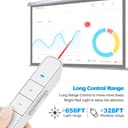
The Key-Customized Wireless Presenter Remote, NORWII N36, is a versatile presentation tool designed for professionals. With a plug-and-play setup, customizable hotkeys, and an impressive control range of up to 100 meters, this remote ensures you can deliver impactful presentations with ease. Its bright red laser pointer enhances visibility, making it perfect for any setting. Compatible with various operating systems, this presenter is a must-have for anyone looking to make a lasting impression.


| ASIN | B072HNPJGM |
| Additional Features | Ergonomic |
| Battery Type | AAA |
| Best Sellers Rank | #652,230 in Office Products ( See Top 100 in Office Products ) #222 in Office Presentation Remotes |
| Brand | KNORVAY |
| Button Quantity | 5 |
| Color | Black |
| Compatible Devices | Television |
| Connectivity Technology | Bluetooth |
| Controller Type | Button Control |
| Customer Reviews | 4.4 out of 5 stars 87 Reviews |
| Item Weight | 27.22 g |
| Manufacturer | Shanghai Norwii Technology Co., Ltd |
| Max Number of Supported Devices | 1 |
| Maximum Number of Supported Devices | 1 |
| Maximum Range | 330 Feet |
| Mfr Part Number | N36 |
| Model Number | N36 |
| Number of Batteries | 1 AAA batteries required. |
| Special Feature | Ergonomic |
R**N
Great product. Super light & priced right.
This is a great tool, even without using the remote for PowerPoint presentations. As a manager, I am constantly training my staff and this tool is perfect for helping out several people quickly while doing hands-on instruction. I can be walking around the room instructing navigation steps between platforms which is generally a pain as some are zooming along while others are steps behind struggling to keep pace. With this tool I am able to quickly identify the ones that are needing some extra guidance, and use the laser to silently assist them to catch up with the group. Not only that, I’ve received feedback to thank me for my help in this way because it affords the extra assistance they needed without holding the group and makes them feel more confident that the team isn’t aware of the “nudge” of help they received. It’s actually making my training more efficient, too. I can’t believe I waited so long to pick something like this up before now. Plus, the white color helps it to stand out so I don’t easily misplace it. This is an all-around win for me!
D**.
Plug & Play - customization sw works well
Plugged in the USB key to my windows11 laptop and it worked out of the box. Laser is plenty bright. I downloaded the customization sw from norwii.com, and it allowed me to update the FW and swap the up/down button functions so they are more intuitive. Customization sw lets you set each button to any keyboard key. Great product & price.
E**E
Great but gets dirty quickly
The only issue is that because it's white, it gets dirty very quickly. I use a white board while teaching so by the end of the day, this is a different color.
P**S
Programmable so Good for more than PowerPoint
Bought it because it claimed to allow programming of the buttons. It allows easy selection between several typical use pairs. It works to advance thru MS Photos as well as PowerPoint with some very easy key presses
K**N
Lost my $40 clicker, got this cheap replacement. Probably won't buy another $40 one.
This is just as good as the more expensive clickers and, at least to me, it looks a little more sleek. The design makes me feel like I'm living in a future where function is preferred to comfort, all the vehicles are aerodynamic and solar powered, and the North American government is ruled by a council of academics who base their policies on research instead of whim. I like the idea of that future, hence, I like this slide advancer. Downside: The up botton goes back and the down button goes forward. Yes, it makes sense with how Powerpoint organizes slides in the left hand bar, but it doesn't really make sense with the way we correlate forward with up. Not to mention, if you hold the clicker flat, the up button actually points forward. It's a little annoying and it takes some getting used to. However, the laser pointer button is just below the slide advance button and if the advance/back up buttons were reversed, the laser button would be further away. I feel like there wasn't a lot of UX testing that went into the button layout. But whatever. You get used to it pretty quickly and then when your colleague uses it, you just warn them and laugh when they forget.
W**R
Snap
I have to confess, I drop and lose tiny things like crazy. The fact that this product has a USB part that slips in magnetically and stays there without me losing it, makes all the difference to me. When I have to present and organize things in a snap, I do not have time to look for little USB adapters. I have so many tiny adapters now that I can not even remember what they go to (Bluetooth, mouse, pointers, etc.) After using this product, I snap the adapter into the stick and forget about it. All products with USB tiny adapters need to do what this product has done, have a magnet hold the two part together, design it so that you can tell it apart from others, and color match the parts. If I could give it 6 starts I would.
F**H
Great for teachers
This was great for my classroom. I like to walk around the room during my lessons, so this was much needed for me. I no longer have to run back to my laptop to switch the slides. It works from anywhere in the room. Very easy to use.
L**A
Lo amo!
Práctico, funcional, ha sido de gran ayuda en mis presentaciones. Lo recomiendo totalmente.
Trustpilot
Hace 1 día
Hace 3 semanas