We remain fully operational. Our teams are working around the clock to ensure your deliveries continue safely.

Descargar la aplicación


Servicios al cliente
Sobre nosotros
Copyright © 2025 Desertcart Holdings Limited
Descargar la aplicación

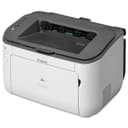

🚀 Compact speed meets wireless freedom—print smarter, not harder!
The Canon imageCLASS LBP6230dw is a compact monochrome laser printer delivering sharp 600 dpi prints at a rapid 26 pages per minute. Featuring wireless connectivity, automatic duplex printing, and a 250-sheet capacity, it’s designed to fit seamlessly into professional home offices or small workspaces. Compatible with mobile devices and backed by a 1-year warranty, it offers reliable, cost-effective printing without the bulk.


| ASIN | B00MWDUXZ0 |
| Additional Printer Functions | Print Only |
| B&W Pages per Minute | 26 ppm |
| Best Sellers Rank | #283,873 in Office Products ( See Top 100 in Office Products ) #406 in Laser Computer Printers |
| Brand | Canon |
| Built-In Media | Canon imageCLASS LBP6230dw Wireless Laser Printer |
| Color | LBP623Cdw |
| Color Pages per Minute | 1 ppm |
| Compatible Devices | Laptops, PC |
| Control Method | App |
| Controller Type | Android |
| Customer Reviews | 4.1 4.1 out of 5 stars (4,424) |
| Display Type | AMOLED |
| Dual-sided printing | Yes |
| Duplex | Automatic |
| Global Trade Identification Number | 00013803237702 |
| Hardware Interface | USB 2.0 |
| Ink Color | Black |
| Item Dimensions D x W x H | 11.5"D x 14.9"W x 9.6"H |
| Item Type Name | Laser Printer |
| Item Weight | 15.4 Pounds |
| Manufacturer | Canon USA (Lasers) |
| Maximum Copy Resolution Black and White | 600 dpi |
| Maximum Copy Speed Black and White | 26 ppm |
| Maximum Media Size | 8.5 x 14 inch |
| Maximum Print Resolution Black and White | 600 dots_per_inch |
| Maximum Sheet Capacity | 250 |
| Model Name | iC LBP623Cdw |
| Model Number | LBP6230dw |
| Model Series | imageCLASS |
| Number of Trays | 1 |
| Other Special Features of the Product | Auto-Duplex |
| Output sheet capacity | 250 |
| Paper Size | 8.5 inch x 14 |
| Power Consumption | 2 Watts |
| Print media | Paper (plain) |
| Printer Connectivity Type | Ethernet, USB |
| Printer Output Type | Monochrome |
| Printer Type | Laser |
| Resolution | 600 x 600 |
| Scanner Type | Sheetfed |
| Specific Uses For Product | Office |
| Total USB 2.0 Ports | 1 |
| Total Usb Ports | 1 |
| UPC | 013803237702 |
| Unit Count | 1.0 Count |
| Warranty Description | 1‐year exchange/carry‐in |
| Warranty Type | full warranty |
| Wattage | 400 watts |
S**R
Great laser printer for the size and price!
The near perfect home laser (so far). Our inkjet decided to kill itself by eating 25+ sheets of paper at once, so I figured I'd give laser a shot since we rarely need color printing and (in general,) the running costs are much lower on laser. Setup was very easy. Followed the little getting started card and removed all the shipping tape, foam, etc. After plugging it into power, I simply downloaded the newest driver and utility from Canon's site as the disc included has a driver not supported by Mac OS 10.10 Mavericks. Although you really should be getting the newest driver no matter what. After installation you simply fire up the utility, set your wireless info (if you're using wifi) and select the printer on your computer. Had zero issues finding it on multiple Macs around the house with the driver installed. WPA2 is supported despite me reading a spec page somewhere not listing it. Text quality is sharp and clean. Images look, well, like they were done on a laser printer - as expected. Printing is very fast (for a home printer) - I thought it was still warming up and it had already spit out a page. The whole thing is very compact and folds up quite nicely if you don't keep paper in it. Even with all the trays out it is still very small. Takes up less space than my multifunction inkjet (since this has no scanner). So far, the only minor annoyance is the stupid "I am connected to the network" blue LED on the front. Why do I need an LED on for that? I haven't found a way to disable it in software yet. From what I can tell, it stays on during low power mode as well.
O**E
good value, works with MacOS
A fast, cheap monochrome laser. It works well with MacOS and was a breeze to set up with a wired connection. And there's a major bonus considering the price range: the "starter" toner kit has a page-rating comparable to their regular toner purchase. Canon supports a number of MacOS versions for this printer (included some EOL ones like "Mountain Lion"). I downloaded drivers from the Canon website-- the recent date on them indicates they're still actively maintained. This was for my older system running MacOS Sierra; it's quite possible newer MacOS already bundles the drivers. Once you have the drivers and the printer is on the network, it's literally 3-4 clicks to add the printer, select the type, and set it as the default. No other software needed. This model has a "alternate" feed right above the main tray, for printing envelopes, labels, etc. Note the slightly cheaper monochrome ImageCLASS does not have this feature. The printer is really fast coming out of sleep mode and generating that first print. Faster than the massive office-style HP Pagewide it replaces. In fact, my only quibbles are very minor: * it's a little loud when powered on / plugged in * the paper tray doesn't hold a full ream * it looks sort of cheap But considering how inexpensive it is, all of these things are completely acceptable. I'll also note, for most printing, B&W is just fine, and color is much much more expensive (whether laser toner or ink). If you don't specifically need to print color, I highly recommend sticking to monochrome. If you've ever bought a set of color cartridges (or toners) when all you usually do is print black&white, you'll know exactly what I mean. I first came to know Canon as a camera company, but have since come to appreciate their printers, of which I've owned several. This is my first Canon laser, and I'm pleased with it. Highly Recommended.
K**N
Lightning fast printer, abysmal wireless support
I just want to start off by saying I am fairly tech savvy. Unboxing and setting up the physical aspects of the printer itself was an easy task. However, problems arise by getting this thing to turn wireless. I just have to ask, why was this not created with a Bluetooth feature for set up? My printer that was from the early 2010s wireless was set up via Bluetooth! It was a piece of crap all around, but at least it had easy set up! Instead you are tasked with this bizarre linking set up to your internet connection. Currently, I am unable to actually use the wireless feature. I was able to find my wireless connection and even enter my password, yet this machine is claiming it can't find my internet! The software it uses looks like it hasn't been updated since the early 00s. Canon even has an installation app that is user friendly...why was this device omitted from using it? As of now, I am giving up on the wireless component of this device. I am glad I got it at a discount otherwise it would be returned as I am using half of the devices capabilities. On the bright side, setting things up the non-wireless mode is a piece of cake. I have a desktop computer and I just have left it connected nearby. I just plugged it into the motherboard of my PC and it was good to go (the USB's in the back, not the USB at the top or front). My computer was able to find the device and set it up on its own. I was able to also set this up non-wireless on my macbook laptop as well. Anyway, apart from my attempts and failures at using the wireless feature this printer works pretty great. I've never owned a quicker printer than this one by a long shot. For reference I've owned HP, Brother, and Epson. I timed it out of curiosity and it takes me about 2 seconds to print a full text page, 3 seconds to do a double sided page. All in all, I actually rate this printer 4 stars due to the speed and quality of the printer. I work in research and I am often printing out extremely long files and this thing does it in 1/4 of the time my other printers did. The wireless feature is a shame, perhaps I will get it to work one day. If I do, I will update this review with any tips I learned.
Trustpilot
Hace 4 días
Hace 2 días