We remain fully operational. Our teams are working around the clock to ensure your deliveries continue safely.

Descargar la aplicación


Servicios al cliente
Sobre nosotros
Copyright © 2025 Desertcart Holdings Limited
Descargar la aplicación
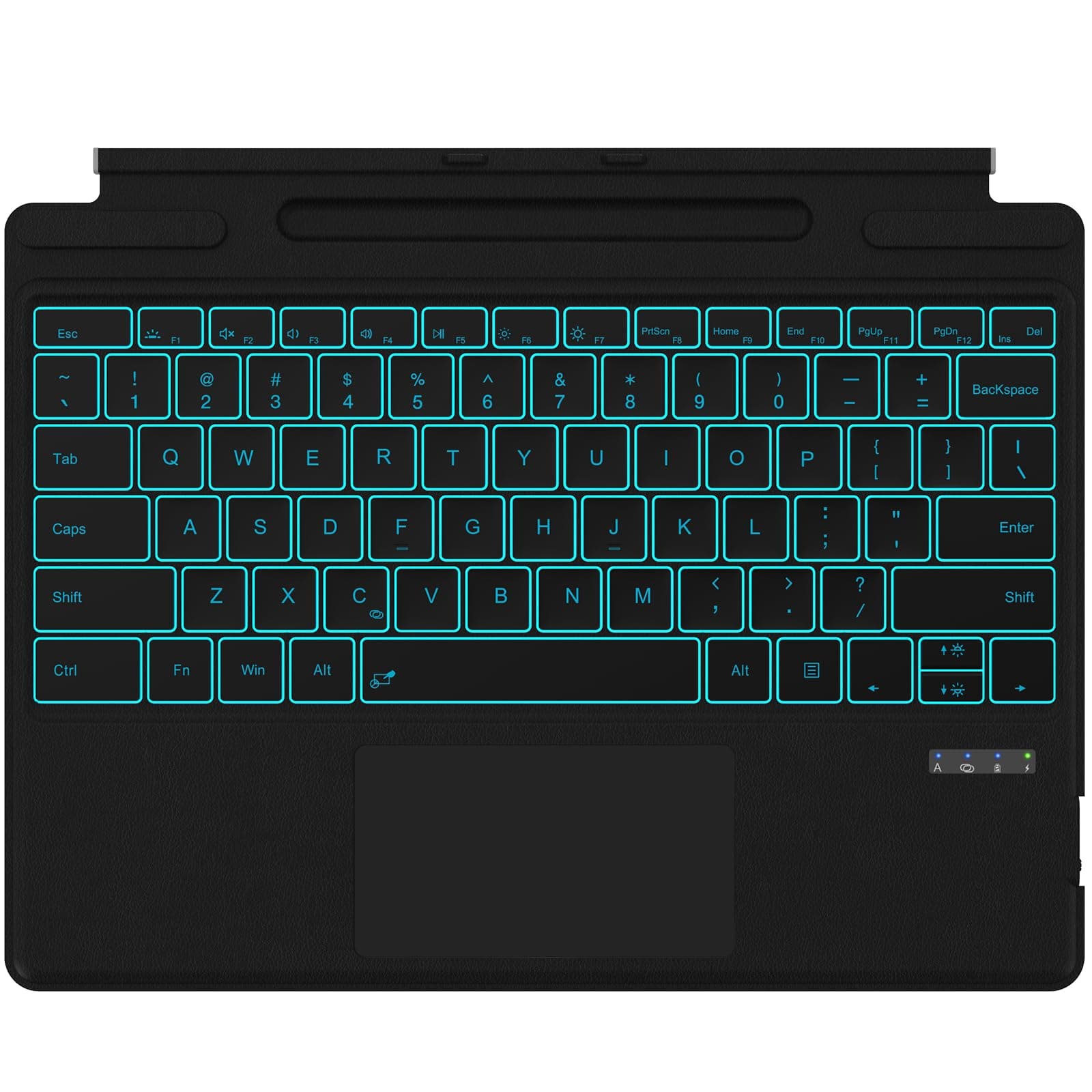
⌨️ Elevate your Surface Pro game with style, speed, and smart tech!
The Seteesamvo Surface Pro Keyboard is a Bluetooth-enabled, rechargeable type cover designed for Microsoft Surface Pro 11/10/9/8/X. Featuring a 7-color backlit keyboard with adjustable brightness, a responsive multi-gesture touchpad, and a magnetic detachable design wrapped in premium leather, it offers seamless connectivity up to 10 meters and convenient pen storage. Perfect for professionals seeking a stylish, portable, and efficient typing experience.


| ASIN | B0DRTJ27LW |
| Additional Features | Backlit, Hotkeys and Media Keys, Lightweight, Rechargeable, Trackpad |
| Antenna Location | Business, Education, Everyday Use, Personal |
| Best Sellers Rank | #791 in Computer Keyboards |
| Brand | Seteesamvo |
| Built-In Media | Surface pro keyboard, USB Cable, User Manual |
| Compatible Devices | Surface Pro 11/10/9/8/X |
| Connectivity Technology | Bluetooth |
| Customer Reviews | 4.4 4.4 out of 5 stars (131) |
| Enclosure Material | Leather |
| Hand Orientation | Ambidextrous |
| Item Dimensions L x W x H | 10"L x 8.5"W x 0.27"H |
| Keyboard Backlighting Color Support | RGB |
| Keyboard Description | Multi Functional |
| Keyboard Layout | QWERTY |
| Manufacturer | Seteesamvo |
| Model Number | Surface Pro 11/10/9/8/X |
| Number of Keys | 78 |
| Power Source | Battery Powered |
| Unit Count | 1.0 Count |
| Warranty Description | 30 days |
L**I
Great Keyboard for Surface Pro – Stylish, Handy, and Easy to Use!
Works with Multiple Models – It fits a wide range of newer Surface Pro devices, which is great if you upgrade often. Cool Backlight Colors – You can pick from 7 different backlight colors and adjust the brightness. It’s especially useful if you type in low-light settings or just like a bit of style. Built-In Pen Slot – There’s a slot to hold your Surface Pen so it’s not rolling around or getting lost. Just a heads-up: it doesn’t charge the pen, it just stores it. Easy Bluetooth Connection – Pairs quickly with your Surface using Bluetooth and reconnects automatically after the first time. Works smoothly even from across the room. Smart Touchpad – The touchpad is responsive and supports gesture controls (like swiping or tapping for shortcuts). You can even lock it if you’re worried about accidental touches while typing. Magnetic and Portable – It magnetically attaches to your Surface or detaches easily if you want to use it separately. It’s lightweight, slim, and fits easily in a bag – perfect for travel or work on the go. Shortcut Keys – The top row has shortcut keys (like volume, brightness, etc.) that work right away without needing to press extra buttons.
N**R
Works Perfectly with Surface Pro
This keyboard connects easily via Bluetooth and works seamlessly with my Surface Pro. The keys are comfortable and responsive, and the touchpad is smooth and accurate. I love the 7-color backlit options, especially for low-light use. The sleep/wake function works well, and the rechargeable battery lasts a long time. Great alternative to the original Surface keyboard. My son loves it with his Surface!
J**A
Nice keyboard
I bought it and I really liked it! The keyboard is lightweight, compact, and easy to connect. The keys are soft and comfortable to type on, and the touchpad works great. Excellent for work, study, or travel. Practical and functional, I recommend it!
S**A
Very good keyboard for Surface Pro 11 but with a few small issues for power users
Typing on this keyboard feels good. They keys have a good response and they are not too loud. I appreciate all the gestures that work on the touchpad. The included instructions taught me of a few gestures I was not aware of on Windows 11 with a touchpad. Able to turn on Fn lock so I can use F1-F12 keys without holding down Fn. To activate Fn lock press Fn + Caps Lock. I am a keyboard power user and I do have a few complaints that most users would not notice: - You cannot hold CTRL or SHIFT then click with the touchpad. If you click twice it may work. Sometimes it takes 3 clicks. This also means you cannot hold CTRL and drag to copy a file. - You cannot hold Fn and press right-arrow key to jump to simulate pressing the End key. This works on some laptops and I have started liking this feature, especially while writing code. UPDATE: - You can actually double-tap and drag with the touch pad. It is a Windows setting under Touchpad called "Tap twice to drag and multi-select"
T**U
High quality and great value keyboard for my Surface pro
The Surface keyboard with backlighting is a sleek, responsive, and well-built accessory that enhances the typing experience, especially in low-light environments.( The original one doesn’t have this function) The keys are quiet and comfortable, with a smooth tactile feel. The backlight is evenly distributed and adjustable, making nighttime use a breeze. Its compact, minimalist design pairs perfectly with Surface devices, maintaining a clean, professional aesthetic. Battery life is solid, though frequent backlight use can drain it faster. Overall, it’s a great addition for those who value both form and function.
A**S
Perfect Surface Pro Keyboard!
Perfect Surface Pro Keyboard! Works flawlessly with my Surface Pro. Bluetooth connects instantly, typing is smooth, and the design is sleek and portable. Love it!
T**R
Disappointed
I ordered this keyboard as a replacement for my original keyboard on my surface pro. It was great for the 1st month, then my computer started doing weird things like having the pointer disappear and the webpages suddenly shutting down. It then started not working properly, as if it needed to be charged. I would charge it overnight and it worked fine for n an hour or so then, more ofbthe same as before the charge. Suddenly the number 1 key stopped working. I took the keyboard off and stopped using it. I purchased a wireless keyboard and mouse and my problems vanished. I decided to try it again and all of the same problems started again after a couple of hours. It's too bad that i won't be using the keyboard anymore because the keys were lit up and it had a nice feel while typing.
T**Y
It works great
I saw some negative reviews regarding this keyboard. I've been using it every day for about two weeks. The battery lasts all day (down to about 40% after on-and-off usage). No complaints, I would buy it again.
T**G
It's not very good but it's okay
D**Y
Not even close to OEM quality. The magnets that hold the keyboard to the screen in typing mode are weak and the keyboard keeps popping off and going flat. But worst, that makes the unit completely unusable is that when a button is depressed while using the trackpad the pointer stops moving until you start moving the mouse again. Makes it difficult to select a range of things. Does not work seamlessly as a keyboard and trackpad, operates like one or the other. Would not recommend, do not buy.
P**D
Good product. Would have given 5 stars, but mouse pad is little desensitized
D**A
bueno
M**L
To remain connected you have to switch it on and off each time the Surface Pro goes to sleep.
Trustpilot
Hace 2 semanas
Hace 5 días