We remain fully operational. Our teams are working around the clock to ensure your deliveries continue safely.

Descargar la aplicación


Servicios al cliente
Sobre nosotros
Copyright © 2025 Desertcart Holdings Limited
Descargar la aplicación

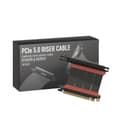

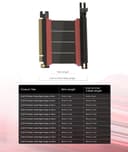



🚀 Elevate your GPU game with LINKUP’s PCIe 5.0 riser — where power meets precision!
The LINKUP PCIe 5.0 Riser Cable is a high-performance, 90cm left-angle cable designed for vertical GPU mounting in diverse PC cases. It supports full PCIe 5.0 x16 bandwidth (128GB/s) with robust EMI shielding and premium materials to maintain signal integrity. Compatible with next-gen GPUs like RTX 5090 and RX 9070, it offers multiple length and connector angle options for custom builds, enhancing airflow and aesthetics while ensuring stable, low-latency data transfer for gaming, AI, and professional workloads.


| ASIN | B0DKPDSH4H |
| Best Sellers Rank | #2 in Flat Ribbon Cables (Computers & Accessories) |
| Brand | LINKUP |
| Brand Name | LINKUP |
| Cable Type | Riser Cable |
| Color | Black |
| Compatible Devices | GPU, M.2 SSD, Motherboard |
| Connector Gender | Male-to-Female |
| Connector Type | Pcie-cem |
| Customer Reviews | 4.3 out of 5 stars 635 Reviews |
| Data Transfer Rate | 128 Gigabytes Per Second |
| Ethernet Cable Category | Cat 8 |
| Frequency | 128000000000 Hz |
| Indoor Outdoor Usage | Indoor |
| Item Weight | 0.1 Kilograms |
| Manufacturer | LINKUP Technology Inc. |
| Model | AVA5 |
| Number of Items | 1 |
| Number of Pins | 32 |
| Other Special Features of the Product | Data Transfer, High Speed |
| Recommended Uses For Product | PC Chassis, AI Apps, Servers, Extreme Gaming, ITX, Water-cooled Systems |
| Special Feature | Data Transfer, High Speed |
| Specification Met | Pci-e 5.0 |
| UPC | 882991239641 |
J**S
The pcie 5 riser cable to buy
Great pcie 5 riser cable, works as intended and the make quality is very good as well. Customer service was very responsive and helpful, were able to work through issues that came up with case compatibility. I have been using LINKUP’s riser cables for several years now and will continue to do so. Highly recommend.
E**C
Great length and connector orientation options
I had a PCIE 4.0 riser cable from Corsair that I grabbed when I bought my case way back, but being able to get a more build-specific length and connector orientation was so much better. Yeah, I know that I am probably not even taking advantage of the full bandwidth capabilities with my 5070ti going from a PCIE 4.0 to a 5.0, but I feel like the airflow gains without the previous massively excessive S-bend of flexible riser packed in between my GC and the MoBo isolating the card from the flow was worth the cost. Installed easy, comes with hardware if you need the standoffs/screws to mount to your case. Build quality feels good. So far it works well, looks good to have the GC vertical and not worry about sag, and in my mind now I’m getting everything out of my GPU without any bottlenecks to slow me down.
J**.
Not Magic
It seems a lot of people buy these expecting a miracle. There are lots of things to consider. PCIe, especially Gen5, is particularly finicky about signal integrity. While longer options are offered, what cable length you can get away with will vary wildly by a few factors. 1) Your motherboard / chipset quality, manufacturer, and CPU brand. 2) The slot you pick (huge), as closer to the CPU has shorter traces, and the bottom slot is often controlled by the chipset, which is less reliable. 3) PCI generation. If you're buying this, I assume you want 5, which is harder to stabilize than 4, which is harder than 3. Generally, you might be able to get away with 20-25 cm on the top PCIe slot. On the bottom, you might be lucky to get 10 cm to work. Video is more robust, among other reasons because it has error detection and retry to smooth over signal integrity issues. On the other hand, audio out from the GPU is notoriously flaky. While you may get video working, audio may be borderline or outright broken. Audio is a real-time, isochronous stream. Packets have to arrive on time and do not have recovery mechanisms. Your GPU will receive the information and process it itself, not on a different chip on the board. The GPU brand and generation could easily influence how reliable this is. The audio may be more or less reliable depending on the source. Browser audio, such as Bandcamp, will constantly re-negotiate and sync with a smaller stream buffer. This can cause serious audio cutouts if the PCIe connectivity isn't ideal. Something like a locally installed app, such as MusicBee, will be more reliable, but not necessarily perfect. What can you do to prevent problems? 1) Use the minimum generation PCIe setting you can without running out of bandwidth overhead. Not every use case will require the bandwidth to saturate gen 4, making gen 5 have no benefit while being harder to drive. 2) Use the PCIe slot closest to the GPU, where able. Sometimes you can't because of the lane configurations. Use GPU-Z to check if you're seeing the right lane distribution among your devices. Read your motherboard manual and ask an AI how much bandwidth you need for your monitor's resolution and refresh rate. 3) Measure twice, consider required bends, and buy the shortest possible cable. Even small differences in length mean huge attenuation benefits. 4) Consider if you need HDMI / DP audio out. If so, you need to be stricter. 5) During install, prevent any strain on the cable. Keep them as straight as possible. Gentle bends and nothing sharp to damage them. Straighter cables are more reliable. As far as operating system / driver / BIOS changes: 1) Disable PCIe link power state management. 2) Disable PCIe power saving features in BIOS. 3) If using the chipset lanes, make sure to check for any chipset settings in BIOS that may impact it, particularly power-related. 4) Use the lowest audio format you need for your equipment and source files. No 24-bit, 192k if you only need 16-bit, 48k. 5) Consider turning off AMD ULPS in the registry for the GPU, if using AMD. 6) Also on AMD, turning on audio noise suppression can mitigate flaky audio. This forces a continuous, buffered stream and can prevent the GPU audio processing from idling between packets, smoothing over minor drops.
M**L
This cable did not work for me
I bought this LINKUP riser cable because my PC had been running with a 4.0 for some time, and I wasn't getting optimal throughput for my 5.0-capable GPU and motherboard. After the install I spent a week wrestling with BIOS settings and even did a fresh install of Windows 11 to verify that this LINKUP cable wasn't working properly. It would work for an hour, sometimes two, then my PC would completely lock. I'll add that this was under low-to-average CPU/GPU user load, with no gaming more intense than Stardew Valley. I purchased a different 5.0 riser cable made by a very well known PC case manufacturer and it works beautifully with no other changes to BIOS or operating system. A simple swap out resolved the hangs that had been happening since I installed the LINKUP cable. No more freezes for several days now. I either got a bad cable or this product cannot work at its advertised speed.
M**.
Reliable 5.0 Brand With a Wide Range of Sizes
This is my second riser cable from LinkUp, the first was a longer double reverse in my old sandwich style build - which couldn't be reused for this one. So far so good in my new build - I installed the 5cm riser for my fat boi Astral 5090 in my Ncase M2. Even at 5cm, there is a bend in the cable, so I'm glad I didn't have to go with a longer one. Originally I ordered a 10cm, but Amazon returns made it easy to swap that out for the 5cm once I had the card in hand and realized it would be longer than I needed. I have the '3rd gen', which really doesn't matter since I don't have the cable attached to the case. Connection between the motherboard and the GPU is solid. Because of the right angle, I was able to place a slim fan underneath the GPU at the rear of the case. Some people don't like the red accents on the gen 1 and gen 3, it doesn't really matter to me. I guess I like the smaller board on the Gen 3 because it blocks less air flow from the fan, but that probably doesn't matter. No errors or black screens, it appears that I am getting full 5.0 without any degradation or need to lower the specs in the BIOS. What else can I say? It does what it's supposed to and lets me use this card in this case. I don't usually write reviews but I gather from Reddit that Linkup is a smaller company and listens to feedback from customers, so I wanted to give them props where it is due.
D**.
Check your Hole Alignment.
Quality is great but check your fitment and hole alignment before ordering.
E**D
Ready for Nvidia 50 series cards
Works well for Nvidia 50 series cards
J**L
Works great!
Worked perfect for my 7900xt when an older cable didn't.
Trustpilot
Hace 1 día
Hace 1 mes