We remain fully operational. Our teams are working around the clock to ensure your deliveries continue safely.

Descargar la aplicación


Servicios al cliente
Sobre nosotros
Copyright © 2025 Desertcart Holdings Limited
Descargar la aplicación





Buy anything from 5,000+ international stores. One checkout price. No surprise fees. Join 2M+ shoppers on Desertcart.
Desertcart purchases this item on your behalf and handles shipping, customs, and support to Nicaragua.
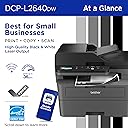
🖨️ Compact power, endless productivity — print smarter, not harder!
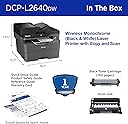
The Brother DCP-L2640DW is a compact, wireless monochrome laser printer designed for small businesses and professionals. Combining printing, scanning, and copying in one device, it delivers high-quality black & white prints at speeds up to 36 ppm. Featuring a 50-page auto document feeder, 250-sheet tray, and flexible connectivity via dual-band Wi-Fi, Ethernet, and USB, it streamlines office workflows. The printer supports mobile management through the Brother Mobile Connect app and offers eco-friendly duplex printing and a toner subscription service to reduce downtime and costs.


| ASIN | B0CPLFTPCV |
| Additional Printer Functions | Copy, Scan |
| B&W Pages per Minute | 36 ppm |
| Best Sellers Rank | #7,436 in Computers ( See Top 100 in Computers ) #20 in Laser Printers |
| Brand | Brother |
| Built-In Media | AC Power Cord, Drum Unit, Toner Cartridges |
| Color | Black |
| Color Depth | 1 bits_per_pixel |
| Compatible Cartridge | Brother Genuine TN830, TN830XL |
| Compatible Devices | Laptops, PC, Smartphones, Tablets, iPhone |
| Control Method | Touch |
| Controller Type | Android |
| Customer Reviews | 4.3 4.3 out of 5 stars (3,006) |
| Display Type | LCD |
| Dual-sided printing | Yes |
| Duplex | Automatic |
| Hardware Interface | Ethernet, USB |
| Initial Page Print Time | 8.5 Seconds |
| Ink Color | Black |
| Item Dimensions D x W x H | 39.9D x 40.9W x 31.8H centimeters |
| Item Type Name | Multifunction Printer |
| Item Weight | 25 Pounds |
| Manufacturer | Brother |
| Maximum Copies Per Run | 50 |
| Maximum Copy Resolution Black and White | 300 x 300 |
| Maximum Copy Speed Black and White | 36 ppm |
| Maximum Media Size | A4 |
| Maximum Print Resolution Black and White | 1200 dots_per_inch |
| Maximum Sheet Capacity | 250 |
| Model Name | DCPL2640DW |
| Model Number | DCPL2640DW |
| Model Series | DCP-L |
| Number of Drivers | 3 |
| Number of Ethernet Ports | 1 |
| Number of Trays | 1 |
| Other Special Features of the Product | Auto Document Feeder, Auto-Duplex, Energy Star, Epeat Qualified, Network-Ready |
| Output sheet capacity | 120.0 |
| Paper Size | Up to 8.5 x 14 |
| Print media | Envelopes, Labels, Paper (plain) |
| Printer Connectivity Type | Ethernet, USB |
| Printer Output Type | Monochrome |
| Printer Type | Laser |
| Processor Count | 1 |
| Resolution | 1200 x 1200 |
| Scanner Type | Flatbed |
| Series Number | 2640 |
| Specific Uses For Product | Home, Office |
| Total USB 2.0 Ports | 1 |
| Total Usb Ports | 1 |
| UPC | 012502672685 |
| Unit Count | 1 Count |
| Warranty Type | limited warranty |
| Wattage | 10.5 watts |
J**.
Great printer
So happy to move from ink jet to laser. Will never turn back. Super quality. Highly recommend
A**R
Setup was straightforward on Wi‑Fi and it also played nicely with a wired Ethernet connection when I tried it. Text looks crisp and professional, and scans come out clear with accurate alignment. The auto document feeder saves a ton of time for multi‑page jobs, and double‑sided printing and scanning have been flawless. The 250‑sheet tray means fewer refills, the manual feed handles envelopes without fuss, and the footprint fits comfortably on a small desk. Noise is low, and the quiet mode is great for late‑night print runs. Printing from phones and laptops has been smooth, and the companion app is handy for quick scans to mobile and checking toner levels. That said, the app can feel sluggish at times and I’ve had to restart it on occasion. Once everything is configured, the connection stays stable and the device wakes up quickly for on‑demand jobs. For the price, it’s an excellent value, especially if you catch it on sale. My only real gripe is the starter toner, which ran out sooner than I expected. Swapping in a standard or high‑yield cartridge solved that, but I wish the in‑box supply stretched a bit further. A firmware update also took a few extra steps to find and install. Still, none of that outweighs how consistently it delivers sharp output and reliable duplex scanning for everyday home office use.
D**.
Excelente!! Recomendo a todos, não irão se arrepender!!isso eu garanto, vale a pena.
Z**O
After suffering with overpriced ink and inkjet printers for years I finally decided to jump ship to a laser printer. This is leaps and bounds beyond a typical b&w inkjet printer in every way. The ink cost is lower, it prints faster, more consistently, no paper jams, why oh why didn't I switch to laser earlier? I had heard that Brother brand was highly recommended and I'm a total convert now. This printer just works out of the box. I hooked it up to my network and was printing in minutes. It also has an app but everything is totally usable without ever touching the app which I appreciate. Installing the ink cartridge was also very easy, it's designed so it's pretty difficult to not do it correctly. The scanner copier functions also work perfectly, no issues at all. Can't recommend Brother laser printers enough.
A**R
Unbelievably easy to set up and use. My last printer was not a Brother and I had to spend so much time setting it up, trying to connect to it, etc. it was ridiculous. This printer was so easy to connect to my wireless network. And the print quality is outstanding. It can even scan and photocopy and holds plenty of paper. I don't need to print a lot but when I do, I know it's going to print with no issues. I am so happy that I purchased this printer!
M**N
I purchased the Brother DCP-L2640DW All-in-One Printer (Printer/Scanner/Copier) and overall it has been an excellent experience. The build quality is solid and feels reliable right out of the box. Print quality is sharp and professional, scanning is clear, and copy results are very impressive. It truly offers great value for money, especially for home offices or small business use. This printer feels dependable and handles regular workloads without any issues. Wireless functionality is available, which is convenient, but unfortunately the Brother mobile app is a downside. The app feels heavy, extremely laggy, and slow to respond, which affects usability. Because of this, I prefer using a wired connection, which works perfectly and is very stable. Despite the app limitations, the printer itself performs exceptionally well and delivers consistent results. Overall, the product itself deserves a solid 5-star rating for performance, quality, and reliability.
Trustpilot
Hace 1 mes
Hace 2 semanas