
Descargar la aplicación


Servicios al cliente
Sobre nosotros
Copyright © 2025 Desertcart Holdings Limited
Descargar la aplicación
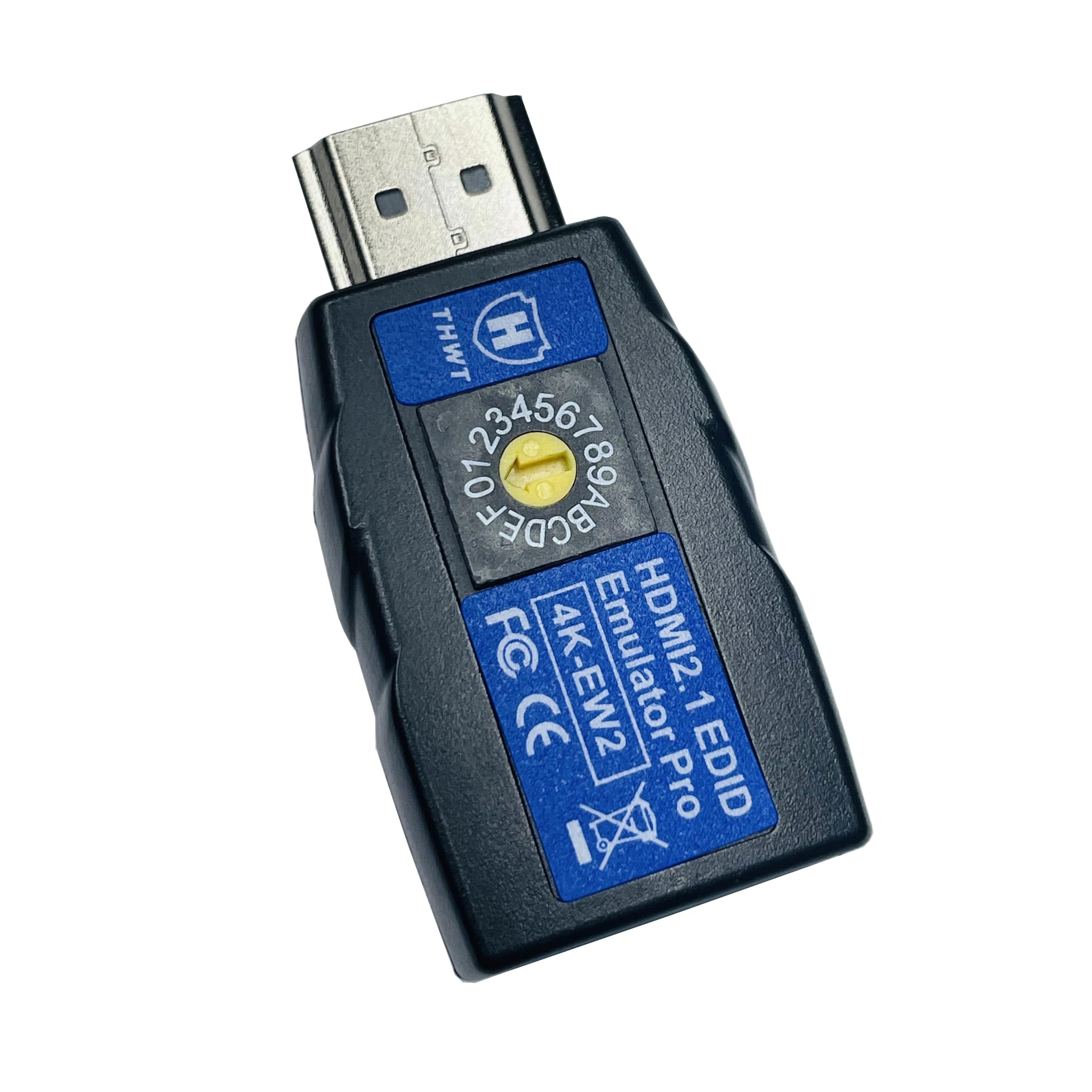
🎯 Master your AV setup with precision and speed
The HDMI 2.1 4K EDID Emulator PRO (Model 4K-EW2) is a professional-grade device designed to copy and emulate exact EDID data from external monitors, supporting HDMI 2.1 standards and HDCP pass-through. It offers 14 preset EDID profiles, supports resolutions up to 4K@120Hz and 1080p@240Hz, and features bi-directional auto detection for flexible installation. Powered by the HDMI source, it requires no external power and ensures seamless compatibility across splitters, switchers, and extenders, making it an essential tool for flawless AV signal management.

P**S
It worked for me
The THWT emulator pretends to be an HDMI display. It does its job but I don't like the super-bright light on it that randomly flashes. It's useful for keeping graphics acceleration turned on for computers that are remote controlled without a real monitor and for preventing windows from being rearranged when an HDMI switcher is used.Using THWT requires a small flathead screwdriver to rotate a little dial (called a rotary switch) to point an arrow at 16 settings labeled 0-9 and A-F. I tested setting 6 representing a generic 1920x1080 monitor, plugged it in to a mini PC without a display, and it correctly recognized it and changed its remote-control desktop to match the monitor resolution.On rotary 0, it copies the EDID (which includes resolution, refresh rate, and make/model) of a display it's plugged into. I connected it to my computer without a display plugged into the other side of the THWT and it appeared as a 3840x2160 Acer display while the blue light on the THWT flashed regularly. When plugged into a real display, it flashed cyan, then flashed blue again until remaining solid blue.Once unplugged from the display, it flashed blue again and I rotated the switch to point at 1 which is supposed to make it emulate the last EDID it was plugged into at setting 0. I unplugged it from the computer to power cycle it, and after plugging in to just the computer, it flashed for a bit before remaining to solid blue, turning off briefly every few seconds. As expected, my computer thinks the copied monitor is still plugged in even though it's not.Unfortunately, after I turned off my main DisplayPort monitor, Windows shifted everything to another HDMI monitor that was turned off. This doesn't normally happen, and it continued to happen even after I removed the THWT and plugged in the monitor it had been emulating. I think the issue is that connecting the THWT as a 3840x2160 display made Windows clear its memory of how I use my monitors. I've had this happen before with other new monitors and it takes a few days to learn that I don't want things to shift to other monitors when I turn one of the two main ones off. Whatever reasoning Windows uses to learn new behavior is not clearly documented but has been reported by other users. It remains broken after two days and a reboot so it's very frustrating.The light on the THWT is ridiculously bright and will definitely bother people at night as it randomly flashes. I suppose it's intended to be visible behind a TV from all angles but it might need to be taped over in a bedroom setting.THWT has been around since 1990 and I verified their web site has been up since at least 2000 so I have a reasonable hope this emulator will last. Five stars.
M**N
Works as intended
I am using this with a KVM switch between a Mac Studio and a desktop PC using multiple monitors. Before adding this, my monitors would rearrange themselves every time I would make the switch. This successfully fixed that issue, so I'm very pleased. There is only a second or two pause after switching.I took a star off for the cost, especially since you can get KVM switches with EDID built in. At the time of this review, it costs $90 with a 5% coupon.4 out of 5 stars.
P**C
Useful for docks and KVMs
I use this to keep my monitors from resetting whenever one turns off from the source. Works well and emulates the EDID (either included option or cloned ones) as expected
�**�
Works as advertised - annoying status LED
Great product for EDID/DisplayID emulation.The only feature I would like to see is a method to copy an EDID/DisplayID into memory *without* having the physical monitor. I.e. use a tool like "EDID/DisplayID writer from ToastyX on "Monitor Tests forum".
L**N
Works as advertised but pricey
This thing costs quite a bit for its size and function but it does deliver the promised performance. What this does is that it advertises a specific HDMI resolution and frame rate based on what the dial is set to on the bottom of the dongle. If you're having trouble getting your computer and display to agree on the proper resolution or want to force a specific resolution and framerate, this will accomplish the goal.As others note the light on this is unnecessary most of the time and ridiculously bright. An option to turn off the light would have been nice to have here.
E**I
Functional EDID Emulator with Bright Light and Setup Quirks
This EDID emulator does a solid job emulating HDMI displays and maintaining consistent resolutions for headless setups or when switching between devices. It’s particularly useful for preventing screen rearrangement when using an HDMI switch or remote-controlling a PC without a monitor. The ability to copy an EDID and emulate it later using the rotary switch is handy, and the device is compact enough to fit into tight setups.However, there are a couple of drawbacks. The bright, flashing light can be distracting, especially in dim environments, and may require covering if used in a bedroom or similar setting. Additionally, the rotary switch for selecting presets or copying EDIDs requires a small flathead screwdriver, which adds a minor inconvenience during setup. Despite these quirks, the emulator is effective and reliable for most use cases, making it a good tool for managing HDMI connections.
T**6
Works But Seems Overpriced
This item does effectively emulate EDID, making a computer think that a monitor is connected even when its not. However, it seems overpriced to me, given that there are complete KVM switches that offer this capability for less money than this device costs.If you want a simple, compact, EDID emulator, this will do the trick nicely but the main use case for this is with a KVM switch. Just get a switch that has this capability built-in, which is what I eventually did.
G**Y
Works as intended, but pricy
It does the job of emulating and forcing your screen monitor (from your computer) to the output display at whatever display you want to have without having to change it through software. Nice tool if you are constantly having to present off your computer to an external display or you are streaming from your computer to home and you are changing your display out device (like moving from one room to another). So it is a set it and forgot, with it being manually done with a rotary switch, there isn't ever a question as to what the settings are or will be. The instructions are pretty simple and straightforward to read and understand. However, it is a bit pricy for what it does though. The only reason for the 4 star is the price.
Trustpilot
Hace 2 semanas
Hace 2 meses